
Package to easily control your DotBots and SailBots.


Project description





PyDotBot
This package contains a complete environment for controlling and visualizing DotBots.
The DotBots hardware design can be found here (PCB). The firmware running on the DotBots can be found here.
This package can also be used to control devices running the SailBot firmware application.
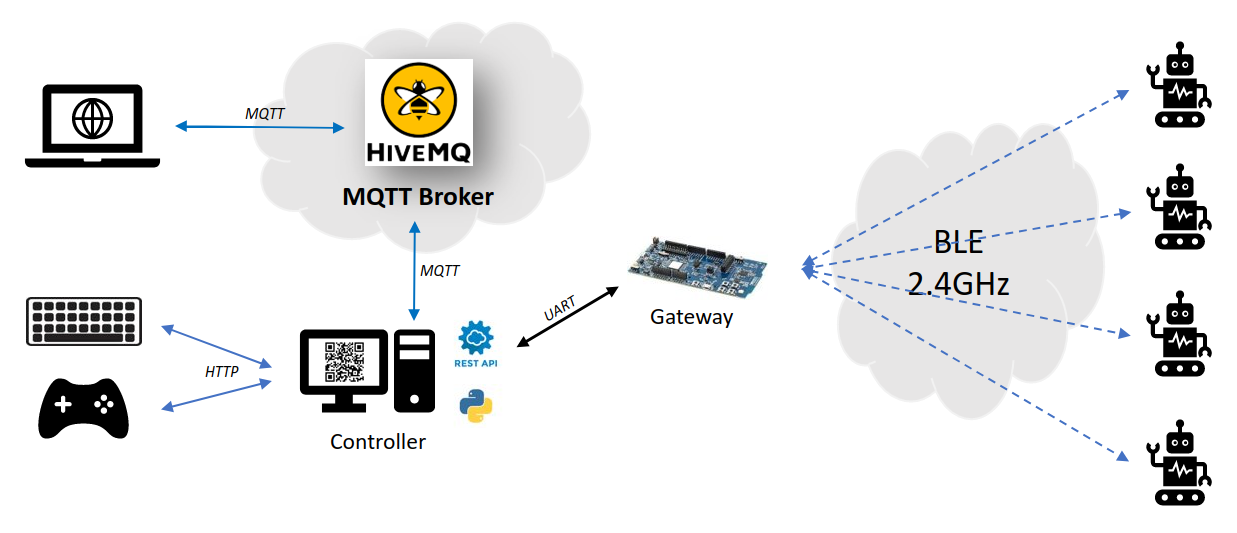
Installation
Run pip install pydotbot
Setup
Flash the required firmwares on the DotBots and gateway board (use an nRF52833DK/nRF52840DK/nrf5340DK board as gateway), as explained in the DotBots firmware repository.
Usage
dotbot-controller --help
Usage: dotbot-controller [OPTIONS]

  DotBotController, universal SailBot and DotBot controller.

Options:
  -a, --adapter [serial|edge|cloud]
                                  Controller interface adapter. Defaults to
                                  serial
  -p, --port TEXT                 Serial port used by 'serial' and 'edge'
                                  adapters. Defaults to '/dev/ttyACM0'
  -b, --baudrate INTEGER          Serial baudrate used by 'serial' and 'edge'
                                  adapters. Defaults to 1000000
  -H, --mqtt-host TEXT            MQTT host used by cloud adapter. Default:
                                  localhost.
  -P, --mqtt-port INTEGER         MQTT port used by cloud adapter. Default:
                                  1883.
  -T, --mqtt-use_tls              Use TLS with MQTT (for cloud adapter).
  -d, --dotbot-address TEXT       Address in hex of the DotBot to control.
                                  Defaults to FFFFFFFFFFFFFFFF
  -g, --gw-address TEXT           Gateway address in hex. Defaults to
                                  0000000000000000
  -s, --network-id TEXT           Network ID in hex. Defaults to 0000
  -c, --controller-http-port INTEGER
                                  Controller HTTP port of the REST API.
                                  Defaults to '8000'
  -w, --webbrowser                Open a web browser automatically
  -v, --verbose                   Run in verbose mode (all payloads received
                                  are printed in terminal)
  --log-level [debug|info|warning|error]
                                  Logging level. Defaults to info
  --log-output PATH               Filename where logs are redirected
  --help                          Show this message and exit.
By default, the controller expects the serial port to be /dev/ttyACM0, as on
Linux, use the --port option to specify another one if it's different. For
example, on Windows, you'll need to check which COM port is connected to the
gateway and add --port COM3 if it's COM3.
Using the --webbrowser option, a tab will automatically open at
http://localhost:8000/PyDotBot. The page maintains
a list of available DotBots, allows to set which one is selected and controllable
and provide a virtual joystick to control it or change the color of the on-board
RGB LED.
Firefox users:
If the webapp is not working, press Ctrl + L, type about:config,
and set network.http.http2.websockets to false.
Tests
To run the tests, install tox and use it:
tox
Release history Release notifications | RSS feed


Download files
Download the file for your platform. If you're not sure which to choose, learn more about installing packages.
Source Distribution
File details
Details for the file pydotbot-0.27.0.tar.gz.
File metadata
- Download URL: pydotbot-0.27.0.tar.gz
- Upload date:
- Size: 2.9 MB
- Tags: Source
- Uploaded using Trusted Publishing? No
- Uploaded via: twine/6.1.0 CPython/3.13.7
File hashes
| Algorithm | Hash digest | |
|---|---|---|
| SHA256 |
b10691ed961745e31e489969425a3dc47d4f18ca9fd37ea586d28a1a16e95e1d
|
|
| MD5 |
dc5bfc3ee5e696de34d28daee1a4f152
|
|
| BLAKE2b-256 |
8fb1d9b6c7b299b303d343e76b8e1a57ca14eaa43caea616a7eb5e4a5e8dc124
|






