
A versatile Python toolkit for programmatically generating, manipulating, and assembling scalable vector graphics (SVG) images.

Project description
pyDreamplet
pyDreamplet is a low-level library for SVG image generation — perfect for creating beautiful data visualizations with Python. Its intuitive API lets you build complex, scalable SVG graphics effortlessly, making it an ideal choice for projects ranging from simple charts to intricate visualizations.
Features
- Lightweight & Flexible: Generate SVG images with minimal overhead.
- Easy Integration: Works seamlessly in Jupyter notebooks, scripts, or web applications.
- Customizable: Set any attribute on your SVG elements using simple keyword arguments.
- No Heavy Dependencies: Designed to work with just Python’s standard library (plus Pillow and IPython for additional features).
Installation
Install pyDreamplet using your preferred package manager:
With uv:
uv add pydreamplet
With pip:
pip install pydreamplet
Documentation
For complete documentation, tutorials, and API references, please visit pyDreampled documentation
Examples
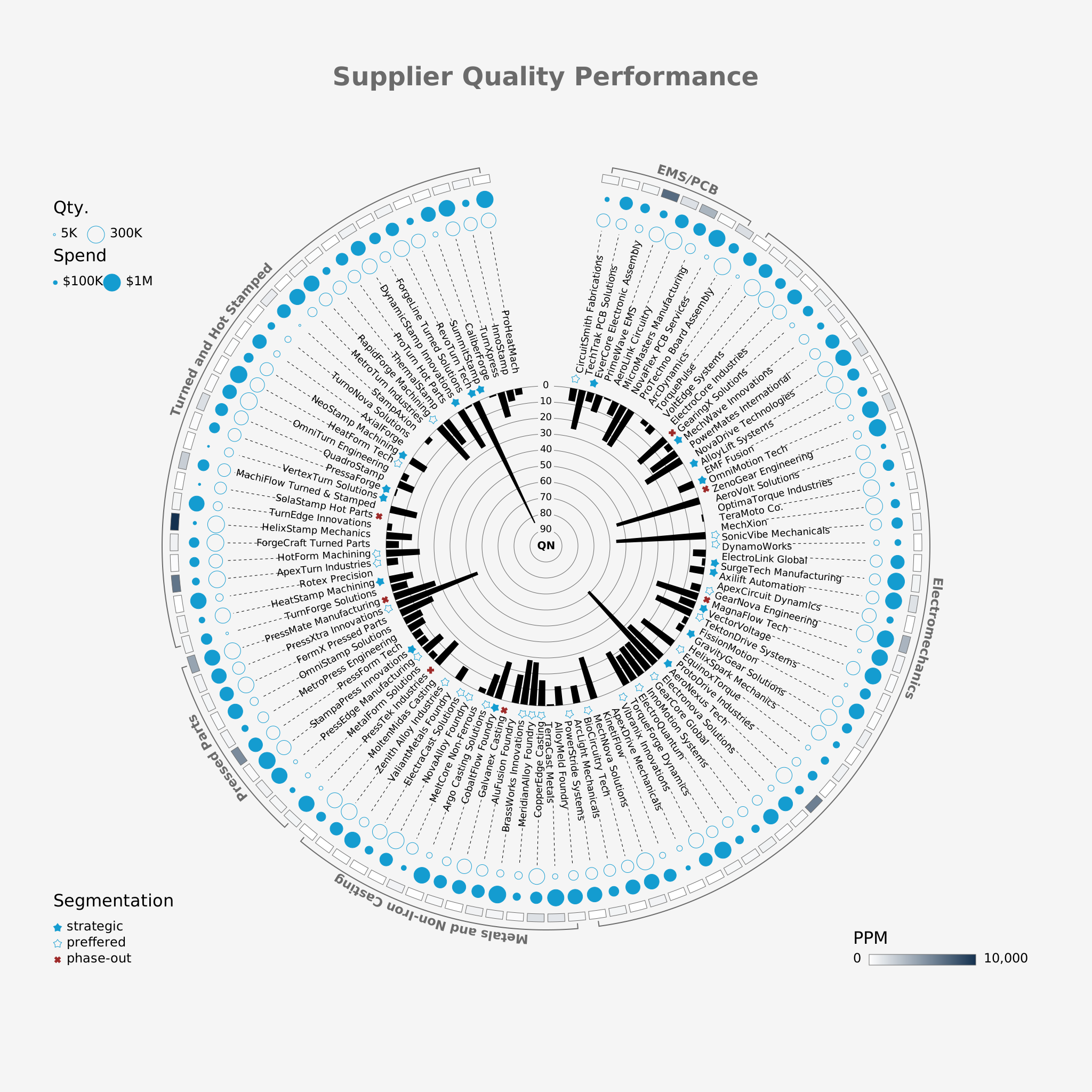
Multidimensional Visualization of Supplier Quality Performance
This example showcases a sophisticated, multidimensional SVG visualization that displays supplier quality performance metrics. In this visualization, data dimensions such as defect occurrences, defect quantity, and spend are combined to provide an insightful overview of supplier performance. The visualization uses color, shape, and layout to encode multiple measures, allowing users to quickly identify strengths and weaknesses across suppliers.
Creative Coding
This example uses pyDreamplet to create an engaging animated visualization featuring a series of circles. The animation leverages dynamic properties like stroke color and radius, which are mapped using linear and color scales. Each circle’s position and size are animated over time, creating a pulsating, rotating effect that results in a visually striking pattern.

Usage example
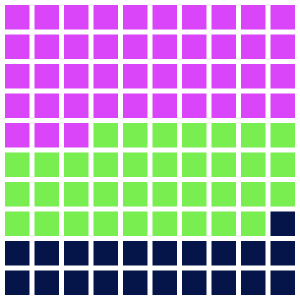
Here's a quick example of how to create a waffle chart using pyDreamplet:
import pydreamplet as dp
from pydreamplet.colors import random_color

data = [130, 65, 108]


def waffle_chart(data, side=300, rows=10, cols=10, gutter=5, colors=["blue"]):
    sorted_data = sorted(data, reverse=True)
    while len(colors) < len(sorted_data):
        colors.append(random_color())

    svg = dp.SVG(side, side)

    total_cells = rows * cols
    total = sum(data)
    proportions = [int(round(d / total * total_cells, 0)) for d in sorted_data]
    print("Proportions:", proportions)

    cell_side = (side - (cols + 1) * gutter) / cols

    cell_group_map = []
    for group_index, count in enumerate(proportions):
        cell_group_map.extend([group_index] * count)

    if len(cell_group_map) < total_cells:
        cell_group_map.extend([None] * (total_cells - len(cell_group_map)))

    paths = {i: "" for i in range(len(sorted_data))}

    for i in range(total_cells):
        col = i % cols
        row = i // cols

        x = gutter + col * (cell_side + gutter)
        y = gutter + row * (cell_side + gutter)

        group = cell_group_map[i]
        if group is not None:
            paths[group] += f"M {x} {y} h {cell_side} v {cell_side} h -{cell_side} Z "

    for group_index, d_str in paths.items():
        if d_str:
            path = dp.Path(d=d_str, fill=colors[group_index])
            svg.append(path)

    return svg


svg = waffle_chart(data)
svg.display()  # in jupyter notebook
svg.save("waffle_chart.svg")
Contributing
I welcome contributions from the community! Whether you have ideas for new features, bug fixes, or improvements to the documentation, your input is invaluable.
- Open an Issue: Found a bug or have a suggestion? Open an issue on GitHub.
- Submit a Pull Request: Improve the code or documentation? I’d love to review your PR.
- Join the Discussion: Get involved in discussions and help shape the future of pyDreamplet.
License
This project is licensed under the MIT License.
Release history Release notifications | RSS feed


Download files
Download the file for your platform. If you're not sure which to choose, learn more about installing packages.
Source Distribution
Built Distribution
Filter files by name, interpreter, ABI, and platform.
If you're not sure about the file name format, learn more about wheel file names.
Copy a direct link to the current filters
File details
Details for the file pydreamplet-1.1.9.tar.gz.
File metadata
- Download URL: pydreamplet-1.1.9.tar.gz
- Upload date:
- Size: 363.8 kB
- Tags: Source
- Uploaded using Trusted Publishing? No
- Uploaded via: uv/0.8.13
File hashes
| Algorithm | Hash digest | |
|---|---|---|
| SHA256 |
8bf874de9cc0ffca6edeaddf6dcddf23d61ca8aedcbe7a936945de9a1abb383e
|
|
| MD5 |
137950cb49df3016e1ef0349805d0945
|
|
| BLAKE2b-256 |
65f4207c30f5f54a53b24b2fe02a115eb995a9d98d11c22808f4b36945f4ff16
|
File details
Details for the file pydreamplet-1.1.9-py3-none-any.whl.
File metadata
- Download URL: pydreamplet-1.1.9-py3-none-any.whl
- Upload date:
- Size: 99.1 kB
- Tags: Python 3
- Uploaded using Trusted Publishing? No
- Uploaded via: uv/0.8.13
File hashes
| Algorithm | Hash digest | |
|---|---|---|
| SHA256 |
bd9615945df1703cd0778a4a528f2cb8fc6e0e22c7d9ce1e23c78987efc7cf34
|
|
| MD5 |
745b35189d2d64ede588805ab60aa564
|
|
| BLAKE2b-256 |
7e254201559a150c8da267005ea7a4015e7d4cfd20b5d192837e5539959fae1a
|






