
Show tasks with @due tags from Markdown files

Project description
due – Tasks with @due tags from Markdown files
A terminal CLI that scans Markdown files for tasks carrying a @due(...) tag and
presents them in an interactive fuzzy finder. Select a task to open the file at
the exact line in your editor.


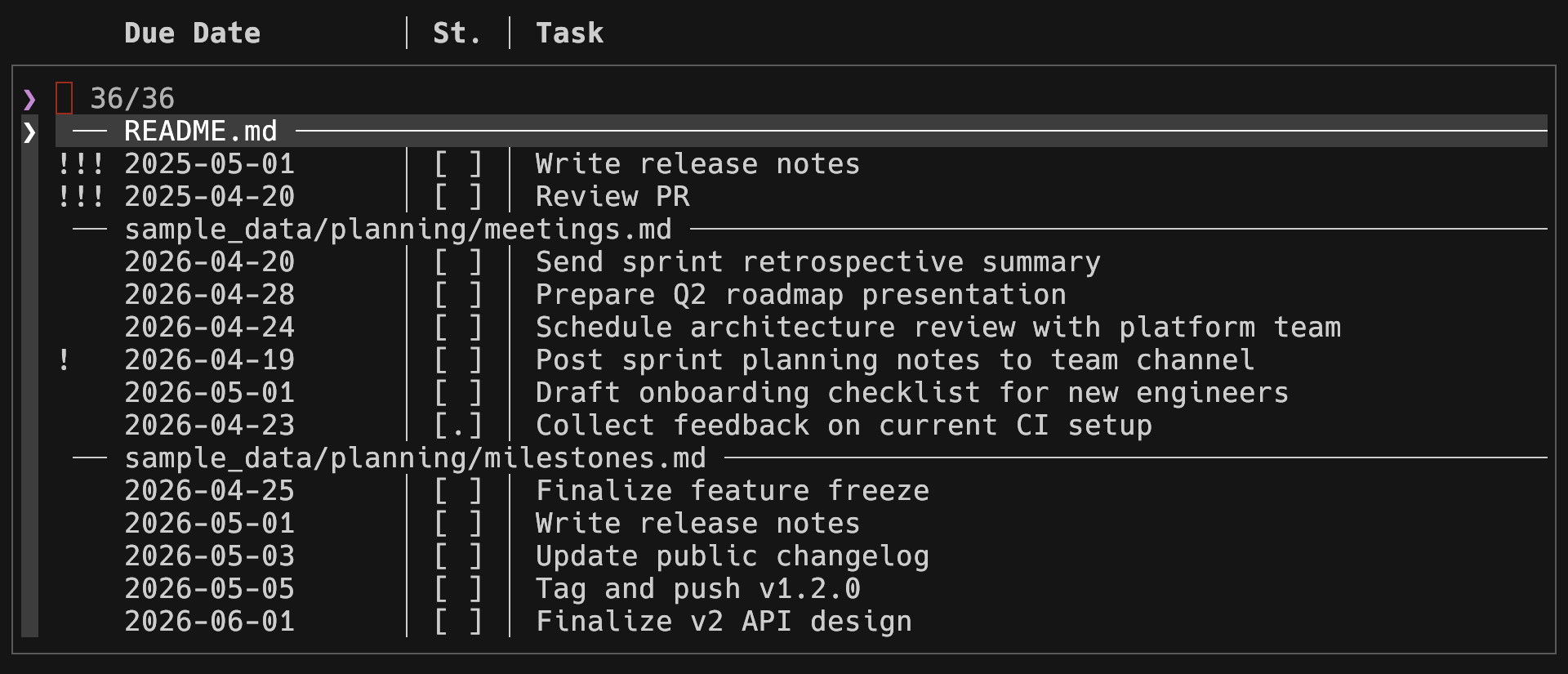
Table of Contents
Features
- Fuzzy finder – interactive search across all tasks powered by InquirerPy
- Two views – grouped by file (default) or flat list sorted by due date
- Urgency indicators – overdue tasks are prefixed with
!!!, tasks due today with! - Flexible filtering – include undated tasks, closed tasks, or filter to overdue / today / future only
- Jump to line – opens the selected file at the exact task line in your editor
- Path argument – pass any directory to scan instead of the current working directory
- Zero-config start – works out of the box with
nvim; one-line config to change the editor
Planned features
- Support for additional tag formats
- Multiple path arguments
- Config option for custom date formats
Motivation & Mission
Most task managers pull you away from the files where the work actually lives.
due stays out of the way: your tasks remain plain Markdown, your editor stays
your editor. due just surfaces what needs attention and gets you to the right
line in one keypress.
Installation
Requirements
See pyproject.toml.
Installation via pip
pip install pydue
Installation from Source
-
Clone this repository:
git clone https://github.com/cgroening/due.git
cd due
-
Install the package to make the
duecommand available globally:uv pip install .
Alternatively, due can be run without installation from the project root:
python -m due
Configuration
Create ~/.config/due/config.yaml. The file is optional – without it due
falls back to nvim (or the $EDITOR environment variable).
editor: nvim
Configuration Options
| Option | Type | Required | Description | Default |
|---|---|---|---|---|
editor |
string | No | Editor command used to open files | nvim |
Usage
Basic Usage
due                   # grouped by file, @due tasks only, open tasks only
due ~/notes           # scan ~/notes instead of the current directory
Task Format
due recognises standard Markdown checkboxes with a @due(...) tag:
- [ ] Write release notes @due(2025-05-01)
- [ ] Review PR @due(2025-04-20)
- [x] Deploy to staging @due(2025-04-15)
Supported status characters: [ ] open, [x] done, [c] / [/] cancelled.
Command Line Commands and Options
due [PATH] [OPTIONS]
due list [PATH] [OPTIONS]
| Option | Short | Description |
|---|---|---|
--sort-by-date |
-s |
Flat list sorted by due date (oldest first) instead of grouped by file |
--include-undated |
-u |
Include tasks that have no @due tag |
--include-closed |
-c |
Include completed [x] and cancelled [c] tasks |
--due-filter INT |
-d |
Show only: -1 overdue, 0 today, 1 future |
Examples:
due                            # grouped by file, @due tasks, open only
due --sort-by-date             # flat list sorted by date (oldest first)
due --include-undated          # also show tasks without @due
due --include-closed           # also show [x] and [c] tasks
due --due-filter -1            # only overdue tasks
due --due-filter 0             # only tasks due today
due --due-filter 1             # only future tasks
due list --sort-by-date -u     # explicit list subcommand with flags
due ~/notes --sort-by-date     # scan a specific directory
Without Installation
python -m due
License
This project is licensed under the MIT License – see the LICENSE file for details.
Acknowledgments
- Rich – Rich text and beautiful formatting in the terminal
- InquirerPy – Fuzzy finder and interactive prompts
- Typer – CLI framework based on Python type hints
Release history Release notifications | RSS feed


Download files
Download the file for your platform. If you're not sure which to choose, learn more about installing packages.
Source Distribution
Built Distribution
Filter files by name, interpreter, ABI, and platform.
If you're not sure about the file name format, learn more about wheel file names.
Copy a direct link to the current filters
File details
Details for the file pydue-0.1.1.tar.gz.
File metadata
- Download URL: pydue-0.1.1.tar.gz
- Upload date:
- Size: 19.3 kB
- Tags: Source
- Uploaded using Trusted Publishing? No
- Uploaded via: uv/0.10.8 {"installer":{"name":"uv","version":"0.10.8","subcommand":["publish"]},"python":null,"implementation":{"name":null,"version":null},"distro":{"name":"macOS","version":null,"id":null,"libc":null},"system":{"name":null,"release":null},"cpu":null,"openssl_version":null,"setuptools_version":null,"rustc_version":null,"ci":null}
File hashes
| Algorithm | Hash digest | |
|---|---|---|
| SHA256 |
838682a2000e764403d665414ff9ac471712cb9de267fffea68f3fa07834f98c
|
|
| MD5 |
dc3537597f4441ba39c25b8d1442b42b
|
|
| BLAKE2b-256 |
1b78f5b03743b9f2a67574dec9df1eb9d87b6ec7ee5b23d4cbeca154fbb08445
|
File details
Details for the file pydue-0.1.1-py3-none-any.whl.
File metadata
- Download URL: pydue-0.1.1-py3-none-any.whl
- Upload date:
- Size: 21.8 kB
- Tags: Python 3
- Uploaded using Trusted Publishing? No
- Uploaded via: uv/0.10.8 {"installer":{"name":"uv","version":"0.10.8","subcommand":["publish"]},"python":null,"implementation":{"name":null,"version":null},"distro":{"name":"macOS","version":null,"id":null,"libc":null},"system":{"name":null,"release":null},"cpu":null,"openssl_version":null,"setuptools_version":null,"rustc_version":null,"ci":null}
File hashes
| Algorithm | Hash digest | |
|---|---|---|
| SHA256 |
37fff759429d6d7e9154ffe371fae06e562f7bccb9ed1c49b74e70b7e6d79324
|
|
| MD5 |
63ee091daba375bfd261222ecef6e568
|
|
| BLAKE2b-256 |
f01295db46a3430ce229ed9e0ed2f660469d070f5c40f16307dba29be1db0025
|






