
pydx12
DirectX 12 for Python, in pure ctypes.

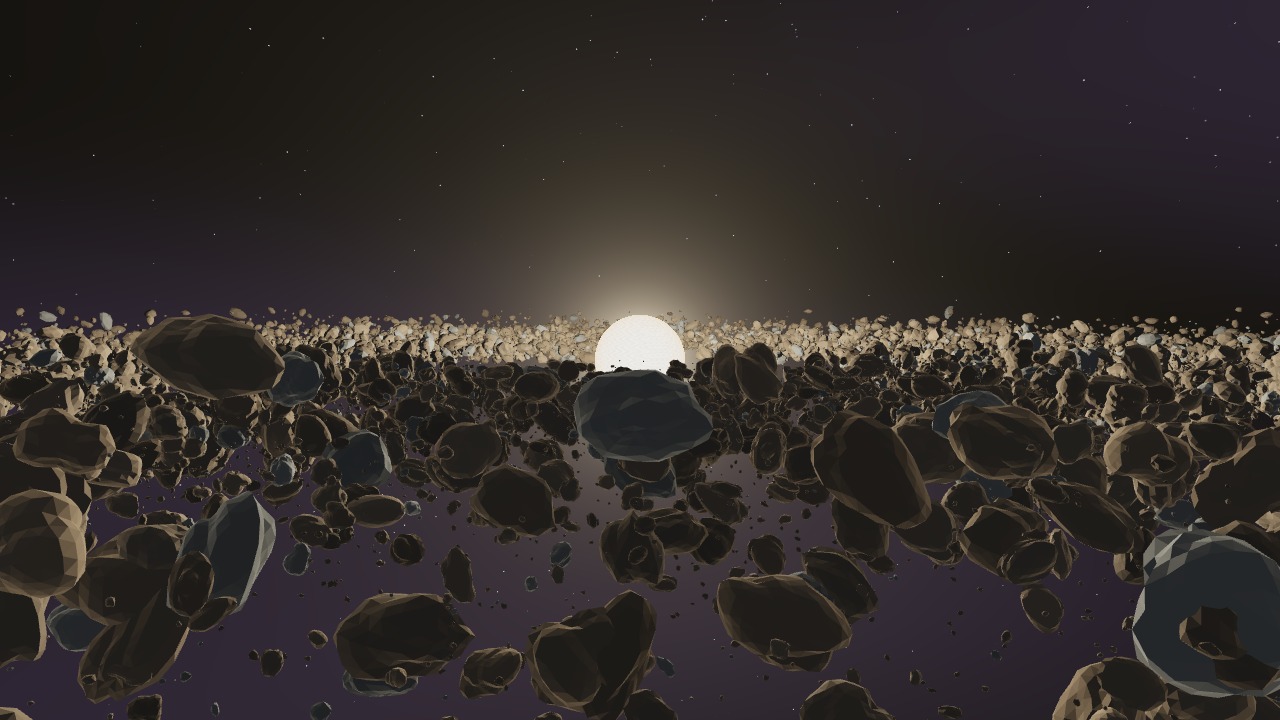
Rendered in real time from Python. Left: path tracing with DirectX Raytracing (examples/pathtracer.py). Right: 50,000 asteroids generated by mesh shaders (examples/asteroids.py).
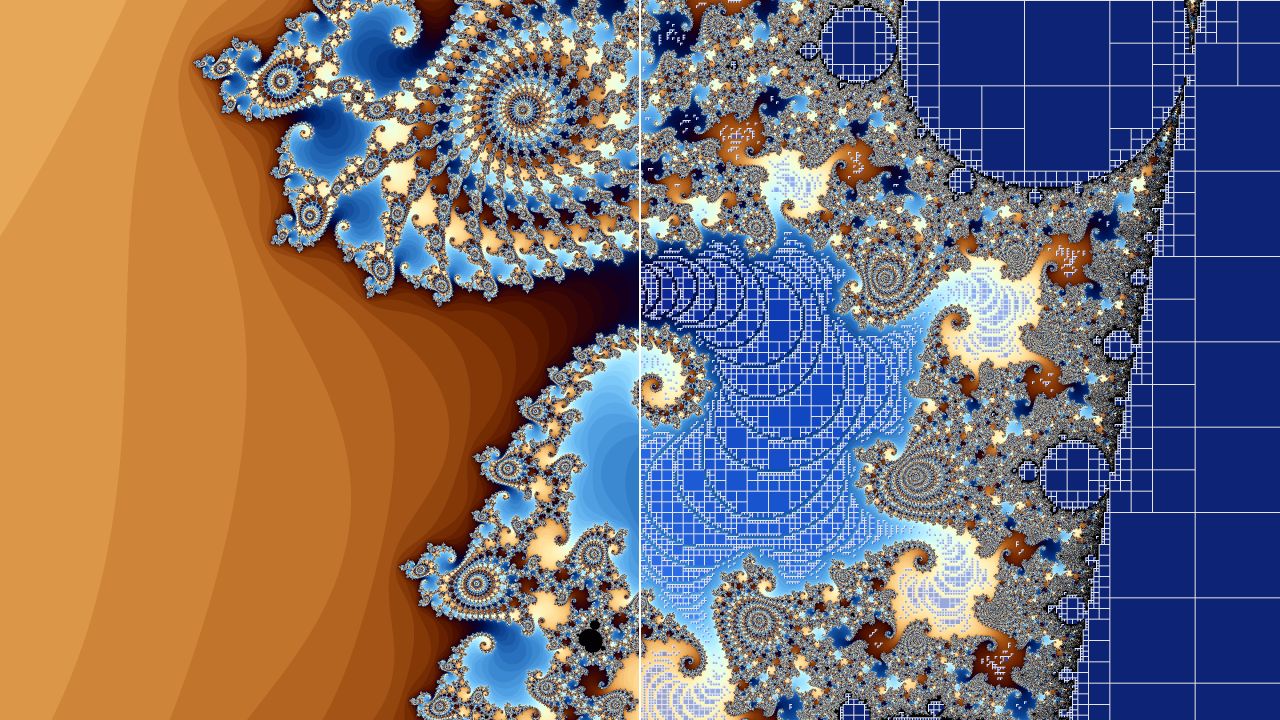
A work graph drawing the Mandelbrot set by adaptive subdivision: the GPU decides on its own which tiles to split and which to fill. The right half shows the tiles (examples/workgraph.py).
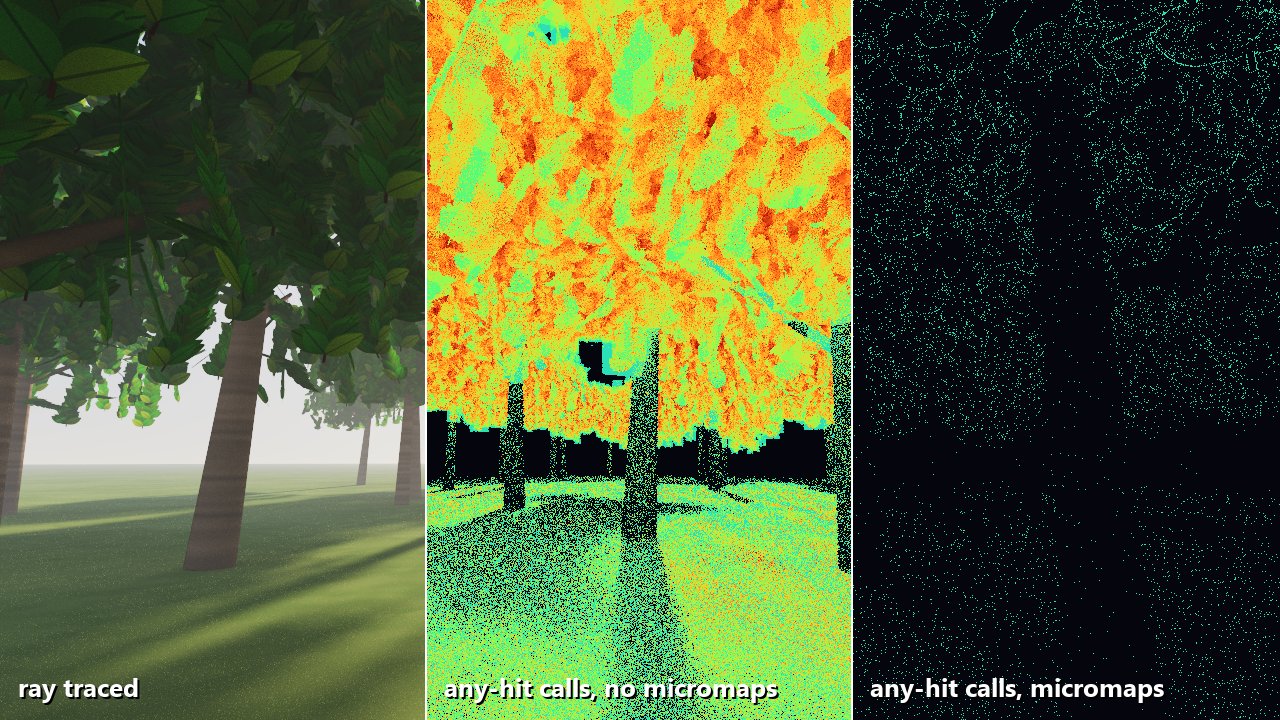
DXR 1.2 opacity micromaps on 65,000 alpha-tested leaf cards: the same view, ray traced, then the any-hit shader calls per pixel without and with micromaps, which resolve almost every leaf hit without running the shader (examples/micromaps.py).
pydx12 exposes the whole DirectX 12 family as plain Python: every enum, constant, struct, COM interface and exported function, generated from Microsoft's own headers. Nothing is compiled — the package is Python source plus the DirectX Shader Compiler DLLs.
DirectX is Windows only, so this is the only supported platform. Python 3.9+ on x64.
| Area | APIs |
|---|---|
| Direct3D 12 | Core API and DirectX 12 Ultimate (DXR raytracing, mesh/amplification shaders, variable rate shading, sampler feedback), enhanced barriers, work graphs, D3D12 video, debug layer / DRED, shader reflection, Agility SDK device factory |
| DXGI / DXCore | DXGI 1.0–1.6 (adapters, outputs, swapchains, debug), DXCore adapter enumeration |
| Shader compilers | DXC (dxcompiler.dll, bundled, SM 6.0–6.9), FXC (d3dcompiler_47.dll) |
| Compute / ML | DirectML |
| Tools | PIX events, markers, counters and programmatic captures |
| Interop | D3D11On12 and D3D9On12, with the Direct3D 11 and Direct3D 9 APIs they return |
| I/O and input | DirectStorage, GameInput, XInput |
| Audio | XAudio2, X3DAudio, XAPO |
The package ships type information (.pyi stubs), so editors and type checkers know the parameters,
fields and return types.
Install
pip install pydx12
DirectStorage, GameInput and PIX ship their runtimes as NuGet packages, and so does the newest D3D12 runtime (the Agility SDK); see Runtimes that are not in Windows.
The examples and tutorials also use numpy and Pillow (pip install numpy pillow), and tutorials 012-017
use pyrr.
Quickstart
import pydx12 as dx

factory = dx.CreateDXGIFactory2()
i = 0
while True:
    try:
        adapter = factory.EnumAdapters1(i)
    except dx.DXError as e:
        if e.hresult == dx.DXGI_ERROR_NOT_FOUND:
            break
        raise
    desc = adapter.GetDesc1()
    print('%s (%d MB)' % (desc.Description, desc.DedicatedVideoMemory // 2**20))
    i += 1

adapter = factory.EnumAdapterByGpuPreference(0, dx.DXGI_GPU_PREFERENCE_HIGH_PERFORMANCE)
device = dx.D3D12CreateDevice(adapter)
queue = device.CreateCommandQueue(dx.D3D12_COMMAND_QUEUE_DESC(Type=dx.D3D12_COMMAND_LIST_TYPE_DIRECT))
Complete programs, in examples/:
pathtracer.py: a real-time DXR path tracer with global illumination, soft shadows, glass, metals, a glossy floor, depth of field and progressive accumulation; triangle meshes and procedural spheres traced by an intersection shaderasteroids.py: DirectX 12 Ultimate mesh shaders, an asteroid belt of 50,000 rocks generated on the GPU with no vertex buffers; amplification shaders cull and pick levels of detail, pipeline statistics show what they let through, V cycles variable rate shadingworkgraph.py: a work graph (Shader Model 6.8) that draws the Mandelbrot set with the Mariani-Silver algorithm: recursive nodes split tiles whose borders are not flat, a node with a dynamic dispatch grid fills the flat ones, and the last thread group of each tile decides through cross-group record sharing; B compares it with a brute force compute shader using GPU timestampsmicromaps.py: DXR 1.2 opacity micromaps, built from a leaf texture, on a ray traced forest of 65,000 alpha-tested leaf cards; a heatmap counts the any-hit shader calls, M switches the micromaps off, and--checkproves they change no pixel while removing about 99% of the any-hit callstriangle.py: a swapchain on a tkinter windowdirectstorage.py: streams a GDeflate compressed 8K texture (a Mandelbrot set rendered by a compute shader) from disk into GPU memory with GPU decompression, compared with reading, decompressing and uploading it the classic way; then lets you explore itdirectml_life.py: Conway's Game of Life as a DirectML operator graph (wrap padding, a 3×3 convolution and two element-wise operators)xaudio2_orbit.py: a synthesized sound orbiting around you, with X3DAudio panning, Doppler and distance-driven reverb, and a volume meter showing the left/right levelsgamepad.py: a live gamepad view with rumble, plus keyboard and mouse, through GameInput (or XInput)
The tutorials in docs/ go from enumerating adapters to DXR raytracing.
How the C API maps to Python
Names and parameter order are the ones in Microsoft's documentation, so the C++ docs apply directly. The generator reads the headers' SAL annotations and applies these rules:
- Errors raise. A failing
HRESULTraisespydx12.DXError(.hresult,.name); compiler error blobs are included in the message. Successful calls return their out-parameters, orNone(other success codes, such asDXGI_STATUS_OCCLUDEDfromPresent, are returned as an int). - Out-parameters are returned.
adapter.GetDesc1()returns aDXGI_ADAPTER_DESC1; several out-parameters come back as a tuple. riid/ppvpairs take an interface class and return that interface. Common factory methods have a default:device.CreateCommandList(0, type, allocator)returns anID3D12GraphicsCommandList, andD3D12CreateDevice(...),CreateDXGIFactory2()and the like pick the obvious interface. Pass another class to get a newer version:dx.D3D12CreateDevice(adapter, dx.D3D_FEATURE_LEVEL_12_2, dx.ID3D12Device10).- Arrays take sequences and their count parameter is filled in for you:
cl.ResourceBarrier([barrier]),queue.ExecuteCommandLists([cl]). The count is still available as a keyword-only argument for partial arrays. - Buffers take bytes-like objects:
bytes,bytearray,memoryview, numpy arrays, ctypes arrays, or a blob (ID3DBlob,IDxcBlob). Strings takestr. - Methods that return a struct (
GetDesc(),GetCPUDescriptorHandleForHeapStart(), …) return it. - Pointers you get back are integers.
resource.Map(0)returns the address; usectypes.memmove,ctypes.string_ator(ctypes.c_float * n).from_address(addr)to read and write it. - C++ default arguments are kept (
xaudio2.CreateMasteringVoice()needs none), and trailing optional pointers default toNone.
Every method's docstring holds its C signature.
Structs
Structs are ctypes.Structure subclasses with keyword constructors, and struct fields accept Python values:
desc = dx.D3D12_GRAPHICS_PIPELINE_STATE_DESC(
    pRootSignature=root_signature,                       # COM object: kept alive by the struct
    VS=dx.D3D12_SHADER_BYTECODE(pShaderBytecode=blob),   # BytecodeLength is filled in
    RTVFormats=(dx.DXGI_FORMAT_R8G8B8A8_UNORM,),         # fixed arrays take short sequences
    NumRenderTargets=1)
desc.InputLayout.pInputElementDescs = [                  # NumElements is filled in
    dx.D3D12_INPUT_ELEMENT_DESC(SemanticName='POSITION', Format=dx.DXGI_FORMAT_R32G32B32_FLOAT)]
Pointer and count fields, string fields, buffer fields and interface fields keep what you assign to them alive
for as long as the struct (or any struct it is copied into) lives. Anonymous unions are flattened as in C
(barrier.Transition, clear_value.Color).
COM objects
Interface wrappers release their reference when garbage collected. Interface(obj) and
obj.QueryInterface(Interface) both call QueryInterface, for example dx.ID3D12InfoQueue(device).
obj.value is the raw pointer.
To implement an interface in Python (XAudio2 callbacks, include handlers, and so on), subclass ComImplementation:
class EngineCallback(dx.ComImplementation):
    _interfaces_ = (dx.IXAudio2EngineCallback,)

    def OnCriticalError(self, error):
        print('XAudio2 error', hex(error))

callback = EngineCallback()
xaudio2.RegisterForCallbacks(callback)
Keep a reference to the object (here callback) for as long as the API may call it.
Runtimes that are not in Windows
The bindings are generated from these SDK versions (dx.PACKAGE_VERSIONS):
| Package (NuGet) | Version | DLLs |
|---|---|---|
Microsoft.Direct3D.D3D12 (Agility SDK) |
1.620.2 | D3D12Core.dll, d3d12SDKLayers.dll |
Microsoft.Direct3D.DXC |
1.9.2609.5 | dxcompiler.dll, dxil.dll (bundled in pydx12) |
Microsoft.Direct3D.DirectStorage |
1.4.0 | dstorage.dll, dstoragecore.dll |
Microsoft.GameInput |
4.1.315 | GameInputRedist.dll |
WinPixEventRuntime |
1.0.240308001 | WinPixEventRuntime.dll |
Agility SDK. The in-box D3D12 runtime works for the core API. For the newest features, load the Agility
SDK runtime through the device factory. This works from python.exe and does not need developer mode:
config = dx.D3D12GetInterface(dx.CLSID_D3D12SDKConfiguration, dx.ID3D12SDKConfiguration1)
device_factory = config.CreateDeviceFactory(dx.AGILITY_SDK_VERSION, 'C:\\path\\to\\agility\\bin\\x64\\')
device = device_factory.CreateDevice(adapter, dx.D3D_FEATURE_LEVEL_12_0, dx.ID3D12Device)
DirectStorage, GameInput, PIX. Put the DLLs next to your program, or add their folder:
os.add_dll_directory(r'C:\path\to\directstorage\bin\x64')
storage = dx.DStorageGetFactory()
XAudio2 is in Windows, but needs COM initialized on the calling thread
(ctypes.windll.ole32.CoInitializeEx(None, 0)).
PIX. Events and markers show up in PIX captures; they take a color (0xAARRGGBB) and a plain string:
dx.PIXBeginEventOnCommandList(command_list, 0xFF00FF00, 'shadows')
...
dx.PIXEndEventOnCommandList(command_list)
Programmatic GPU captures (PIXGpuCaptureNextFrames, PIXBeginCapture2, PIXSetTargetWindow, ...) need
WinPixGpuCapturer.dll from the PIX installation folder to be loaded before the D3D12 device is created, for
example with ctypes.WinDLL(r'C:\Program Files\Microsoft PIX\<version>\WinPixGpuCapturer.dll').
D3D11On12, D3D9On12. Run Direct3D 11 or 9 code on a D3D12 device, sharing its resources:
device11, context11, level = dx.D3D11On12CreateDevice(device12, 0, None, [queue], 0)
on12 = dx.ID3D11On12Device(device11)
texture11 = on12.CreateWrappedResource(texture12, dx.D3D11_RESOURCE_FLAGS(BindFlags=dx.D3D11_BIND_RENDER_TARGET),
                                       dx.D3D12_RESOURCE_STATE_RENDER_TARGET, dx.D3D12_RESOURCE_STATE_PRESENT,
                                       dx.ID3D11Texture2D)
Regenerating the bindings
pydx12/_api.py is generated by tools/generate.py from the Windows SDK headers plus any
NuGet packages extracted under .deps/<name>-<version>/pkg (agility, dxc, directstorage, gameinput,
winpixeventruntime). It writes pydx12/_api.pyi (the type stubs) at the same time:
pip install clang==<your libclang version>      # LLVM must be installed (libclang.dll)
python tools/generate.py
A .nupkg is a zip file: download it from nuget.org and extract it, for example into
.deps/agility-1.620.2/pkg. The newest version of each package found there is used.
It needs the Windows SDK, the MSVC headers and LLVM. tests/layout_data.py is generated along with it,
and tests/test_layout.py checks every struct's size, alignment and field offsets against clang's
MSVC x64 layout.
Tests
pip install pytest numpy
python -m pytest tests
The tests need a D3D12-capable GPU. The Agility SDK, DirectStorage, GameInput and PIX tests are skipped
unless those packages are under .deps/. To check the type stubs against the examples and tests:
pip install mypy
python -m mypy --ignore-missing-imports --check-untyped-defs examples tests
1 maintainer

Metadata
1 maintainer
Release files for pydx12 0.3.1
For a detailed explanation of source distributions (sdists) and built distributions (wheels), please see the package formats documentation.
Source distribution (sdist)
| File | Size | Uploaded | Provenance | Actions |
|---|---|---|---|---|
| pydx12-0.3.1.tar.gz | 11.1 MB | Without provenance | Details for pydx12-0.3.1.tar.gz |
Built distribution (wheel)
| File | Interpreter | ABI | Platform | Actions Reset |
|---|---|---|---|---|
| pydx12-0.3.1-py3-none-win_amd64.whl | Python 3 | none | Windows x86-64 | Details for pydx12-0.3.1-py3-none-win_amd64.whl |
Total release size: 22.5 MB
Release files / pydx12-0.3.1.tar.gz
| Download URL | pydx12-0.3.1.tar.gz |
|---|---|
| Size | 11.1 MB |
| Tags | Source |
|
SHA-256 checksum How to use checksums |
a0dab51ba099b393aa93a72fea2c24395d535d262e8bffac07f7c2f9344606ca
|
|
BLAKE2b-256 checksum How to use checksums |
7c341359fd76bc3386e1bb8060c9f2491eafd8072620f1b374693efb596d70e1
|
| Upload date | |
|
Uploaded using Trusted Publishing? What is trusted publishing? |
No |
| Uploaded via |
twine/7.0.0 CPython/3.14.3
|
Release files / pydx12-0.3.1-py3-none-win_amd64.whl
| Download URL | pydx12-0.3.1-py3-none-win_amd64.whl |
|---|---|
| Size | 11.4 MB |
| Tags | Python 3 Windows x86-64 |
|
SHA-256 checksum How to use checksums |
13387c2051ff176a2817136e4888e9dec0b723946458c917a599e04ee01a5e8e
|
|
BLAKE2b-256 checksum How to use checksums |
14d4b5f5df12f6f09459d8ac8ae8ead21d1f5dba77bb054832f227abb8496ff4
|
| Upload date | |
|
Uploaded using Trusted Publishing? What is trusted publishing? |
No |
| Uploaded via |
twine/7.0.0 CPython/3.14.3
|
Security for pydx12 0.3.1
Provenance
Provenance describes where a file came from. On PyPI, provenance is shared via attestations, which provide a verifiable record of the build or publishing details. View details, limitations and caveats.
No provenance found
None of the files in this release were uploaded with provenance metadata.
A note on package security
PyPI is a repository for distributing packages, not a service for auditing them. While third-party security researchers and our staff do their best to detect and remove malicious packages, PyPI cannot guarantee the quality, security or suitability of any given package.
To learn more about protecting yourself from malicious actors, visit our package security documentation.














