
PyEasyEdit
PyEasyEdit is a lightweight, feature-rich text editor built with PyQt6 and QScintilla. Designed to offer a flexible and efficient editing environment, PyEasyEdit supports syntax highlighting for multiple programming languages, file management capabilities, and customizable themes, making it an ideal choice for developers and writers alike.
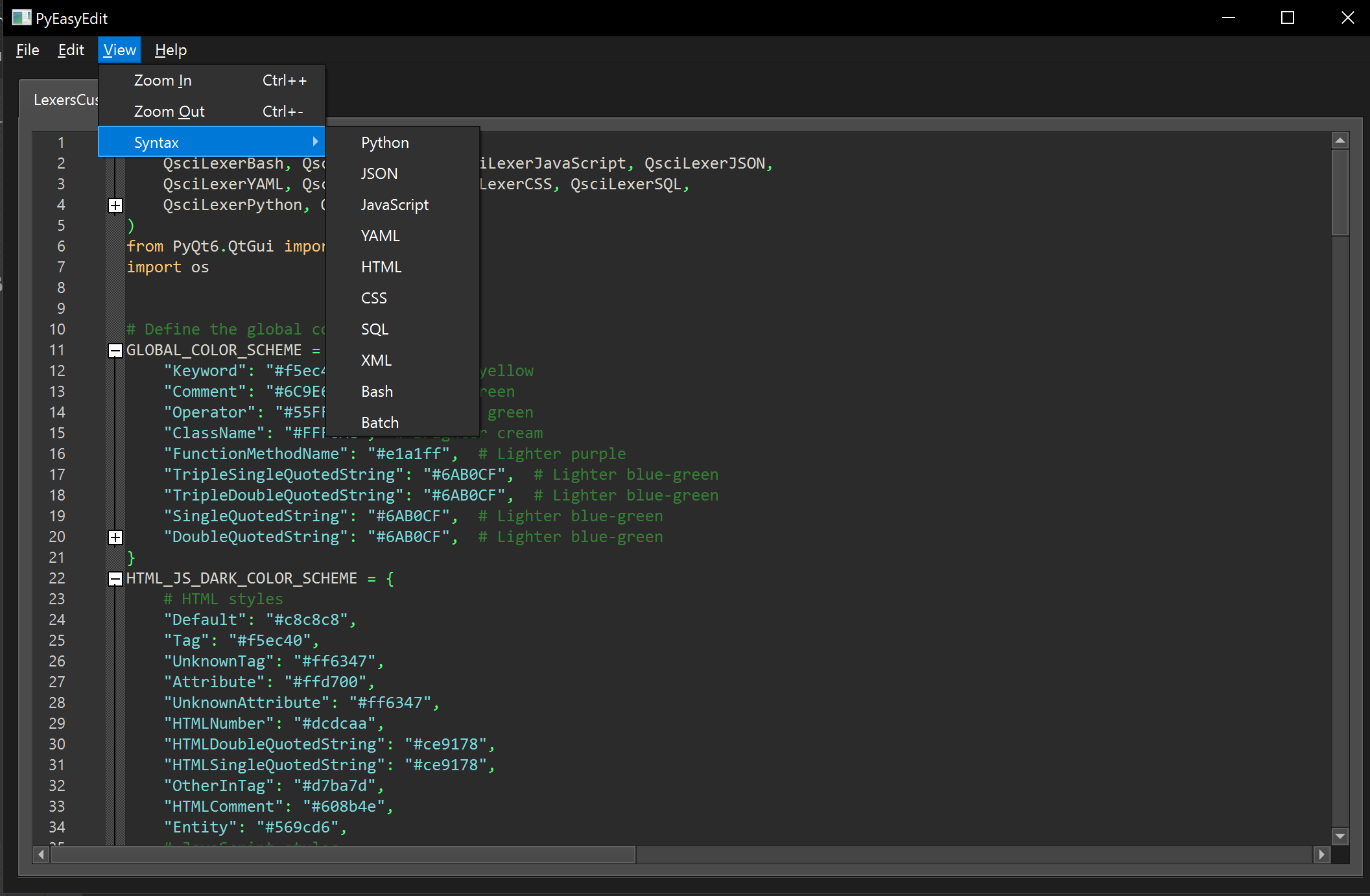
Features
- Syntax Highlighting: Supports syntax coloring for Python, JavaScript, HTML, CSS, and more, making code easier to read and write.
- Auto Completion: Source code auto-completion
- Code Folding: Now you can collapse blocks of code
- Jedi Support: Auto-completion now includes improved jedi inspection (Python only), but this is still a work in progress.
- Tab to space conversion: Critical for python
- File Management: Open, edit, and save files with an intuitive interface. Recent files are tracked for quick access.
- Search and Replace: Powerful search and replace functionality to easily modify your documents.
- Custom Dialogs: Includes custom dialogs for searching, replacing, and more, enhancing the user experience.
- Extensibility: Designed with extensibility in mind, allowing for additional features and languages to be added.
Getting Started via Pip
Create a virtual env for Python:
md pyeasyedit
cd pyeasyedit
python -m venv venv
venv\Scripts\activate
pip install pyeasyedit
python -m pyeasyedit
Getting Started From Source
Prerequisites
Before you begin, ensure you have met the following requirements:
-
Python 3.9 or later installed on your system.
-
PyQt6 and QScintilla libraries installed. You can install these using pip:
pip install PyQt6 QScintilla
Installation
Clone the repository to your local machine:
git clone git@github.com:scottpeterman/pyeasyedit.git
cd pyeasyedit
pip install -r requirements.txt
Running PyEasyEdit
To start the editor, run the following command from the terminal:
python -m pyeasyedit
Optionally, you can specify a file to open directly:
python -m pyeasyedit /path/to/your/file.txt
Usage
- File Menu: Use the File menu to open, save, or create new documents.
- Edit Menu: Access search and replace functions through the Edit menu.
- Help Menu: Contains the About dialog that provides information about the editor and a link to the project's GitHub page.
License
PyEasyEdit is released under the GPLv3 License. See the LICENSE file for more information.
Acknowledgments
- Special thanks to the PyQt and QScintilla teams for providing the powerful libraries that made this project possible.
- Learn more about PyQt and Qt at Riverbank Computing and Qt Group, respectively.
# Create a source distribution and a wheel, upload to pypi
python setup.py sdist bdist_wheel
twine upload dist/*
1 maintainer

Metadata
1 maintainer
Release files for pyeasyedit 0.1.22
For a detailed explanation of source distributions (sdists) and built distributions (wheels), please see the package formats documentation.
Source distribution (sdist)
| File | Size | Uploaded | |
|---|---|---|---|
| pyeasyedit-0.1.22.tar.gz | 2.9 MB | Details |
Built distribution (wheel)
| File | Interpreter | ABI | Platform | Reset |
|---|---|---|---|---|
| pyeasyedit-0.1.22-py3-none-any.whl | Python 3 | none | any | Details |
Total release size: 5.8 MB
Release files / pyeasyedit-0.1.22.tar.gz
| Download URL | pyeasyedit-0.1.22.tar.gz |
|---|---|
| Size | 2.9 MB |
| Tags | Source |
|
SHA-256 checksum How to use checksums |
9737ba4ea1b4084ceffd69f42bdffd784de4889c0253a5dfbfdc66358c43fcce
|
|
BLAKE2b-256 checksum How to use checksums |
929b61a7a33b33c2de8187f69e6adbed7aa973b9bb215f70420a4d595a9935dc
|
| Upload date | |
|
Uploaded using Trusted Publishing? What is trusted publishing? |
No |
| Uploaded via |
twine/5.0.0 CPython/3.9.11
|
Release files / pyeasyedit-0.1.22-py3-none-any.whl
| Download URL | pyeasyedit-0.1.22-py3-none-any.whl |
|---|---|
| Size | 2.9 MB |
| Tags | Python 3 |
|
SHA-256 checksum How to use checksums |
b6057c1b40c71fbf07f899ced1b005ede9b128f1c968debd43e3578fc0a45b1e
|
|
BLAKE2b-256 checksum How to use checksums |
0bd679cf2ffe08cbedc54c9da831327a7a671e1cd3a8324d82cb9bc7da9a6b75
|
| Upload date | |
|
Uploaded using Trusted Publishing? What is trusted publishing? |
No |
| Uploaded via |
twine/5.0.0 CPython/3.9.11
|














