
Immediate mode GUI library

Project description
pyegui is a native extenstion for Python that provides bindings for Rust immediate mode GUI library egui.
Example
from pyegui import *

name = Str("Van")
age = Int(24)

def update_func(ctx):
  heading("My egui Application")
  text_edit_singleline(name, hint_text="Your name")
  slider_int(age, 0, 150, "age")

  if button_clicked("Increment"):
    age.value += 1

  heading(f"Hello '{name.value}', age {age.value}")
  image("file://image.png", max_width=350, max_height=250)

run_native("My pyegui Application", update_func)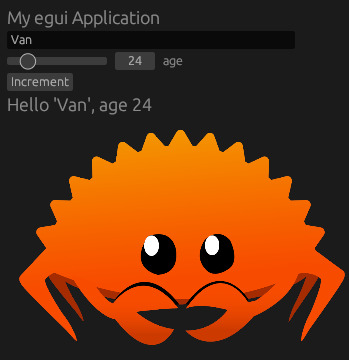
Features
pyegui tries to be as close as possible to the original egui API, but with the focus on simplicity and usability. Callbacks were removed where possible to accomplish more smooth expirience in Python.
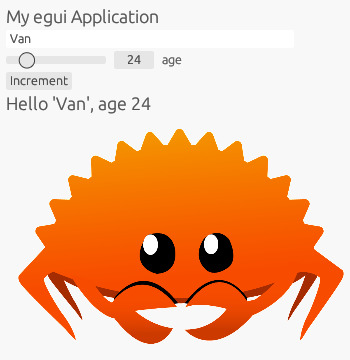
Light and Dark themes(defaults to the system’s)
Built-in latin and cyrillic alphabets. You can load any font you want with ctx.set_font function
Images(png and jpeg)
Date picker
RBG color picker
Text fields, radio buttons, buttons, code, progress bar etc.
No dependencies which destroy you project when you distribute it. Just pure giant Rust binary
Full list of implemented features is available here
Install
Prebuilt binaries are provided for Linux and Windows. On other platforms pip will build wheel for your OS. In this case you’ll need Rust compiler and maturin
Install from pypi
pip install pyeguiInstall from source
git clone https://github.com/gachilord/pyegui
pip install <path to pyegui>
Usage
This is how you write a “hello world” app.
from pyegui import *

def update_func(ctx):
  # draw UI here
  heading("Hello, World!")

run_native("Example app", update_func)
You can find more examples in this folder. Also Python’s help(pyegui.some_function) will be quite effective(there are examples for every function). Read the source code of this binding and the original library.
Update functions
pyegui has a notion of update functions which the library calls to draw your UI.
def update_func():
  # you can place here any widget
  heading("I'm a heading")
  # some widgets are interactive
  if button_clicked("I'm a clickable button"):
    # you can update state from here or show another widget
    print("Clicked")
The top level update function has the Context object that controls global aspects of your app(e.g fonts and theme).
def update_func(ctx):
  ctx.set_light_theme()
  heading("Using light theme even if system's is dark")
Update functions may be nested. Such functions create a new UI scope that can have different styles and befaviour.
def update_func(ctx):
  # define update_func
  def nested():
    label("I'm a label inside nested update function")
    label("New label")
    disable() # this function will disable all further widgets in the scope
    if button_clicked("You can't click me"):
      print("Unreachable")
  # all the widgets inside 'nested' will be centered vertically
  horizontal_centered(nested)
  # this widget won't be disabled though it goes after 'disable()'
  if button_clicked("You can click me"):
    print("Clicked")
Variables
Many widgets require access to a state via a reference, which can’t be done for integers, floats and strings in Python. That’s why such helper classes as Str, Bool, Int, Float, RGB and Date exist.
They are essentially the following:
# Example for bool type
class Bool:
  value = False
These classes can be used to draw UI or to store user input. You have to create them outside of update functions.
data = Bool(False)

def update_func():
  heading(f"Value of the data is {data.value}")
  # button will be shown only if the checkbox is checked
  if data.value and button_clicked("set to False"):
    # hiding the button
    data.value = False
  checkbox(data, "Check me")

Download files
Download the file for your platform. If you're not sure which to choose, learn more about installing packages.
Source Distribution
Built Distributions
Filter files by name, interpreter, ABI, and platform.
If you're not sure about the file name format, learn more about wheel file names.
Copy a direct link to the current filters
File details
Details for the file pyegui-0.3.2.tar.gz.
File metadata
- Download URL: pyegui-0.3.2.tar.gz
- Upload date:
- Size: 247.7 kB
- Tags: Source
- Uploaded using Trusted Publishing? No
- Uploaded via: twine/6.2.0 CPython/3.13.13
File hashes
| Algorithm | Hash digest | |
|---|---|---|
| SHA256 |
b2350d7676a9bc0a66412c0de389def596d41bf4a9c53dc5be4bdfa30eb8a3ea
|
|
| MD5 |
42edd403c98c7c72aeb83cdbc821548e
|
|
| BLAKE2b-256 |
e4fe135b8310ff19a6b0361463870886e6c38785cd7e8d8ed11ae96caf666c15
|
File details
Details for the file pyegui-0.3.2-cp311-abi3-win_amd64.whl.
File metadata
- Download URL: pyegui-0.3.2-cp311-abi3-win_amd64.whl
- Upload date:
- Size: 9.4 MB
- Tags: CPython 3.11+, Windows x86-64
- Uploaded using Trusted Publishing? No
- Uploaded via: twine/6.2.0 CPython/3.13.13
File hashes
| Algorithm | Hash digest | |
|---|---|---|
| SHA256 |
4d1798cdad7af1857297366f2fa90aeedb9e5f329a181d0301cde9743d216880
|
|
| MD5 |
1332eaabed10139a0a6807d6c1c3ae09
|
|
| BLAKE2b-256 |
e8f63905a9644584b635739248b32130135d67a582c04639886801e4c6cd509c
|
File details
Details for the file pyegui-0.3.2-cp311-abi3-manylinux_2_17_x86_64.manylinux2014_x86_64.whl.
File metadata
- Download URL: pyegui-0.3.2-cp311-abi3-manylinux_2_17_x86_64.manylinux2014_x86_64.whl
- Upload date:
- Size: 8.0 MB
- Tags: CPython 3.11+, manylinux: glibc 2.17+ x86-64
- Uploaded using Trusted Publishing? No
- Uploaded via: twine/6.2.0 CPython/3.13.13
File hashes
| Algorithm | Hash digest | |
|---|---|---|
| SHA256 |
89c8b9350d0172c04d712431fb71e46865cd6914c083cf3a09ee1d9a397b6a40
|
|
| MD5 |
4ed8e04c7282ea0560071e5ae8fb5e18
|
|
| BLAKE2b-256 |
009c9c6d03cf8d2c385da2045653f69f709e991e6d082c3be137ff100ecd184d
|






