
pyemcee










Description
pyemcee is a Python implementation of the affine-invariant Markov chain Monte Carlo (MCMC) ensemble sampler, based on sl_emcee by M. A. Nowak, an S-Lang/ISIS implementation of the MCMC Hammer proposed by Goodman & Weare (2010), and also implemented in Python (emcee) by Foreman-Mackey et al. (2013).
Installation
To install the last version, all you should need to do is
$ python setup.py installTo install the stable version, you can use the preferred installer program (pip):
$ pip install pyemceeor you can install it from the cross-platform package manager conda:
$ conda install -c conda-forge pyemceeThis package requires the following packages:
How to Use
The Documentation of the functions provides in detail in the API Documentation (mcfit.github.io/pyemcee/doc). This Python library creates the MCMC sampling for given upper and lower uncertainties, and propagates uncertainties of parameters into the function.
See Jupyter Notebook: Notebook.ipynb
Run Jupyter Notebook on Binder:
First, you need to load the pyemcee library as follows:
import pyemcee
import numpy as np
You need to define your function. For example:
def myfunc21(input1):
   result1 = np.sum(input1)
   result2 = input1[1] ** input1[0]
   return [result1, result2]
Then, specify the upper and lower uncertainties of the prior parameters:
input1 = np.array([1., 2.])
input1_err = np.array([0.2, 0.5])
input1_err_p = input1_err
input1_err_m = -input1_err
output1 = myfunc21(input1)
output1_num = len(output1)
Choose the appropriate uncertainty distribution. For example, for a uniform distribution, use_gaussian=0, and a Gaussian distribution use_gaussian=1. Then, specify the number of walkers and the number of iterations, e.g. walk_num=30 and iteration_num=100. You can then create the MCMC sample and propagate the uncertainties of the input parameters into your defined functions as follows:
use_gaussian=0 # uniform distribution from min value to max value
walk_num=30 # number of walkers
iteration_num=100 # number of samplers
mcmc_sim = pyemcee.hammer(myfunc21, input1, input1_err_m,
                          input1_err_p, output1, walk_num,
                          iteration_num, use_gaussian)
To determine the upper and lower errors of the function outputs, you need to run with the chosen appropriate confidence level. For example, a 1.645-sigma standard deviation can be specified with clevel=0.90. For a 1-sigma standard deviation, we have clevel=0.682:
clevel=0.68268949 # 1-sigma
output1_error = pyemcee.find_errors(output1, mcmc_sim, clevel, do_plot=1)
which shows the following distribution histograms:
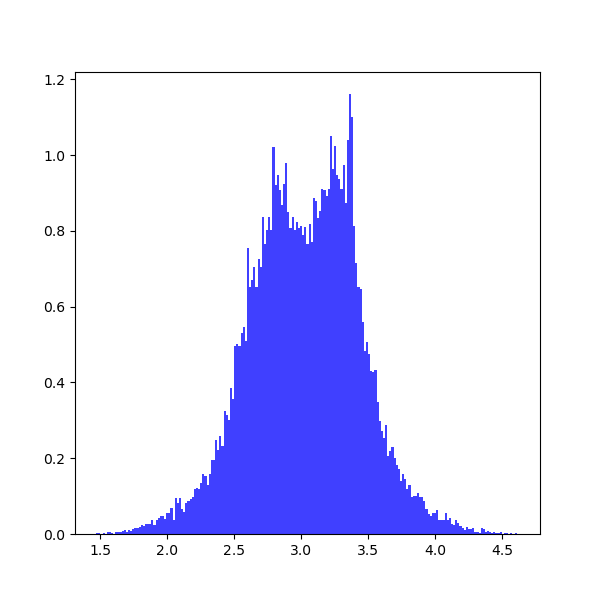
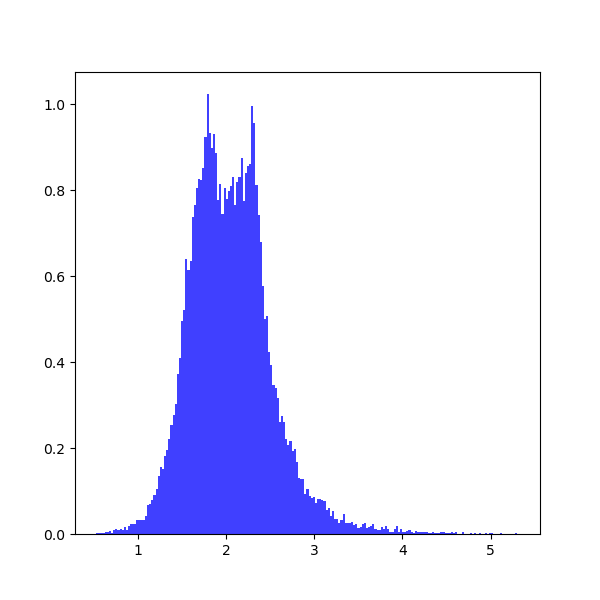
To prevent plotting, you should set do_plot=None. To print the results:
for i in range(0, output1_num):
   print(output1[i], output1_error[i,:])
which provide the upper and lower limits on each parameter:
3.0 [-0.35801017 0.35998471]
2.0 [-0.37573196 0.36297235]
For other standard deviation, you should use different confidence levels:
clevel=0.38292492 # 0.5-sigma
clevel=0.68268949 # 1.0-sigma
clevel=0.86638560 # 1.5-sigma
clevel=0.90       # 1.645-sigma
clevel=0.95       # 1.960-sigma
clevel=0.95449974 # 2.0-sigma
clevel=0.98758067 # 2.5-sigma
clevel=0.99       # 2.575-sigma
clevel=0.99730020 # 3.0-sigma
clevel=0.99953474 # 3.5-sigma
clevel=0.99993666 # 4.0-sigma
clevel=0.99999320 # 4.5-sigma
clevel=0.99999943 # 5.0-sigma
clevel=0.99999996 # 5.5-sigma
clevel=0.999999998# 6.0-sigma
Documentation
For more information on how to use the API functions from the pyemcee library, please read the API Documentation published on mcfit.github.io/pyemcee.
Learn More
Documentation |
|
Repository |
|
Issues & Ideas |
|
Conda-Forge |
|
PyPI |
|
Archive |
1 maintainer

Metadata
1 maintainer
Release files for pyemcee 0.2.6
For a detailed explanation of source distributions (sdists) and built distributions (wheels), please see the package formats documentation.
Source distribution (sdist)
| File | Size | Uploaded | |
|---|---|---|---|
| pyemcee-0.2.6.tar.gz | 22.7 kB | Details |
Built distribution (wheel)
| File | Interpreter | ABI | Platform | Reset |
|---|---|---|---|---|
| pyemcee-0.2.6-py2.py3-none-any.whl | Python 3, Python 2 | none | any | Details |
Total release size: 56.0 kB
Release files / pyemcee-0.2.6.tar.gz
| Download URL | pyemcee-0.2.6.tar.gz |
|---|---|
| Size | 22.7 kB |
| Tags | Source |
|
SHA-256 checksum How to use checksums |
6277bb06a133a5ab8f4cff1296ff8698ffebbdc41cce600e44b43ff199879721
|
|
BLAKE2b-256 checksum How to use checksums |
a013dbebc939751d62d2a3a489fdab06494dcfcfcf45020eb82aa80fefde0498
|
| Upload date | |
|
Uploaded using Trusted Publishing? What is trusted publishing? |
No |
| Uploaded via |
twine/4.0.2 CPython/3.9.16
|
Release files / pyemcee-0.2.6-py2.py3-none-any.whl
| Download URL | pyemcee-0.2.6-py2.py3-none-any.whl |
|---|---|
| Size | 33.4 kB |
| Tags | Python 2 Python 3 |
|
SHA-256 checksum How to use checksums |
5a44217598be0cbfa774221974a886a104f495a54bc60a6500865df596f62b78
|
|
BLAKE2b-256 checksum How to use checksums |
3efcbf2f80207fea9409595faac2a52e2a7f00abb5182acda1d51734266f954f
|
| Upload date | |
|
Uploaded using Trusted Publishing? What is trusted publishing? |
No |
| Uploaded via |
twine/4.0.2 CPython/3.9.16
|














