
pyEPR — Energy-Participation-Ratio Framework
Automated Python module for the design and quantization of Josephson quantum circuits





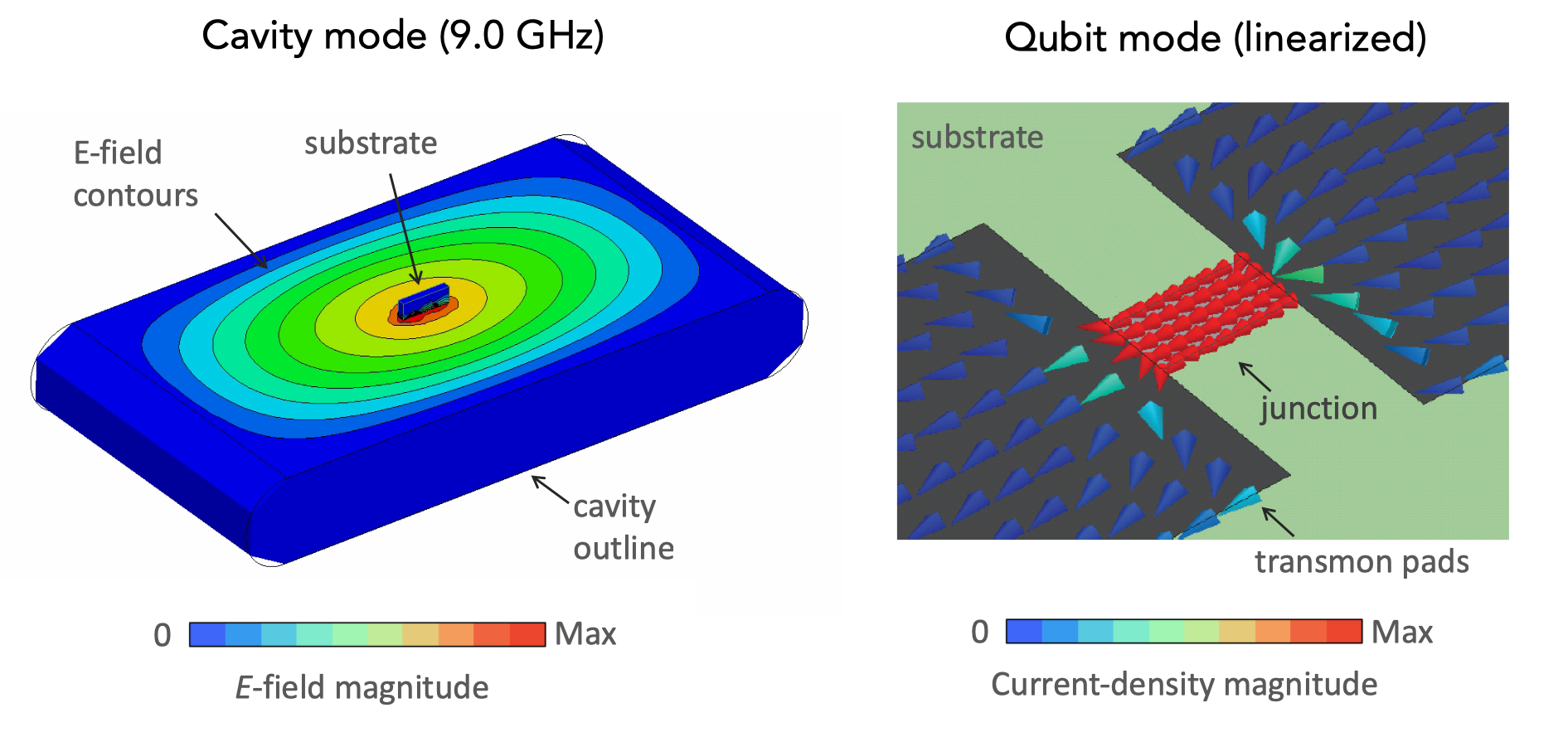
pyEPR bridges classical EM simulation and quantum circuit theory via the energy-participation ratio (EPR) method. Given a 3-D HFSS eigenmode simulation — or your own frequencies and inductances — it extracts the full quantum Hamiltonian in minutes:
- Simulate the linearized circuit in Ansys HFSS to get eigenmode frequencies and field distributions.
- Extract energy participation ratios $p_{mj}$ and zero-point phase fluctuations $\varphi_\mathrm{zpf}^{(mj)}$ for each junction and mode.
- Diagonalize $H = \sum_m \omega_m a_m^\dagger a_m - \sum_j E_J[\cos\hat\varphi_j - 1 + \hat\varphi_j^2/2]$ numerically to get dressed frequencies, anharmonicities, and the dispersive-shift matrix $\chi$.
Works for any number of modes and junctions. Handles strongly anharmonic circuits (fluxonium, $\varphi_\mathrm{zpf}\gtrsim 1$). No manual circuit diagram — only the 3-D geometry.
No HFSS licence? The Hamiltonian diagonalization (steps 2–3) works with any frequencies and inductances. Start with Tutorial 6 on Binder — runs in your browser, no install.
Install
pip install pyEPR-quantum
Requires Python 3.9–3.12. All dependencies (numpy, qutip, matplotlib, …) are installed automatically.
conda:
conda install -c conda-forge pyepr-quantum
development install:
git clone https://github.com/zlatko-minev/pyEPR.git && cd pyEPR
pip install -e ".[test]" && pytest
New in v0.9.6 — cross-platform gRPC backend (Linux · macOS · Windows)
pyEPR now ships a second HFSS transport that runs entirely over gRPC through
Ansys's official PyAEDT library — no COM, no
pywin32, and no Windows requirement.
| Classic COM backend | PyAEDT / gRPC backend | |
|---|---|---|
| Install | pip install pyEPR-quantum |
pip install "pyEPR-quantum[pyaedt]" |
| Class | DistributedAnalysis |
PyaedtDistributedAnalysis |
| Platform | Windows only | Linux · macOS · Windows |
| Transport | COM / pywin32 | gRPC (Ansys official API) |
| Session attach | new COM session | attaches to running AEDT via .aedt.lock |
from pyEPR.ansys_pyaedt import PyaedtDistributedAnalysis

eprd = PyaedtDistributedAnalysis(pinfo, aedt_version="2026.1")
eprd.do_EPR_analysis()   # pure gRPC — no COM, works on Linux/macOS
f_ND, chi_ND = eprd.analyze()
The physics is identical — participations, eigenfrequencies, and the full
diagonalization feed pyEPR's own QuantumAnalysis unchanged, validated
digit-for-digit against the COM path.
The gRPC backend also resolves the stale-session and project-locked errors that
have long been the main pain point with COM.
Many thanks to Joey Yaker for designing and contributing this backend. See the PyAEDT backend docs for full details and Tutorial 7.
Quickstart — no Ansys required
Compute the transmon anharmonicity from first principles, no HFSS needed:
import numpy as np
from pyEPR.calcs.back_box_numeric import epr_numerical_diagonalization

# Standard transmon: E_J/h = 20 GHz, E_C/h = 300 MHz
# Plasma frequency f_p = sqrt(8 E_J E_C)/h ≈ 6.93 GHz
freqs   = np.array([6.928])     # GHz  (linearised plasma frequency)
Ljs     = np.array([8.2e-9])    # H    (Josephson inductance L_J = (Phi_0/2pi)^2 / E_J)
phi_zpf = np.array([[0.416]])   # dimensionless  (n_modes x n_junctions)

# Diagonalize — returns dressed frequencies in Hz and chi matrix in MHz
f_dressed, chi_matrix = epr_numerical_diagonalization(
    freqs, Ljs, phi_zpf, cos_trunc=8, fock_trunc=15
)
print(f"Qubit frequency : {f_dressed[0].real / 1e9:.3f} GHz")
print(f"Anharmonicity   : {chi_matrix[0,0].real:.0f} MHz")
# -> Qubit frequency : 6.615 GHz
# -> Anharmonicity   : 335 MHz
For multi-mode systems, fluxonium, or custom potentials: Tutorial 6.
Full HFSS workflow
import pyEPR as epr

# 1. Connect to Ansys HFSS
pinfo = epr.ProjectInfo(project_path=r'C:\sim_folder',
                        project_name=r'cavity_with_two_qubits',
                        design_name=r'Alice_Bob')

# 2. Specify Josephson junctions
pinfo.junctions['jAlice'] = {'Lj_variable':'Lj_alice', 'rect':'rect_alice',
                              'line': 'line_alice', 'Cj_variable':'Cj_alice'}
pinfo.junctions['jBob']   = {'Lj_variable':'Lj_bob',   'rect':'rect_bob',
                              'line': 'line_bob',   'Cj_variable':'Cj_bob'}
pinfo.validate_junction_info()

# 3. Extract EPR participation ratios
eprd = epr.DistributedAnalysis(pinfo)
eprd.do_EPR_analysis()

# 4. Quantum Hamiltonian — dressed frequencies and chi matrix
epra = epr.QuantumAnalysis(eprd.data_filename)
epra.analyze_all_variations(cos_trunc=8, fock_trunc=15)
epra.plot_hamiltonian_results(swp_variable='Lj_alice')
Documentation
Full docs, API reference, and guides: pyepr-docs.readthedocs.io
Tutorial Notebooks
The tutorials are Jupyter notebooks in _tutorial_notebooks/.
| # | Title | HFSS? | Topics |
|---|---|---|---|
| 1 | Startup example | Yes | End-to-end workflow: HFSS → EPR → χ matrix |
| 2 | Dielectric loss EPR | Yes | Dielectric energy participation, loss rates, HFSS fields calculator |
| 3 | Circuit QED parameters | No | E_J, E_C, L_J, I_c conversions; transmon model |
| 4 | Parametric sweeps | Yes | HFSS Optimetrics: linear, log, file-based sweeps |
| 5 | Generic junction potential & fluxonium | No | Exact cosine for fluxonium; custom V(phi); asymmetric SQUIDs |
| 6 | EPR without HFSS | No | Numerical workflow: supply freqs, Ljs, phi_zpf directly |
Tutorials 3, 5, and 6 require only
pip install pyEPR-quantum— no Ansys licence.
Video Tutorials
Who uses pyEPR?
pyEPR is used by superconducting qubit research groups worldwide, including:
- Yale University — Michel Devoret QLab and Rob Schoelkopf RSL
- IBM Quantum and Qiskit Metal
- QUANTIC — INRIA/ENS/MINES Paris/UPMC/CNRS (Zaki Leghtas group), France
- Quantum Circuit Group — Benjamin Huard, ENS Lyon, France
- Emanuel Flurin, CEA Saclay, France
- Ioan Pop group, KIT Physikalisches Institut, Germany
- UC Berkeley, Quantum Nanoelectronics Laboratory, Irfan Siddiqi
- Quantum Circuits, Inc. · Seeqc · Alice&Bob, France · Bleximo
- Serge Rosenblum Lab, Weizmann Institute, Israel
- University of Oxford — Leek Lab
- Britton Plourde Lab, Syracuse University
- Javad Shabani Lab, NYU
- UChicago Dave Schuster Lab · Lawrence Berkeley National Lab · Colorado School of Mines
- IPQC, SJTU, Shanghai · Bhabha Atomic Research Centre, India
- Quantum Device Lab ETHZ — Andreas Wallraff · Centre for Quantum Technologies / Qcrew
- SQC lab — Shay Hacohen-Gourgy, Israel · Quantum Computing UK
- ... and many more — e-mail
zlatko.minev@aya.yale.eduto be added.
Platform support
| Feature | Windows | macOS | Linux |
|---|---|---|---|
| EPR / quantum analysis | Yes | Yes | Yes |
| Ansys HFSS COM interface | Yes | limited | limited |
The HFSS COM interface uses pythoncom/win32com (Windows). On macOS/Linux you can connect to a remote Windows HFSS instance via network COM.
PyAEDT is Ansys's official cross-platform AEDT scripting library. pyEPR and PyAEDT are complementary — use PyAEDT for geometry/mesh/solve automation, pyEPR for EPR quantization.
HFSS Project Setup
Eigenmode Design — Junction setup
The EPR method requires each Josephson junction to be modelled as a lumped RLC boundary on a rectangle in HFSS, together with a polyline defining the current direction. Steps:
- Create a rectangle for each junction (e.g.,
rect_alice). Assign aLumped RLCboundary with inductance variableLj_alice. - Draw a polyline spanning the junction rectangle to define current flow (e.g.,
line_alice). - The linearised Josephson inductance used in HFSS is $L_J = (\Phi_0/2\pi)^2/E_J$. The full cosine potential is restored in the quantum Hamiltonian step.
- Enable Save Fields for each variation if running parametric sweeps (Tutorial 4).
- Use
Mixed Ordersolutions for best accuracy.
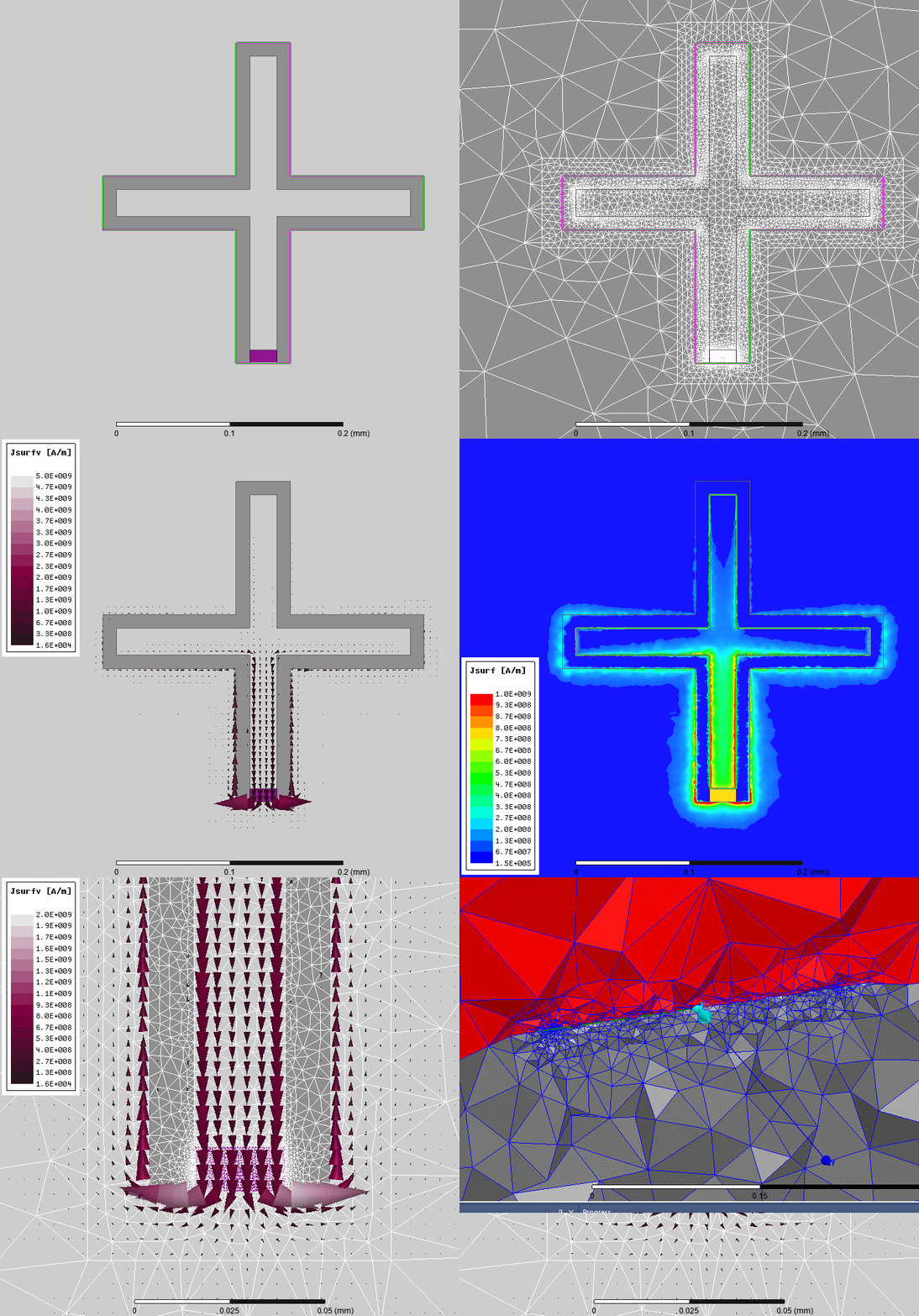
For a full walkthrough, see Tutorial 1 and the HFSS setup guide in the docs.
Troubleshooting
See the troubleshooting guide in the docs.
Common issues:
- pint error
system='mks' unknown— upgrade pint:pip install pint --upgrade - QuTiP not found — it is installed automatically with pyEPR-quantum; for manual install:
pip install qutip - COM Error on opening HFSS — check file path (no apostrophes/special chars); check HFSS hasn't popped an error dialog
- Parametric sweep missing field solutions — enable "Save Fields and Mesh" in ParametricSetup → Properties → Options (see Tutorial 4)
ValueError: cannot set WRITEABLE flag— upgrade numpy
Citation
If you use pyEPR in your research, please cite:
EPR method (primary reference):
Z. K. Minev, Z. Leghtas, S. O. Mundhada, L. Christakis, I. M. Pop, M. H. Devoret, Energy-participation quantization of Josephson circuits, npj Quantum Information 7, 131 (2021) · arXiv:2010.00620
Software (Zenodo DOI for the specific version):
BibTeX for both: pyEPR.bib
Related:
- Z. K. Minev, Ph.D. Dissertation, Yale (2018), Ch. 4 — arXiv:1902.10355
- A. Petrescu, C. T. Hann, Z. K. Minev et al., EPR for very anharmonic circuits — arXiv:2411.15039
Authors and Contributors
- Authors: Zlatko Minev & Zaki Leghtas, 2015–present.
- Contributors: Phil Reinhold, Lysander Christakis, Devin Cody, Zachary Parrott, Asaf Diringer, and many others.
- Original
pyHFSS.pyandpyNumericalDiagonalization.pyby Phil Reinhold — original repo. - To contribute: open a GitHub issue or PR, or contact Z. Minev.
Community contributions
Joey Yaker — PyAEDT gRPC backend (pyEPR.ansys_pyaedt, v0.9.6).
Designed and implemented PyaedtDistributedAnalysis: a complete alternative HFSS transport layer that
drives the EPR field extraction entirely over gRPC via Ansys's official PyAEDT API, with no COM / pywin32.
Includes the key insight that CalculatorWrite (write to a .fld file) must replace the stateful
ClcEval/GetTopEntryValue round-trip for results to survive gRPC — validated digit-for-digit against
the COM path. Makes pyEPR fully cross-platform for users with PyAEDT installed.

2 maintainers


Release files for pyEPR-quantum 1.0.1
For a detailed explanation of source distributions (sdists) and built distributions (wheels), please see the package formats documentation.
Source distribution (sdist)
| File | Size | Uploaded | |
|---|---|---|---|
| pyepr_quantum-1.0.1.tar.gz | 138.9 kB | Details |
Built distribution (wheel)
| File | Interpreter | ABI | Platform | Reset |
|---|---|---|---|---|
| pyepr_quantum-1.0.1-py3-none-any.whl | Python 3 | none | any | Details |
Total release size: 259.4 kB
Release files / pyepr_quantum-1.0.1.tar.gz
| Download URL | pyepr_quantum-1.0.1.tar.gz |
|---|---|
| Size | 138.9 kB |
| Tags | Source |
|
SHA-256 checksum How to use checksums |
b16cf1dff322369677c961fd8a916b718dc0b7cc97246d0b93e6df279951c846
|
|
BLAKE2b-256 checksum How to use checksums |
471c9e62c109736000768a3a768181b959193b6f4f013a158bfb38bdc847f4d4
|
| Upload date | |
|
Uploaded using Trusted Publishing? What is trusted publishing? |
Yes |
| Uploaded via |
twine/6.1.0 CPython/3.13.7
|
Provenance
Provenance describes where a file came from. On PyPI, provenance is shared via attestations, which provide a verifiable record of the build or publishing details. View details, limitations and caveats.


PyPI Publish Attestation
PyPI verified that this artifact, at this checksum, originated from the publisher listed below.
Signed by GitHub Actions, verified by PyPI on Jul 17, 2026.
Transparency logRelease files / pyepr_quantum-1.0.1-py3-none-any.whl
| Download URL | pyepr_quantum-1.0.1-py3-none-any.whl |
|---|---|
| Size | 120.5 kB |
| Tags | Python 3 |
|
SHA-256 checksum How to use checksums |
548e8db772c9a05dfb5915c2290bb47419711d04551d28020d6764620976e047
|
|
BLAKE2b-256 checksum How to use checksums |
141c62625646dd0436dc5e851e5a5bc4a364f10a1b25043fccff274156707653
|
| Upload date | |
|
Uploaded using Trusted Publishing? What is trusted publishing? |
Yes |
| Uploaded via |
twine/6.1.0 CPython/3.13.7
|
Provenance
Provenance describes where a file came from. On PyPI, provenance is shared via attestations, which provide a verifiable record of the build or publishing details. View details, limitations and caveats.
PyPI Publish Attestation
PyPI verified that this artifact, at this checksum, originated from the publisher listed below.
Signed by GitHub Actions, verified by PyPI on Jul 17, 2026.
Transparency log













