
pyeti-python3
Pyeti-Python (pyeti) is the bundle uses to interface with the YETI API. This is the new package that can be installed directly with pip. Pyeti-python allows you to extract data from YETI such as specific observables (malware, IP, domains...). It can be used to plug in your own tool and enrich your Threat Intelligence feed with Yeti.
Getting Started
To install it you can clone the repo and run the following command:
$ python3 setup.py install
You can also install it with pip:
$ pip3 install pyeti-python3
Once installed the first thing to do is to get your API key from the Yeti interface.
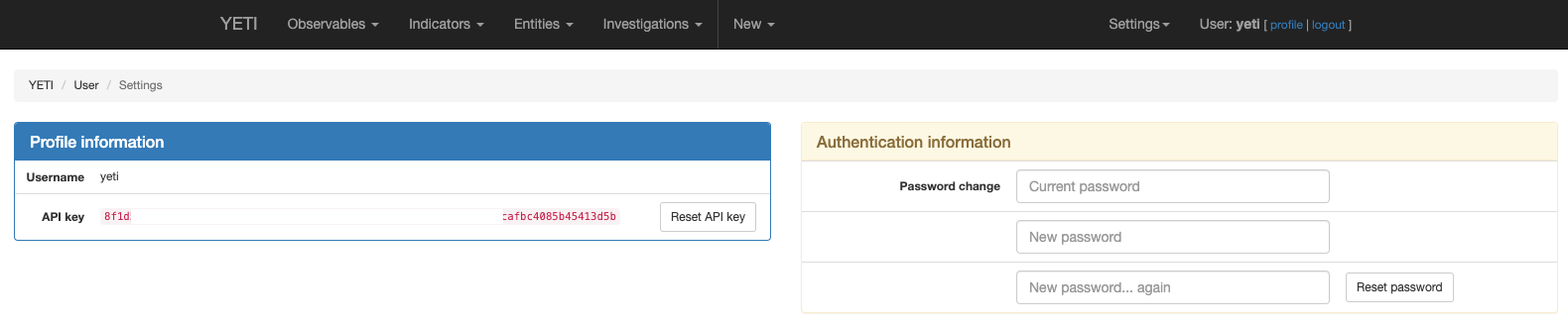
Then you can configure your script with the following information to test the connection:
server="<IPofYETI>"
key="<APIKEY>"
tag="<NameoftheObservable>" # example: 'lokibot'

api = pyeti.YetiApi("http://%s:5000/api/" % server, api_key=key)
request = api.observable_search(tags=tag, count=50)
Testing
You can run tests from the root directory by running:
$ pip3 install nose
$ python3 setup.py test
Note that most tests require a full running install of Yeti on localhost:5000
Use cases
First thing is to import the library and instantiate a client.
import pyeti, json    # json is only used for pretty printing in the examples below
api = pyetix.YetiApi("http://localhost:5000/api/")
If you are using a self signed cert on your yeti instance you can set the verify_ssl parameter to True to ignore warnings.
Otherwise all ssl connections are verified by default.
import pyeti, json    # json is only used for pretty printing in the examples below
api = pyeti.YetiApi("http://localhost:5000/api/", verify_ssl=False)
Adding observables
results = api.observable_add("google.com", ['google'])
print(json.dumps(results, indent=4, sort_keys=True))
Bulk add
results = api.observable_bulk_add(["google.com", "bing.com", "yahoo.com"])
print(len(results))
3
print(json.dumps(results[1], indent=4, sort_keys=True))
Get a single observable
results = api.observable_add("google.com")
print(results['id'])
info = api.observable_details(results['id'])
print(json.dumps(info, indent=4, sort_keys=True))
Search for observables
api.observable_add("search-domain.com")
result = api.observable_search(value="search-dom[a-z]+", regex=True)
print(json.dumps(result, indent=4, sort_keys=True))
Add observables
result = api.observable_file_add("/tmp/hello.txt", tags=['benign'])
print(json.dumps(result, indent=4, sort_keys=True))
# Get file contents
api.observable_file_contents(objectid="594fff86bf365e6270f8914b")
'Hello!\n'
api.observable_file_contents(filehash="e134ced312b3511d88943d57ccd70c83") # you can also use any hash computed above
'Hello!\n'
License
This project is licensed under the Apache License - see the LICENSE.md file for details
1 maintainer

Metadata
1 maintainer
Release files for pyeti-python3 1.1
For a detailed explanation of source distributions (sdists) and built distributions (wheels), please see the package formats documentation.
Built distribution (wheel)
| File | Interpreter | ABI | Platform | Reset |
|---|---|---|---|---|
| pyeti_python3-1.1-py3-none-any.whl | Python 3 | none | any | Details |
Release files / pyeti_python3-1.1-py3-none-any.whl
| Download URL | pyeti_python3-1.1-py3-none-any.whl |
|---|---|
| Size | 17.9 kB |
| Tags | Python 3 |
|
SHA-256 checksum How to use checksums |
2b2011fadacf799bd99bcb5c3feec4ffafc031bb81e1ab713cd977948ca7d698
|
|
BLAKE2b-256 checksum How to use checksums |
a890f64bcd302e9aa7fab6aad841eb84fb072230785765258c3a36f6abd0e229
|
| Upload date | |
|
Uploaded using Trusted Publishing? What is trusted publishing? |
No |
| Uploaded via |
twine/3.4.1 importlib_metadata/4.0.1 pkginfo/1.7.0 requests/2.25.1 requests-toolbelt/0.9.1 tqdm/4.60.0 CPython/3.9.2
|














