
pyEugene 📈



Eugene Investment & Securities Champion Open Api Python Wrapper
Free software: MIT
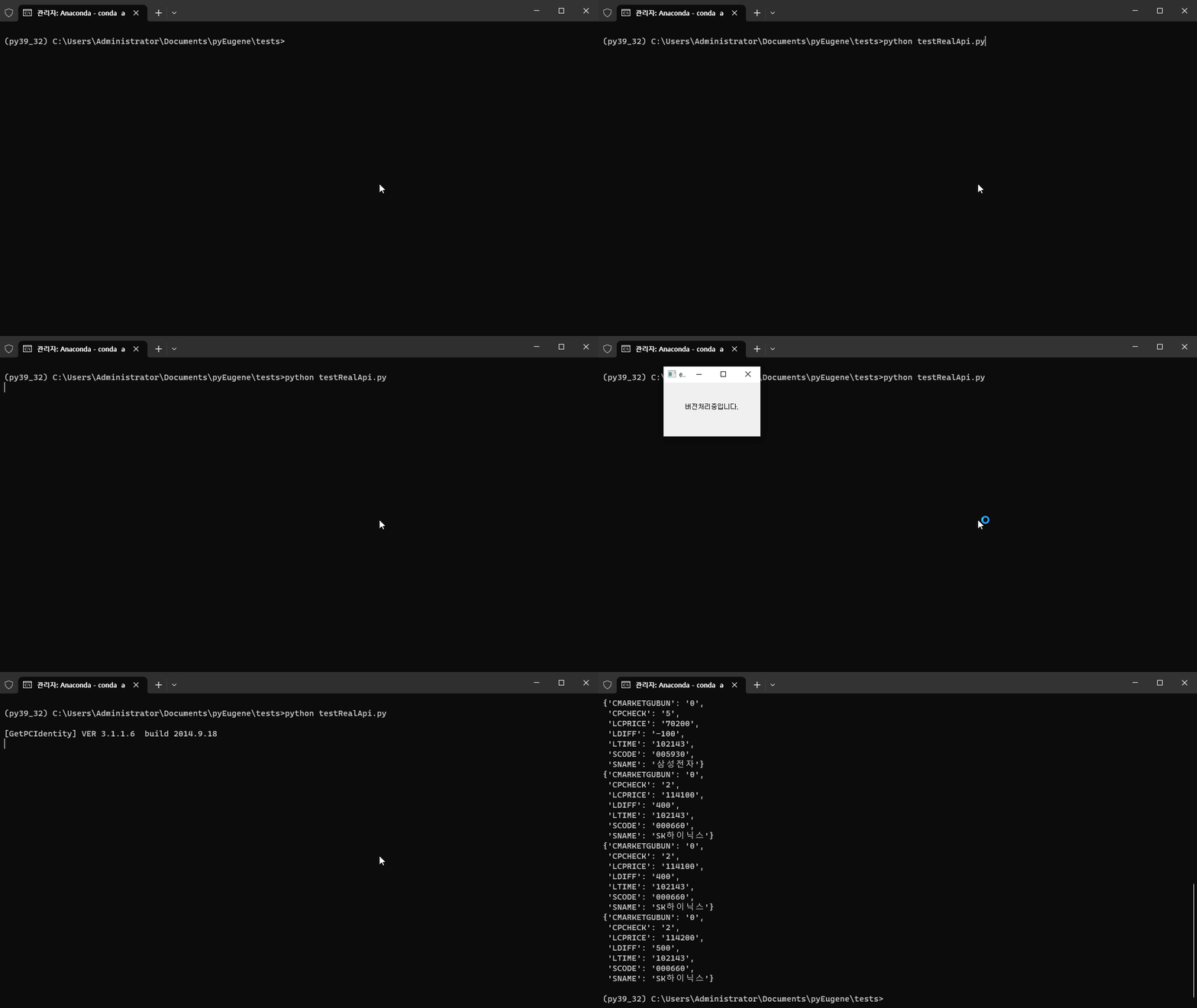
Demo
Prerequisites 👓
- Python 3.9.*
- 32 Bit Development environment
- Eugene Web Account (need Eugene securities account)
Introduction 💻
pyEugene is an unofficial python wrapper for easy use of the Champion Open API provided by Eugene Investment & Securities.
Even if you are not familiar with the functions below, you can use all of them.
- The API structure of OCX provided by Eugene Investment & Securities
- Operating Structure of the Version Processing Program Provided by Eugene Investment & Securities
- Use
dynamicCallfunction for function invocation in con>
한국어 소개 💻
pyEugene은 유진투자증권에서 제공하는 Champion Open API를 쉽게 사용하기 위한 비공식 python wrapper입니다.
아래의 기능들을 잘 모르더라도 충분히 모든 기능을 사용할 수 있습니다.
- 유진투자증권에서 제공하는 OCX의 API 구조
- 유진투자증권에서 제공하는 버전처리 프로그램의 작동 구조
- 컨트롤에서 함수 호출을 위한
dynamicCall함수 사용
Getting Started 🚀
To begin using pyEugene, start by installing anaconda(or you can use miniconda):
Download anaconda
Download miniconda
When you're done installing the anaconda, run the anaconda prompt and set it to a 32-bit development environment
set CONDA_FORCE_32BIT=1
If you replace the anaconda with 32-bit, create a 32-bit virtual environment (You should use Python 3.9 version)
conda create --name py39_32 python=3.9
When you're done installing, activate virtual environment and use the pip to install pyEugene
conda activate py39_32
pip install pyeugene
Once you've installed pyEugene, you can start using it right away.
For example, to get real-time stock price using pyEugene, enter the following code:
import sys
import os
from pprint import pprint
from dotenv import load_dotenv
from pyeugene.eugene_manager import EugeneManager

if __name__ == "__main__":
    load_dotenv()
    em = EugeneManager(os.getenv("USER_ID"), os.getenv("USER_PW"), os.getenv("CERT_PW"))

    real_cmd = {
        'realId': '21',
        'realKey': '005930',
        'output': ["SCODE", "SNAME", "CMARKETGUBUN", "LTIME", "CPCHECK", "LDIFF", "LCPRICE"]
    }

    em.put_real(real_cmd)
    for i in range(10):
        data = em.get_real()
        pprint(data)
    sys.exit()
한국어 사용 가이드 🚀
pyEugene을 사용하기 위해서는 아나콘다를 설치해야 합니다(미니콘다를 설치해 사용할 수도 있습니다)
아나콘다 다운로드가 완료 되었으면 아나콘다 프롬프트를 실행해 32bit 개발환경으로 설정해줘야 합니다
set CONDA_FORCE_32BIT=1
32bit로 설정이 완료 되었으면 32bit 가상 개발 환경을 만들어줍니다 (파이썬 3.9 버전을 사용해야 합니다)
conda create --name py39_32 python=3.9
설치가 모두 끝나면 가상환경을 실행하고 pip를 통해 pyEugene을 설치해줍니다
conda activate py39_32
pip install pyeugene
다음부터는 pyEugene을 설치하지 않고도 기능을 사용할 수 있습니다.
간단한 예시로 pyEugene을 이용해 실시간 시세를 받아오려면 아래 코드를 사용하면 됩니다
import sys
import os
from pprint import pprint
from dotenv import load_dotenv
from pyeugene.eugene_manager import EugeneManager

if __name__ == "__main__":
    load_dotenv()
    em = EugeneManager(os.getenv("USER_ID"), os.getenv("USER_PW"), os.getenv("CERT_PW"))

    real_cmd = {
        'realId': '21',
        'realKey': '005930',
        'output': ["SCODE", "SNAME", "CMARKETGUBUN", "LTIME", "CPCHECK", "LDIFF", "LCPRICE"]
    }

    em.put_real(real_cmd)
    for i in range(10):
        data = em.get_real()
        pprint(data)
    sys.exit()
Contributions 💬
Feel free to contribute to pyEugene fixing bugs.
If you have any problems, please contact me by e-mail(danielch0401@naver.com)
1 maintainer

Metadata
1 maintainer
Release files for pyeugene 1.2.1
For a detailed explanation of source distributions (sdists) and built distributions (wheels), please see the package formats documentation.
Source distribution (sdist)
| File | Size | Uploaded | |
|---|---|---|---|
| pyeugene-1.2.1.tar.gz | 8.6 kB | Details |
Built distribution (wheel)
| File | Interpreter | ABI | Platform | Reset |
|---|---|---|---|---|
| pyeugene-1.2.1-py3-none-any.whl | Python 3 | none | any | Details |
Total release size: 18.5 kB
Release files / pyeugene-1.2.1.tar.gz
| Download URL | pyeugene-1.2.1.tar.gz |
|---|---|
| Size | 8.6 kB |
| Tags | Source |
|
SHA-256 checksum How to use checksums |
fec968b35d416df5bca1fd716985a708595cef9389e939f049eff89274fbca5a
|
|
BLAKE2b-256 checksum How to use checksums |
3678790dce1651b803434793f610ac8ef830e492fa72fcddf53d87156dcf7cad
|
| Upload date | |
|
Uploaded using Trusted Publishing? What is trusted publishing? |
No |
| Uploaded via |
poetry/2.2.1 CPython/3.9.13 Windows/10
|
Release files / pyeugene-1.2.1-py3-none-any.whl
| Download URL | pyeugene-1.2.1-py3-none-any.whl |
|---|---|
| Size | 9.9 kB |
| Tags | Python 3 |
|
SHA-256 checksum How to use checksums |
36600f84648527a95ecc6ce90f92a6789450e827d59567ba807b47e5d2ec2181
|
|
BLAKE2b-256 checksum How to use checksums |
ba761d47b1f70e75ec74a60c3145fe23eca97d4f23525817f12f0e769be97709
|
| Upload date | |
|
Uploaded using Trusted Publishing? What is trusted publishing? |
No |
| Uploaded via |
poetry/2.2.1 CPython/3.9.13 Windows/10
|














