
Python codes to Flowcharts.

Project description
PyFlowchart
PyFlowchart is a package to:
- write flowchart in Python,
- translate Python source codes into flowchart.
PyFlowchart produces flowcharts in flowchart.js flowchart DSL, a widely used flow chart textual representation. It's easy to convert these flowcharts text into a picture via flowchart.js.org, francoislaberge/diagrams, or some markdown editors.
Get PyFlowchart
$ pip3 install pyflowchart
Flowchart in Python
PyFlowchart including flowchart.js node types:
- StartNode
- OperationNode
- ConditionNode
- InputOutputNode
- SubroutineNode
- EndNode
Nodes can be connected by connect() method (connect_{yes|no} for ConditionNode).
Get a Flowchart with your start node and call its flowchart() method to generate flowchart.js flowchart DSL:
from pyflowchart import *

st = StartNode('a_pyflow_test')
op = OperationNode('do something')
cond = ConditionNode('Yes or No?')
io = InputOutputNode(InputOutputNode.OUTPUT, 'something...')
sub = SubroutineNode('A Subroutine')
e = EndNode('a_pyflow_test')

# define the direction the connection will leave the node from
sub.set_connect_direction("right")

st.connect(op)
op.connect(cond)
cond.connect_yes(io)
cond.connect_no(sub)
sub.connect(op)
io.connect(e)

fc = Flowchart(st)
print(fc.flowchart())
Output:
st4471442960=>start: start a_pyflow_test
op4471442064=>operation: do something
cond4471501392=>condition: Yes or No?
io4471501648=>inputoutput: output: something...
e4471501904=>end: end a_pyflow_test
sub4471501584=>subroutine: A Subroutine

st4471442960->op4471442064
op4471442064->cond4471501392
cond4471501392(yes)->io4471501648
io4471501648->e4471501904
cond4471501392(no)->sub4471501584
sub4471501584(right)->op4471442064
Go http://flowchart.js.org and translate the generated textual representation into SVG flow chart diagrams:
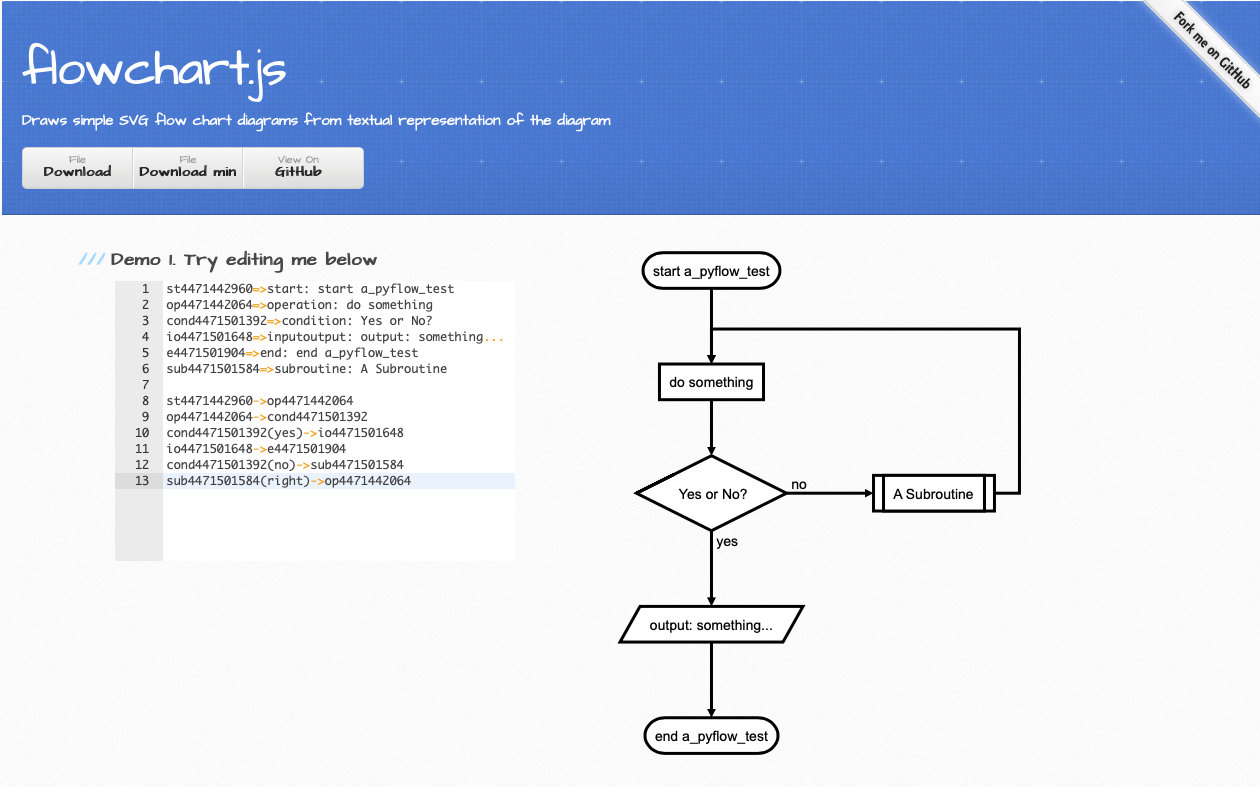
P.S. Many Markdown editors (for example, Typora) support this flowchart syntax, too. And if you prefer CLI, see francoislaberge/diagrams.
Python to Flowchart
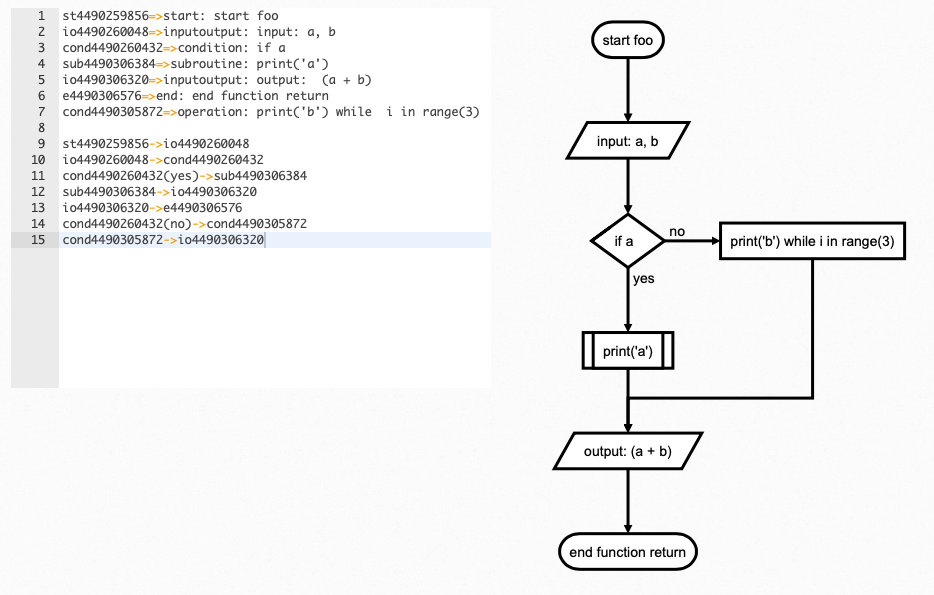
PyFlowchart can also translate your Python Codes into Flowcharts.
For example, you got a simple.py:
def foo(a, b):
    if a:
        print("a")
    else:
        for i in range(3):
            print("b")
    return a + b
Run PyFlowchart in CLI to generate flowchart code:
$ python3 -m pyflowchart simple.py

# output flowchart code.
Or, in Python
>>> from pyflowchart import Flowchart
>>> with open('simple.py') as f:
...     code = f.read()
...
>>> fc = Flowchart.from_code(code)
>>> print(fc.flowchart())

# output flowchart code.
Advanced Usages
As mentioned above, we use Flowchart.from_code to translate Python code into Flowchart. The from_code is defined as:
Flowchart.from_code(code, field='', inner=True, simplify=True)
PyFlowchart CLI is a 1:1 interface for this function:
python3 -m pyflowchart [-f FIELD] [-i] [--no-simplify] code_file
Let's talk about those three args:
field: Specify a field of code to generate flowchartinner: True: parse the body of field; Field: parse the body as a objectsimplify: for If & Loop statements: simplify the one-line-body or not
field
field is the path to a field (i.e. a function) you want to draw flowchart.
# example.py
print("start")

def foo():
    foo = "foo"

class Bar():
    def buzz(self, f):
        def g(self):
            print("g")
            f(self)
        return g(self)

Bar().buzz(foo)
print("end")
For example.py above, available paths are:
- "" (means the whole code)
- "foo"
- "Bar.buzz"
- "Bar.buzz.g"
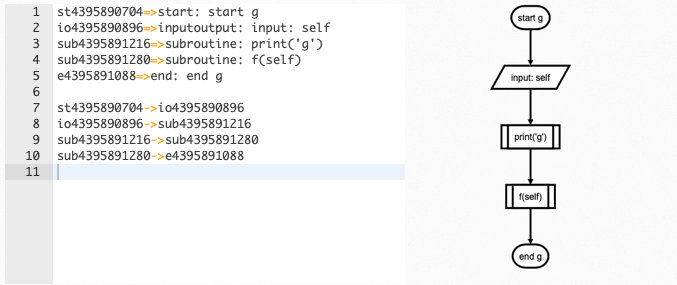
To generate a flowchart of Bar.buzz.g:
# Python
from pyflowchart import Flowchart
with open('example.py') as f:
	code = f.read()
fc = Flowchart.from_code(code, field='Bar.buzz.g', inner=False)
print(fc.flowchart())
# CLI
python3 -m pyflowchart example.py -f Bar.buzz.g
Output result:
inner
inner controls parser's behaves. Techly, inner=True means parsing field.body, while inner=False parses [field]. So, if inner=True, pyflowchart will look into the field, otherwise it takes field as a node.
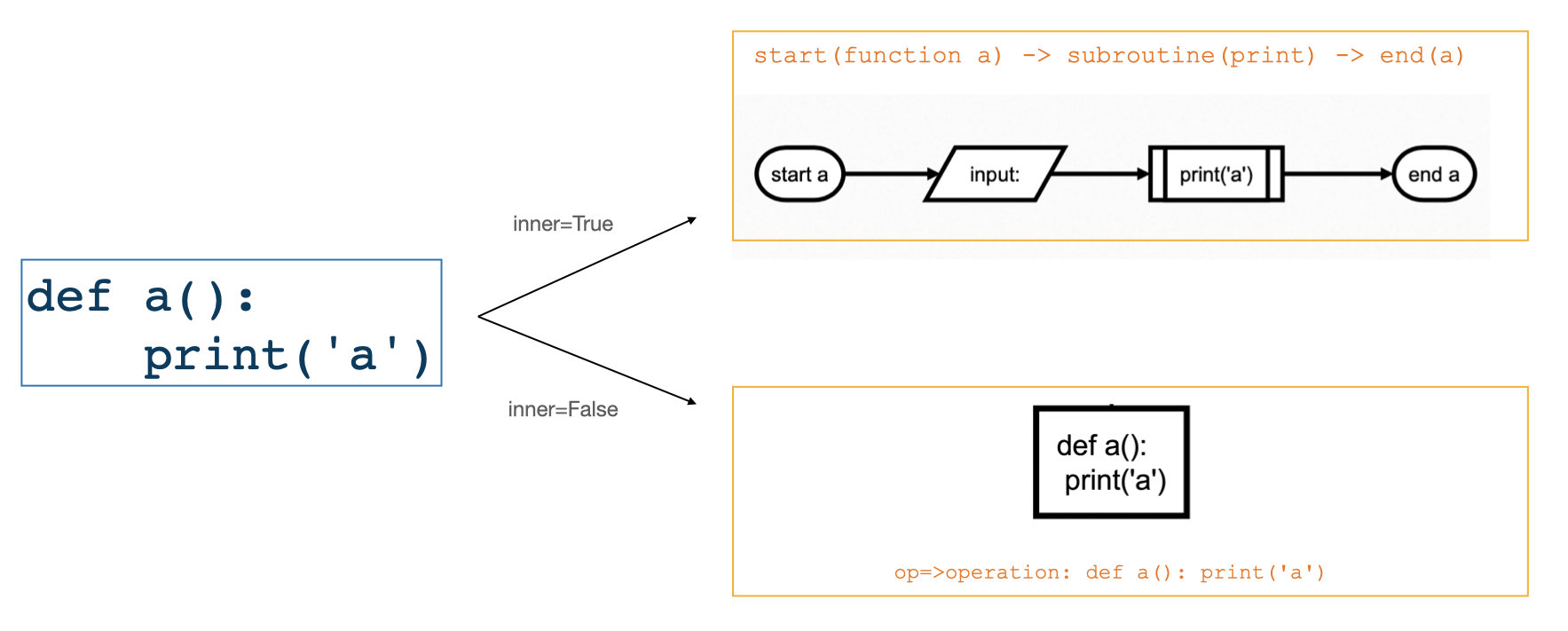
For CLI, adding an argument -i means inner=True, else inner=False.
simplify
simplify is for If & Loop statements: simplify the one-line-body.
For example:
# example_simplify.py
a = 1
if a == 1:
    print(a)
while a < 4:
    a = a + 1
- Default:
simplify=True:
flowchart = Flowchart.from_code(example_simplify_py, field="", inner=True)
print(flowchart.flowchart())
# CLI $ p3 -m pyflowchart example_simplify.py

simplify=False:
flowchart = Flowchart.from_code(example_simplify_py, field="", inner=True, simplify=False)
print(flowchart.flowchart())
# CLI $ p3 -m pyflowchart --no-simplify example_simplify.py

Beautify Flowcharts
Modify the generated flowchart code by yourself.
TODO
- Generate flowchart SVG/HTML.
$ pyflowchart example.py -o flowchart.svg
Depends node.js and flowchart.js.
- PyFlowchart GUI
Well, I guess a GUI for PyFlowchart may be remarkable. Pasting your code into it, the flowchart DSL will be generated just in time, and flowchart will be shown aside.
- The Chinese README your buddies waiting for!
Sadly, I am too busy (this word is pronounced as [ˈlеizi]——lazy) to code these ideas. Please submit an issue to push me on. Or, PR to make it by yourself. I cannot wait to appreciate your great contribution!
References
- Inspired by Vatsha/code_to_flowchart
- Based on adrai/flowchart.js, python ast, simonpercivall/astunparse
- A blog about this project
License
Copyright 2020 CDFMLR. All rights reserved.
Licensed under the MIT License.
Release history Release notifications | RSS feed


Download files
Download the file for your platform. If you're not sure which to choose, learn more about installing packages.
Source Distribution
Built Distribution
Filter files by name, interpreter, ABI, and platform.
If you're not sure about the file name format, learn more about wheel file names.
Copy a direct link to the current filters
File details
Details for the file pyflowchart-0.1.3.tar.gz.
File metadata
- Download URL: pyflowchart-0.1.3.tar.gz
- Upload date:
- Size: 16.2 kB
- Tags: Source
- Uploaded using Trusted Publishing? No
- Uploaded via: twine/3.3.0 pkginfo/1.7.0 requests/2.25.1 setuptools/53.0.0 requests-toolbelt/0.9.1 tqdm/4.59.0 CPython/3.9.2
File hashes
| Algorithm | Hash digest | |
|---|---|---|
| SHA256 |
ad22173bfe9d98d3c5b5c83e036649ac99a9a102b206511d1753ce5cf051aae1
|
|
| MD5 |
9e76ea896a0aa3cf407cbbff7ba5adac
|
|
| BLAKE2b-256 |
36db40e5b13ce2b6716376aa05b63c3c8f43c2a3cc19f16c4206f9dcbbede113
|
File details
Details for the file pyflowchart-0.1.3-py3-none-any.whl.
File metadata
- Download URL: pyflowchart-0.1.3-py3-none-any.whl
- Upload date:
- Size: 16.5 kB
- Tags: Python 3
- Uploaded using Trusted Publishing? No
- Uploaded via: twine/3.3.0 pkginfo/1.7.0 requests/2.25.1 setuptools/53.0.0 requests-toolbelt/0.9.1 tqdm/4.59.0 CPython/3.9.2
File hashes
| Algorithm | Hash digest | |
|---|---|---|
| SHA256 |
9bd5a2ae5fd8bbf670231c4f1ff40412aa622cf84691f43d72720fba975b764e
|
|
| MD5 |
3f7663819529ce7daa3f33b186e46cb7
|
|
| BLAKE2b-256 |
64b665bb0ca47e55bfa09f1246e2cc0994f6e682c2e13344211f2b2ead57e147
|






