
PyFlowchart
PyFlowchart is a package to:
- write flowchart in Python,
- translate Python source codes into flowchart.
PyFlowchart produces flowcharts in flowchart.js flowchart DSL, a widely used flow chart textual representation. It's easy to convert these flowcharts text into a picture via flowchart.js.org, francoislaberge/diagrams, or some markdown editors.
Get PyFlowchart
$ pip3 install pyflowchart
Flowchart in Python
PyFlowchart including flowchart.js node types:
- StartNode
- OperationNode
- ConditionNode
- InputOutputNode
- SubroutineNode
- EndNode
Nodes can be connected by connect() method (connect_{yes|no} for ConditionNode).
Get a Flowchart with your start node and call its flowchart() method to generate flowchart.js flowchart DSL:
from pyflowchart import *

st = StartNode('a_pyflow_test')
op = OperationNode('do something')
cond = ConditionNode('Yes or No?')
io = InputOutputNode(InputOutputNode.OUTPUT, 'something...')
sub = SubroutineNode('A Subroutine')
e = EndNode('a_pyflow_test')

# define the direction the connection will leave the node from
sub.set_connect_direction("right")

st.connect(op)
op.connect(cond)
cond.connect_yes(io)
cond.connect_no(sub)
sub.connect(op)
io.connect(e)

fc = Flowchart(st)
print(fc.flowchart())
Output:
st4471442960=>start: start a_pyflow_test
op4471442064=>operation: do something
cond4471501392=>condition: Yes or No?
io4471501648=>inputoutput: output: something...
e4471501904=>end: end a_pyflow_test
sub4471501584=>subroutine: A Subroutine

st4471442960->op4471442064
op4471442064->cond4471501392
cond4471501392(yes)->io4471501648
io4471501648->e4471501904
cond4471501392(no)->sub4471501584
sub4471501584(right)->op4471442064
Go http://flowchart.js.org and translate the generated textual representation into SVG flow chart diagrams:
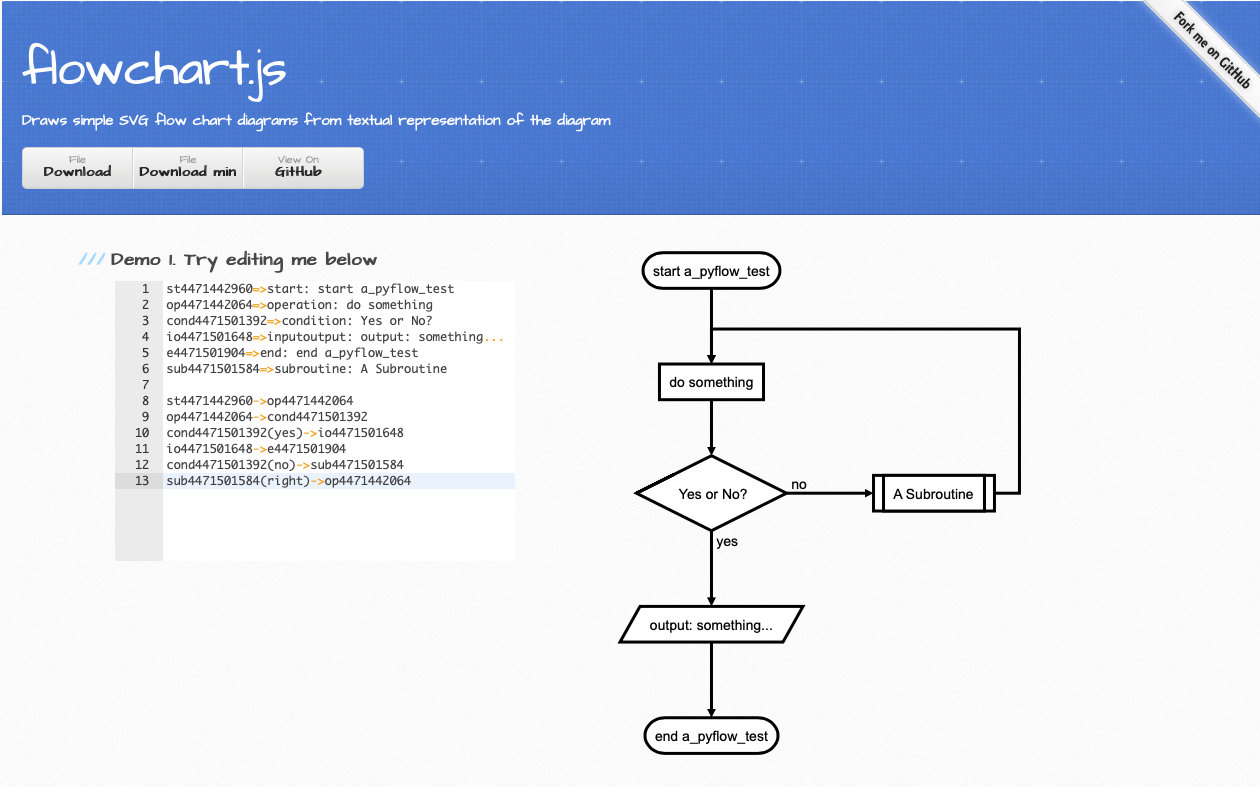
P.S. Many Markdown editors (for example, Typora) support this flowchart syntax, too. And if you prefer CLI, see francoislaberge/diagrams.
Python to Flowchart
PyFlowchart can also translate your Python Codes into Flowcharts.
For example, you got a simple.py:
def foo(a, b):
    if a:
        print("a")
    else:
        for i in range(3):
            print("b")
    return a + b
Run PyFlowchart in CLI to generate flowchart code:
$ python3 -m pyflowchart simple.py

# output flowchart code.
Or, in Python
>>> from pyflowchart import Flowchart
>>> with open('simple.py') as f:
...     code = f.read()
...
>>> fc = Flowchart.from_code(code)
>>> print(fc.flowchart())

# output flowchart code.
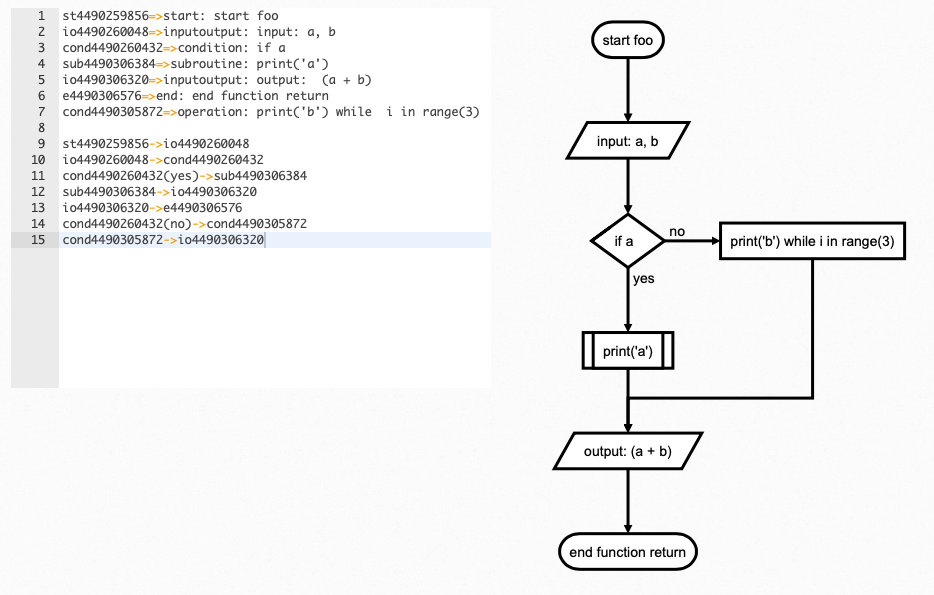
Advanced Usages
As mentioned above, we use Flowchart.from_code to translate Python code into Flowchart. The from_code is defined as:
Flowchart.from_code(code, field='', inner=True, simplify=True)
PyFlowchart CLI is a 1:1 interface for this function:
python3 -m pyflowchart [-f FIELD] [-i] [--no-simplify] code_file
Let's talk about those three args:
field: Specify a field of code to generate flowchartinner: True: parse the body of field; Field: parse the body as a objectsimplify: for If & Loop statements: simplify the one-line-body or not
field
field is the path to a field (i.e. a function) you want to draw flowchart.
# example.py
print("start")

def foo():
    foo = "foo"

class Bar():
    def buzz(self, f):
        def g(self):
            print("g")
            f(self)
        return g(self)

Bar().buzz(foo)
print("end")
For example.py above, available paths are:
- "" (means the whole code)
- "foo"
- "Bar.buzz"
- "Bar.buzz.g"
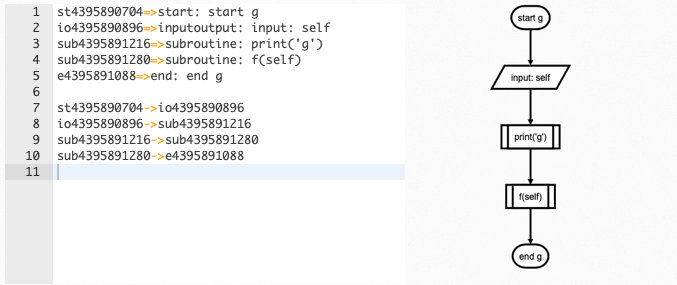
To generate a flowchart of Bar.buzz.g:
# Python
from pyflowchart import Flowchart
with open('example.py') as f:
	code = f.read()
fc = Flowchart.from_code(code, field='Bar.buzz.g', inner=False)
print(fc.flowchart())
# CLI
python3 -m pyflowchart example.py -f Bar.buzz.g
Output result:
inner
inner controls parser's behaves. Techly, inner=True means parsing field.body, while inner=False parses [field]. So, if inner=True, pyflowchart will look into the field, otherwise it takes field as a node.
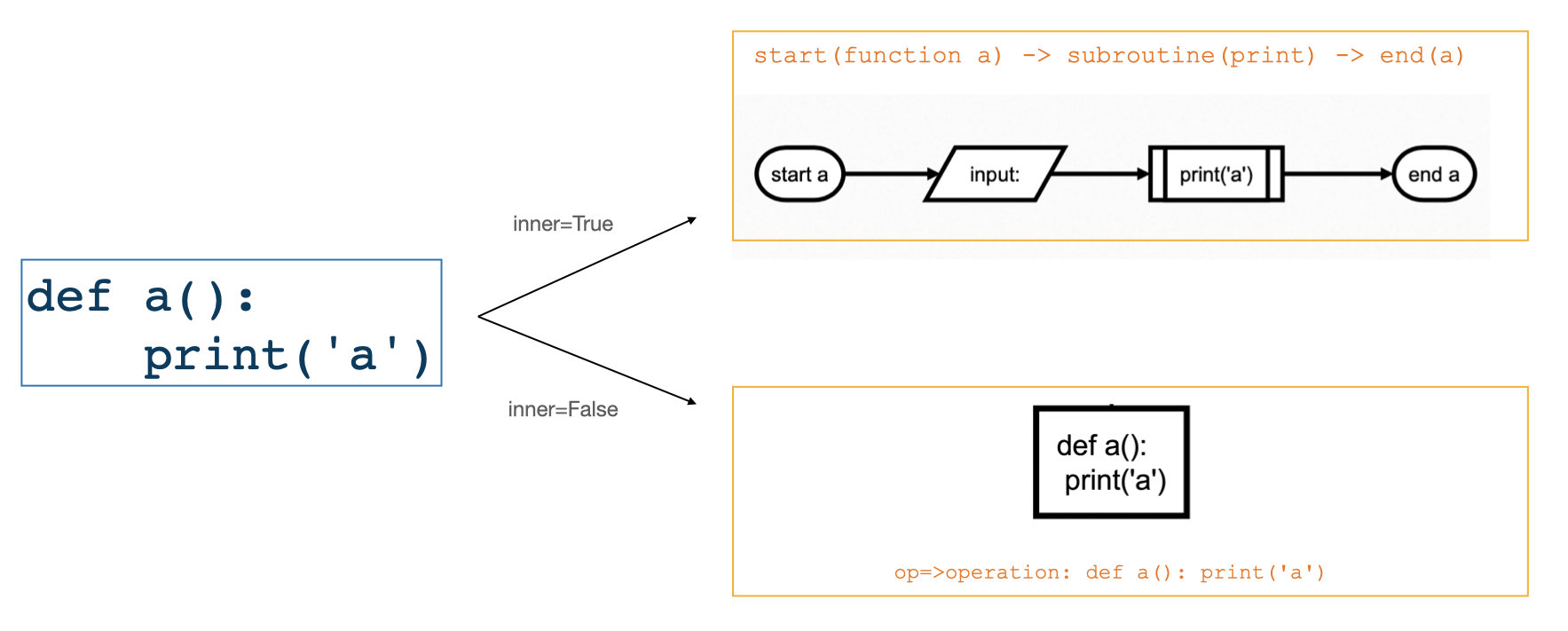
For CLI, adding an argument -i means inner=True, else inner=False.
simplify
simplify is for If & Loop statements: simplify the one-line-body.
For example:
# example_simplify.py
a = 1
if a == 1:
    print(a)
while a < 4:
    a = a + 1
- Default:
simplify=True:
flowchart = Flowchart.from_code(example_simplify_py, field="", inner=True)
print(flowchart.flowchart())
# CLI $ p3 -m pyflowchart example_simplify.py

simplify=False:
flowchart = Flowchart.from_code(example_simplify_py, field="", inner=True, simplify=False)
print(flowchart.flowchart())
# CLI $ p3 -m pyflowchart --no-simplify example_simplify.py

Beautify Flowcharts
Modify the generated flowchart code by yourself.
TODO
- Generate flowchart SVG/HTML.
$ pyflowchart example.py -o flowchart.svg
Depends node.js and flowchart.js.
- PyFlowchart GUI
Well, I guess a GUI for PyFlowchart may be remarkable. Pasting your code into it, the flowchart DSL will be generated just in time, and flowchart will be shown aside.
- The Chinese README your buddies waiting for!
Sadly, I am too busy (this word is pronounced as [ˈlеizi]——lazy) to code these ideas. Please submit an issue to push me on. Or, PR to make it by yourself. I cannot wait to appreciate your great contribution!
References
- Inspired by Vatsha/code_to_flowchart
- Based on adrai/flowchart.js, python ast, simonpercivall/astunparse
- A blog about this project
License
Copyright 2020 CDFMLR. All rights reserved.
Licensed under the MIT License.
1 maintainer

Metadata
1 maintainer
Release files for pyflowchart 0.1.4
For a detailed explanation of source distributions (sdists) and built distributions (wheels), please see the package formats documentation.
Source distribution (sdist)
| File | Size | Uploaded | |
|---|---|---|---|
| pyflowchart-0.1.4.tar.gz | 16.3 kB | Details |
Built distribution (wheel)
| File | Interpreter | ABI | Platform | Reset |
|---|---|---|---|---|
| pyflowchart-0.1.4-py3-none-any.whl | Python 3 | none | any | Details |
Total release size: 32.9 kB
Release files / pyflowchart-0.1.4.tar.gz
| Download URL | pyflowchart-0.1.4.tar.gz |
|---|---|
| Size | 16.3 kB |
| Tags | Source |
|
SHA-256 checksum How to use checksums |
22c52bd06f9443f9a21b82f3e948eb27edf80e076f9915ac7b7e03dfa9369dbd
|
|
BLAKE2b-256 checksum How to use checksums |
4165319bda587fb1c7950186b66f64a689a5b4a7b62a9010bbb220a3c7174d1a
|
| Upload date | |
|
Uploaded using Trusted Publishing? What is trusted publishing? |
No |
| Uploaded via |
twine/3.4.1 importlib_metadata/4.6.0 pkginfo/1.7.0 requests/2.25.1 requests-toolbelt/0.9.1 tqdm/4.61.1 CPython/3.9.6
|
Release files / pyflowchart-0.1.4-py3-none-any.whl
| Download URL | pyflowchart-0.1.4-py3-none-any.whl |
|---|---|
| Size | 16.7 kB |
| Tags | Python 3 |
|
SHA-256 checksum How to use checksums |
4de0e6db049462218ae996b285549c6a763eac9b30ab7cb2f38a29462649234d
|
|
BLAKE2b-256 checksum How to use checksums |
d7b3b7fc4125fb57fb71db06a6ab3b8e2e93b213ee3552720f1b9c377094701d
|
| Upload date | |
|
Uploaded using Trusted Publishing? What is trusted publishing? |
No |
| Uploaded via |
twine/3.4.1 importlib_metadata/4.6.0 pkginfo/1.7.0 requests/2.25.1 requests-toolbelt/0.9.1 tqdm/4.61.1 CPython/3.9.6
|














