
Python SDK and runtime for Flyde - a visual flow-based programming language and IDE.

Project description
PyFlyde


Python runtime for Flyde with Data Engineering emphasis.
Links:
Getting started
You need Python 3.9+ installed on your machine to run PyFlyde.
Then you can install PyFlyde to your environment using pip:
pip install pyflyde
On some systems Python3 requires pip3 command instead:
pip3 install pyflyde
Running the examples
You can copy examples folder from this repository to your local project to give it a try. Then you can run the example flow with:
pyflyde examples/HelloWorld.flyde
Or you can install this package locally after cloning this repository and run the examples directly:
pip install .
./pyflyde examples/HelloWorld.flyde
To run other examples you would need to install their dependencies:
pip install examples/
Then you can run e.g.
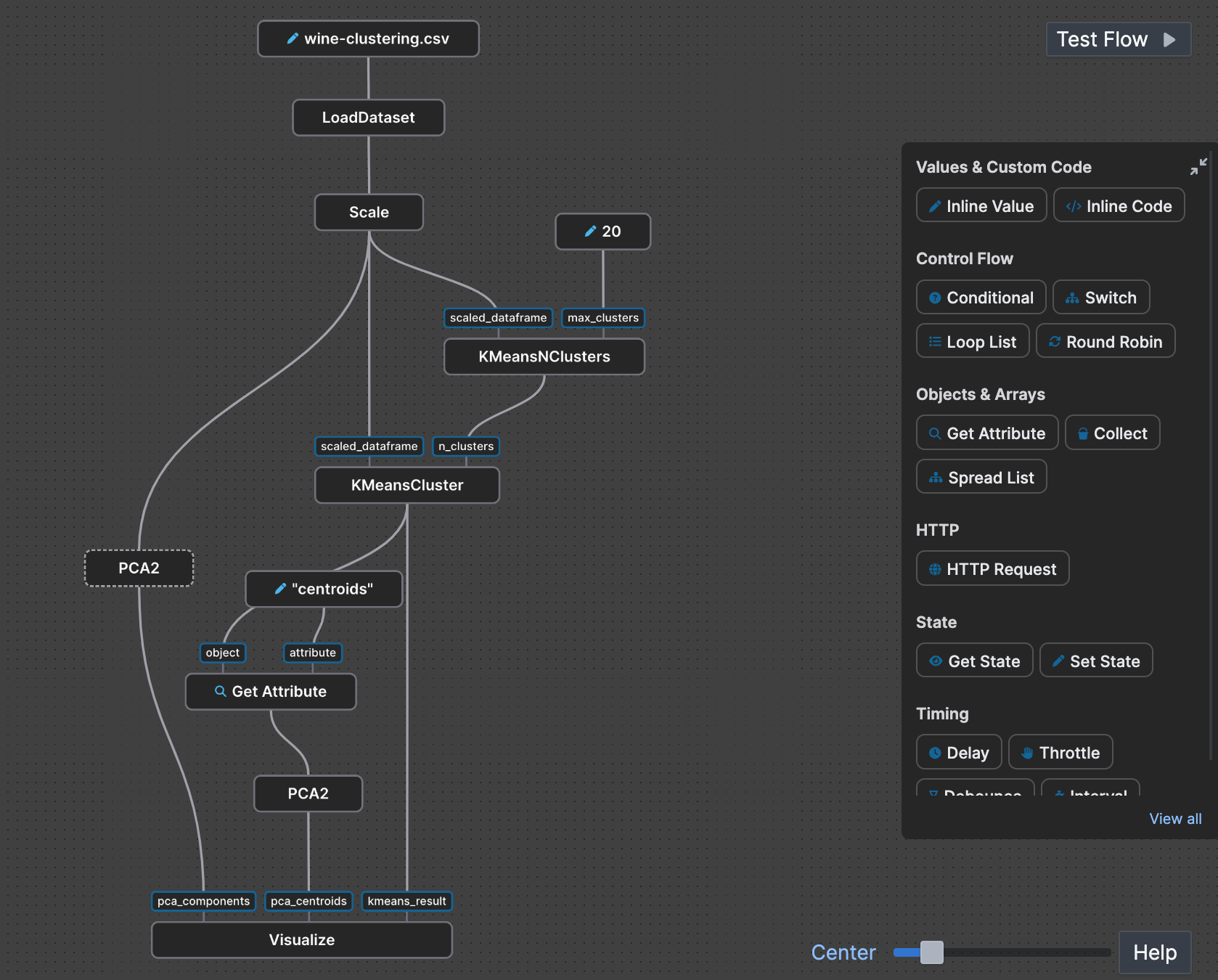
./pyflyde examples/Clustering.flyde
Using the visual editor
Install Flyde VSCode extension from the marketplace. It will open existing .flyde files in the visual editor. You can call Flyde: New Visual Flow command in VSCode to create a new flow file.
You can browse the component library in the panel on the right. To see your local components click the "View all" button. They will appear under the "Current project". Note that PyFlyde doesn't implement all of the Flyde's stdlib components, only a few essential ones.
Whenever you change your component library classes or their interfaces, use pyflyde gen command to generate .flyde.ts definitions, e.g.:
pyflyde gen examples/mylib/components.py
Flyde editor needs .flyde.ts files in order to "see" your components.
Running a Machine Learning example and creating your first project
For further details please check Quickstart guide.
Contributing
Install dev dependencies
pip install .\[dev\]
Run tests, linters and coverage reports
To run tests only:
make test
To run tests with coverage and see report:
make cover report
To run linters:
make lint
Release history Release notifications | RSS feed


Download files
Download the file for your platform. If you're not sure which to choose, learn more about installing packages.
Source Distribution
Built Distribution
Filter files by name, interpreter, ABI, and platform.
If you're not sure about the file name format, learn more about wheel file names.
Copy a direct link to the current filters
File details
Details for the file pyflyde-0.0.11.tar.gz.
File metadata
- Download URL: pyflyde-0.0.11.tar.gz
- Upload date:
- Size: 357.2 kB
- Tags: Source
- Uploaded using Trusted Publishing? No
- Uploaded via: twine/6.0.1 CPython/3.13.0
File hashes
| Algorithm | Hash digest | |
|---|---|---|
| SHA256 |
dccee42415e9bbd3c3555d72cab67e6964adfaf1da0bf85f6d45a512e9b012da
|
|
| MD5 |
57b0a7d5ef1c88b43a213bf85d747f22
|
|
| BLAKE2b-256 |
55623b556941f39137dc21a784f20e5c783907fe2919de600b9afbf3ed2d187a
|
File details
Details for the file pyflyde-0.0.11-py3-none-any.whl.
File metadata
- Download URL: pyflyde-0.0.11-py3-none-any.whl
- Upload date:
- Size: 28.6 kB
- Tags: Python 3
- Uploaded using Trusted Publishing? No
- Uploaded via: twine/6.0.1 CPython/3.13.0
File hashes
| Algorithm | Hash digest | |
|---|---|---|
| SHA256 |
6fad375782bbabf0e5845b2819db22816e200dbbf9eb18efe9f6e12bc60f91ea
|
|
| MD5 |
bc23707148c98b8404c924eae1ef2f2b
|
|
| BLAKE2b-256 |
fe2637619ef6164de50010d53c64ce83c992408156c337389a8c1c38593c7d5e
|






