
Helper library for processing FlySight GPS flight logs.
Verified details
These details have been verified by PyPIProject links
GitHub Statistics
Maintainers

Project description
pyflysight




Helper library for processing FlySight GPS flight logs. Support is provided for both the V1 and V2 hardware revisions, see: Hardware Revisions for a description of the differences between the two.
Installation
Install from PyPi with your favorite pip invocation:
$ pip install pyflysight
You can confirm proper installation via the pyflysight CLI:
$ pyflysight --help
Usage: pyflysight [OPTIONS] COMMAND [ARGS]...

Options:
  --help  Show this message and exit.

Commands:
  device       FlySight device utilities.
  logs         FlySight device log utilities.
  log_convert  FlySight V2 log conversion.
  trim         FlySight log trimming.
Programmatic Access
See: https://sco1.github.io/pyflysight/ for library documentation.
pyflysight exposes helpers for parsing your flight data from their CSV representation into a Polars dataframe. All dataframes derive an elapsed_time column, calculated as the delta of the row timestamp from the first seen timestamp of the data file. All GPS dataframes calculate a groundspeed column from the northing and easting GPS velocity components.
FlySight V1
pyflysight.flysight_proc.load_flysight parses the GPS track log into a dataframe, inferring column names from the first row of the CSV; unit information is discarded.
pyflysight.flysight_proc.batch_load_flysight wraps pyflysight.flysight_proc.load_flysight to batch load a directory of logs into a dictionary of dataframes. Because the FlySight V1 hardware groups logs by date & the log CSV name does not contain date information, the date is inferred from the log's parent directory name & the output dictionary is of the form {log date: {log_time: DataFrame}}.
FlySight V2
Both the SENSOR.CSV and TRACK.CSV files share a similar data format: a series of header rows followed by a series of data rows. As the filenames suggest, SENSOR.CSV contains all of the onboard sensor information and TRACK.CSV contains the GPS track. RAW.UBX is the raw binary data stream from the onboard u-blox hardware; at this time this file is currently ignored.
pyflysight.flysight_proc.parse_v2_log_directory is intended to be the main user interface, which wraps the data parsing pipelines and outputs an instance of the pyflysight.flysight_proc.FlysightV2FlightLog container class.
Interactive Log Trimming
🚨 NOTE: Log trimming is currently only implemented for FlySight V2 data. 🚨
pyflysight.trim_app.windowtrim_flight_log allows the user to interactively trim your FlySight log data using a plot of the elapsed time vs. pressure altitude. Trimmed data may be optionally written to disk into a directory of files, named by the current flight session. A CSV file is created for each sensor present, along with the GPS track and device information:
.
└── device/
    └── session/
        ├── BARO.CSV
        ├── device_info.json
        ├── IMU.CSV
        ├── TRACK.CSV
        └── ...
Data trimming & CSV export is handled programmatically by methods of pyflysight.flysight_proc.FlysightV2FlightLog. The CSV output is designed to be round-trippable.
Hardware Revisions
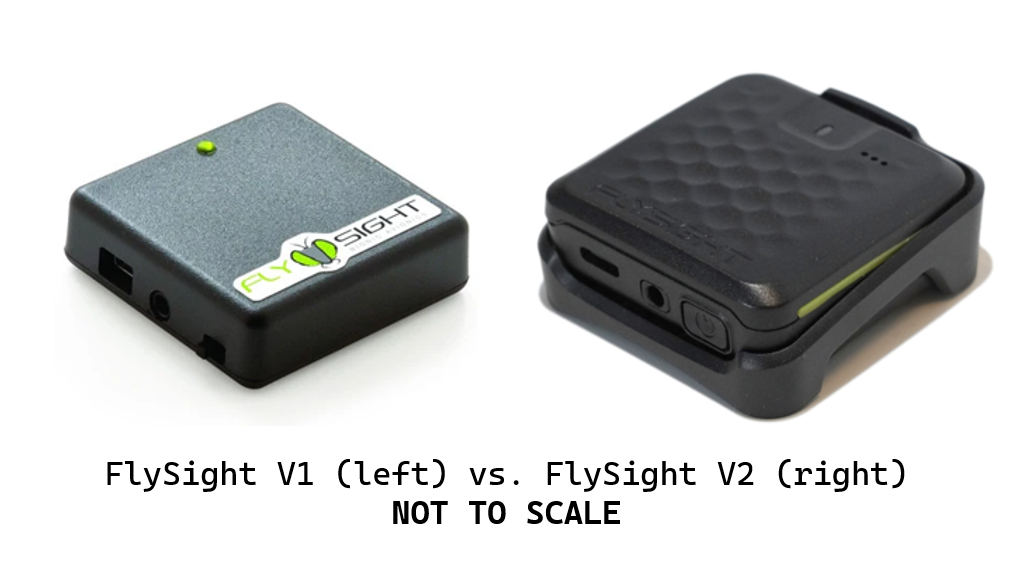
FlySight released a new hardware revision in Summer 2023 with many improvements over the original, including the addition of additional sensors. In addition to the GPS information logged by the FlySight V1, the FlySight V2 adds IMU & environmental data streams to your flight logs. The main user-facing change is a difference in log output.
Where the FlySight V1 log output looks something like:
.
└── 24-04-20/
    └── 04-20-00.CSV
The FlySight V2 log output looks something like:
.
└── 24-04-20/
    └── 04-20-00/
        ├── RAW.UBX
        ├── SENSOR.CSV
        └── TRACK.CSV
Project details
Verified details
These details have been verified by PyPIProject links
GitHub Statistics
Maintainers
Release history Release notifications | RSS feed


Download files
Download the file for your platform. If you're not sure which to choose, learn more about installing packages.
Source Distribution
Built Distribution
Filter files by name, interpreter, ABI, and platform.
If you're not sure about the file name format, learn more about wheel file names.
Copy a direct link to the current filters
File details
Details for the file pyflysight-0.9.1.tar.gz.
File metadata
- Download URL: pyflysight-0.9.1.tar.gz
- Upload date:
- Size: 25.3 kB
- Tags: Source
- Uploaded using Trusted Publishing? Yes
- Uploaded via: twine/6.1.0 CPython/3.13.7
File hashes
| Algorithm | Hash digest | |
|---|---|---|
| SHA256 |
a53f2fa1846ee187fd65a14a42d146e8c22f6086007f5ee6d4e462618a583a88
|
|
| MD5 |
1a29794075e66f1be7c1383803a091f4
|
|
| BLAKE2b-256 |
78b222e1e88cf58a73ccb0d6eaf2585dca2b4bce1ee767430dbe2c85d2f7fb60
|
Provenance
The following attestation bundles were made for pyflysight-0.9.1.tar.gz:
Publisher:
pypi_release.yml on sco1/pyflysight
-
Statement:
-
Statement type:
https://in-toto.io/Statement/v1 -
Predicate type:
https://docs.pypi.org/attestations/publish/v1 -
Subject name:
pyflysight-0.9.1.tar.gz -
Subject digest:
a53f2fa1846ee187fd65a14a42d146e8c22f6086007f5ee6d4e462618a583a88 - Sigstore transparency entry: 526006377
- Sigstore integration time:
-
Permalink:
sco1/pyflysight@7a1677781ba918328e7391ed00474872b480dc42 -
Branch / Tag:
refs/tags/v0.9.1 - Owner: https://github.com/sco1
-
Access:
public
-
Token Issuer:
https://token.actions.githubusercontent.com -
Runner Environment:
github-hosted -
Publication workflow:
pypi_release.yml@7a1677781ba918328e7391ed00474872b480dc42 -
Trigger Event:
release
-
Statement type:
File details
Details for the file pyflysight-0.9.1-py3-none-any.whl.
File metadata
- Download URL: pyflysight-0.9.1-py3-none-any.whl
- Upload date:
- Size: 30.0 kB
- Tags: Python 3
- Uploaded using Trusted Publishing? Yes
- Uploaded via: twine/6.1.0 CPython/3.13.7
File hashes
| Algorithm | Hash digest | |
|---|---|---|
| SHA256 |
8398c4f77c68e461c7913d4fc14fa719fbe759f99628d8a82ef0de0c9e9dcf7b
|
|
| MD5 |
2b58daf76202ce3bb9489b9a0f10a69b
|
|
| BLAKE2b-256 |
2eb273e21c30e921f4f050d839067ba94366faa75c8cf476735b3ca00c352a06
|
Provenance
The following attestation bundles were made for pyflysight-0.9.1-py3-none-any.whl:
Publisher:
pypi_release.yml on sco1/pyflysight
-
Statement:
-
Statement type:
https://in-toto.io/Statement/v1 -
Predicate type:
https://docs.pypi.org/attestations/publish/v1 -
Subject name:
pyflysight-0.9.1-py3-none-any.whl -
Subject digest:
8398c4f77c68e461c7913d4fc14fa719fbe759f99628d8a82ef0de0c9e9dcf7b - Sigstore transparency entry: 526006504
- Sigstore integration time:
-
Permalink:
sco1/pyflysight@7a1677781ba918328e7391ed00474872b480dc42 -
Branch / Tag:
refs/tags/v0.9.1 - Owner: https://github.com/sco1
-
Access:
public
-
Token Issuer:
https://token.actions.githubusercontent.com -
Runner Environment:
github-hosted -
Publication workflow:
pypi_release.yml@7a1677781ba918328e7391ed00474872b480dc42 -
Trigger Event:
release
-
Statement type:






