
A Python library for federated many-task optimization research

Project description
                               ____                __
            ____     __  __   / __/  ____ ___     / /_   ____
           / __ \   / / / /  / /_   / __ `__ \   / __/  / __ \
          / /_/ /  / /_/ /  / __/  / / / / / /  / /_   / /_/ /
         / .___/   \__, /  /_/    /_/ /_/ /_/   \__/   \____/
        /_/       /____/
PyFMTO







PyFMTO is a pure Python library for federated many-task optimization research
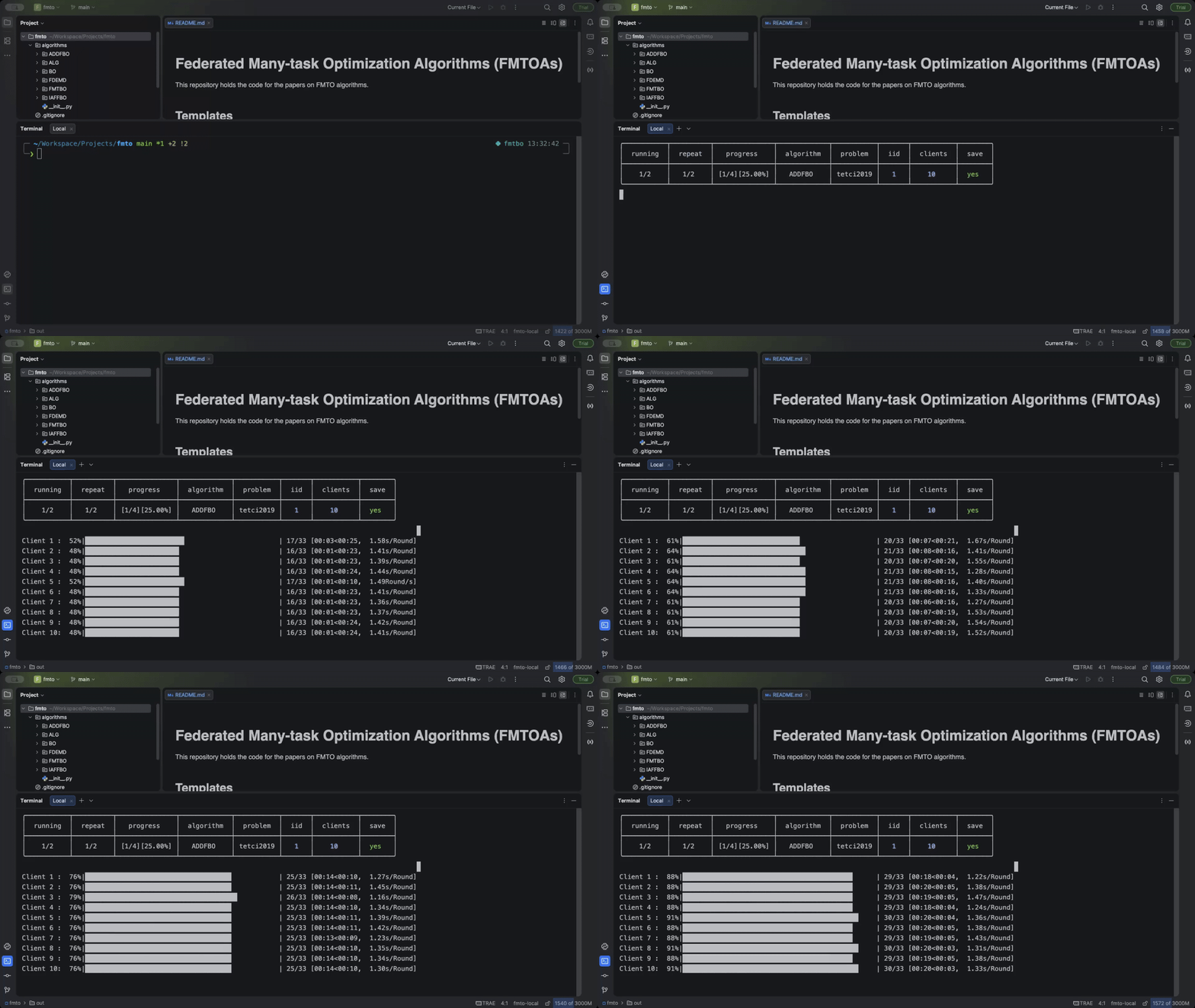 Run experiments |
 Plot tasks |
Usage
Quick Start
Clone the fmto repository (why?):
git clone https://github.com/Xiaoxu-Zhang/fmto.git
cd fmto
Create an environment (conda is recommended) and install PyFMTO:
conda create -n fmto python=3.10
conda activate fmto
pip install pyfmto
Start the experiments:
pyfmto run
Generate reports:
pyfmto report
The reports will be saved in the folder out/results/<today>
Command-line Interface (CLI)
PyFMTO provides a command-line interface (CLI) for running experiments, analyzing results and get helps. The CLI layers are as follows:
pyfmto
   ├── -h/--help
   ├── run [-c/--config <config_file>]
   ├── report [-c/--config <config_file>]
   ├── list algorithms/problems/reports
   └── show <result of list>
Examples:
- Get help:
pyfmto -h # or ↓
# pyfmto --help
# pyfmto list -h
- Run experiments:
pyfmto run # or ↓
# pyfmto run -c config.yaml
- Generate reports:
pyfmto report # or ↓
# pyfmto report -c config.yaml
- List something:
pyfmto list algorithms
output:Found 6 Available Algorithms: FDEMD ADDFBO BO FMTBO IAFFBO ALG
- Show supported configurations:
pyfmto show algorithms.ALG  # or pyfmto show problems.Cec2022
# 'algorithms', 'problems', and 'reports' can be replaced with any prefix of length ≥ 1.
# pyfmto matches the prefix to the corresponding category.
# For example, 'algorithms.ALG' is equivalent to 'a.ALG' or 'al.ALG'
output:client: alpha: 0.2 server: beta: 0.5
Use PyFMTO in python
from pyfmto import Launcher, Reporter

if __name__ == '__main__':
    launcher = Launcher()
    launcher.run()

    reports = Reports()
    reports.to_curve()
    # reporter.to_ ...
Architecture and Ecosystem

Where the filled area represents the fully developed modules. And the non-filled area represents the base modules that can be inherited and extended.
The bottom layer listed the core technologies used in PyFMTO for computing, communicating, plotting and testing.
About fmto
The repository fmto is the official collection of
published FMTO algorithms. The relationship between the fmto and PyFMTO is as follows:

The fmto is designed to provide a platform for researchers to compare and evaluate the
performance of different FMTO algorithms. The repository is built on top of the PyFMTO library,
which provides a flexible and extensible framework for implementing FMTO algorithms.
It also serves as a practical example of how to structure and perform experiments. The repository includes the following components:
- A collection of published FMTO algorithms.
- A config file (config.yaml) that provides guidance on how to set up and configure the experiments.
- A template algorithm named "ALG" that you can use as a basis for implementing your own algorithm.
- A template problem named "PROB" that you can use as a basis for implementing your own problem.
The config.yaml, ALG and PROB provided detailed instructions, you can even start your
research without additional documentation. The fmto repository is currently in the early stages
of development. I'm actively working on improving existing algorithms and adding new algorithms.
Algorithm's Components
An algorithm includes two parts: the client and the server. The client is responsible for optimizing the local problem and the server is responsible for aggregating the knowledge from the clients. The required components for client and server are as follows:
# myalg_client.py
from pyfmto import Client, Server

class MyClient(Client):
	def __init__(self, problem, **kwargs):
		super().__init__(problem)

	def optimize():
		# implement the optimizer
		pass

class MyServer(Server):
	def __init__(self, **kwargs):
		super().__init__():

	def aggregate(self) -> None:
		# implement the aggregate logic
		pass

	def handle_request(self, pkg) -> Any:
		# handle the requests of clients to exchange data
		pass
Problem's Components
There are two types of problems: single-task problems and multitask problems. A single-task problem is a problem that has only one objective function. A multitask problem is a problem that has multiple single-task problems. To define a multitask problem, you should implement several SingleTaskProblem and then define a MultiTaskProblem to aggregate them.
Note: There are some classical SingleTaskProblem defined in
pyfmto.problems.benchmarksmodule. You can use them directly.
import numpy as np
from numpy import ndarray
from pyfmto.problems import SingleTaskProblem, MultiTaskProblem
from typing import Union

class MySTP(SingleTaskProblem):

    def __init__(self, dim=2, **kwargs):
        super().__init__(dim=dim, obj=1, lb=0, ub=1, **kwargs)

    def _eval_single(self, x: ndarray):
        pass

class MyMTP(MultiTaskProblem):
    is_realworld = False
    intro = "user defined MTP"
    notes = "a demo of user-defined MTP"
    references = ['ref1', 'ref2']

    def __init__(self, dim=10, **kwargs):
        super().__init__(dim, **kwargs)

    def _init_tasks(self, dim, **kwargs) -> list[SingleTaskProblem]:
        # Duplicate MySTP for 10 here as an example
        return [MySTP(dim=dim, **kwargs) for _ in range(10)]
Tools
list_problems
from pyfmto.problems import list_problems

# list all problems in console
list_problems(print_it=True)

# it also return the dict {ProblemName: ProblemDataInstance} of problems
prob_lst = list_problems()
init_problem
from pyfmto.problems import init_problem

_ = load_problem('Arxiv2017')

# init a problem with customized args
prob = init_problem('Arxiv2017', dim=2, fe_init=20, fe_max=50, npd=5)

# problem instance can be print
print(prob)
Visualization
SingleTaskProblem Visualization
from pyfmto.problems.benchmarks import Ackley

task = Ackley()
task.plot_2d(f'visualize2D')
task.plot_3d(f'visualize3D')
task.iplot_3d() # interactive plotting
MultiTaskProblem Visualization
The right side interactive plotting at the beginning is generated by the following code:
from pyfmto import init_problem

if __name__ == '__main__':
    prob = init_problem('Arxiv2017', dim=2)
    prob.iplot_tasks_3d(tasks_id=[2, 5, 12, 18])
Contributing
See contributing for instructions on how to contribute to PyFMTO.
Bugs/Requests
Please send bug reports and feature requests through github issue tracker. PyFMTO is currently under development now, and it's open to any constructive suggestions.
License
Copyright (c) 2025 Xiaoxu Zhang
Distributed under the terms of the Apache 2.0 license.
Acknowledgements
Foundations
This project is supported, in part, by the National Natural Science Foundation of China under Grant 62006143; the Natural Science Foundation of Shandong Province under Grants ZR2025MS1012 and ZR2020MF152. I would like to express our sincere gratitude to Smart Healthcare and Big Data Laboratory, Shandong Women's University, for providing research facilities and technical support.
Mentorship and Team Support
I would like to express my sincere gratitude to the Computational Intelligence and Applications Group for their invaluable help, encouragement, and collaboration throughout the development of this project.
Special thanks go to my mentor, Jie Tian, whose insightful guidance and constructive feedback were crucial in refining and improving the work at every stage.
Open Source Contributions
This project would not have been possible without the outstanding contributions of the open-source community. I am deeply grateful to the maintainers and contributors of the following projects:
- FastAPI – A high-performance web framework that made building APIs both fast and efficient.
- NumPy – The fundamental package for scientific computing in Python, enabling high-speed numerical operations.
- Pandas – Powerful data structures and tools that formed the backbone of data analysis in this work.
- Matplotlib and Seaborn – Essential for producing high-quality, publication-ready visualizations.
- PyVista – An intuitive, high-level 3D plotting and mesh analysis interface, making scientific visualization seamlessly integrated into PyFMTO.
- Scikit-learn – An extensive set of machine learning algorithms and utilities.
- SciPy – Fundamental algorithms and mathematical functions critical to scientific computing.
I would also like to acknowledge the maintainers and contributors of other open-source libraries
that supported this work, including:
jinja2, msgpack, openpyxl, opfunu, pillow, pydantic, pydantic_core, pyDOE,
pyyaml, requests, ruamel-yaml, scienceplots, setproctitle, tabulate, tqdm,
uvicorn, and wrapt.
Your dedication to building and maintaining these tools has made it possible for this project to achieve both depth and breadth that would otherwise have been unattainable.
Release history Release notifications | RSS feed


Download files
Download the file for your platform. If you're not sure which to choose, learn more about installing packages.
Source Distribution
Built Distribution
Filter files by name, interpreter, ABI, and platform.
If you're not sure about the file name format, learn more about wheel file names.
Copy a direct link to the current filters
File details
Details for the file pyfmto-0.2.1.tar.gz.
File metadata
- Download URL: pyfmto-0.2.1.tar.gz
- Upload date:
- Size: 1.3 MB
- Tags: Source
- Uploaded using Trusted Publishing? No
- Uploaded via: twine/6.2.0 CPython/3.10.19
File hashes
| Algorithm | Hash digest | |
|---|---|---|
| SHA256 |
1b0aab4554a117324f92b294a5f8855d13a6e4c1f4294fa0110f8564bd1289df
|
|
| MD5 |
736e50b16f94c51b6a8c4556092940eb
|
|
| BLAKE2b-256 |
f7dca50902152c0ae6d9ab78f18ee3b5ac3c009a6169ac182e95ba6c1f5cb9dc
|
File details
Details for the file pyfmto-0.2.1-py3-none-any.whl.
File metadata
- Download URL: pyfmto-0.2.1-py3-none-any.whl
- Upload date:
- Size: 1.3 MB
- Tags: Python 3
- Uploaded using Trusted Publishing? No
- Uploaded via: twine/6.2.0 CPython/3.10.19
File hashes
| Algorithm | Hash digest | |
|---|---|---|
| SHA256 |
2ba78e875150904c488ab1c72f2fcd278b9215a417c40302e7314443e81d191f
|
|
| MD5 |
a240898f06714d806f85d5fc594c58f4
|
|
| BLAKE2b-256 |
c8170323b806c1f81398690f04475e549df861d5d33212670ed3cc2a5773e3cf
|






