
A type-safe invoice generation library using Pydantic and Typst

Project description
pyfox-invoice
pyfox-invoice is a robust and flexible Python library designed to generate beautiful, high-quality invoices, pro-forma invoices, and payment requests (bills). It processes your financial data and produces stunning PDF outputs using the Typst rendering engine.
The library strictly separates data modeling, regional localization, and document rendering, making it easily extensible for various geographical regions and output styles.
Features
- Type-Safe Data Modeling: Uses Pydantic v2 to ensure your input data is robust, clean, and strictly validated.
- High-Quality Rendering: Leverages Typst to generate modern, clean, and perfectly aligned PDF documents faster than traditional HTML-to-PDF tools.
- Regional Localization: Built-in support for translations, address formatting, and local conventions for:
- European Union (English, Germany, France)
- Poland
- Ukraine
- Payment QR Codes: Automatically generates compliant payment QR codes to facilitate quick and accurate payments:
- EPC (SEPA) QR: For EU countries (Germany, France, etc.)
- ZBP QR: For Poland
- NBU QR: For Ukraine
- Multiple Visual Styles: Includes ready-to-use templates (
classic,modern, andcompact-bill) to match your branding.
Installation
Assuming you are using pip or another package manager like uv or poetry:
pip install pyfox-invoice
Quick Start
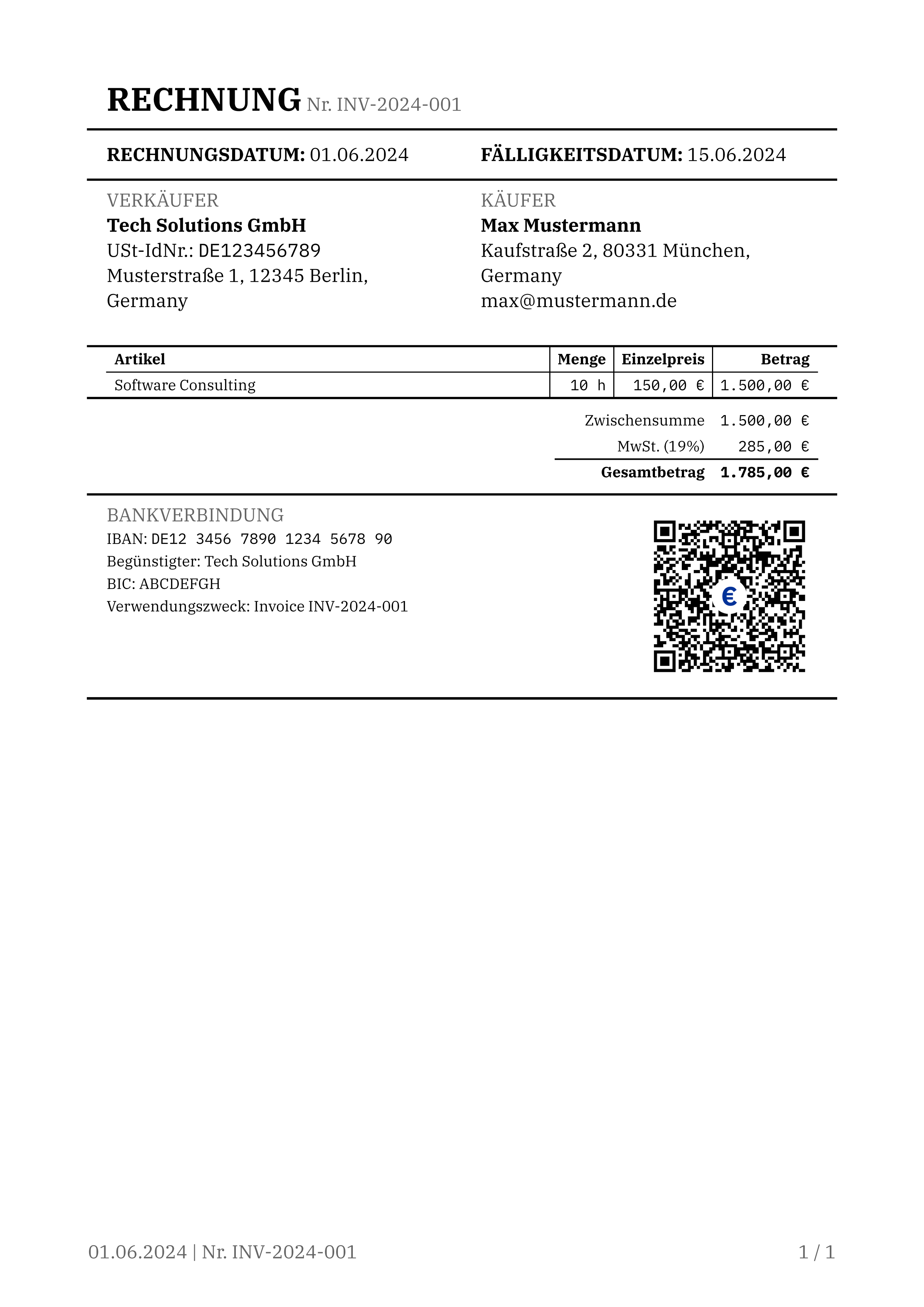
Here's a simple example of generating a localized German invoice with a SEPA QR code in the classic style.
import datetime
from decimal import Decimal
from pyfox_invoice.models import (
    Invoice, InvoiceType, LineItem, Party, PaymentDetails, VATLine
)
from pyfox_invoice.regions import DERegion
from pyfox_invoice.renderers import PDFTypstRenderer

# 1. Define the Seller and Buyer
seller = Party(
    name="Tech Solutions GmbH",
    tax_id="DE123456789",
    address="Musterstraße 1, 12345 Berlin, Germany",
)

buyer = Party(
    name="Max Mustermann",
    address="Kaufstraße 2, 80331 München, Germany",
    email="max@mustermann.de",
)

# 2. Define Payment Details (Used for EPC / SEPA QR Code)
payment_details = PaymentDetails(
    iban="DE12345678901234567890",
    currency="EUR",
    extra_fields={
        "beneficiary": "Tech Solutions GmbH",
        "bic": "ABCDEFGH",
        "remittance_information": "Invoice INV-2024-001",
    },
)

# 3. Add Line Items
items = [
    LineItem(
        description="Software Consulting",
        quantity=Decimal("10"),
        unit="h",
        unit_price=Decimal("150.00"),
        total_amount=Decimal("1500.00"),
    )
]

# 4. Construct the Invoice Model
invoice = Invoice(
    number="INV-2024-001",
    issue_date=datetime.date.today(),
    due_date=datetime.date.today() + datetime.timedelta(days=14),
    seller=seller,
    buyer=buyer,
    items=items,
    subtotal=Decimal("1500.00"),
    vat_line=VATLine(tax_rate=Decimal("19"), tax_amount=Decimal("285.00")),
    total=Decimal("1785.00"),
    currency="EUR",
    payment_details=payment_details,
    type=InvoiceType.INVOICE,
)

# 5. Render the PDF (or PNG/SVG)
region = DERegion()
renderer = PDFTypstRenderer(template_name="classic")
pdf_bytes = renderer.render(invoice, region, output_format="pdf")

# You can also generate image formats:
# png_bytes = renderer.render(invoice, region, output_format="png")
# svg_bytes = renderer.render(invoice, region, output_format="svg")

# 6. Save the output
with open("invoice.pdf", "wb") as f:
    f.write(pdf_bytes)
Input Data Format
The library operates on a strict schema-driven approach. You must construct Pydantic models for your data, which guarantees the renderer always receives clean information.
Instead of programatic approach, InvoiceGenerator object can be used to generated desired document based on input data in JSON.
Note: The library trusts your input. It does not calculate taxes or totals; it only formats and renders them.
Core Models
Invoice: The root model containing all document information (number, dates, amounts, type).Party: Represents either the buyer or the seller (name, address, tax IDs, contact info).LineItem: Represents a single row in the invoice (description, quantity, unit price, total).VATLine: Summarizes the tax rates and amounts.PaymentDetails: Contains bank information (IBAN, Currency) andextra_fieldsrequired for generating regional QR codes (like BIC, beneficiary, and remittance info).
Example of JSON input
{
  "number": "JSON-2024-005",
  "issue_date": "2024-09-01",
  "due_date": "2024-09-15",
  "type": "invoice",
  "currency": "EUR",
  "seller": {
    "name": "Data Systems SAS",
    "tax_id": "FR12345678901",
    "address": "10 Rue de la Paix, 75002 Paris, France",
    "email": "contact@datasystems.fr",
    "phone": "+33 1 23 45 67 89"
  },
  "buyer": {
    "name": "Acme Corp",
    "address": "15 Avenue des Champs-Élysées, 75008 Paris, France"
  },
  "items": [
    {
      "description": "Database Migration (Net Price)",
      "quantity": "1",
      "unit": "project",
      "unit_price": "2000.00",
      "total_amount": "2000.00"
    },
    {
      "description": "Server Maintenance (Net Price)",
      "quantity": "10",
      "unit": "h",
      "unit_price": "80.00",
      "total_amount": "800.00"
    }
  ],
  "subtotal": "2800.00",
  "vat_line": {
    "tax_rate": "20",
    "tax_amount": "560.00",
    "tax_label": "TVA (20%)"
  },
  "total": "3360.00",
  "payment_details": {
    "iban": "FR7612345678901234567890123",
    "currency": "EUR",
    "extra_fields": {
      "beneficiary": "Data Systems SAS",
      "bic": "ABCDFRPP",
      "remittance_information": "Facture JSON-2024-005"
    }
  },
  "note": "Thank you for your business!"
}
from pathlib import Path

from pyfox_invoice import InvoiceGenerator
from pyfox_invoice.regions import FRRegion
from pyfox_invoice.renderers import PDFTypstRenderer
from pyfox_invoice.adapters import JsonAdapter


def main() -> None:
    # 1. Load JSON data from a file
    json_path = Path(__file__).parent / "sample_invoice.json"
    with json_path.open() as f:
        json_data = f.read()

    # 2. Create an InvoiceGenerator with the appropriate region, renderer, and adapter
    generator = InvoiceGenerator(
        region=FRRegion(),
        renderer=PDFTypstRenderer(),
        adapter=JsonAdapter(),
    )

    # 3. Render the invoice to PNG and PDF
    png_bytes = generator.generate(json_data, output_format="png")
    pdf_bytes = generator.generate(json_data, output_format="pdf")

    # 4. Save the output
    output_dir = Path(__file__).parent / "images"
    output_dir.mkdir(exist_ok=True)

    (output_dir / "json_invoice.png").write_bytes(png_bytes)
    (output_dir / "json_invoice.pdf").write_bytes(pdf_bytes)
    print("Generated json_invoice.png and json_invoice.pdf from JSON input")


if __name__ == "__main__":
    main()

Templates & Styles
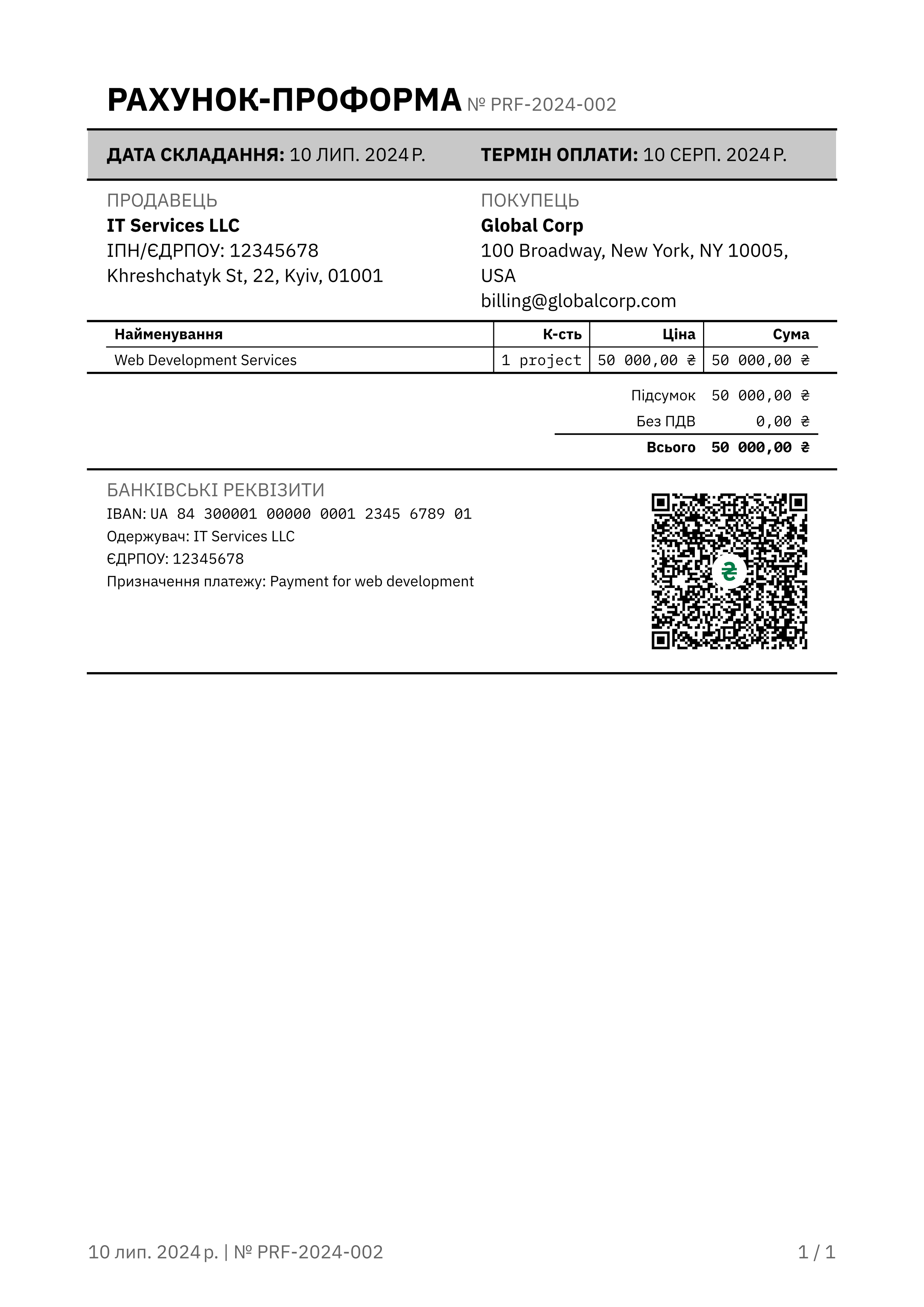
pyfox-invoice comes with three built-in Typst templates. When instantiating the PDFTypstRenderer, simply pass the template_name:
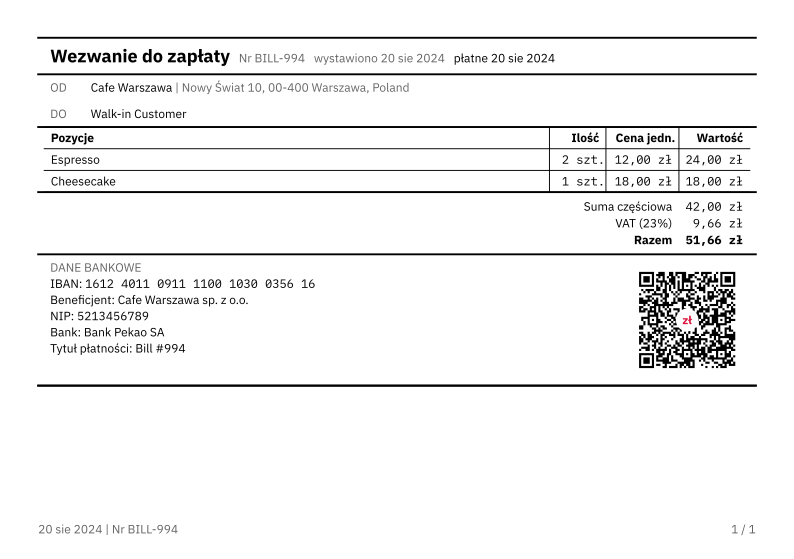
classic: A timeless, traditional invoice layout. Best for conservative businesses and detailed line items.modern: A sleek, contemporary design with bolder typography and clean spacing. Great for digital agencies and modern startups.compact-bill: A condensed layout modeled after retail receipts and quick payment requests. Perfect for POS (Point of Sale) or simple one-item transactions.
# Use modern template
renderer = PDFTypstRenderer(template_name="modern")

# Use classic template
renderer = PDFTypstRenderer(template_name="classic")

# Use compact bill template
renderer = PDFTypstRenderer(template_name="compact-bill")
| Modern (Proforma) | Classic (Invoice) |
|---|---|
 |
|
| Compact Bill (ISO-A5 paper size) |
|---|
 |
Release history Release notifications | RSS feed

Download files
Download the file for your platform. If you're not sure which to choose, learn more about installing packages.
Source Distribution
Built Distribution
Filter files by name, interpreter, ABI, and platform.
If you're not sure about the file name format, learn more about wheel file names.
Copy a direct link to the current filters
File details
Details for the file pyfox_invoice-0.1.1.tar.gz.
File metadata
- Download URL: pyfox_invoice-0.1.1.tar.gz
- Upload date:
- Size: 1.3 MB
- Tags: Source
- Uploaded using Trusted Publishing? No
- Uploaded via: uv/0.11.7 {"installer":{"name":"uv","version":"0.11.7","subcommand":["publish"]},"python":null,"implementation":{"name":null,"version":null},"distro":{"name":"Ubuntu","version":"24.04","id":"noble","libc":null},"system":{"name":null,"release":null},"cpu":null,"openssl_version":null,"setuptools_version":null,"rustc_version":null,"ci":null}
File hashes
| Algorithm | Hash digest | |
|---|---|---|
| SHA256 |
e4310de5fbddcc71f3811be0263f366d8bd9b8c40b3c59eaae7299ae241d6a64
|
|
| MD5 |
7f540d45f9d154a7b1d04a5f38c41018
|
|
| BLAKE2b-256 |
262c1acbeae67382cd4dd2d29bb423a8614cbcf5d12c590f33684b7b7463a865
|
File details
Details for the file pyfox_invoice-0.1.1-py3-none-any.whl.
File metadata
- Download URL: pyfox_invoice-0.1.1-py3-none-any.whl
- Upload date:
- Size: 1.4 MB
- Tags: Python 3
- Uploaded using Trusted Publishing? No
- Uploaded via: uv/0.11.7 {"installer":{"name":"uv","version":"0.11.7","subcommand":["publish"]},"python":null,"implementation":{"name":null,"version":null},"distro":{"name":"Ubuntu","version":"24.04","id":"noble","libc":null},"system":{"name":null,"release":null},"cpu":null,"openssl_version":null,"setuptools_version":null,"rustc_version":null,"ci":null}
File hashes
| Algorithm | Hash digest | |
|---|---|---|
| SHA256 |
c7d83fc01805cd1428e7e8067dc8ed89b4c1c1b2950d48f8103bc835a157838d
|
|
| MD5 |
9bb0810877b90f429292491027c0e56b
|
|
| BLAKE2b-256 |
a33d1c15803e35843a65191331958cab3ec299c56aa1ac250cac7c6e47787c4b
|






