
pyfractal
A simple gui based self-similar fractal generator
Introduction
This project is aimed to provide a simple gui for drawing fractals so that anyone enthusiastic enough can give them a try.
Table of contents
I was exploring an awesome site which taught me how a turtle would draw amazing fractal curves. Perhaps I made a small script which would draw fractals pretty neatly but it had two issues :-
- It was slow as it took sleeps in between each step (huh is it a turtle or a rabbit) and even after turning the animations off, it was still slow due to implementation styles
- Python Turtle's audience is beginners to programming, so it limited the extendibility of the script
- I wanted to learn more about GUI programming, python packaging, good coding practices and other important stuff
- It had limited scope in scrolling, panning and zooming (the most fun things to do with a fractal)
- There is no pyfractal python library hehe
Features
- A GUI (obviously)
- Exporting fractals to your desired format (namely svg, postscript and png)
- Loading and storing curve parameters for future endeavours
- Scrolling, panning and zooming to any extent
- Preview of base shape of fractal
- Drawing multiple fractals at once on a canvas
- Appending rules of several fractals (more people may consider it a bug, but i consider it a feature)
- Degree and radian support
Setup
pip3 install pyfractal
or
pip install pyfractal
should do the job depending on the distribution
Having issues installing? Feel free to report issue or simply clone the repository and run main.py
Usage
import pyfractal  #import the module
pyfractal.GUI().run()  #to run the main gui
A GUI should pop up

Curve parameter input
Pressing on the plus and minus buttons adds and removes entires for rule input
Saving curve parameters
Press the Save Parameters button to save the parameters, a dialog box should appear asking for the name of the file to save
the parameters are stored in a json file
Loading curve parameters
Press the Load Parameters button to load the parameters, a dialog box should appear asking for the name of the file. If the file is correctly formatted, you should see the parameters loaded onto the screen and list of rules added to the list.
NOTE
The rules are appended to the list of pre-written rules (this is a design choice, not a bug) , clear the pre-existing rules by repeatedly pressing minus button then loading from file.
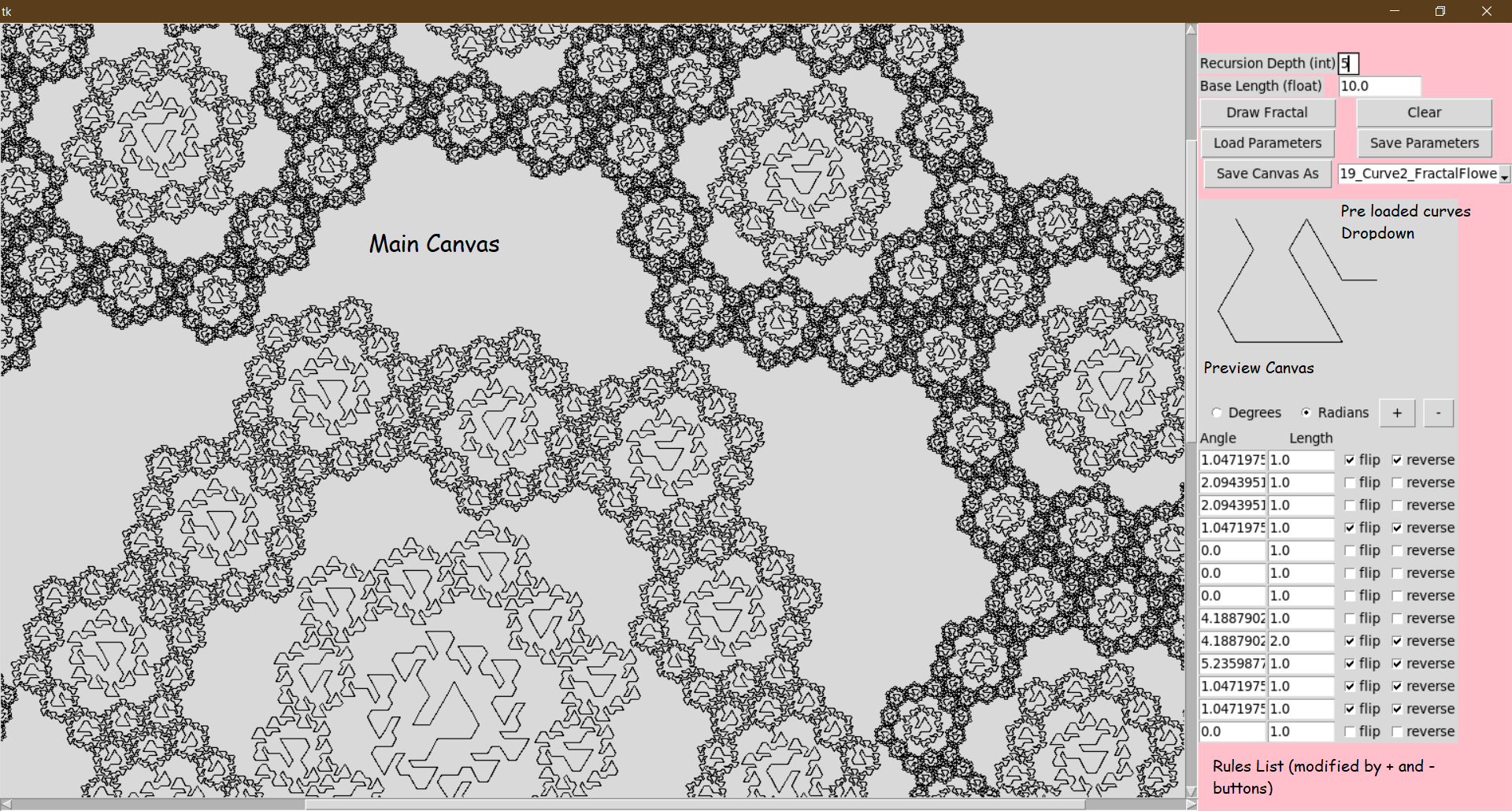
Drawing fractals
Feed in/ load the rules, you will see the preview of base fractal image on the smaller canvas.
Enter your desired Recursion Depth and you will see your fractal drawn on the canvas
Pan/scale/scroll in the canvas according to your viewing preferences
NOTE
The rules/preview-canvas is update only once plus or minus button is pressed.
Start drawing fractal from a smaller recursion-depth. The size of fractal is exponential in the recursion depth. It is recommended that you keep Recursion depth to a single digit integer.
Libraries Used
The project is almost built entirely on tkinter Besides using Pillow and canvasvg to save the canvas
Feedback
Feel free to contribute/clone/Issue or Contact me
TODO
This is probably a VERY long list but here are key TODO's :-
- Curved Edges
- Adding option to curve the corners/edges to make the fractal smoother and to see more clearly the sweep of the fractal
- Adding splines instead of boring straight lines
- Conversion of degree to radians in input feild on pressing radio buttons (not really important but OK)
- Help Pages
- No amount of help pages is sufficient
- Menubar
- Adding a Menubar for easy access to resources and help pages
- More graphic options
- Color support for lines and fills
- Background color/image specification
- Animations
- Animating the turtle (why?? wasn't this the main purpose behind building this project) to momentarily enjoy the chaos caused by simple rules of life
- More types of fractals
- Grid based input
As described here
- Square grid
- Triangular grid
- A general lattice maybe?
- A general 3 dimensional lattice (okay I admit I am being too optimistic)
- Fractal type specifier
- Automatically specify self-avoiding, self-contacting(edge/vertex), self-crossing types from the base rules
- Dimension calculator
- Fractal tile extraction
- Extract tiles from tile-able fractals
- More toooooools
- Clone fractals
- Drag and drop items around on the canvas
Sources
The following links are pretty useful and helpful in learning more about fractals
- http://www.fractalcurves.com is the main inspiration behind this project
- https://www.youtube.com/watch?v=gB9n2gHsHN4 is a pretty interesting watch by 3Blue1Brown
Contact
- My website
- Feel free to give suggestions/recommendations/criticism on Discord or LinkedIn
1 maintainer

Metadata
1 maintainer
Release files for pyfractal 0.0.2
For a detailed explanation of source distributions (sdists) and built distributions (wheels), please see the package formats documentation.
Source distribution (sdist)
| File | Size | Uploaded | Provenance | Actions |
|---|---|---|---|---|
| pyfractal-0.0.2.tar.gz | 23.4 kB | Without provenance | Details for pyfractal-0.0.2.tar.gz |
Built distribution (wheel)
| File | Interpreter | ABI | Platform | Actions Reset |
|---|---|---|---|---|
| pyfractal-0.0.2-py3-none-any.whl | Python 3 | none | any | Details for pyfractal-0.0.2-py3-none-any.whl |
Total release size: 59.2 kB
Release files / pyfractal-0.0.2.tar.gz
| Download URL | pyfractal-0.0.2.tar.gz |
|---|---|
| Size | 23.4 kB |
| Tags | Source |
|
SHA-256 checksum How to use checksums |
ca2e16605b02eebbb55d56ae13ca8c114489ac99c2ee7e5978abc20d453a813c
|
|
BLAKE2b-256 checksum How to use checksums |
eb2a2bca466c60cecfcad41fadc65b864d0ab2143287af3bd058ea8fc094246b
|
| Upload date | |
|
Uploaded using Trusted Publishing? What is trusted publishing? |
No |
| Uploaded via |
twine/3.1.1 pkginfo/1.5.0.1 requests/2.22.0 setuptools/47.1.1 requests-toolbelt/0.9.1 tqdm/4.46.0 CPython/3.8.2
|
Release files / pyfractal-0.0.2-py3-none-any.whl
| Download URL | pyfractal-0.0.2-py3-none-any.whl |
|---|---|
| Size | 35.8 kB |
| Tags | Python 3 |
|
SHA-256 checksum How to use checksums |
5e1ec62dbd1f55d8fb29fcd94cea442f70d770a4607eee306736832c6deb239d
|
|
BLAKE2b-256 checksum How to use checksums |
87e114b7c89e3cac2636c7c92d4dcba4cdf5cc9f22be7cdcbd6f5cf5242136d6
|
| Upload date | |
|
Uploaded using Trusted Publishing? What is trusted publishing? |
No |
| Uploaded via |
twine/3.1.1 pkginfo/1.5.0.1 requests/2.22.0 setuptools/47.1.1 requests-toolbelt/0.9.1 tqdm/4.46.0 CPython/3.8.2
|
Security for pyfractal 0.0.2
Provenance
Provenance describes where a file came from. On PyPI, provenance is shared via attestations, which provide a verifiable record of the build or publishing details. View details, limitations and caveats.
No provenance found
None of the files in this release were uploaded with provenance metadata.
A note on package security
PyPI is a repository for distributing packages, not a service for auditing them. While third-party security researchers and our staff do their best to detect and remove malicious packages, PyPI cannot guarantee the quality, security or suitability of any given package.
To learn more about protecting yourself from malicious actors, visit our package security documentation.














