
pyfragments







Add animations to revealjs presentations from Python code-blocks.
Example
A Revealjs presentation created with Quarto, which shows matplotlib figure animated with fragments (i.e., moving to the next slide):
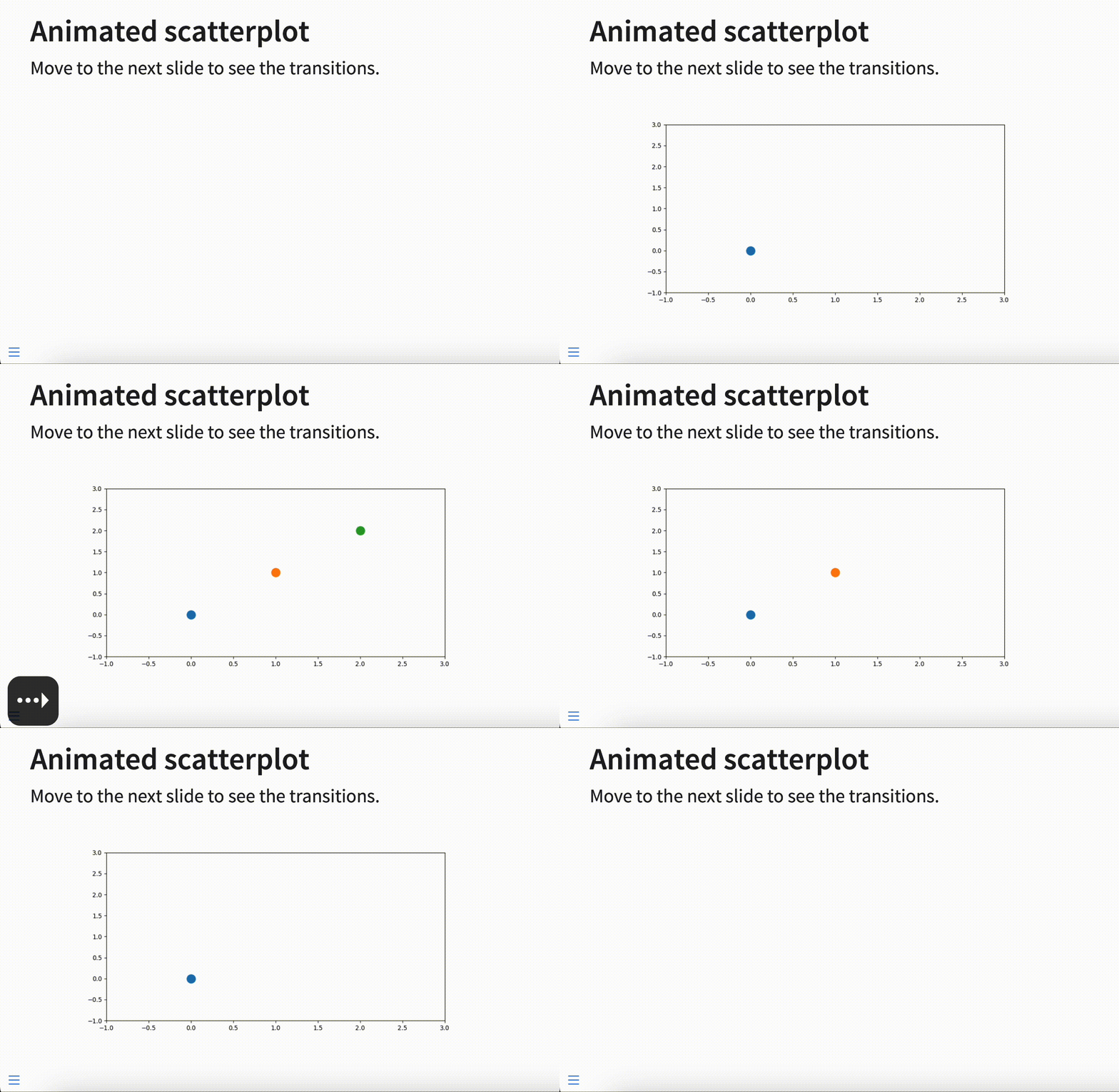
This is created with the following code,
in a Quarto .qmd file.
---
format: revealjs
---

## Animated scatterplot

Move to the next slide to see the transitions.

```{python}
# | output: asis
import matplotlib.pyplot as plt
from pyfragments.png import AnimatedFigure

with AnimatedFigure() as ani:
    plt.xlim(-1, 3)
    plt.ylim(-1, 3)
    for i in range(3):
        with ani.fragment():
            plt.scatter(i, i, s=200)

```
Docs
See the demo in GitHub Pages.
To change the order of fragments,
or make different elements appear at the same time,
use ani.fragment(<num>):
with ani.fragment(2):  # appears second
    ax.scatter(...)
with ani.fragment(1):  # appears first
    ax.scatter(...)
with ani.fragment(2):  # appears second
    ax.scatter(...)
SVG
To use SVG images,
each call to a matplotlib function must include a group id (gid) with a value of .fragment.
---
format: revealjs
---

# Example of an animated figure

## Animated scatterplot

Move to the next slide to see the transitions.

```{python}
from matplotlib.figure import Figure
from pyfragments.svg import animate

fig = Figure()
ax = fig.add_subplot()
for i in range(3):
    ax.scatter(i, i, gid=".fragment")
animate(fig)
```
To change the order of fragments,
or make different elements appear at the same time,
use .fragment-<num>:
ax.scatter(..., gid=".fragment-2")  # appears second
ax.scatter(..., gid=".fragment-1")  # appears first
ax.scatter(..., gid=".fragment-2")  # appears second
To allow animation of images,
such as with ax.imshow,
it is important to disable image.composite_image:
import matplotlib

matplotlib.rc("image", composite_image=False)
Install
Using pixi, install from PyPI with:
pixi add --pypi pyfragments
or install the latest development version from GitHub with:
pixi add --pypi pyfragments@https://github.com/maurosilber/pyfragments.git
Otherwise,
use pip or your pip-compatible package manager:
pip install pyfragments  # from PyPI
pip install git+https://github.com/maurosilber/pyfragments.git  # from GitHub
Development
This project is managed by pixi. You can install it for development using:
git clone https://github.com/maurosilber/pyfragments
cd pyfragments
pixi run pre-commit-install
Pre-commit hooks are used to lint and format the project.
Testing
Run tests using:
pixi run test
Publishing to PyPI
When a tagged commit is pushed to GitHub,
the GitHub Action defined in .github/workflows/ci.yml
builds and publishes the package to PyPI.
Tag a commit and push the tags with:
git tag <my-tag>
git push --tags
Trusted publishing must be enabled once in PyPI Publishing. Fill the following values in the form:
PyPI Project Name: pyfragments
            Owner: maurosilber
  Repository name: pyfragments
    Workflow name: ci.yml
 Environment name: pypi
1 maintainer

Download files
Download the file for your platform. If you're not sure which to choose, learn more about installing packages.
Source Distribution
Built Distribution
Filter files by name, interpreter, ABI, and platform.
If you're not sure about the file name format, learn more about wheel file names.
Copy a direct link to the current filters
File details
Details for the file pyfragments-0.5.0.tar.gz.
File metadata
- Download URL: pyfragments-0.5.0.tar.gz
- Upload date:
- Size: 5.0 kB
- Tags: Source
- Uploaded using Trusted Publishing? Yes
- Uploaded via:
uv/0.12.5 {"installer":{"name":"uv","version":"0.12.5","subcommand":["publish"]},"python":null,"implementation":{"name":null,"version":null},"distro":{"name":"Ubuntu","version":"24.04","id":"noble","libc":null},"system":{"name":null,"release":null},"cpu":null,"openssl_version":null,"setuptools_version":null,"rustc_version":null,"ci":true}
File hashes
| Algorithm | Hash digest | |
|---|---|---|
| SHA256 |
e299a24914d4dad16e40971a6b9fe553579297160d1549ffb87e0a84082cd180
|
|
| MD5 |
14f2cff5fc9a6c75a6eccfb6f896e4db
|
|
| BLAKE2b-256 |
432d3b82456311def49b6631638e80d62f4b0bdad6486bcfb78b2e94d9e065ee
|
File details
Details for the file pyfragments-0.5.0-py3-none-any.whl.
File metadata
- Download URL: pyfragments-0.5.0-py3-none-any.whl
- Upload date:
- Size: 6.6 kB
- Tags: Python 3
- Uploaded using Trusted Publishing? Yes
- Uploaded via:
uv/0.12.5 {"installer":{"name":"uv","version":"0.12.5","subcommand":["publish"]},"python":null,"implementation":{"name":null,"version":null},"distro":{"name":"Ubuntu","version":"24.04","id":"noble","libc":null},"system":{"name":null,"release":null},"cpu":null,"openssl_version":null,"setuptools_version":null,"rustc_version":null,"ci":true}
File hashes
| Algorithm | Hash digest | |
|---|---|---|
| SHA256 |
887e1b067e833ee11c84df4f3b38141eab54964d52d1100f83d31b7a25283b9c
|
|
| MD5 |
510b53c3df4fc06c66738430aa06c816
|
|
| BLAKE2b-256 |
d553e4af70e5442492435f86762fdea76396e2ea9bd2bc6d3ef6134ace3ea0d1
|














