
What is this package?
A Python API on top of the FreeRADIUS database for automation purposes.
- It provides an object-oriented view of the database schema
- It implements some logic to ensure data consistency
Originally embedded in freeradius-api, it is now a separate and ready-to-use package.
Other than Pydantic, it only relies on Python builtins.
What database support?
It works with MySQL, MariaDB, PostgreSQL and SQLite using DB-API 2.0 (PEP 249) compliant drivers such as:
mysql-connector-python
psycopg
psycopg2
pymysql
pysqlite3
sqlite3
It may work with other compliant drivers, yet not tested.
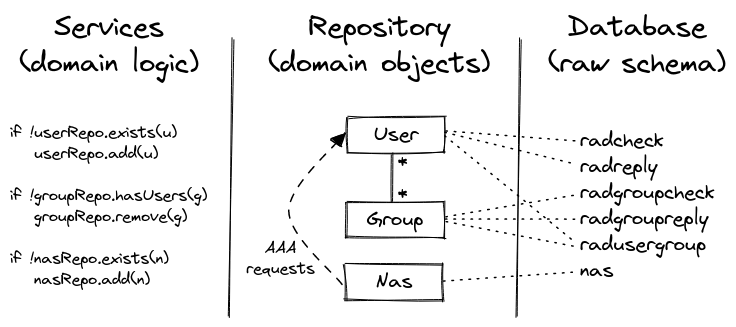
Repository and Service layers
This package comes with two usable layers named as per the DDD (Domain-Driven Design):
- Repository layer—responsible for mapping the (domain) objects to the database
- Service layer—responsible for maintaining the (domain) logic using the repositories
In other words, the service layer guarantees you data consistency and is the recommended one.
Yet you are free to use the repository layer and implement your own logic over it.
The HOWTO focuses on services.
Quick start
Install pyfreeradius and the appropriate DB-API 2.0 driver:
python3 -m venv venv
source venv/bin/activate
#
pip install pyfreeradius
pip install mysql-connector-python
Database
An instance of the FreeRADIUS server is NOT needed for testing, the focus being on the database schema.
Either you use an existing database or (preferably) a Docker container for testing the package:
wget https://github.com/angely-dev/pyfreeradius/archive/refs/heads/main.zip
unzip main.zip
cd pyfreeradius-main/tests/docker
#
docker compose -f docker-compose-mysql.yml up -d --wait
docker inspect -f '{{range.NetworkSettings.Networks}}{{.IPAddress}}{{end}}' docker-mydb-1
# 172.18.0.2
sudo echo "172.18.0.2 mydb" | sudo tee -a /etc/hosts
ping mydb
# PING mydb (172.18.0.2) 56(84) bytes of data.
# 64 bytes from mydb (172.18.0.2): icmp_seq=1 ttl=64 time=0.234 ms
Example #1
Find all groupnames, usernames and NAS names (number of results is limited to 100 by default):
from mysql.connector import connect
from pyfreeradius import Services

db_session = connect(user="raduser", password="radpass", host="mydb", database="raddb")
services = Services(db_session)

print(services.user.find_usernames())
print(services.group.find_groupnames())
print(services.nas.find_nasnames())

db_session.close()
Example #2
Create a group, a user in the group and a NAS:
from mysql.connector import connect
from pyfreeradius import Services
from pyfreeradius.models import AttributeOpValue, Group, Nas, User, UserGroup

db_session = connect(user="raduser", password="radpass", host="mydb", database="raddb")
services = Services(db_session)

# Create a group
group = Group(
    groupname="my-group",
    replies=[
        AttributeOpValue(attribute="Cisco-AVPair", op="+=", value="ip:vrf-id=MY-VRF"),
        AttributeOpValue(attribute="Cisco-AVPair", op="+=", value="ip:ip-unnumbered=Loopback10"),
        AttributeOpValue(attribute="Framed-IP-Netmask", op=":=", value="255.255.255.255"),
    ],
)
services.group.create(group)

# Create a user while adding it to the group
user = User(
    username="my-user",
    groups=[UserGroup(groupname="my-group")],
    checks=[AttributeOpValue(attribute="Cleartext-Password", op=":=", value="password")],
    replies=[
        AttributeOpValue(attribute="Framed-IP-Address", op=":=", value="10.0.0.78"),
        AttributeOpValue(attribute="Framed-Route", op="+=", value="192.168.1.0/24"),
        AttributeOpValue(attribute="Framed-Route", op="+=", value="192.168.2.0/24"),
        AttributeOpValue(attribute="Framed-Route", op="+=", value="192.168.3.0/24"),
    ],
)
services.user.create(user)

# Create a NAS
nas = Nas(nasname="192.168.1.1", shortname="my-shortname", secret="my-secret")
services.nas.create(nas)

db_session.commit()
db_session.close()
Example #3
Use pyfreeradius to build a REST API: you may be interested in freeradius-api project.
HOWTO
Install
pyfreeradius is available on PyPI:
pip install pyfreeradius
Database
Session
The app which makes use of pyfreeradius is responsible for establishing and closing the database connection as well as handling the transaction lifecycle:
from mysql.connector import connect
from pyfreeradius import Services

db_session = connect(user="raduser", password="radpass", host="mydb", database="raddb")
services = Services(db_session)

# some service calls
# …

db_session.commit()
db_session.close()
The example above imports connect from mysql-connector-python driver. Depending on your SQL backend, you have to import it from the appropriate DB-API 2.0 driver, e.g.:
from pymysql import connect
db_session = connect(user="raduser", password="radpass", host="mydb", database="raddb")
from psycopg import connect
db_session = connect("user=raduser password=radpass host=mydb dbname=raddb")
from sqlite3 import connect
db_session = connect("my-database.db")
Table names (optional)
By default, the following table names are used:
from pyfreeradius import RadTables

RadTables()
# RadTables(
#     radcheck='radcheck',
#     radreply='radreply',
#     radgroupcheck='radgroupcheck',
#     radgroupreply='radgroupreply',
#     radusergroup='radusergroup',
#     nas='nas',
# )
To change all or part of the table names:
from mysql.connector import connect
from pyfreeradius import RadTables, Services

db_session = connect(user="raduser", password="radpass", host="mydb", database="raddb")
rad_tables = RadTables(
    radcheck="my-radcheck-table",
    radreply="my-radreply-table",
)
services = Services(db_session=db_session, rad_tables=rad_tables)

# some service calls
# …

db_session.commit()
db_session.close()
Read operations
As an overview:
findreturns all items (number of results is limited to100by default, see filtering and limiting)find_onereturns one item if it exists,Noneotherwisegetreturns the item if it exists, raises aNotFounderror otherwiseexistsreturnsTrueif the item exists,Falseotherwise
Just like find, there are also find_*names methods. They could be handy for a quick retrieval test.
Get users
services.user.find_usernames()
# ['alice@adsl', 'bob', 'eve', 'oscar@adsl']

services.user.find()
# [User(username='alice@adsl', …), User(username='bob', …), User(username='eve', …), User(username='oscar@adsl', …)]
services.user.find(limit=2)
# [User(username='alice@adsl', …), User(username='bob', …)]

services.user.find(username_like="%adsl")
# [User(username='alice@adsl', …), User(username='oscar@adsl', …)]

services.user.exists("alice@adsl")
# True
services.user.exists("mallory")
# False

services.user.find_one("alice@adsl")
services.user.get("alice@adsl")
# User(
#     username='alice@adsl',
#     checks=[AttributeOpValue(attribute='Cleartext-Password', op=':=', value='alice-pass')],
#     replies=[
#         AttributeOpValue(attribute='Framed-IP-Address', op=':=', value='10.0.0.2'),
#         AttributeOpValue(attribute='Framed-Route', op='+=', value='192.168.1.0/24'),
#         AttributeOpValue(attribute='Framed-Route', op='+=', value='192.168.2.0/24'),
#         AttributeOpValue(attribute='Huawei-Vpn-Instance', op=':=', value='alice-vrf'),
#     ],
#     groups=[UserGroup(groupname='100m', priority=1)],
# )

services.user.find_one("mallory")
# None
services.user.get("mallory")
# pyfreeradius.services.ServiceExceptions.UserNotFound: Given user does not exist
Get groups
services.group.find_groupnames()
# ['100m', '200m', '250m']

services.group.find()
# [Group(groupname='100m', …), Group(groupname='200m', …), Group(groupname='250m', …)]
services.group.find(limit=2)
# [Group(groupname='100m', …), Group(groupname='200m', …)]

services.group.find(groupname_like="2%")
# [Group(groupname='200m', …), Group(groupname='250m', …)]

services.group.exists("100m")
# True
services.group.exists("300m")
# False

services.group.find_one("100m")
services.group.get("100m")
# Group(
#     groupname='100m',
#     checks=[],
#     replies=[AttributeOpValue(attribute='Filter-Id', op=':=', value='100m')],
#     users=[
#         GroupUser(username='bob', priority=1),
#         GroupUser(username='alice@adsl', priority=1),
#         GroupUser(username='eve', priority=1),
#     ],
# )

services.group.find_one("300m")
# None
services.group.get("300m")
# pyfreeradius.services.ServiceExceptions.GroupNotFound: Given group does not exist
Get NASes
services.nas.find_nasnames()
# ['3.3.3.3', '4.4.4.4', '4.4.4.5']

services.nas.find()
# [Nas(nasname='3.3.3.3', …), Nas(nasname='4.4.4.4', …), Nas(nasname='4.4.4.5', …)]
services.nas.find(limit=2)
# [Nas(nasname='3.3.3.3', …), Nas(nasname='4.4.4.4', …)]

services.nas.find(nasname_like="4.4.4.%")
# [Nas(nasname='4.4.4.4', …), Nas(nasname='4.4.4.5', …)]

services.nas.exists('3.3.3.3')
# True
services.nas.exists('5.5.5.5')
# False

services.nas.find_one('3.3.3.3')
services.nas.get('3.3.3.3')
# Nas(
#     nasname='3.3.3.3',
#     shortname='my-super-nas',
#     secret='my-super-secret'
# )

services.nas.find_one('5.5.5.5')
# None
services.nas.get('5.5.5.5')
# pyfreeradius.services.ServiceExceptions.NasNotFound: Given NAS does not exist
find_one vs get
The former returns None if the item is not found whereas the latter raises a NotFound error.
Filtering and pagination with find
find returns a list of items ordered by name, i.e., by username, groupname or nasname:
services.user.find()
services.group.find()
services.nas.find()
Filtering results is possible through the *name_like parameter:
services.user.find(username_like="%@realm")
services.group.find(groupname_like="VPN-%")
services.nas.find(nasname_like="192.168.%")

# the same applies for *names methods
services.user.find_usernames(username_like="%@realm")
services.group.find_groupnames(groupname_like="VPN-%")
services.nas.find_nasnames(nasname_like="192.168.%")
As a precaution, find returns a limited number of results (100 by default). To get more or even all results, either:
- Increase the limit:
services.user.find(limit=900)
services.group.find(limit=900)
services.nas.find(limit=900)

# the same applies for *names methods
services.user.find_usernames(limit=900)
services.group.find_groupnames(limit=900)
services.nas.find_nasnames(limit=900)
- Disable the limit:
# all items will be returned, be cautious!
services.user.find(limit=None)
services.group.find(limit=None)
services.nas.find(limit=None)

# the same applies for *names methods
services.user.find_usernames(limit=None)
services.group.find_groupnames(limit=None)
services.nas.find_nasnames(limit=None)
- Use keyset pagination via the
*name_gtparameter (gt stands for greater than):
# iterate through all users
# the same applies for groups ans NASes
# as well as *names methods

all_users = []
users = services.user.find()
while users:
    all_users += users
    last_user = users[-1]
    users = services.user.find(username_gt=last_user.username)
print(len(all_users))
Pagination may be useful for a frontend app which lists users through infinite scrolling.
All the above parameters can combine, e.g.:
services.user.find(username_like="%@realm", username_gt="cust123", limit=5)
services.user.find_usernames(username_like="%@realm", username_gt="cust123", limit=5)
Create operations
Create a user
from mysql.connector import connect
from pyfreeradius import Services
from pyfreeradius.models import AttributeOpValue, User

db_session = connect(user="raduser", password="radpass", host="mydb", database="raddb")
services = Services(db_session)

user = User(
    username="my-user",
    checks=[AttributeOpValue(attribute="Cleartext-Password", op=":=", value="password")],
    replies=[
        AttributeOpValue(attribute="Framed-IP-Address", op=":=", value="10.0.0.1"),
        AttributeOpValue(attribute="Framed-IP-Netmask", op=":=", value="255.255.255.255"),
        AttributeOpValue(attribute="Cisco-AVPair", op="+=", value="ip:vrf-id=MY-VRF"),
        AttributeOpValue(attribute="Cisco-AVPair", op="+=", value="ip:ip-unnumbered=Loopback10"),
    ],
)

services.user.exists("my-user")
# False
services.user.create(user)
services.user.exists("my-user")
# True
services.user.create(user)
# pyfreeradius.services.ServiceExceptions.UserAlreadyExists: Given user already exists

db_session.commit()
db_session.close()
Create a user within groups
This allows to create a user while adding it to groups. To modify an existing user, see update operation.
from pyfreeradius.models import UserGroup

user = User(
    username="my-user",
    checks=[AttributeOpValue(attribute="Cleartext-Password", op=":=", value="password")],
    replies=[
        AttributeOpValue(attribute="Framed-IP-Address", op=":=", value="10.0.0.1"),
        AttributeOpValue(attribute="Framed-IP-Netmask", op=":=", value="255.255.255.255"),
        AttributeOpValue(attribute="Cisco-AVPair", op="+=", value="ip:vrf-id=MY-VRF"),
        AttributeOpValue(attribute="Cisco-AVPair", op="+=", value="ip:ip-unnumbered=Loopback10"),
    ],
    groups=[
        UserGroup(groupname="my-group-1"),  # priority defaults to 1
        UserGroup(groupname="my-group-2", priority=2),
    ],
)

services.group.get("my-group-1").contains_user("my-user")
# False
services.user.create(user)
services.group.get("my-group-1").contains_user("my-user")
# True
If one of the group does not exist, a GroupNotFound error will be raised:
services.user.create(user)
# pyfreeradius.services.ServiceExceptions.GroupNotFound:
#  Given group 'my-group-2' does not exist:
#  create it first or set 'allow_groups_creation' parameter to true
Ideally, groups must be created first. Alternatively, the allow_groups_creation option can be enabled:
services.group.exists("my-group-2")
# False
services.user.create(user, allow_groups_creation=True)
services.group.exists("my-group-2")
# True
This results in creating the missing groups (without any attributes):
services.group.get("my-group-2")
# Group(groupname='my-group-2', checks=[], replies=[], users=[GroupUser(username='my-user', priority=2)])
The newly created groups can be updated later to set their attributes.
Create a group
from mysql.connector import connect
from pyfreeradius import Services
from pyfreeradius.models import AttributeOpValue, Group

db_session = connect(user="raduser", password="radpass", host="mydb", database="raddb")
services = Services(db_session)

group = Group(
    groupname="my-group",
    replies=[
        AttributeOpValue(attribute="Cisco-AVPair", op="+=", value="ip:vrf-id=MY-VRF"),
        AttributeOpValue(attribute="Cisco-AVPair", op="+=", value="ip:ip-unnumbered=Loopback10"),
    ],
)

services.group.exists("my-group")
# False
services.group.create(group)
services.group.exists("my-group")
# True
services.group.create(group)
# pyfreeradius.services.ServiceExceptions.GroupAlreadyExists: Given group already exists

db_session.commit()
db_session.close()
Create a group with users
This allows to create a group while adding users in it. To modify an existing group, see update operation.
from pyfreeradius.models import GroupUser

group = Group(
    groupname="my-group",
    replies=[
        AttributeOpValue(attribute="Cisco-AVPair", op="+=", value="ip:vrf-id=MY-VRF"),
        AttributeOpValue(attribute="Cisco-AVPair", op="+=", value="ip:ip-unnumbered=Loopback10"),
    ],
    users=[
        GroupUser(username="my-user-1"),  # priority defaults to 1
        GroupUser(username="my-user-2", priority=2),
    ],
)

services.user.get("my-user-1").belongs_to_group("my-group")
# False
services.group.create(group)
services.user.get("my-user-1").belongs_to_group("my-group")
# True
If one of the user does not exist, a UserNotFound error will be raised:
services.group.create(group)
# pyfreeradius.services.ServiceExceptions.UserNotFound:
#  Given user 'my-user-2' does not exist:
#  create it first or set 'allow_users_creation' parameter to true
Ideally, users must be created first. Alternatively, the allow_users_creation option can be enabled:
services.user.exists("my-user-2")
# False
services.group.create(group, allow_users_creation=True)
services.user.exists("my-user-2")
# True
This results in creating the missing users (without any attributes):
services.user.get("my-user-2")
# User(username='my-user-2', checks=[], replies=[], groups=[UserGroup(groupname='my-group', priority=2)])
The newly created users can be updated later to set their attributes.
Create a NAS
from mysql.connector import connect
from pyfreeradius import Services
from pyfreeradius.models import Nas

db_session = connect(user="raduser", password="radpass", host="mydb", database="raddb")
services = Services(db_session)

nas = Nas(nasname="192.168.1.1", shortname="my-shortname", secret="my-secret")

services.nas.exists("192.168.1.1")
# False
services.nas.create(nas)
services.nas.exists("192.168.1.1")
# True
services.nas.create(nas)
# pyfreeradius.services.ServiceExceptions.NasAlreadyExists: Given NAS already exists

db_session.commit()
db_session.close()
Delete operations
Delete a user
The delete operation deletes all user attributes and group belongings:
from mysql.connector import connect
from pyfreeradius import Services

db_session = connect(user="raduser", password="radpass", host="mydb", database="raddb")
services = Services(db_session)

services.user.exists("my-user")
# True
services.user.delete("my-user")
services.user.exists("my-user")
# False
services.user.delete("my-user")
# pyfreeradius.services.ServiceExceptions.UserNotFound: Given user does not exist

db_session.commit()
db_session.close()
If the user belongs to a group without any attributes and no other users, this group would disappear as per the FreeRADIUS schema (i.e., it wouldn't exist in the database anymore). The delete operation prevents this by default:
services.user.get("my-user").groups
# [UserGroup(groupname='my-group', priority=1)]

services.group.find_one("my-group")
# Group(groupname='my-group', checks=[], replies=[], users=[GroupUser(username='my-user', priority=1)])

services.user.delete("my-user")
# pyfreeradius.services.ServiceExceptions.GroupWouldBeDeleted:
#  Group 'my-group' would be deleted as it has no attributes and no other users:
#  delete it first or set 'prevent_groups_deletion' parameter to false

services.user.delete("my-user", prevent_groups_deletion=False)

services.group.find_one("my-group")
# None
Delete a group
The delete operation deletes all group attributes and user belongings to the group:
from mysql.connector import connect
from pyfreeradius import Services

db_session = connect(user="raduser", password="radpass", host="mydb", database="raddb")
services = Services(db_session)

services.group.exists("my-group")
# True
services.group.delete("my-group")
services.group.exists("my-group")
# False
services.group.delete("my-group")
# pyfreeradius.services.ServiceExceptions.GroupNotFound: Given group does not exist

db_session.commit()
db_session.close()
A GroupStillHasUsers error is raised though if the group still has users:
services.group.get("my-group").users
# [GroupUser(username='my-user-1', priority=1), GroupUser(username='my-user-2', priority=2)]

services.group.delete("my-group")
# pyfreeradius.services.ServiceExceptions.GroupStillHasUsers:
#  Given group still has users:
#  delete them first or set 'ignore_users' parameter to true

services.user.get("my-user-1").belongs_to_group("my-group")
# True
services.group.delete("my-group", ignore_users=True)
services.user.get("my-user-1").belongs_to_group("my-group")
# False
If the group contains a user without any attributes and no other groups, this user would disappear as per the FreeRADIUS schema (i.e., it wouldn't exist in the database anymore). The delete operation prevents this by default:
services.group.get("my-group").users
# [GroupUser(username='my-user', priority=1)]

services.user.find_one("my-user")
User(username='my-user', checks=[], replies=[], groups=[UserGroup(groupname='my-group', priority=1)])

services.group.delete("my-group")
# pyfreeradius.services.ServiceExceptions.GroupStillHasUsers:
#  Given group still has users:
#  delete them first or set 'ignore_users' parameter to true

services.group.delete("my-group", ignore_users=True)
# pyfreeradius.services.ServiceExceptions.UserWouldBeDeleted:
#  User 'my-user' would be deleted as it has no attributes and no other groups:
#  delete it first or set 'prevent_users_deletion' parameter to false

services.group.delete("my-group", ignore_users=True, prevent_users_deletion=False)

services.user.find_one("my-user")
# None
Delete a NAS
from mysql.connector import connect
from pyfreeradius import Services

db_session = connect(user="raduser", password="radpass", host="mydb", database="raddb")

services = Services(db_session)

services.nas.exists("192.168.1.1")
# True
services.nas.delete("192.168.1.1")
services.nas.exists("192.168.1.1")
# False
services.nas.delete("192.168.1.1")
# pyfreeradius.services.ServiceExceptions.NasNotFound: Given NAS does not exist

db_session.commit()
db_session.close()
Update operations
TL;DR
It is generally simpler to just delete and recreate the item.
However, there are situations when updating is preferable, e.g., deleting a group to change its attributes would delete all user belongings which will have to be recreated. Therefore, updating just the group attributes seems more appropriate.
Update strategy (JSON Merge Patch)
Updates are made possible using three complex parameters (which are Pydantic models):
from pyfreeradius.params import UserUpdate
from pyfreeradius.params import GroupUpdate
from pyfreeradius.params import NasUpdate
They allow to change all or part of the field values, except for the *name.
That is, in order to change the
usernameof a user, it is required to delete it and recreate it.
The update strategy follows RFC 7396 (JSON Merge Patch) guidelines:
- omitted fields during the update are not modified
Nonevalue means removal (i.e., resets a field to its default value)- a list field can only be overwritten (replaced)
As a consequence of the last point, to add attributes to an existing user, you must fetch the existing attributes first, combine them with the new ones, and send the result as the update parameter.
Update a user
Below we add (overwrite) reply attributes of an existing user and remove all of its group belongings.
from mysql.connector import connect
from pyfreeradius import Services
from pyfreeradius.models import AttributeOpValue
from pyfreeradius.params import UserUpdate

db_session = connect(user="raduser", password="radpass", host="mydb", database="raddb")
services = Services(db_session)

services.user.get("my-user")
# User(
#     username="my-user",
#     checks=[AttributeOpValue(attribute="Cleartext-Password", op=":=", value="password")],
#     replies=[AttributeOpValue(attribute="Framed-IP-Address", op=":=", value="10.0.0.1")],
#     groups=[UserGroup(groupname="my-group", priority=1)],
# )

fields_to_update = UserUpdate(
    replies=[
        AttributeOpValue(attribute="Framed-IP-Address", op=":=", value="10.0.0.1"),
        AttributeOpValue(attribute="Framed-IP-Netmask", op=":=", value="255.255.255.255"),
        AttributeOpValue(attribute="Cisco-AVPair", op="+=", value="ip:vrf-id=MY-VRF"),
        AttributeOpValue(attribute="Cisco-AVPair", op="+=", value="ip:ip-unnumbered=Loopback10"),
    ],
    groups=None,  # or groups=[]
)

services.user.update("my-user", user_update=fields_to_update)
services.user.get("my-user")
# User(
#     username="my-user",
#     checks=[AttributeOpValue(attribute="Cleartext-Password", op=":=", value="password")],
#     replies=[
#         AttributeOpValue(attribute="Framed-IP-Address", op=":=", value="10.0.0.1"),
#         AttributeOpValue(attribute="Framed-IP-Netmask", op=":=", value="255.255.255.255"),
#         AttributeOpValue(attribute="Cisco-AVPair", op="+=", value="ip:vrf-id=MY-VRF"),
#         AttributeOpValue(attribute="Cisco-AVPair", op="+=", value="ip:ip-unnumbered=Loopback10"),
#     ],
#     groups=[],
# )

db_session.commit()
db_session.close()
The update operation logic is not trivial and is a mix of create and delete operations. Therefore, if a list of groups is given as an update parameter, it may raise:
GroupNotFounderror—if one of the given groups does not exist (unlessallow_groups_creationis enabled)GroupWouldBeDeletederror—if one of the current user groups would result in a deletion (unlessprevent_groups_deletionis disabled)
A group would result in a deletion if it has no attributes and no other users than the one updated.
In addition, it ensures the new fields won't result in user deletion as per the FreeRADIUS schema (that is, a user without any attributes and no groups). A UserWouldBeDeleted error may be raised in that sense.
Update a group
Below we remove check attributes of an existing group and add (overwrite) user belongings.
from mysql.connector import connect
from pyfreeradius import Services
from pyfreeradius.models import GroupUser
from pyfreeradius.params import GroupUpdate

db_session = connect(user="raduser", password="radpass", host="mydb", database="raddb")
services = Services(db_session)

services.group.get("my-group")
# Group(
#     groupname="my-group",
#     checks=[AttributeOpValue(attribute="Auth-Type", op=":=", value="Accept")],
#     replies=[AttributeOpValue(attribute="Cisco-AVPair", op="+=", value="ip:vrf-id=MY-VRF")],
#     users=[GroupUser(username="my-user-1", priority=1)],
# )

fields_to_update = GroupUpdate(
    checks=[],  # or checks=None
    users=[GroupUser(username="my-user-1"), GroupUser(username="my-user-2")],
)

services.group.update("my-group", group_update=fields_to_update)
services.group.get("my-group")
# Group(
#     groupname="my-group",
#     checks=[],
#     replies=[AttributeOpValue(attribute="Cisco-AVPair", op=":=", value="ip:vrf-id=MY-VRF")],
#     users=[GroupUser(username="my-user-1", priority=1), GroupUser(username="my-user-2", priority=1)],
# )

db_session.commit()
db_session.close()
The update operation logic is not trivial and is a mix of create and delete operations. Therefore, if a list of users is given as an update parameter, it may raise:
UserNotFounderror—if one of the given users does not exist (unlessallow_users_creationis enabled)UserWouldBeDeletederror—if one of the current group users would result in a deletion (unlessprevent_users_deletionis disabled)
A user would result in a deletion if it has no attributes and no other groups than the one updated.
In addition, it ensures the new fields won't result in group deletion as per the FreeRADIUS schema (that is, a group without any attributes and no users). A GroupWouldBeDeleted error may be raised in that sense.
Update a NAS
Below we only update the secret of an existing NAS:
from mysql.connector import connect
from pyfreeradius import Services
from pyfreeradius.params import NasUpdate

db_session = connect(user="raduser", password="radpass", host="mydb", database="raddb")
services = Services(db_session)

services.nas.get("192.168.1.1")
# Nas(nasname='192.168.1.1', shortname='my-shortname', secret='my-secret')

fields_to_update = NasUpdate(secret="new-secret")
services.nas.update("192.168.1.1", nas_update=fields_to_update)

services.nas.get("192.168.1.1")
# Nas(nasname='192.168.1.1', shortname='my-shortname', secret='new-secret')

db_session.commit()
db_session.close()
1 maintainer

Download files
Download the file for your platform. If you're not sure which to choose, learn more about installing packages.
Source Distribution
Built Distribution
Filter files by name, interpreter, ABI, and platform.
If you're not sure about the file name format, learn more about wheel file names.
Copy a direct link to the current filters
File details
Details for the file pyfreeradius-1.4.0.tar.gz.
File metadata
- Download URL: pyfreeradius-1.4.0.tar.gz
- Upload date:
- Size: 24.8 kB
- Tags: Source
- Uploaded using Trusted Publishing? No
- Uploaded via:
twine/6.1.0 CPython/3.10.12
File hashes
| Algorithm | Hash digest | |
|---|---|---|
| SHA256 |
2e719ffc8428c0d9195c4d39ce5ebf78ab6258ad99fb65e8fc4d07298f821564
|
|
| MD5 |
03179642480d007fd4898777677105eb
|
|
| BLAKE2b-256 |
e85fcd00186433890a380bf76dc89d15417d85aaf720b739c630888df49670ad
|
File details
Details for the file pyfreeradius-1.4.0-py3-none-any.whl.
File metadata
- Download URL: pyfreeradius-1.4.0-py3-none-any.whl
- Upload date:
- Size: 16.5 kB
- Tags: Python 3
- Uploaded using Trusted Publishing? No
- Uploaded via:
twine/6.1.0 CPython/3.10.12
File hashes
| Algorithm | Hash digest | |
|---|---|---|
| SHA256 |
13380a7c26d8b1916bae03ad0a0f58d9e0bdf3321f7132cc85a7bc2879174cd3
|
|
| MD5 |
89b2a7baef0b2ca2099aa6311e179d1d
|
|
| BLAKE2b-256 |
e31879ebb728fbc4086e1abefc8df624a34e639a7494379a9452b71c0762cf7e
|














