
pyfunnel

A cross-platform C-based software for comparing two (x, y) data sets given tolerances in x and y directions.
Principles
Overall
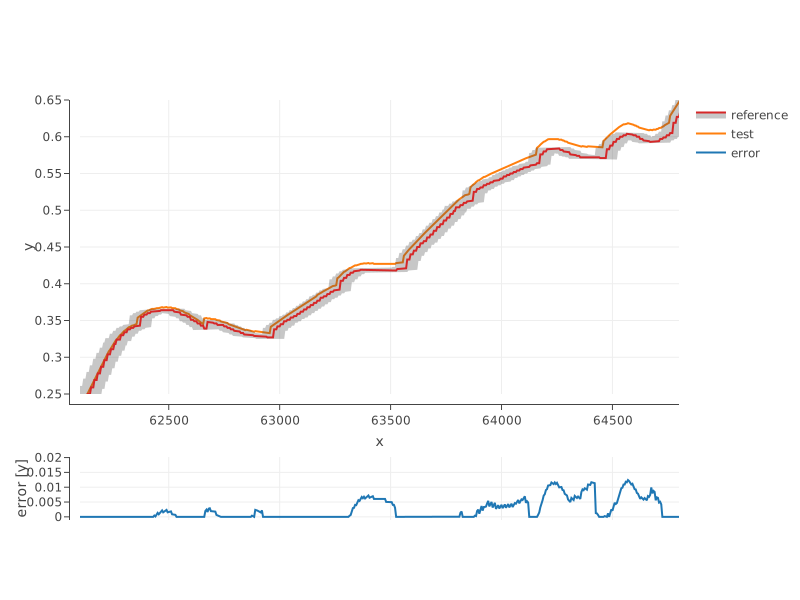
A so-called funnel is generated around the reference (x, y) data points.
The funnel is sized according to the absolute or relative tolerance in
both x and y directions.
The algorithm then checks if any test data points are inside the funnel,
and reports these points in the file errors.csv in the output directory.
Four other files are stored in the output directory: reference data points,
test data points, lower bounds and upper bounds of the funnel.
One potential application is to validate the development of building HVAC control sequences. By comparing data curves from real operation with data curves from simulation, one can verify if the control sequences have been implemented such that they produce a similar control response than a simulation model that is considered to be the original specification.
Method to Compute the Funnel
The funnel is computed as follows.
-
Tolerance areas (based on L1-norm) are built around each reference data point.
-
The tolerance parameters correspond to the half-width and half-height of the tolerance areas. They default to 0.
-
When using
atolxandatoly, the tolerance is considered as absolute (same unit asxandy). -
When using
ltolxandltoly, the tolerance is considered relative to the local value ofxandy. -
When using
rtolxandrtoly, the tolerance is considered relative to the range ofxandy. This option is available mainly for compatibility with the algorithm implemented in csv-compare for relative comparison. It should be used with caution.
-
-
The algorithm selects which corners of the tolerance rectangles are used to build the envelopes based on the change in the derivative sign at each reference point.
-
Intersection boundary points are computed when a selected corner happens not to be in the logical order with the next one on the
xscale (i.e., at a local extremum). New envelopes are then built encompassing all boundary points, and points strictly within the envelopes are dropped.
The comparison then simply consists of interpolating the upper and lower envelopes
at the x test values and comparing the yielded y_up and y_low values with the y test values.
By convention, the error is max(0, y - y_up) - min(0, y - y_low) and hence it is always positive.
How to Run
System Requirements
The software is tested on the following platforms.
- Linux x64: Ubuntu 20.04 and 24.04
- Windows x64: Windows Server 2022
- macOS x64 and arm64: macOS 14
A Python binding is available to access the library. It is supported on Python versions 3.8 through 3.12.
Installing
The Python binding is delivered as a package named pyfunnel, available on PyPI.
Main Functions
The software is primarily intended to be used by means of a Python binding.
The package pyfunnel provides the following functions.
-
compareAndReport: callsfunnelbinary with list-like objects asx,yreference and test values. Outputserrors.csv,lowerBound.csv,upperBound.csv,reference.csv,test.csvinto the output directory (./resultsby default). -
plot_funnel: plotsfunnelresults stored in the directory which path is provided as argument. Displays plot in default browser. See function docstring for further details.
A standalone CLI script pyfunnel/cli.py is available, which is also accessible via the
funnel entry point when the package is installed. To access the usage instructions, run: funnel --help
Example
From a Python shell with ./tests/test_bin as the current working directory, run
>>> import pandas as pd
>>> import pyfunnel
>>> ref = pd.read_csv('trended.csv')
>>> test = pd.read_csv('simulated.csv')
>>> pyfunnel.compareAndReport(xReference=ref.iloc(axis=1)[0], yReference=ref.iloc(axis=1)[1],
... xTest=test.iloc(axis=1)[0], yTest=test.iloc(axis=1)[1], atolx=0.002, atoly=0.002)
>>> pyfunnel.plot_funnel('results')
Or from a terminal with ./tests/test_bin as the current working directory, run
funnel --reference trended.csv --test simulated.csv --atolx 0.002 --atoly 0.002
Build from Source
System Requirements
The cross-platform build system relies on CMake (version 3.22).
The distributed binaries are built with Microsoft Visual Studio C/C++ compiler (Windows), Clang (macOS) and GCC (Linux).
Procedure
To compile, link and install, from the top-level directory, run the following commands
mkdir -p build && cd build
cmake ..  # Add `-A x64` on Windows to compile in 64 bits
cmake --build . --target install --config Release
To run the tests, from ./build run
ctest -C Release --verbose
Contributing
Please see our contributing guidelines.
License
Modified 3-clause BSD, see LICENSE.txt.
Copyright
See COPYRIGHT.txt.


Release files for pyfunnel 2.0.2
For a detailed explanation of source distributions (sdists) and built distributions (wheels), please see the package formats documentation.
Source distribution (sdist)
| File | Size | Uploaded | |
|---|---|---|---|
| pyfunnel-2.0.2.tar.gz | 84.2 kB | Details |
Built distribution (wheel)
| File | Interpreter | ABI | Platform | Reset |
|---|---|---|---|---|
| pyfunnel-2.0.2-py3-none-any.whl | Python 3 | none | any | Details |
Total release size: 164.0 kB
Release files / pyfunnel-2.0.2.tar.gz
| Download URL | pyfunnel-2.0.2.tar.gz |
|---|---|
| Size | 84.2 kB |
| Tags | Source |
|
SHA-256 checksum How to use checksums |
6c221cf247590839a013122d8f45e9cee1f97ad9fb3f459c6dd6e37ea66f70f0
|
|
BLAKE2b-256 checksum How to use checksums |
fd43ea1f6f8e5ff3d59b4df1ad6ffc34ca95b00eb4babe8cbe5281c55255916b
|
| Upload date | |
|
Uploaded using Trusted Publishing? What is trusted publishing? |
No |
| Uploaded via |
twine/7.0.0 CPython/3.12.3
|
Release files / pyfunnel-2.0.2-py3-none-any.whl
| Download URL | pyfunnel-2.0.2-py3-none-any.whl |
|---|---|
| Size | 79.8 kB |
| Tags | Python 3 |
|
SHA-256 checksum How to use checksums |
2a558114801da5d524b43bef7117af2ef2b16af3c7e98bf5b220848e8e948b8f
|
|
BLAKE2b-256 checksum How to use checksums |
b74bfc7abebd1bcde356043d99ac1b0be0d1d6bfae0195b32cbdf9e009da5bfd
|
| Upload date | |
|
Uploaded using Trusted Publishing? What is trusted publishing? |
No |
| Uploaded via |
twine/7.0.0 CPython/3.12.3
|














