




Fun and challenging puzzle game – 2048 !
Install immediately and enjoy yourself !
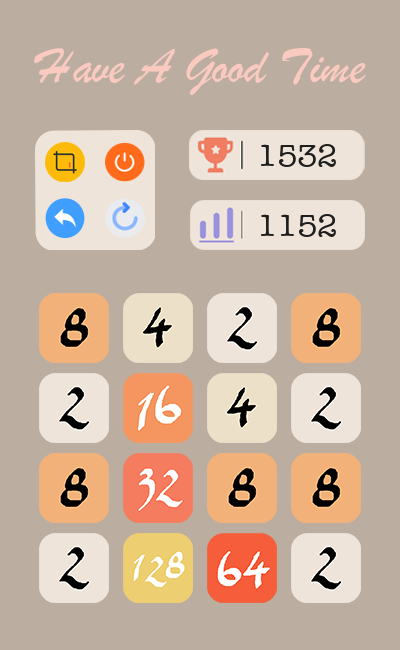
Screenshot
Installation
Installing Game 2048 is simple with pip:
$ python3 -m pip install pygame-2048Once installed the game can be played using the following command
$ game_2048If you want to uninstall the game using the following command
$ python3 -m pip uninstall pygame-2048
Development
After cloning the repository, install the game in development mode using the following command
$ python3 setup.py developYou can modify the program and then test it by using the following command
$ game_2048
Tips
You can use ⬅️⬆️➡️⬇️ keys or ‘AWSD’ keys to remove the blocks on the screen
Screenshot will be saved to ‘ ~/Desktop/game-2048/screenshots ‘
You can’t make 4096 block when you have two 2048 blocks. So what you should do next is reset this game and start a new challenge.
1 maintainer

Release files for pygame-2048 1.9.4
For a detailed explanation of source distributions (sdists) and built distributions (wheels), please see the package formats documentation.
Source distribution (sdist)
| File | Size | Uploaded | |
|---|---|---|---|
| pygame-2048-1.9.4.tar.gz | 3.1 MB | Details |
Built distribution (wheel)
| File | Interpreter | ABI | Platform | Reset |
|---|---|---|---|---|
| pygame_2048-1.9.4-py3-none-any.whl | Python 3 | none | any | Details |
Total release size: 6.1 MB
Release files / pygame-2048-1.9.4.tar.gz
| Download URL | pygame-2048-1.9.4.tar.gz |
|---|---|
| Size | 3.1 MB |
| Tags | Source |
|
SHA-256 checksum How to use checksums |
27b2fefc266e65e5d38e9a50f49711c4be5ae708ccf93a47646b9b8a7fbe188b
|
|
BLAKE2b-256 checksum How to use checksums |
258ef4deaa638f7da0136b2d39fdf53c0f2960766aeddd05289bdd24b625555c
|
| Upload date | |
|
Uploaded using Trusted Publishing? What is trusted publishing? |
No |
| Uploaded via |
twine/3.4.2 importlib_metadata/4.6.3 pkginfo/1.7.1 requests/2.26.0 requests-toolbelt/0.9.1 tqdm/4.62.0 CPython/3.9.6
|
Release files / pygame_2048-1.9.4-py3-none-any.whl
| Download URL | pygame_2048-1.9.4-py3-none-any.whl |
|---|---|
| Size | 3.1 MB |
| Tags | Python 3 |
|
SHA-256 checksum How to use checksums |
47352afcfd153f39fcc077ad3481f5493dffed25fda1c7b4152081c4ee58fbbb
|
|
BLAKE2b-256 checksum How to use checksums |
634505316f37f2a5ae76a94e143bf53f647667216cc21cf99eeeba2bb3029ae8
|
| Upload date | |
|
Uploaded using Trusted Publishing? What is trusted publishing? |
No |
| Uploaded via |
twine/3.4.2 importlib_metadata/4.6.3 pkginfo/1.7.1 requests/2.26.0 requests-toolbelt/0.9.1 tqdm/4.62.0 CPython/3.9.6
|














