
A pakage to create easy gui in Python

Project description
pygamergui-0.6
A simple gui library made using python and pygame module as core.
Authors
🔗 Links



How to install ?
Install module
pip install pygame,pygamergui
Demo Video

Demo image

Demo code
from pygamergui import buttons,slider,text,window


def b1test(args):
    t1.text = "use->"
    print(args)


def b2test(args):
    t1.text = "Pygamergui"
    print(args)

anemi = text.Word_Animation("pygamergui",color='red')

b1 = buttons.simple_button(target=b1test,
                         text='use',
                         fg='white',
                         w=75,
                         h=50,
                         color=(0, 175, 250),
                         args=[1]
                         )

b2 = buttons.simple_button(target=b2test,
                         fg='white',
                         text="PGG",
                         w=100,
                         h=50,
                         color=(0, 175, 250)
                         )

t1 = text.text("what to use??")

r1 = buttons.button_radio(radius=30, color='cyan')

s1 = slider.slider(300,
                  550,
                  h=10,
                  corner_round=10,
                  color='purple',
                  t1_align='side',
                  text_size=20,
                  text_color='black',
                  color_circle=(0, 175, 250)
                  )


def update():
    b1.show_no_anemi(200, 400, window=windowm, corner_round_level=10)
    b2.show_color_change(300, 400, window=windowm, corner_round_level=10)

    t1.show(windowm, 175, 175)

    a=r1.show(windowm, 300, 300)
    if a:
        anemi.show(windowm,180,100,4)
    a = s1.show(windowm)


windowm = window.app(title='test',
                    bgcolor=(40, 40, 40),
                    target=update, update_rate=10,
                    background="python1.png"
                    )
windowm.run()
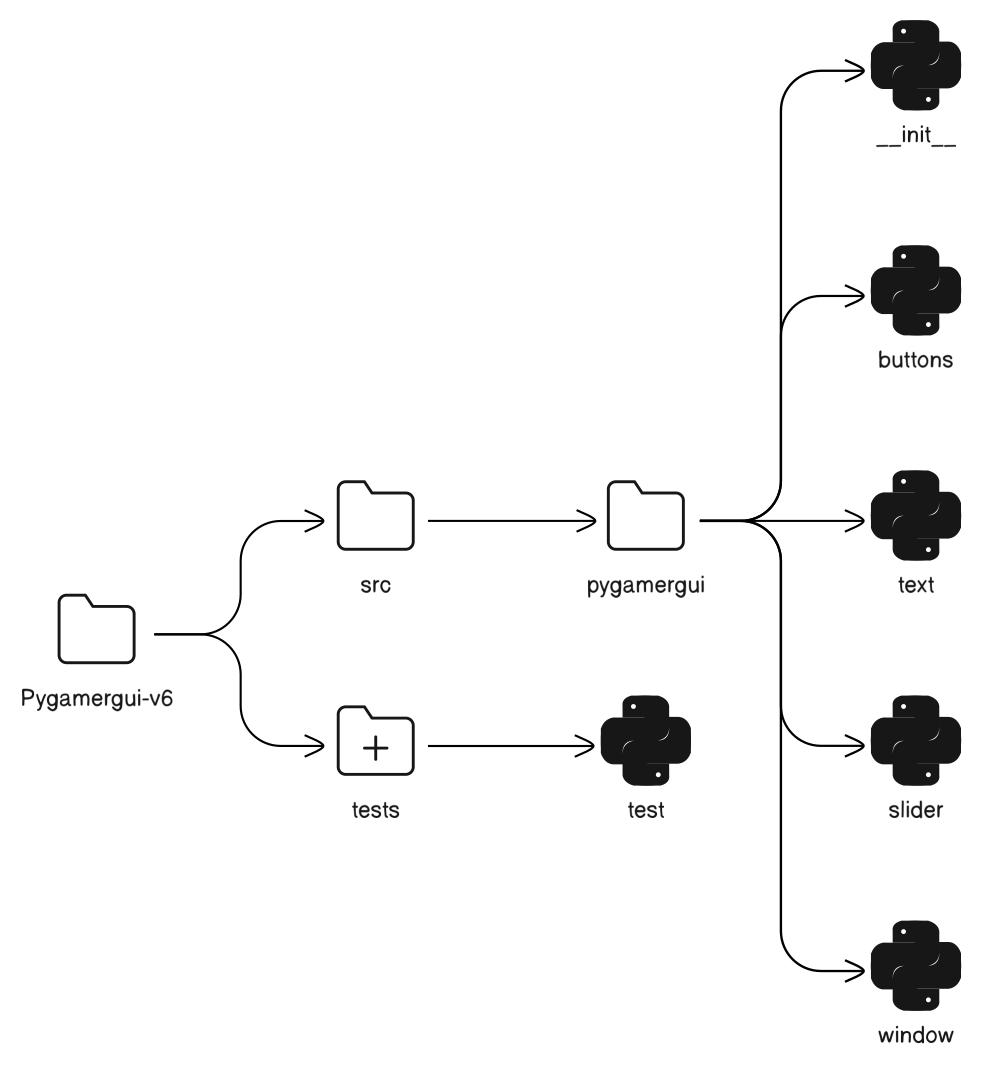
Project structure
Appendix
Important points:
-
all widgets (i.e button,text,slider,Button_radio)can be used importing text,buttons,slider from pygamergui.
-
background image path should be provided to window class as in example
-
window class makes the main window appear
-
All the show methods should be put in an function which is passed as target to window class
Badges


Download files
Download the file for your platform. If you're not sure which to choose, learn more about installing packages.
Source Distribution
Built Distribution
Filter files by name, interpreter, ABI, and platform.
If you're not sure about the file name format, learn more about wheel file names.
Copy a direct link to the current filters
File details
Details for the file pygamergui-0.6.tar.gz.
File metadata
- Download URL: pygamergui-0.6.tar.gz
- Upload date:
- Size: 8.9 kB
- Tags: Source
- Uploaded using Trusted Publishing? No
- Uploaded via: twine/4.0.2 CPython/3.11.2
File hashes
| Algorithm | Hash digest | |
|---|---|---|
| SHA256 |
2d380506c9ed4de6b5f687b0f043b9ed3b4ab8eebc25f64ac2fad6b0dd96d918
|
|
| MD5 |
a423f6cd58a6ceb42649a8f606c44cc8
|
|
| BLAKE2b-256 |
cde6cc4d2f78e6f92adc116ad14d265d882c0c4dfa3c97be6b2bf8273bb20b86
|
File details
Details for the file pygamergui-0.6-py3-none-any.whl.
File metadata
- Download URL: pygamergui-0.6-py3-none-any.whl
- Upload date:
- Size: 8.4 kB
- Tags: Python 3
- Uploaded using Trusted Publishing? No
- Uploaded via: twine/4.0.2 CPython/3.11.2
File hashes
| Algorithm | Hash digest | |
|---|---|---|
| SHA256 |
1506f58e0de55a58dd60111bb7c667b42bc6cdd6e3c8932734d3673905e13dcb
|
|
| MD5 |
cb17232139ffafcf0821e3c50085dfa2
|
|
| BLAKE2b-256 |
16385d8352161c869ba1a04d87e828507619e1d90bc4eb1ec7e4328fedc1ebc2
|






