

pygmentize to clipboard for macOS
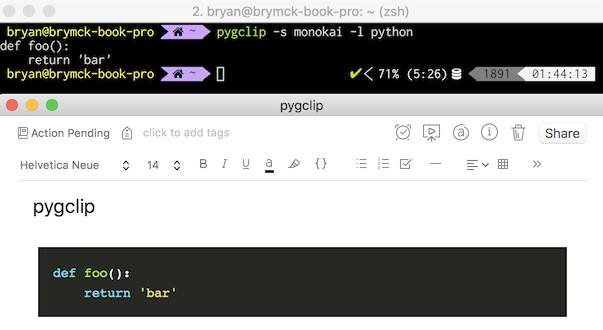
This utility package is designed to send code through pygmentize and save it as rich HTML in your macOS
clipboard. It can then be pasted easily into anything that accepts styled HTML input, such as Evernote, OneNote, Gmail,
etc.
Usage
pygclip offers a couple ways to retrieve code for passing on to pygmentize:
From a file
Via the standard input
Pulling it from your clipboard
Examples below:
File
$ cat path/to/file.py
def foo():
    return 'bar'
$ pygclip -s monokai -l python path/to/file.py
Standard input
$ pygclip -s monokai -l python
def foo():
    bar()
Clipboard
$ echo "def foo():\n    return 'bar'" | pbcopy
$ pygclip -s monokai -l python -c1 maintainer

Release files for pygclip 0.0.8
For a detailed explanation of source distributions (sdists) and built distributions (wheels), please see the package formats documentation.
Source distribution (sdist)
| File | Size | Uploaded | |
|---|---|---|---|
| pygclip-0.0.8.tar.gz | 88.5 kB | Details |
Built distribution (wheel)
| File | Interpreter | ABI | Platform | Reset |
|---|---|---|---|---|
| pygclip-0.0.8-py2.py3-none-any.whl | Python 3, Python 2 | none | any | Details |
Total release size: 95.8 kB
Release files / pygclip-0.0.8.tar.gz
| Download URL | pygclip-0.0.8.tar.gz |
|---|---|
| Size | 88.5 kB |
| Tags | Source |
|
SHA-256 checksum How to use checksums |
6b576142e44121d6dd7b6c804e766bb469da844b71eefa07361b3cc288fbec56
|
|
BLAKE2b-256 checksum How to use checksums |
1741494ae080a2d377dbb9b4bb30092f702255fed53f33ab0181d64bff17ca0d
|
| Upload date | |
|
Uploaded using Trusted Publishing? What is trusted publishing? |
No |
Release files / pygclip-0.0.8-py2.py3-none-any.whl
| Download URL | pygclip-0.0.8-py2.py3-none-any.whl |
|---|---|
| Size | 7.3 kB |
| Tags | Python 2 Python 3 |
|
SHA-256 checksum How to use checksums |
03d101756ad68e3bc1f5f0d76b1c4ce3d1c455b83549d0089b45e9e01497f5d0
|
|
BLAKE2b-256 checksum How to use checksums |
a2faf614439c5dc5954f081cd1486de83cc375f36fa2fb469a3e8ceb5ce33f8a
|
| Upload date | |
|
Uploaded using Trusted Publishing? What is trusted publishing? |
No |














