


PyGellerman: A Python Gellermann series generator
This is a Python implementation of a random genenerator for Gellermann series, pseudorandom binary sequences for human and non-human animal behavioural experiments1. It includes both a graphical user interface (GUI) as well as a simple Python API.
Gellermann series aim to avoid inflating a partipant's experimental performance by excluding random sequences that would match simple psychological or behavioural patterns. More specifically, a Gellermann series is a random sequence which satisfies five criteria; each series of length $n$:
- must contain an equal number (= $n/2$) of As and Bs;
- must contain at most 3 As or Bs in a row;
- must contain at least 20% (= $n/5$) As and Bs within both the first and last half;
- must contain at most $n/2$ reversals (A-B or B-A transitions);
- must provide a correct response rate close to 50% chance when responses are provided as simple alternation (ABAB...) or double alternation (AABBAA... and ABBAAB...).
Installation
PyGellermann is available on PyPI and can be installed using pip:
pip install pygellermann
For details on how to use pip, see the Python Packaging User Guide or pip's User Guide.
Alternatively, you can download the GUI as a standalone executable for Linux, macOS, and Windows from the releases page.
Note: On macOS, opening the PyGellermann app bundle might at first be blocked because it is not signed or distributed through the App Store. To override this and open the app, right-click on the app bundle and select Open from the context menu. This will open a dialog asking you to confirm that you want to open the app. After that, you can open the app by double-clicking on it. For more details, see the macOS User Guide.
Usage
Graphical User Interface
After installation, you can run the GUI by typing pygellermann-gui in your terminal or by running the standalone executable (PyGellermann, PyGellermann.app, or PyGellermann.exe). The following window should appear:
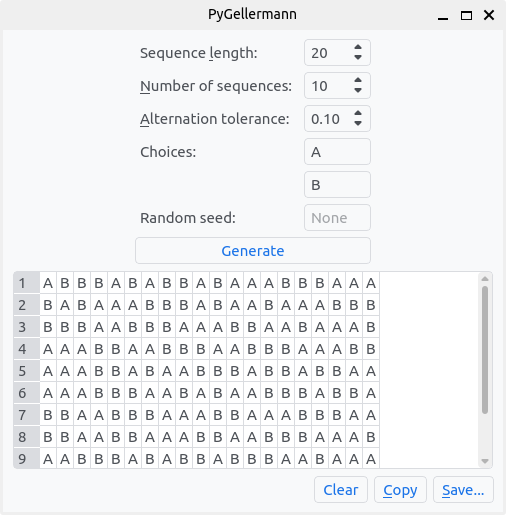
Four parameters can be set to customize the generated Gellermann series:
- Sequence length: The length of each generated sequence.
- Number of sequences: The number of sequences to generate.
- Alternation tolerance: How close to 50% chance level a sequence needs to be when compared to single or double alternation.
- Choices: The two possible choices for each stimulus in the sequences.
- Random seed: The seed for the random number generator, allowing to deterministically generate the same sequences.
The Generate button will then generate the requested number of sequences, and display them in the table underneath.
Finally, the generated Gellermann series can be copied to the clipboard (Copy) or saved to a CSV file (Save...).
Python API
The Python API consists of 4 simple functions:
-
is_gellermann_series(s, alternation_tolerance=DEFAULT_ALTERNATION_TOLERANCE)Check if a binary sequence is a Gellermann series.
Parameters
-
s:Sequence[Any]A binary series (i.e., containing two different elements) of even length.
-
alternation_tolerance:float, optionalThe tolerance around 50% chance level compared to single or double alternation, a value between 0 and 0.5 (default: 0.1).
Returns
-
boolTrue if the given sequence is a Gellermann series, False otherwise.
Raises
-
ValueErrorIf the sequence length is not even, or if the sequence contains more than two different elements, or if the alternation tolerance is not between 0 and 0.5.
Examples
>>> is_gellermann_series(['B', 'B', 'A', 'B', 'A', 'B', 'B', 'A', 'A', 'A'])
True
>>> is_gellermann_series('1112212122122211', alternation_tolerance=0.2)
True
>>> is_gellermann_series('1112212122122211', alternation_tolerance=0.0)
False
-
-
generate_gellermann_series(n, m, choices=('A', 'B'), rng=None, **kwargs)Generate m random Gellermann series of length n.
Parameters
-
n:intThe length of the series.
-
m:intThe number of series to generate.
-
choices:Tuple[Any, Any], optionalThe two elements of the series (default: ('A', 'B')).
-
rng:np.random.Generator, optionalA NumPy random number generator (default:
None, which uses the default NumPy random number generator). -
max_iterations:int, optionalThe maximum number of iterations to try to generate all Gellermann series (default:
None, which tries indefinitely). -
kwargsAdditional keyword arguments passed to
is_gellermann_series.
Yields
-
Iterator[Sequence[Any]]A generator object with m Gellermann series of length n.
-
-
generate_all_gellermann_series(n, choices, **kwargs)Generate all Gellermann series of length n in lexicographic order.Parameters
-
n:intThe length of the series.
-
choices:Tuple[Any, Any], optionalThe two elements of the series (default: ('A', 'B')).
-
kwargsAdditional keyword arguments passed to
is_gellermann_series.
Yields
-
Iterator[Sequence[Any]]A generator object with all Gellermann series of length n.
-
-
generate_gellermann_series_table(n, m, long_format: bool = False, **kwargs)Generate a Pandas DataFrame of m random Gellermann series of length n.
In the wide format, the DataFrame has columns 'series_i', 'element_0', 'element_1', ..., 'element_{n-1}', and each row contains a full series. In the long format, the DataFrame has columns 'series_i', 'element_i', 'element', and each row contains a single element of a series.
Parameters
-
n:intThe length of the series.
-
m:intThe number of series to generate.
-
long_format:bool, optionalIf True, the DataFrame is in long format (default: False).
-
kwargsAdditional keyword arguments passed to
generate_gellermann_series.
Returns
-
pd.DataFrameA Pandas DataFrame of m random Gellermann series of length n.
-
License
PyGellermann is released under the GNU General Public License v3 or later. See the LICENSE file for details.
PyGellermann was developed at the Comparative Bioacoustics Group of the Max Planck Institute for Psycholinguistics, Nijmegen, the Netherlands.
References
-
Gellermann, L. W. (1933). Chance orders of alternating stimuli in visual discrimination experiments. The Journal of Genetic Psychology, 42, 206-208. ↩
1 maintainer

Metadata
1 maintainer
Release files for pygellermann 0.1.0
For a detailed explanation of source distributions (sdists) and built distributions (wheels), please see the package formats documentation.
Source distribution (sdist)
| File | Size | Uploaded | Provenance | Actions |
|---|---|---|---|---|
| pygellermann-0.1.0.tar.gz | 59.8 kB | Without provenance | Details for pygellermann-0.1.0.tar.gz |
Built distribution (wheel)
| File | Interpreter | ABI | Platform | Actions Reset |
|---|---|---|---|---|
| pygellermann-0.1.0-py3-none-any.whl | Python 3 | none | any | Details for pygellermann-0.1.0-py3-none-any.whl |
Total release size: 83.0 kB
Release files / pygellermann-0.1.0.tar.gz
| Download URL | pygellermann-0.1.0.tar.gz |
|---|---|
| Size | 59.8 kB |
| Tags | Source |
|
SHA-256 checksum How to use checksums |
19b2e1562a617bde69fe13608bed2d83aa10c53909edca533833e4a5e63608f5
|
|
BLAKE2b-256 checksum How to use checksums |
4de3c23a6b691f1ec7a84831c95babebb4e38892781ebf5c92cfa8f3f8d00014
|
| Upload date | |
|
Uploaded using Trusted Publishing? What is trusted publishing? |
No |
| Uploaded via |
twine/4.0.2 CPython/3.10.6
|
Release files / pygellermann-0.1.0-py3-none-any.whl
| Download URL | pygellermann-0.1.0-py3-none-any.whl |
|---|---|
| Size | 23.2 kB |
| Tags | Python 3 |
|
SHA-256 checksum How to use checksums |
ff2dde10fb86d137f1eb2ade9125e5abb846fce159291ea7f92b01943e1233a9
|
|
BLAKE2b-256 checksum How to use checksums |
6c8e6006f26053569e1a7c7ec568a50a347b158d3b8d1a5e5d4662b5766e2e1a
|
| Upload date | |
|
Uploaded using Trusted Publishing? What is trusted publishing? |
No |
| Uploaded via |
twine/4.0.2 CPython/3.10.6
|
Security for pygellermann 0.1.0
Provenance
Provenance describes where a file came from. On PyPI, provenance is shared via attestations, which provide a verifiable record of the build or publishing details. View details, limitations and caveats.
No provenance found
None of the files in this release were uploaded with provenance metadata.
A note on package security
PyPI is a repository for distributing packages, not a service for auditing them. While third-party security researchers and our staff do their best to detect and remove malicious packages, PyPI cannot guarantee the quality, security or suitability of any given package.
To learn more about protecting yourself from malicious actors, visit our package security documentation.













