
Supplementary package for usage with Pygeon mobile application

Project description
Introduction
Pygeon lets you monitor programs by enabling in-code alerts in the form of push notifications on your phone. Alerts can have a custom title, body and an optional context string that gets displayed as the subtitle of the notification on your phone. Sound and vibration for alerts are on by default but could be overriden by your phone's notification settings.
Install Pygeon
pip install pygeon-notifications
Usage from the Command Line
Install and open the Pygeon app on your mobile (iOS only) and sign-in. After signing in you will recieve a private key. Use the private key to initialize pygeon in your terminal with the following command:
$ pygeon-init YOUR_PRIVATE_KEY
To send alert from the command line:
$ pygeon -t "Title"
If you want to include a body in the alert (body is optional):
$ pygeon -t "Title" -b "Body"
Note that maximum length of the body is 200 characters.
The most common use case of pygeon from the command line is when you want to alert yourself after a command is done executing. Here are a few examples of this scenario:
Example 1: Send alert when a command is done executing:
$ make && pygeon -t "Build Done"
Example 2: Send alert when a command is done executing and include output of the command in the alert body
$ pygeon -t "Python script finished!" -b $(python main.py)
In this case the output of main.py will be included in the body
Usage with Python (>= 3.6)
Install and open the Pygeon app on your mobile (iOS only) and sign-in. After signing in you will recieve a private key. Use the private key to instantiate a Pygeon object that you can use to send alerts anywhere in your scripts
example
from pygeon import Pygeon
my_pygeon = Pygeon("YOUR_PRIVATE_KEY")

my_pygeon.send("Cool Title", "Even cooler description")
Usage with POST requests
The Pygeon python package under the hood is a simple program that sends a POST request to Pygeon servers. Hence you can send alerts using a simple POST request to https://pygeon.io/api/alert with your private key, title and description in the body of the request.
curl example
curl -X POST "https://pygeon.io/api/alert" -H 'Content-Type: application/json' -d '{"ppk":"YOUR_PRIVATE_KEY","title":"Cool Title", "desc": "Cool Body"}'
node example
const axios = require('axios')

axios.post('https://pygeon.io/api/alert', {
    ppk: 'YOUR_PRIVATE_KEY',
    title: 'Cool Title',
    desc: 'Even cooler description'
  })
  .then(res => {
    console.log(`statusCode: ${res.status}`)
    console.log(res)
  })
  .catch(error => {
    console.error(error)
  })
Example use cases
Pygeon is built for software developers and some use cases include but are not limited to:
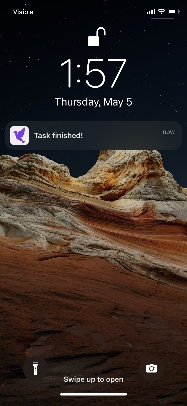
example use case 1: You want to step away from your machine until a task finishes
from pygeon import Pygeon
my_pygeon = Pygeon("YOUR_PRIVATE_KEY")

long_task.execute()
# you step away for a beer 🍺
my_pygeon.send("Task finished!")
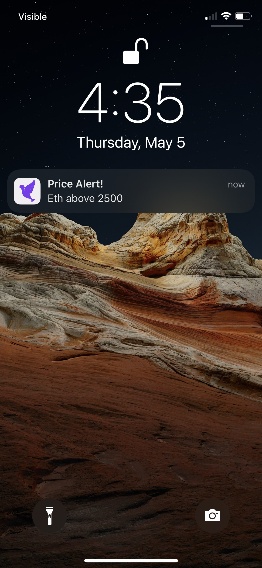
example use case 2: You want alerts in your trading bot about the stock market
from pygeon import Pygeon
my_pygeon = Pygeon("YOUR_PRIVATE_KEY")

#custom trading logic
if eth_price >= eth_strike:
    my_pygeon.send("Price Alert!", f"Eth above {eth_strike}")
Note that Pygeon alerts are also recieved on the apple watch if you have one connected to your phone.
Release history Release notifications | RSS feed


Download files
Download the file for your platform. If you're not sure which to choose, learn more about installing packages.
Source Distribution
Built Distribution
Filter files by name, interpreter, ABI, and platform.
If you're not sure about the file name format, learn more about wheel file names.
Copy a direct link to the current filters
File details
Details for the file pygeon-notifications-1.0.2.tar.gz.
File metadata
- Download URL: pygeon-notifications-1.0.2.tar.gz
- Upload date:
- Size: 4.8 kB
- Tags: Source
- Uploaded using Trusted Publishing? No
- Uploaded via: twine/4.0.0 CPython/3.8.6
File hashes
| Algorithm | Hash digest | |
|---|---|---|
| SHA256 |
ef9f14b33766178f314f1f1a55c675944f8396569efafa0ae5cfcef915a4e227
|
|
| MD5 |
beb78b3905a3f9f18270a815d43fbb59
|
|
| BLAKE2b-256 |
df4df78adb5c3fd93b9fa5530256f68bfc9c4fb2faecee177e5bc1cc6be4d2e6
|
File details
Details for the file pygeon_notifications-1.0.2-py3-none-any.whl.
File metadata
- Download URL: pygeon_notifications-1.0.2-py3-none-any.whl
- Upload date:
- Size: 5.3 kB
- Tags: Python 3
- Uploaded using Trusted Publishing? No
- Uploaded via: twine/4.0.0 CPython/3.8.6
File hashes
| Algorithm | Hash digest | |
|---|---|---|
| SHA256 |
8f964d0b0311e5117fcd3690ede76f5baae91a6830413d221ce386c7ab6c1c68
|
|
| MD5 |
ffc3ce7cce0eb3d45be0f5596b4a4b7b
|
|
| BLAKE2b-256 |
b8a6ed8ecbccbd57bd171ec59f399bc5643ef60e24bfe26fd47f03031a09dff5
|






