
pygidSIM
pygidSIM calculates GIWAXS patterns from CIF files or other crystal structure descriptions.
Installation
Install from PyPi
pip install pygidsim
Install from source
First, clone the repository:
git clone https://github.com/mlgid-project/pygidSIM.git
Then, to install all required modules, navigate to the cloned directory and execute:
cd pygidSIM
pip install -e .
Development Installation
For development and testing, install with development dependencies:
pip install -e .[dev]
Testing
The project uses pytest for testing. To run the test suite:
# Run all tests
pytest

# Run tests with coverage report
pytest --cov=pygidsim --cov-report=html

# Run tests in parallel
pytest -n auto
Usage
From CIF
To calculate the peak positions and their intensities in 2D GIWAXS pattern (qxy, qz) from a CIF file with the default orientation hkl = [001] (vector normal to the substrate, i.e. {001} contact plane) run the following:
from pygidsim import ExpParameters, GIWAXSFromCif

params = ExpParameters(
    q_xy_range=(0, 2.7),
    q_z_range=(0, 2.7),
    en=18000
)  # experimental parameters
el = GIWAXSFromCif(path_to_cif, params)
q_2d, intensity = el.giwaxs.giwaxs_sim()  # q_2d is array with shape (2, peaks number)
To add a crystal rotation use the argument orientation with the value "random" or a list containing the
corresponding Miller indices [hkl]:
q_2d, intensity = el.giwaxs.giwaxs_sim(orientation='random')

q_2d, intensity = el.giwaxs.giwaxs_sim(orientation=[2., 0., 1.])
To move the peaks from the missing wedge to the visible area use the argument move_fromMW:
q_2d, intensity = el.giwaxs.giwaxs_sim(orientation=[2., 0., 1.], move_fromMW=True)
For 3D powder diffraction simulation (non-oriented case) use orientation=None:
q_1d, intensity_1d = el.giwaxs.giwaxs_sim(orientation=None)
To return the Miller indices, you can use the argument return_mi = True:
q_2d, intensity, mi = el.giwaxs.giwaxs_sim(return_mi=True)
To restrict the maximum Miller index for simulation use the argument max_mi:
q_2d, intensity = el.giwaxs.giwaxs_sim(max_mi=3)
Crystal description
To calculate a GIWAXS pattern from your own description, use the following example:
from pygidsim import GIWAXS, Crystal

# space group number
spgr = 221  # alternatively, use e.g. '146:R'

# lattice parameters [a, b, c, α, β, γ]
lat_par = [6.3026, 6.3026, 6.3026, 90., 90., 90.]

# list of atoms
atoms = ['Pb', 'I', 'I', 'I', 'N']

# relative atom positions
atom_positions = [[0., 0., 0.],
                  [0.5, 0., 0.],
                  [0., 0.5, 0.],
                  [0., 0., 0.5],
                  [0.5, 0.5, 0.5]]

# occupancies of the corresponding sites
occupancy = [1., 1., 1., 1., 1.]

cr = Crystal(lat_par, spgr, atoms, atom_positions, occupancy)
el = GIWAXS(cr, params)
q_2d, intensity = el.giwaxs_sim(orientation='random')
The intensities are set to one in case the arguments atoms or/and atom_positions are not provided.
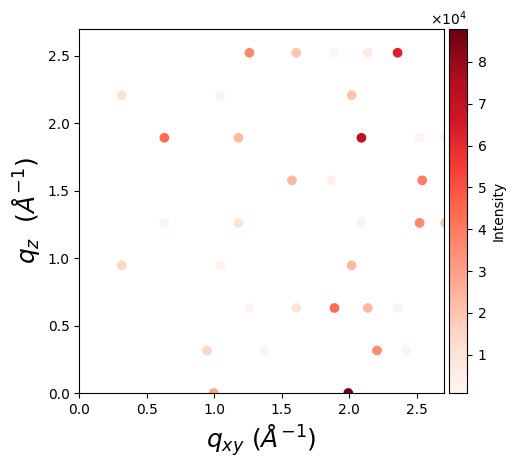
Visualization
One can visualize a GIWAXS pattern using matplotlib:
import matplotlib.pyplot as plt
from mpl_toolkits.axes_grid1.axes_divider import make_axes_locatable

fig, ax = plt.subplots(figsize=(5, 5))
ax.set_aspect('equal')
scatter = ax.scatter(*q_2d, c=intensity, cmap='Reds')

ax.set_xlabel(r'$q_{xy}$ $(Å^{-1})$', fontsize=18)
ax.set_ylabel(r'$q_{z}$ $(Å^{-1})$', fontsize=18)

divider = make_axes_locatable(ax)

# Append a new axes for the color bar to the right of the current axes
cax = divider.append_axes("right", size="5%", pad=0.05)

# Create color bar in the new axes
colorbar = fig.colorbar(scatter, cax=cax)
colorbar.set_label('Intensity')

plt.show()
Citation
If you use this package in your research, please cite it as follows:
Romodin, M., Starostin, V., Lapkin, D., Hinderhofer, A., & Schreiber, F. (2025).
mlgid-project/pygidSIM: v0.1.1. Zenodo. https://doi.org/10.5281/zenodo.17609569
2 maintainers


Metadata
2 maintainers
Release files for pygidsim 0.1.7
For a detailed explanation of source distributions (sdists) and built distributions (wheels), please see the package formats documentation.
Source distribution (sdist)
| File | Size | Uploaded | |
|---|---|---|---|
| pygidsim-0.1.7.tar.gz | 38.5 kB | Details |
Built distribution (wheel)
| File | Interpreter | ABI | Platform | Reset |
|---|---|---|---|---|
| pygidsim-0.1.7-py3-none-any.whl | Python 3 | none | any | Details |
Total release size: 70.9 kB
Release files / pygidsim-0.1.7.tar.gz
| Download URL | pygidsim-0.1.7.tar.gz |
|---|---|
| Size | 38.5 kB |
| Tags | Source |
|
SHA-256 checksum How to use checksums |
d535c60d11b76dc88109334a45cef5b174765855d7cb67d2c46329c0cd5242d9
|
|
BLAKE2b-256 checksum How to use checksums |
0bcd34cefa89211c8e36fd9fb5e9af8a7e69f4ac8b5e41134a9609609a99d13c
|
| Upload date | |
|
Uploaded using Trusted Publishing? What is trusted publishing? |
No |
| Uploaded via |
twine/6.1.0 CPython/3.10.9
|
Release files / pygidsim-0.1.7-py3-none-any.whl
| Download URL | pygidsim-0.1.7-py3-none-any.whl |
|---|---|
| Size | 32.4 kB |
| Tags | Python 3 |
|
SHA-256 checksum How to use checksums |
86ab65956a4ea22fd05c94dccf3fbcdb187e793fcdf62df902905d7625ad1c21
|
|
BLAKE2b-256 checksum How to use checksums |
8c8f6f2ee8672bdfa56cc997ae24a21779c50c5a2767cc860fe023f92530fa24
|
| Upload date | |
|
Uploaded using Trusted Publishing? What is trusted publishing? |
No |
| Uploaded via |
twine/6.1.0 CPython/3.10.9
|














