
PyGlass
Apple-style liquid glass for PyQt6 — real refraction, on macOS and Windows.




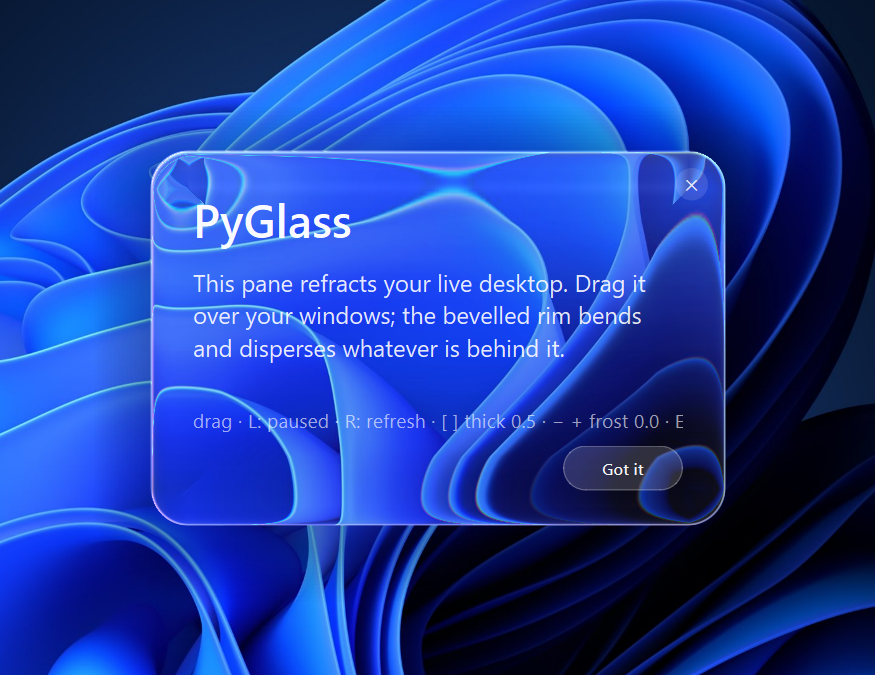
I couldn't sleep one night, so I sat down with Claude Code and tried to replicate Apple's "liquid glass" — for real, in a plain PyQt6 + numpy stack that runs the same on macOS and Windows.
At my company we ship B2B software, and like a lot of B2B software it looked like it was frozen in 2010. My customers aren't digital natives — but they stare at our screens every single day, and I think they deserve something that feels alive too, not the same tired status quo. This is me trying to give a little of that back.
It's MIT-licensed — use it, build something nice with it. And if it made you smile, a ⭐ would genuinely make my day.
Not faux "glassmorphism" (a translucent white rectangle). PyGlass models the panel as a real beveled glass slab and refracts the pixels behind it: Snell lens-wrap at the rim, per-wavelength chromatic dispersion, Fresnel reflection, and an optional frosted blur — all in numpy, no shaders, no native code.
Install
pip install pyglass-qt              # from PyPI
pip install "pyglass-qt[macos]"     # + ScreenCaptureKit (live+recordable desktop mode on macOS)
# or straight from GitHub:
pip install "git+https://github.com/neomosh8/pyglass.git"
The distribution is
pyglass-qt(the namepyglasswas already taken on PyPI), but you stillimport pyglass. The base install is just PyQt6 + numpy; the[macos]extra adds PyObjC for ScreenCaptureKit (only used by desktop mode on macOS 12.3+).
Quick start
from pyglass import GlassPane, GlassMaterial
from PyQt6.QtWidgets import QVBoxLayout, QLabel

# A glass modal over your existing window — refracts whatever's behind it.
pane = GlassPane(my_window, material=GlassMaterial(thickness=0.6, frost=0.3))
QVBoxLayout(pane.content).addWidget(QLabel("Hello from glass"))
pane.show()

# …or, parentless, a frameless window that refracts the live desktop:
GlassPane(material=GlassMaterial(thickness=0.7, frost=0.15)).show()
Put your widgets in pane.content. A child pane captures its parent (with
itself hidden) for the backdrop, so no cooperation from the host is needed —
it works on any widget. Drag it anywhere; [ ] adjust thickness, - +
adjust frost, Esc closes.
Gallery
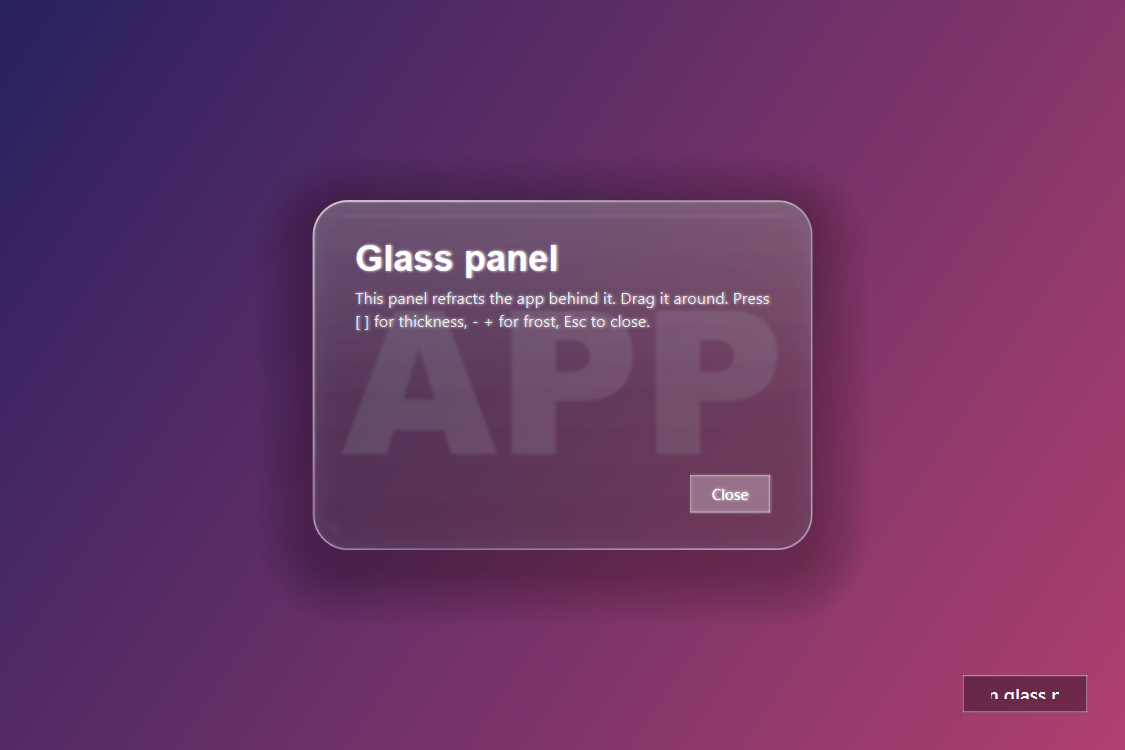
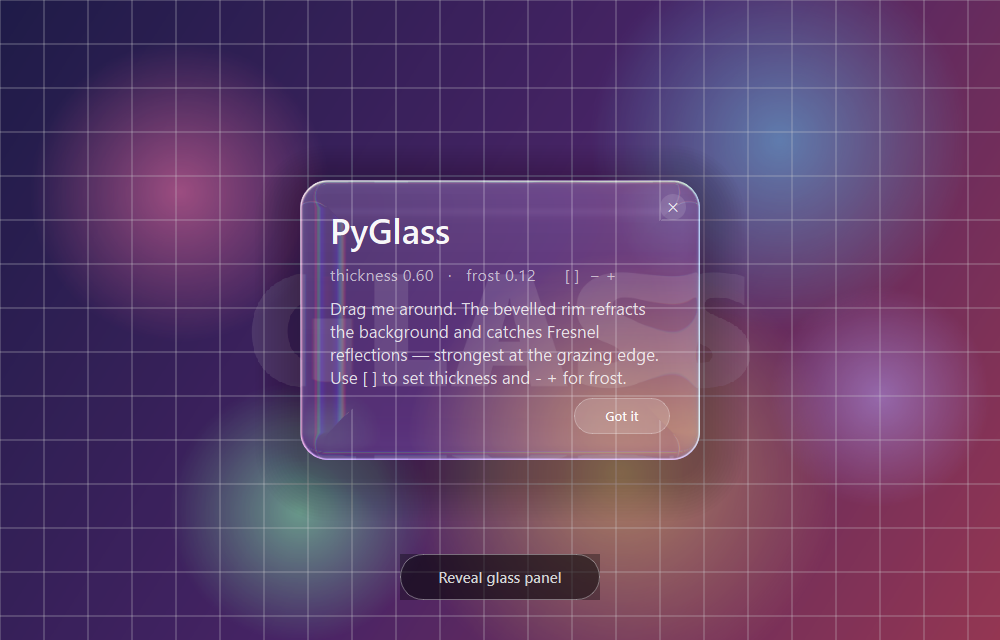
| In-app modal | The frosted demo popup |
|---|---|
 |
 |
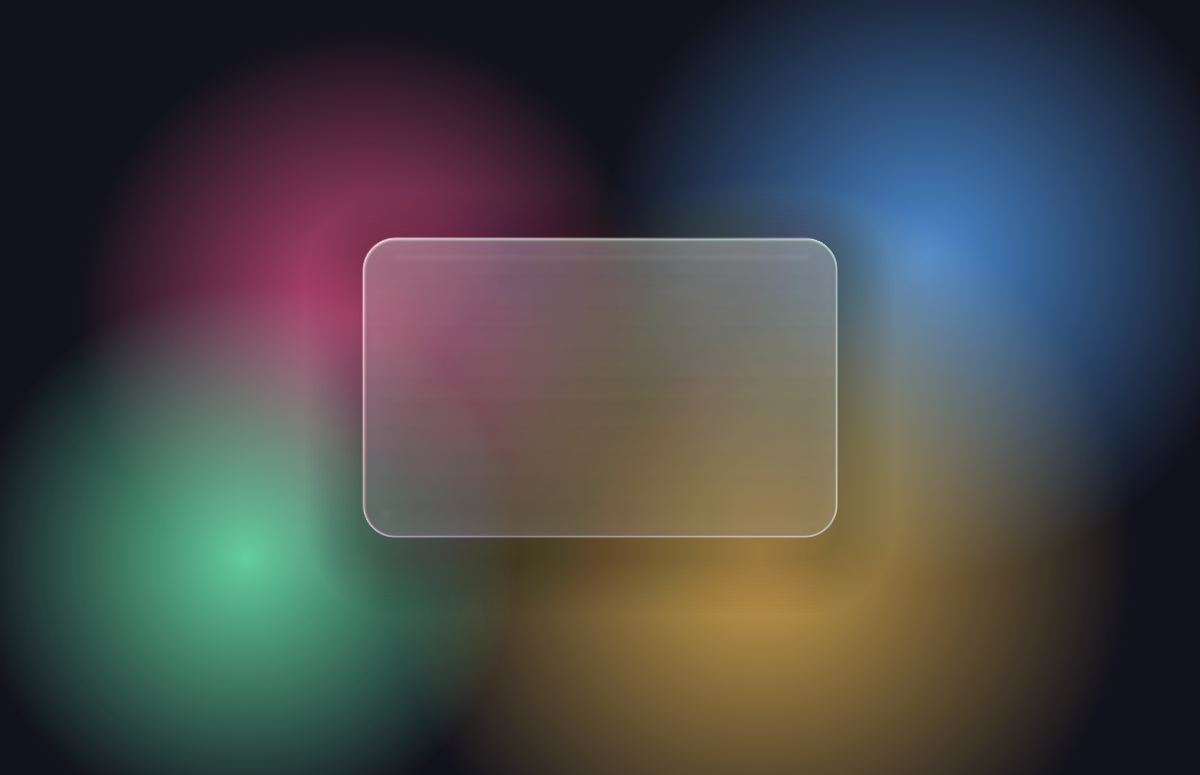
A glass card refracting a live, animated scene (see examples/recipes.py):
The two dials
The whole look is driven by GlassMaterial — two perceptual
dials in [0, 1] that re-derive a dozen physical parameters at once, so the pane
always reads as one coherent piece of glass. The neutral pair
(thickness=0.5, frost=0) reproduces the tuned baseline exactly.
| Dial | Meaning | What it drives |
|---|---|---|
thickness |
perceived slab depth / mass (optical path length) | background displacement, the curved lens-wrap width, the IOR range / rim bend, chromatic dispersion, the spectral rim-line, and the capture margin so the wrap never clamps |
frost |
surface roughness (ground / milk glass) | a transmission blur (forward scatter), a milky multiple-scatter veil, and a softened dispersion line — transmission-side only, so frost=0 is byte-for-byte the sharp look |
thickness is one scalar standing in for T: a thicker slab bends light more,
has a bigger rounded edge, disperses colour more (longer optical path) and casts
a thicker rim — all slaved together. frost is microfacet roughness: a rough
face scatters transmitted light into a cone that projects to a blur.
GlassStyle separately tunes the non-physical chrome (shadow, tint, sheen, rim).
Two layers
High-level — GlassPane (above): a drop-in frameless glass widget. Child →
in-app modal/panel; parentless → a top-level window over the desktop.
Low-level — compose it yourself inside any paintEvent:
from pyglass import GlassRenderer, paint_glass, WidgetBackdrop, GlassMaterial

backdrop = WidgetBackdrop(host)                 # or ScreenBackdrop(window)
renderer = GlassRenderer(GlassMaterial(), w, h, radius)
backdrop.changed.connect(self.update)
# in paintEvent:
pm = renderer.refract(backdrop.array(), origin, backdrop.dpr())
paint_glass(painter, panel_rect, radius, pm)
See pyglass/glass.py (GlassPopup) for a full worked
example with a scrim and an open/close animation.
Recipes — embedding it well
examples/recipes.py is a runnable, heavily-commented
guide to making glass feel right in a real app:
- Live refraction of changing content —
GlassPanegrabs its backdrop on show / drag-release; if the content behind keeps moving (animation, video, a scrolling view), drivepane.refresh()on a timer so the glass tracks it. - Content-friendly material — use a thin
bevelso the refracting rim doesn't bleed into your text; the interior stays a clean 1:1 surface. - Thick vs. frosted — clear thick glass (high
thickness, lowfrost) reads as a block you see through; raisefrostfor a ground-glass look. - Legibility tint via
GlassStyle, and free dragging that re-slices the cached backdrop as you move (full-quality on release).
Run the demos
python main.py            # the frosted refractive modal (above)
python main.py --desktop  # a glass window over your live desktop
python examples/in_app_modal.py
python examples/recipes.py
Desktop mode — glass over your real screen
A parentless GlassPane (or python main.py --desktop) floats over your live
desktop and refracts whatever is behind it — all your windows, not just the
wallpaper (that's the hero shot up top).
The pane keeps the glass out of its own capture (so it doesn't refract itself), which lets it re-grab the live screen without hiding — live, no flicker, and dragging re-slices the last grab each frame.
-
Windows: the Magnification API (
MagSetWindowFilterList+MW_FILTERMODE_EXCLUDE) captures the screen with the glass filtered out of only this capture. So it's live and fully recordable — the window stays visible to Snipping Tool / OBS / Teams — with no flicker and no trade-off. Captures hardware-accelerated windows too. (Falls back toWDA_EXCLUDEFROMCAPTUREon pre-2004 Windows; see the toggle note below.) -
macOS: ScreenCaptureKit (
SCContentFilter(display:excludingWindows:), macOS 12.3+) streams the screen with the glass filtered out of only this stream — the per-stream analog of the Windows magnifier. So it's live and fully recordable (the window stays visible to QuickTime / OBS), with no flicker. Needs the[macos]extra (pip install "pyglass-qt[macos]", which pulls PyObjC) and Screen Recording permission (System Settings → Privacy & Security → Screen Recording).Fallback (macOS < 12.3 or no PyObjC): the system
screencaptureCLI (which, unlike Qt'sgrabWindow, returns the full screen with every window) plus a globalNSWindowSharingNoneexclusion. That hides the window from all recorders, so pressCto make it capturable (paused) and back. -
Linux: no portable self-exclusion, so it captures once and stays paused (press
Rto refresh) — no flicker. The dials still work live.
C— capture toggle (fallback paths only): when the only option is a global exclusion (WDA_EXCLUDEFROMCAPTURE/NSWindowSharingNone) it hides the window from all capture, soCdrops it (window becomes recordable but paused —Rto refresh) and toggles back to hidden + live. The per-stream capturers — Windows Magnification and macOS ScreenCaptureKit — need none of this: they're recordable while live, soCis a no-op there.
Platform support
Cross-platform — macOS, Windows, Linux. PyQt6 + numpy only. The in-app glass reads the app's own rendered scene (no OS screen-capture permission needed); fonts fall back gracefully and device-pixel-ratio is handled, so it renders correctly on Windows HiDPI and Retina alike.
How the refraction works
The panel is a beveled glass slab over a rounded-rectangle signed distance field.
The flat centre passes light straight through; the rim is a quarter-circle
roundover whose slope grows toward the edge. The vertical incident ray is
refracted there with Snell's law and projected through the glass thickness,
so the 1/(-T_z) term curls the background into a curved lens-wrap (not a flat
shift). Each colour channel uses its own IOR → a chromatic-dispersion fringe.
The Schlick–Fresnel term rises from ~F0 at the centre to ~1 at the grazing
rim, where the surface reflects a virtual environment. A lightened iridescent
spectral line is added along the border. frost adds a fast separable blur of
the transmitted background.
All geometry-dependent work (normals, per-channel sample coordinates, Fresnel
weight, reflected environment) is precomputed once into a GlassKernel; each
frame only runs the bilinear gather (+ the box blur when frosted), so dragging
stays smooth.
Layout
| File | Purpose |
|---|---|
pyglass/refract.py |
Engine — GlassKernel (refraction + Fresnel over a beveled SDF) and GlassMaterial (the two dials) |
pyglass/effect.py |
GlassRenderer, paint_glass, GlassStyle — the reusable rendering core |
pyglass/backdrop.py |
WidgetBackdrop / ScreenBackdrop — what the glass refracts |
pyglass/pane.py |
GlassPane — the drop-in glass widget |
pyglass/glass.py |
GlassPopup — in-app modal demo built on the low-level core |
pyglass/desktop.py |
DesktopGlass — desktop-window demo |
examples/ |
in_app_modal.py, desktop_window.py, recipes.py |
License
MIT — see LICENSE. Built one sleepless night with the help of Claude Code. If you ship something nice with it, I'd love a ⭐.
1 maintainer

Metadata
1 maintainer
Release files for pyglass-qt 0.3.0
For a detailed explanation of source distributions (sdists) and built distributions (wheels), please see the package formats documentation.
Source distribution (sdist)
| File | Size | Uploaded | |
|---|---|---|---|
| pyglass_qt-0.3.0.tar.gz | 42.8 kB | Details |
Built distribution (wheel)
| File | Interpreter | ABI | Platform | Reset |
|---|---|---|---|---|
| pyglass_qt-0.3.0-py3-none-any.whl | Python 3 | none | any | Details |
Total release size: 87.2 kB
Release files / pyglass_qt-0.3.0.tar.gz
| Download URL | pyglass_qt-0.3.0.tar.gz |
|---|---|
| Size | 42.8 kB |
| Tags | Source |
|
SHA-256 checksum How to use checksums |
b0ee24cb45b8527d3e0429d239c4617c1bc8203e9e5943efe5e4626a86a7f20b
|
|
BLAKE2b-256 checksum How to use checksums |
a23e8e34bcc36f746a3724fdac9e44a41ee2d6f205a87b8abffc87d6c6dde9f5
|
| Upload date | |
|
Uploaded using Trusted Publishing? What is trusted publishing? |
No |
| Uploaded via |
twine/6.2.0 CPython/3.12.10
|
Release files / pyglass_qt-0.3.0-py3-none-any.whl
| Download URL | pyglass_qt-0.3.0-py3-none-any.whl |
|---|---|
| Size | 44.4 kB |
| Tags | Python 3 |
|
SHA-256 checksum How to use checksums |
0e6fcc7c1efb8cc4480ca529b7eb7764ee7b57962a4df2bb2de0293b679a8573
|
|
BLAKE2b-256 checksum How to use checksums |
6d0b6a604278509e1bb691cd5bfbdc8d0f6c5133ae624b1b167cdb2c16b3c1d8
|
| Upload date | |
|
Uploaded using Trusted Publishing? What is trusted publishing? |
No |
| Uploaded via |
twine/6.2.0 CPython/3.12.10
|














