
A tool for converting dictionary files aka glossaries.

Project description
PyGlossary
A tool for converting dictionary files aka glossaries.
The primary purpose is to be able to use our offline glossaries in any Open Source dictionary we like on any OS/device.
There are countless formats, and my time is limited, so I implement formats that seem more useful for myself, or for Open Source community. Also diversity of languages is taken into account. Pull requests are welcome.
Screenshots
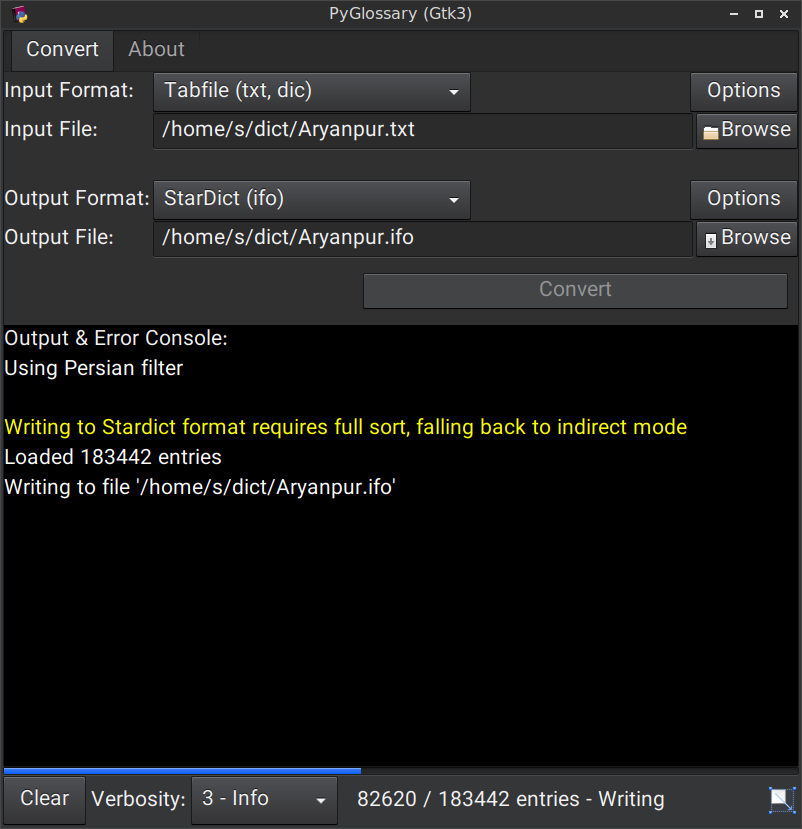
Linux - Gtk3-based interface
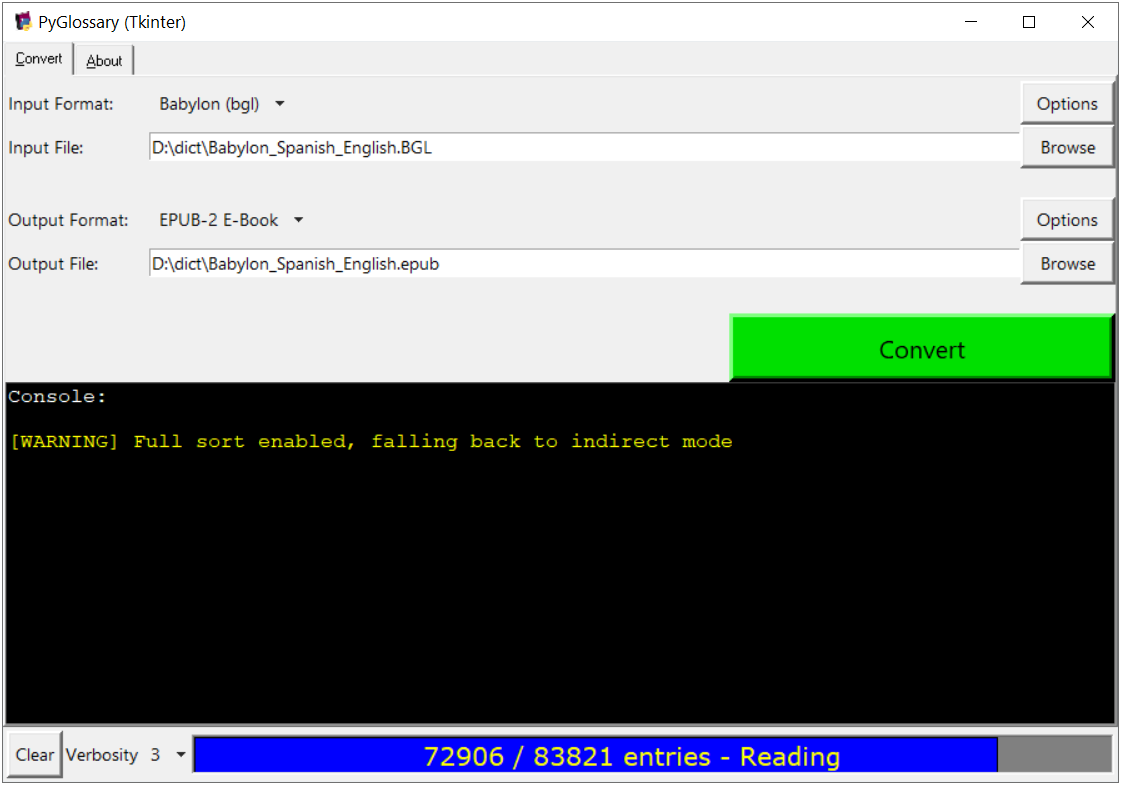
Windows - Tkinter-based interface
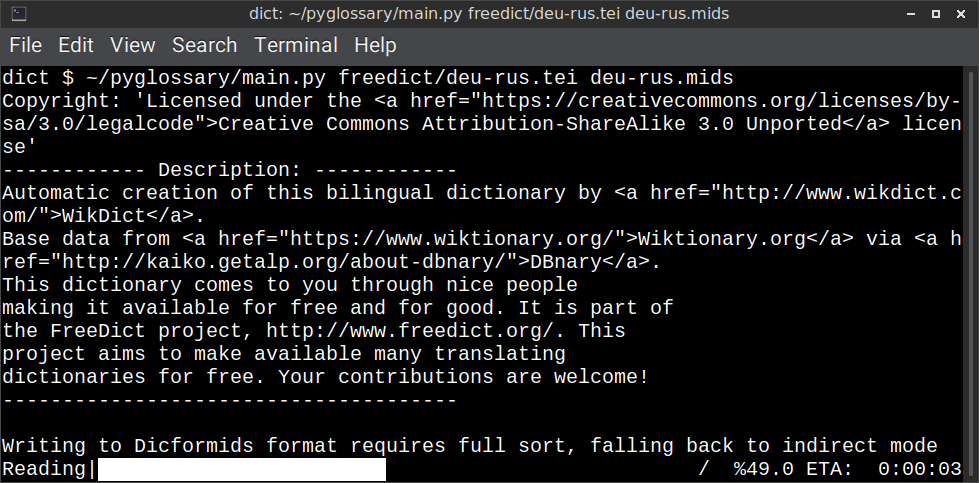
Linux - command-line interface
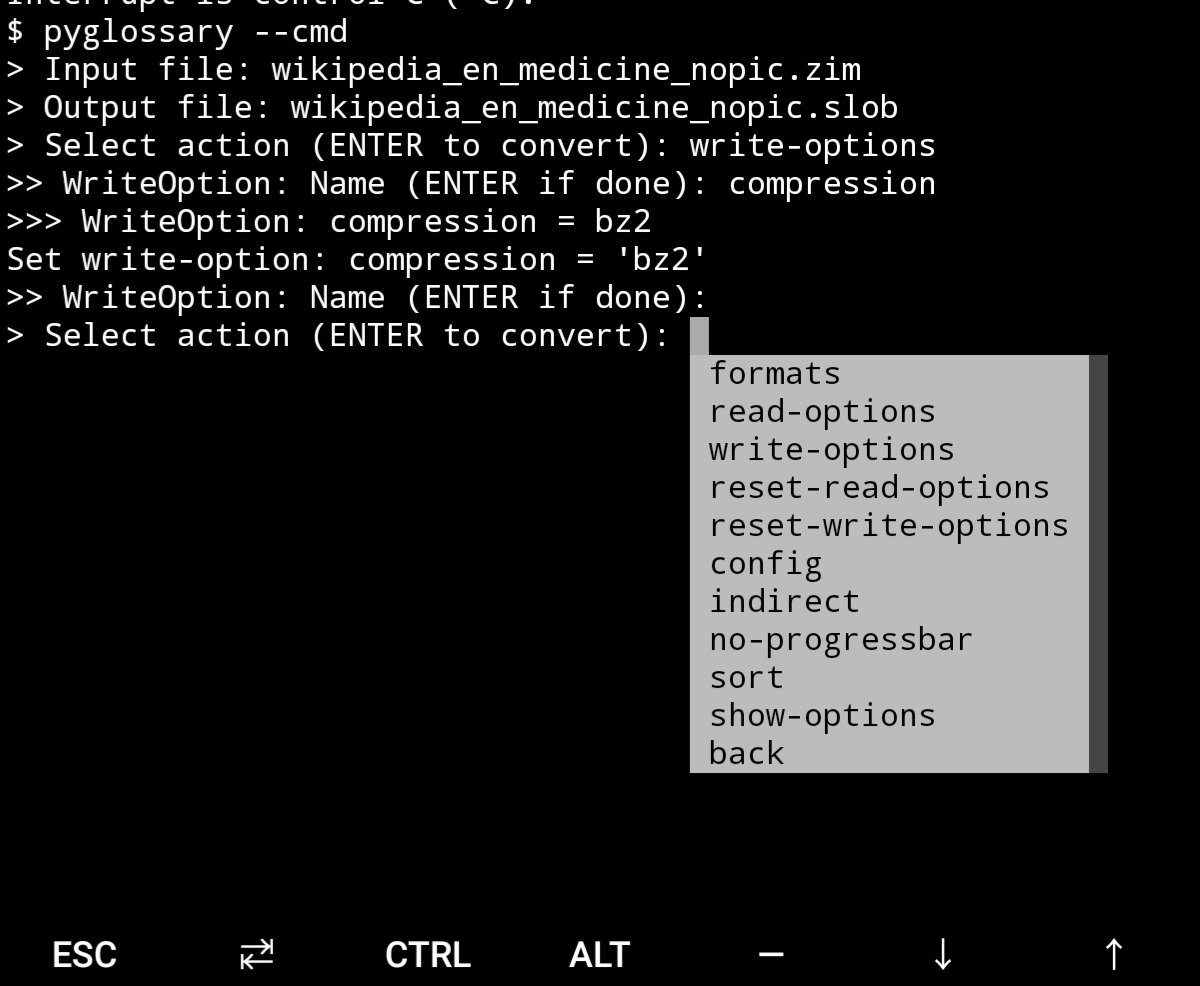
Android Termux - interactive command-line interface
Supported formats
| Format | Extension | Read | Write | |
|---|---|---|---|---|
| Aard 2 (slob) | 🔢 | .slob | ✔ | ✔ |
| ABBYY Lingvo DSL (Russian-origin) | 📝 | .dsl | ✔ | |
| AppleDict Binary | 🔢 | .dictionary | ✔ | ❌ |
| AppleDict Source | 📁 | ✔ | ||
| Babylon | 🔢 | .bgl | ✔ | ❌ |
| CC-CEDICT (Chinese) | 📝 | ✔ | ❌ | |
| cc-kedict (Korean) | 📝 | ✔ | ❌ | |
| CSV | 📝 | .csv | ✔ | ✔ |
| Dict.cc (SQLite3, German) | 🔢 | ✔ | ||
| DICT.org / Dictd server | 📁 | (📝.index) | ✔ | ✔ |
| DICT.org / dictfmt source file | 📝 | (.dtxt) | ✔ | |
| dictunformat output file | 📝 | (.dictunformat) | ✔ | |
| DictionaryForMIDs | 📁 | (📁.mids) | ✔ | ✔ |
| DigitalNK (SQLite3, N-Korean) | 🔢 | ✔ | ||
| EDLIN | 📁 | .edlin | ✔ | ✔ |
| EPUB-2 E-Book | 📦 | .epub | ❌ | ✔ |
| FreeDict | 📝 | .tei | ✔ | ✔ |
| Gettext Source | 📝 | .po | ✔ | ✔ |
| HTML Directory (by file size) | 📁 | ❌ | ✔ | |
| JMDict (Japanese) | 📝 | ✔ | ❌ | |
| JSON | 📝 | .json | ✔ | |
| Kobo E-Reader Dictionary | 📦 | .kobo.zip | ❌ | ✔ |
| Kobo E-Reader Dictfile | 📝 | .df | ✔ | ✔ |
| Lingoes Source | 📝 | .ldf | ✔ | ✔ |
| Octopus MDict (Chinese-origin) | 🔢 | .mdx | ✔ | ❌ |
| Sdictionary Binary | 🔢 | .dct | ✔ | |
| Sdictionary Source | 📝 | .sdct | ✔ | |
| SQL | 📝 | .sql | ❌ | ✔ |
| StarDict | 📁 | (📝.ifo) | ✔ | ✔ |
| Tabfile | 📝 | .txt, .tab | ✔ | ✔ |
| Wiktionary Dump | 📝 | .xml | ✔ | ❌ |
| Wordset.org | 📁 | ✔ | ||
| XDXF | 📝 | .xdxf | ✔ | ❌ |
| Zim (Kiwix) | 🔢 | .zim | ✔ |
Legend:
- 📁 Directory
- 📝 Text file
- 📦 Package/archive file
- 🔢 Binary file
- ✔ Supported
- ❌ Will not be supported
Requirements
PyGlossary requires Python 3.7 or higher, and works in practically all modern operating systems. While primarily designed for GNU/Linux, it works on Windows, Mac OS X and other Unix-based operating systems as well.
As shown in the screenshots, there are multiple User Interface types (multiple ways to use the program).
-
Gtk3-based interface, uses PyGI (Python Gobject Introspection) You can install it on:
- Debian/Ubuntu:
apt install python3-gi python3-gi-cairo gir1.2-gtk-3.0 - openSUSE:
zypper install python3-gobject gtk3 - Fedora:
dnf install pygobject3 python3-gobject gtk3 - ArchLinux:
pacman -S python-gobject gtk3- https://aur.archlinux.org/packages/pyglossary/
- Mac OS X:
brew install pygobject3 gtk+3 - Nix / NixOS:
nix-shell -p gnome3.gobjectIntrospection python38Packages.pygobject3 python38Packages.pycairo
- Debian/Ubuntu:
-
Tkinter-based interface, works in the lack of Gtk. Specially on Windows where Tkinter library is installed with the Python itself. You can also install it on:
- Debian/Ubuntu:
apt-get install python3-tk tix - openSUSE:
zypper install python3-tk tix - Fedora:
yum install python3-tkinter tix - Mac OS X: read https://www.python.org/download/mac/tcltk/
- Nix / NixOS:
nix-shell -p python38Packages.tkinter tix
- Debian/Ubuntu:
-
Command-line interface, works in all operating systems without any specific requirements, just type:
python3 main.py --help- Interactive command-line interface
- Requires:
pip3 install prompt_toolkit - Perfect for mobile devices (like Termux on Android) where no GUI is available
- Automatically selected if output file argument is not passed and one of these:
- On Linux and
$DISPLAYenvironment variable is empty or not set- For example when you are using a remote Linux machine over SSH
- On Mac and no
tkintermodule is found
- On Linux and
- Manually select with
--cmdor--ui=cmd- Minimally:
python3 main.py --cmd - You can still pass input file, or any flag/option
- Minimally:
- If both input and output files are passed, non-interactive cmd ui will be default
- If you are writing a script, you can pass
--no-interactiveto force disable interactive ui- Then you have to pass both input and output file arguments
- Don't forget to use Up/Down or Tab keys in prompts!
- Up/Down key shows you recent values you have used
- Tab key shows available values/options
- You can press Control+C (on Linux/Windows) at any prompt to exit
- Requires:
- Interactive command-line interface
When you run the program without any command-line arguments or options, PyGlossary tries to find PyGI, if it's installed, opens the Gtk3-based interface, if it's not, tries to find Tkinter and open the Tkinter-based interface. And exits with an error if neither are installed.
But you can explicitly determine the user interface type using --ui,
for example:
python3 main.py --ui=gtk
Or
python3 main.py --ui=tk
Feature-specific Requirements
-
Using
--remove-html-allflagsudo pip3 install lxml beautifulsoup4 -
Reading from FreeDict, XDXF, JMDict or CC-CEDICT
sudo pip3 install lxml -
Reading from cc-kedict
sudo pip3 install lxml PyYAML -
Reading or writing Aard 2 (.slob) files
sudo pip3 install PyICU -
Writing to Kobo E-Reader Dictionary
sudo pip3 install marisa-trie -
Reading from Zim (see #228)
sudo pip3 install libzim -
Reading from Octopus MDict (MDX)
python-lzois required for some MDX glossaries. First try converting your MDX file, if failed (AssertionErrorprobably), then try to install LZO library and Python binding.
Using Termux on Android? See doc/termux.md
User Plugins
If you want to add your own plugin without adding it to source code directory, or you want to use a plugin that has been removed from repository, you can place it in this directory:
- Linux:
~/.pyglossary/plugins/ - Mac:
~/Library/Preferences/PyGlossary/plugins - Windows:
C:\Users\USERNAME\AppData\Roaming\PyGlossary\plugins
AppleDict
See doc/apple.md for AppleDict requirements and instructions.
Internal Glossary Structure
A glossary contains a number of entries.
Each entry contains:
- Headword (title or main phrase for query)
- Alternates (some alternative phrases for query)
- Definition
In PyGlossary, headword and alternates together are accessible as a single Python list entry.l_word
entry.defi is the definition as a Python Unicode str. Also entry.b_defi is definition in UTF-8 byte array.
entry.defiFormat is definition format. If definition is plaintext (not rich text), the value is m. And if it's in HTML (contains any html tag), then defiFormat is m. The value x is also allowed for XFXF, but XDXF is not widely supported in dictionary applications.
There is another type of Entry which is called Data Entry, and generally contains image files, TTL or other audio files, or any file that was included in input glossary. For data entries:
entry.s_wordis file name (andl_wordis still a list containing this string),entry.defiFormatisbentry.datagives the content of file inbytes.
Release history Release notifications | RSS feed


Download files
Download the file for your platform. If you're not sure which to choose, learn more about installing packages.
Source Distribution
Built Distribution
Filter files by name, interpreter, ABI, and platform.
If you're not sure about the file name format, learn more about wheel file names.
Copy a direct link to the current filters
File details
Details for the file pyglossary-4.0.9.tar.gz.
File metadata
- Download URL: pyglossary-4.0.9.tar.gz
- Upload date:
- Size: 290.5 kB
- Tags: Source
- Uploaded using Trusted Publishing? No
- Uploaded via: twine/3.2.0 pkginfo/1.6.1 requests/2.24.0 setuptools/50.3.0 requests-toolbelt/0.9.1 tqdm/4.51.0 CPython/3.8.6
File hashes
| Algorithm | Hash digest | |
|---|---|---|
| SHA256 |
fda2dc6233cae14ef21bd168e42ff40b6f7248ccc0a33de8397d6295c3dd410d
|
|
| MD5 |
086d6028278ba28d08f4e0c2bfdceef8
|
|
| BLAKE2b-256 |
9b5be753966542128f7dd381f43c438fcf32a51441f4f76bb4ef0b918ffadb6e
|
File details
Details for the file pyglossary-4.0.9-py3-none-any.whl.
File metadata
- Download URL: pyglossary-4.0.9-py3-none-any.whl
- Upload date:
- Size: 369.6 kB
- Tags: Python 3
- Uploaded using Trusted Publishing? No
- Uploaded via: twine/3.2.0 pkginfo/1.6.1 requests/2.24.0 setuptools/50.3.0 requests-toolbelt/0.9.1 tqdm/4.51.0 CPython/3.8.6
File hashes
| Algorithm | Hash digest | |
|---|---|---|
| SHA256 |
7615675199d97c6704de6fec05542b52d19a3a9f1b1bbc4bfff3bbaf0ecd0710
|
|
| MD5 |
33d9eb5be2716bcba9d5625465769206
|
|
| BLAKE2b-256 |
d8f03bf5bc575a62ee9d0be99afb3e602167f90bfe9fcdcc1aedc67de4f12f75
|






