
A quality-of-life package for colour schemes/palettes and matplotlib plots.

Project description
pygmentation
A quality-of-life package for colour schemes and matplotlib plots. Note: This is not in any way affiliated with the pygments package.
Requirements
pygmentation relies on the following python packages:
numpymatplotlibrich
Colour Schemes
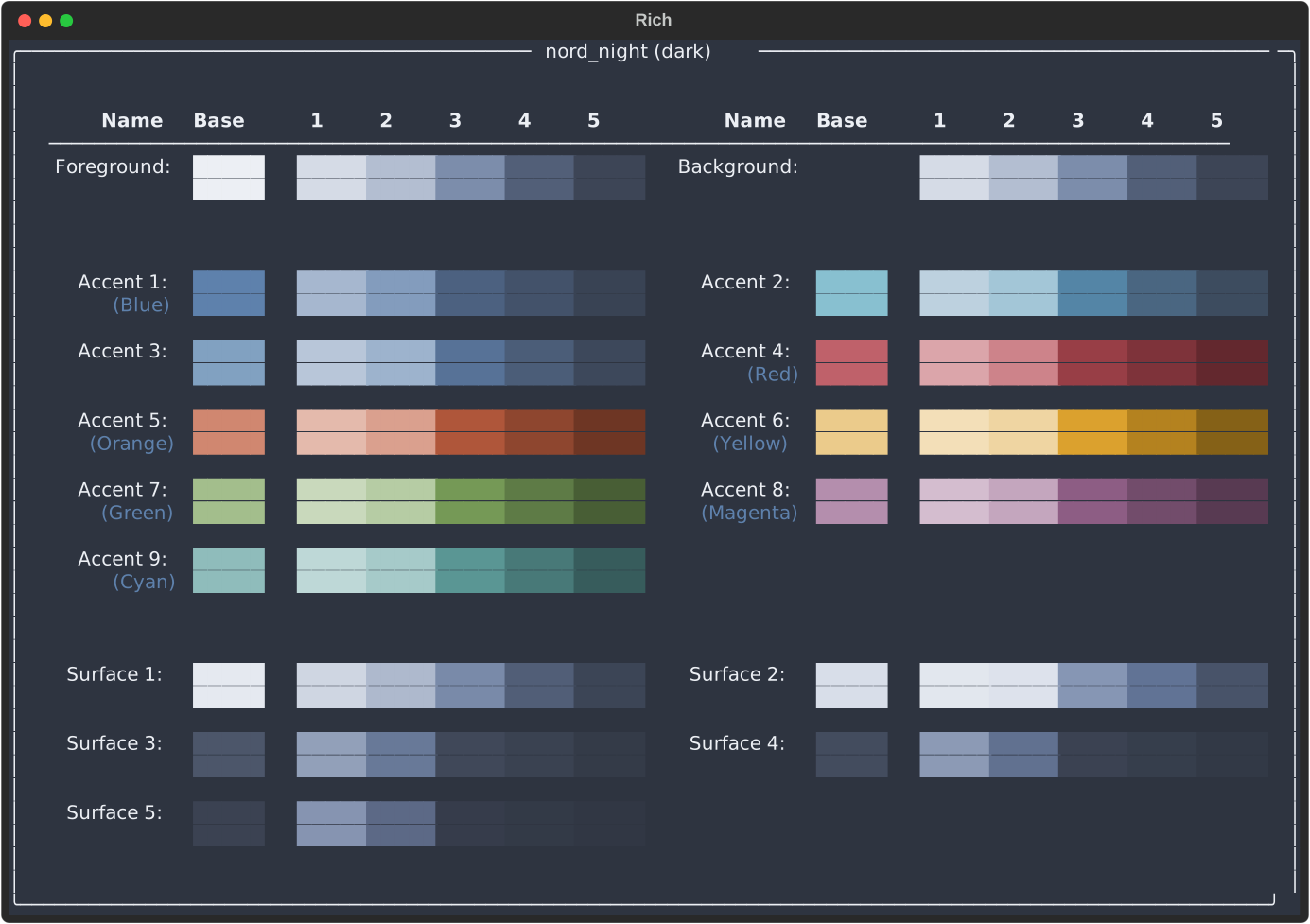
Predominantly, pygmentation is a library for handling colour schemes. Each scheme consists of a background colour family, a foreground colour family, and some number of accent and (optionally) surface colour families. Each colour family consists of six variants: the 'base' colour (the colour which is supplied directly), and 5 automatically generated variants. The exact generation of these variants is discussed in the later sections.
For example, in the Nord colour scheme - https://www.nordtheme.com/ - one of the accent colours is this red: 
1 to 5, which are as follows:
1:2:3:4:5:
Although the exact shades differ depending on the scheme (as discussed in the later sections), they will always be organised such that 1 has the most contrast with the background colour (which is in this case 
5 will have the least contrast. For dark colour schemes, this means that they are ordered from light to dark; for light schemes, from dark to light.
As a full scheme, this gives access to a wide range of variations on each colour. Again taking the Nord theme as an example, all available colours and variants are shown in the image below, which is the output from running the command pygmentation show nord dark:
Colour Aliases
While colours are always available via their index (for example, as scheme.accents[0].base), some colours are also available under aliases. When a scheme is loaded, pygmentation checks all accent colours to find which is the closest to a set of standard colours. These are as follows, with the reference hue in brackets followed by the reference colour for light and dark schemes respectively:
| Name | Hue Angle | Reference (Light) | Reference (Dark) |
|---|---|---|---|
| Red | 0° |  |
 |
| Orange | 30° |  |
 |
| Yellow | 50° |  |
 |
| Green | 120° |  |
 |
| Cyan | 180° |  |
 |
| Blue | 240° |  |
 |
| Purple | 270° |  |
 |
| Magenta | 300° |  |
 |
Four additional aliases are available,
- Error (alias for red)
- Warning (alias for yellow)
- Success (alias for green)
- Info (alias for blue)
All aliases will be assigned, although some aliases may be assigned to the same colour (for example in the Nord theme, purple and magenta both refer to the same colour: 
scheme.red.base or scheme.error.base.
Colour similarity is determined using the CIE Delta E 2000 Color-Difference algorithm; this involves converting the colour (provided in hex format) first into the L*ab colour space, then using the CIEDE2000 algorithm to determine a perceptually uniform distance between the colours. Most colour spaces (such as RGB, HSL, or hsb) are not perceptually uniform. In the HSL colour space, colours are expressed as a hue (expressed as an angle in degrees), saturation (expressed as a percentage), and lightness (expressed as a percentage). "Pure" colours (such as #ff0000 in the RGB colour space) have a saturation of 100% and a lightness of 50%.
However, the perceived visual change between a hue of 100° (


Variation Generation
Each base colour has five colour variants generated. These are designed to usually mimic the colour variations in Microsoft Office, although there are some exceptions. The generation is identical for light and dark colour schemes, but inverted. The process will be explained for a light theme (i.e, one in which the background colour is significantly lighter than the foreground colour). For dark themes, any reference to "lighter" or "darker" should be reversed. Variants are always arranged such that the 1st variant has the most contrast with the background colour, and the 5th variant has the least contrast (assuming the background is sufficiently light or sufficiently dark).
Most base colours will have two darker variants and three lighter variants. Variants are calculated in the HSL colour space. Hue and saturation are (usually) the same for the variants as the base colour, with only the lightness changing. The five variants are (as numbered):
1: 50% darker2: 25% darker3: 40% lighter4: 60% lighter5: 80% lighter
Exactly what is meant by "lighter" and "darker" is discussed in the next section.
Some colours are determined to be too light or too dark to have the full range of variants (again, this is to mimic the behaviour of Microsoft Office). In the Nord theme shown above, this is the case for the foreground and background colours, as well as surface colours 1 and 2. If a base colour has a lightness of $l>80%$, it is deemed too light to have lighter variants. In this case, it is instead given 5 darker variants:
1: 90% darker2: 75% darker3: 50% darker4: 25% darker5: 10% darker
Similarly, if a base colour has a lightness of $l<20%$, it is deemed too dark to have darker variants. In this case, it is instead given 5 lighter variants:
1: 10% lighter2: 25% lighter3: 50% lighter4: 75% lighter5: 90% lighter
Finally, some base colours may have their hue and saturation adjusted in the variants. If the hue and saturation of the base colour is close enough to the background colour (foreground colour for dark schemes), then the lighter variants will have their hue, saturation, and lightness all shifted towards the background colour (still by the same percentages). Similarly, if the hue and saturation of the base colour is close enough to the foreground colour (background colour for dark schemes), then the darker variants will have their hue, saturation, and lightness all shifted towards the foreground colour (again, by the same percentages). This produces very similar results, but gives a slightly more aesthetically pleasing result for some colours, especially when the background colour has a noticeable hue.
"Lighter" and "Darker" colours
The phrase "$20%$ lighter" is ambiguous. Here, it means that the new colour is $20%$ closer to the maximum lightness. This means that a colour will only ever reach maximum lightness if it is "lightened" by $100%$. Most of the time, this means that for a colour with lightness $l$, the colour $x%$ lighter will have lightness: $$l_{\text{new}} = l + x \times (100 - l)$$
For darker colours, the concept is the same: the colour $x%$ darker will have lightness: $$l_{\text{new}} = l - x \times (l - 0%)$$
However, the "maximum" lightness is not always $100%$ in this context. When calculating the lighter variants, the "maximum" lightness is instead the larger value out of $80%$ and the lightness of the background colour. Similarly, when calculating the darker variants, the "minimum" lightness is the smaller value out of $20%$ and the lightness of the foreground colour. This keeps the colour variants within the range of the background and foreground colours, respectively, provided the background colour is sufficiently light and the foreground colour is sufficiently dark.
For dark themes, this process is the same but with the foreground and background colours reversed.
For example, with the dark version of the Nord theme, the red colour is shown in the table below, with and without the background colour taken into account:
| Variant | Modification | Basic | With Foreground/Background |
|---|---|---|---|
| 1 | $50%$ lighter |  |
 |
| 2 | $25%$ lighter |  |
 |
| base | - | |
|
| 3 | $40%$ darker |  |
 |
| 4 | $60%$ darker |  |
 |
| 5 | $80%$ darker |  |
 |
This usually produces more aesthetically pleasing variations, but with slightly less contrast. However, clamping the values to $20%$ and $80%$ helps to ensure that the variants are still distinct from the background and foreground colours, respectively.
Usage
pygmentation can be used as a python library or via the command line interface.
Python Library
The usual use of pygmentation will be to set default styling for matplotlib plots. To be safe, pygmentation should be imported before matplotlib:
import pygmentation.pygmentation as pyg
pyg.init("rose_pine", "light")
import matplotlib.pyplot as plt

# Continue as normal. No further changes to matplotlib are required.
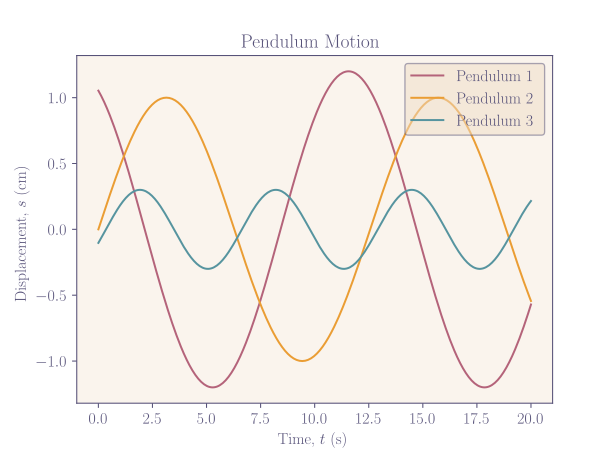
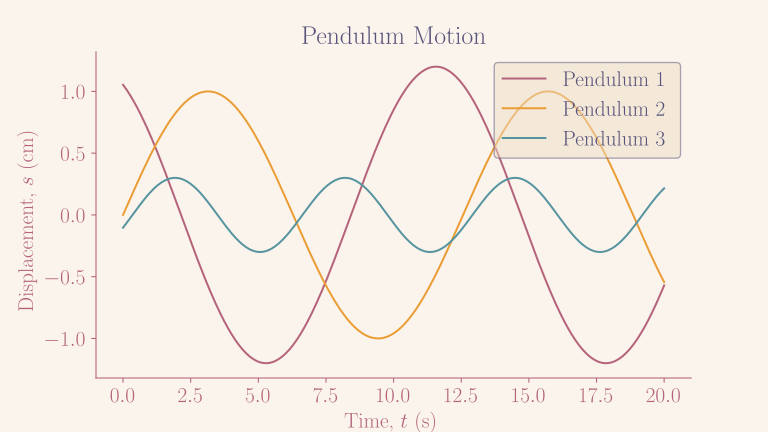
The function pyg.init takes three arguments: the name of the colour scheme, the type ("light" or "dark"), and the target document type ("report" or "presentation"). The document type will determine certain aspects of the styling, such as the aspect ratio, the font size, default text and axis colour, and so on. Examples are seen below for the rose_pine colour scheme. Note that no additional styling was specified. For the "report" style, the background is transparent where possible, with only the plot area having a solid background.
Within python, the current colour scheme is available via the pyg.get_scheme() function. This returns a ColourScheme object.
ColourScheme object
Notable methods and properties are listed below:
- Methods:
get_closest_color(color: str | Color, accents_only: bool = False) -> ColorFamilyThis takes a test colour (as either a hex RGB string or aColorobject) and returns the closest base colour in the scheme. Optionally, this can be restricted to only search the accent colours.to_latex() -> strReturns a string containing appropriate LaTeX code to define the colour scheme. For the exact format of this string, see the section below on the command line interface.to_css() -> strReturns a string containing appropriate CSS code to define the colour scheme. For the exact format of this string, see the section below on the command line interface.to_javascript() -> strReturns a string containing appropriate JavaScript code to define the colour scheme as an object. For the exact format of this string, see the section below on the command line interface.
- Properties:
foreground: ColourFamilyThe foreground colour family.background: ColourFamilyThe background colour family.accents: list[ColourFamily]The list of accent colour families.surfaces: list[ColourFamily]The list of surface colour families. This may be empty.distinct: list[ColourFamily]A list containing a subset of the accent colours. Colours which are deemed too similar to another accent colour are filtered out.colours: list[ColourFamily]A list containing all colour families within the scheme, including the foreground, background, accents, and surfaces.red: ColourFamilyThe closest accent colour to red.- Similar properties exist for each of
orange,yellow,green,cyan,blue,purple, andmagenta. error: ColourFamilyAlias forred.warning: ColourFamilyAlias foryellow.success: ColourFamilyAlias forgreen.info: ColourFamilyAlias forblue.
ColourFamily Object
A ColourFamily object contains the base colour and all variants. Notable methods and properties are listed below:
- Methods:
to_latex() -> strReturns a string containing appropriate LaTeX code to define the colour family.to_css() -> strReturns a string containing appropriate CSS code to define the colour family.to_javascript() -> strReturns a string containing appropriate JavaScript code to define the colour family as an object.
- Properties:
base: ColorThe base colour._1: Colorto_5: ColorThe variants, as described above.lightest: ColorReturns the lightest variant, regardless of whether theColouris in the context of a light or dark scheme.darkest: ColorReturns the darkest variant, regardless of whether theColouris in the context of a light or dark scheme.hex: strReturns the hex code for the base colour, without the leading#.css: strReturns the hex code for the base colour, with the leading#. TheColourFamilyobject is also subscriptable, so a colour variant can be accessed viacolour_family[1]which is equivalent tocolour_family._1.colour_family[0]is equivalent tocolour_family.base.
Colour Object
A Colour object contains a single colour, as well as methods for converting between colour spaces and for comparing colours. Notable methods and properties are listed below:
- Methods:
lighten(amount: float, in_place: bool = False, target_lightness: float = 1) -> ColourLightens the current colour by the specified amount, as described above. Ifamountis between 0 and 1, this is assumed to meanamount * 100%. Ifin_placeis true, the current colour is modified; otherwise, a newColourobject is returned.darken(amount: float, in_place: bool = False, target_lightness: float = 0) -> ColourDarkens the current colour by the specified amount, as described above. Ifamountis between 0 and 1, this is assumed to meanamount * 100%. Ifin_placeis true, the current colour is modified; otherwise, a newColourobject is returned.move_to_colour(other: Colour, amount: float, in_place: bool = False) -> ColourMoves the current colour towards the specified colour by the specified amount, in the HSL colour space. Ifamountis between 0 and 1, this is assumed to meanamount * 100%. Ifin_placeis true, the current colour is modified; otherwise, a newColourobject is returned.hue_diff(other: Colour) -> floatReturns the difference in hue between the current colour and the specified colour, in degrees, accounting for the periodic nature of the hue angle.is_lighter_than(other: Colour) -> boolReturns true if the current colour is lighter than the specified colour.is_darker_than(other: Colour) -> boolReturns true if the current colour is darker than the specified colour.distance_to(other: Colour) -> floatReturns the distance between the current colour and the specified colour using the CIEDE2000 algorithm.
- Properties:
- Properties exist to retrieve the colour in any of the following colour spaces/formats. All properties are read/write -- setting the property in any colour space will change the colour of the
Colourobject. Properties also exist for each component of these colour spaces, occasionally with aliases. These are also read/write.rgbr,g,b
hslh,s,l
hsvh_hsv,s_hsv,v(aliasv_hsv)
xyzx,y,z
labl_lab,a(aliasa_lab),b(aliasb_lab)
hexcss
- Properties exist to retrieve the colour in any of the following colour spaces/formats. All properties are read/write -- setting the property in any colour space will change the colour of the
Command Line Interface
pygmentation can be used as a command line tool when run as a module (with python3 -m pygmentation). There are three main commands: show, save, and write. These will be described fully below. show will display a given scheme in the terminal -- this is useful for quickly checking what colours are available in a given scheme. save will act the same as show but additionally saves the output to an SVG file. write will write the colour scheme to a file in a given format for use outside of python.
For all commands, if the scheme name is not recognised pygmentation will search the available schemes for similar names, and present a list of the closest matches. It will then wait for confirmation from the user. Unless you are certain that the scheme name is correct, do not assume that pygmentation will exit without user input.
In the examples below, the command is shown simply as pygmentation, not python3 -m pygmentation. This is for brevity, but an alias can be created to shorten the command if desired.
show
pygmentation show takes one required argument, the name of the colour scheme to display. This can be followed by an optional argument, the type of colour scheme to display (either light, dark, or both). The default is to display both the light and dark variants. This is rendered using the rich library, and requires a minimum terminal width of 56 characters to render correctly. It also requires your terminal emulator to support full colour. For example, the output shown in the first section for the Nord scheme would be produced by:
pygmentation show nord dark
save
pygmentation save takes the same arguments as show, but additionally takes an output file name. This is passed by the -f or --filename flag, which is required. If both the light and dark variants are to be saved, the file name will be adjusted to include the type of colour scheme (otherwise, it is used directly with no changes). For example, the following command will save the light and dark variants of the Nord scheme to nord_light.svg and nord_dark.svg respectively:
pygmentation save -f nord.svg nord
The target file must be an SVG file. It is saved via the python rich library, so is again dependent on your terminal emulator as it is effectively recording the output of pygmentation show and saving it to a file.
write
pygmentation write takes up to four arguments:
-for--filename: The name of the file to write to. If both light and dark variants are to be written, the filename will be bodified to include_lightand_dark. This is required.-tor--type: The type of file to write. If provided, this should be one ofcss,js, orlatex. If not provided, pygmentation will attempt to infer this from the filename.scheme_name(positional): The name of the scheme to write. This is required.scheme_type(positional): If provided, this should be one oflight,dark, orboth(default). Writes only the specified type of scheme. If not provided, writes both light and dark variants.
A minimal example would be:
pygmentation write -f nord.css nord
This would produce two files, nord_light.css and nord_dark.css, containing the light and dark variants of the Nord scheme respectively. The exact format of the output is described below.
A second example would be:
pygmentation write -f "ctp.txt" -t latex catppuccin dark
This would produce a single file ctp.txt containing the dark variant of the Catppuccin scheme in LaTeX format (https://github.com/catppuccin/catppuccin). The file extension is not used to determine the output format, so the file name can be anything. The output format is determined by the -t or --type flag, which is required if the file name does not contain a recognised extension.
Output Formats
LaTeX
The LaTeX output is a file containing valid LaTeX markup to define all colours and aliases of the scheme with the xcolor package. The foreground colour will be called ForegroundColour, and the background colour will be called BackgroundColour. The accent colours are labelled numerically as Accent1, Accent2 etc, and the surface colours (if any) are labelled similarly: Surface1 etc. The aliases are available under their capitalised names: Red, Error etc. The capitalisation is to avoid conflicts with the standard LaTeX colours.
Variants are available by appending _1 to _5 to each colour name or alias. For example, Blue_5 is the lightest variant of the blue colour, and Error_1 is the darkest variant of the red colour (in a light theme).
CSS
The css output is a file containing css variable declarations. They are not enclosed in any style declaration, and so are not on their own a valid css file. The foreground colour will be defined as --clr-foreground, the background colour as --clr-background, and the accent colours as --clr-accent1 etc. The surface colours (if any) are labelled similarly: --clr-surface1 etc. The aliases are available under their names, such as --clr-red, --clr-error etc.
Variants are available by appending -1 to -5 to each colour name or alias. For example, --clr-blue-5 is the lightest variant of the blue colour, and --clr-error-1 is the darkest variant of the red colour (in a light theme).
Additionally, each colour is available as an rgb triplet, with the same naming convention as the hex colours. For example, --clr-foreground-1-rgb is the rgb triplet for the lightest variant of the foreground colour. This can be used in cases where the hex colour is not appropriate, such as when transparency is needed:
background-color: rgba(var(--clr-foreground-1-rgb), 0.5);
Textual CSS
The tcss output is identical to the css output except that it uses the tcss syntax for use with Textual:
$clr-accent1: #BF616A;
JavaScript
The JavaScript output is a file containing the javascript code necessary to define a single object colours containing all colours and aliases as properties. The foreground colour will be defined as colours.foreground, the background colour as colours.background. Accent colours are defined as both colours.accent1 etc, and as part of the array colours.accents (with surfaces defined in a similar way).
Each colour is also an object which contains the properties base and 1 to 5. Each of these gives the colour as a hex string, with the leading #. Aliases are defined with references, not copies.


Download files
Download the file for your platform. If you're not sure which to choose, learn more about installing packages.
Source Distribution
Built Distribution
Filter files by name, interpreter, ABI, and platform.
If you're not sure about the file name format, learn more about wheel file names.
Copy a direct link to the current filters
File details
Details for the file pygmentation-0.1.2.tar.gz.
File metadata
- Download URL: pygmentation-0.1.2.tar.gz
- Upload date:
- Size: 45.9 kB
- Tags: Source
- Uploaded using Trusted Publishing? No
- Uploaded via: twine/5.1.1 CPython/3.11.6
File hashes
| Algorithm | Hash digest | |
|---|---|---|
| SHA256 |
b1fe5e8034faa797d270554fc8aa33776e329360c24e0c5fb0332d09147be59b
|
|
| MD5 |
3ec2e8d0832f039d606dae7c398d9e3a
|
|
| BLAKE2b-256 |
f804a0befcc9eda1424538fbdd60bb71a6a6052a77429a251b58e1f2b6b2bb73
|
File details
Details for the file pygmentation-0.1.2-py3-none-any.whl.
File metadata
- Download URL: pygmentation-0.1.2-py3-none-any.whl
- Upload date:
- Size: 39.8 kB
- Tags: Python 3
- Uploaded using Trusted Publishing? No
- Uploaded via: twine/5.1.1 CPython/3.11.6
File hashes
| Algorithm | Hash digest | |
|---|---|---|
| SHA256 |
c4e8cba76046550e582067280b32782a00f3843c4660f40535d187cc5429727a
|
|
| MD5 |
960ee1dc4050ad09d0cb09b6fe557481
|
|
| BLAKE2b-256 |
5fc6a100eda1a50c748a0f2a3db07d045f32171f268dca1de5d845d0a2bb81d1
|






