
pygments-djc





Pygments Lexers for django-components.
Installation
-
Install the package:
pip install pygments-djc
-
Add the lexers to your Pygments configuration by simply importing
pygments_djcimport pygments_djc
Lexers
DjangoComponentsPythonLexer
Code blocks: djc_py / djc_python
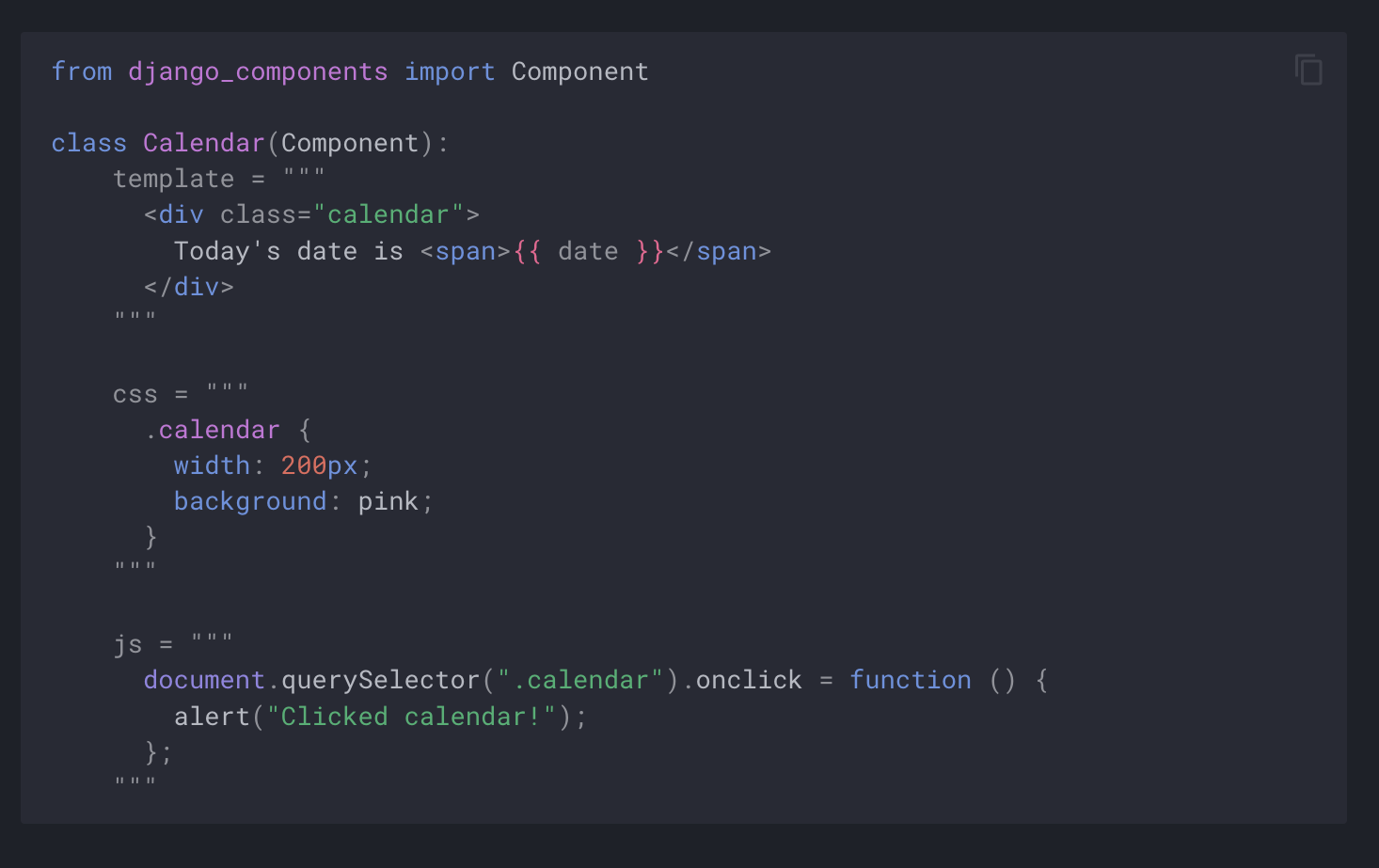
This is the same as Python3 Lexer, but also highlights nested JS / CSS / HTML code blocks within Component classes:
class MyComponent(Component):
    template = """
      <div>Hello World</div>
    """
The syntax highlight then looks like this:
Release notes
Read the Release Notes to see the latest features and fixes.
Development
Tests
To run tests, use:
pytest
1 maintainer

Metadata
1 maintainer
Release files for pygments-djc 1.0.1
For a detailed explanation of source distributions (sdists) and built distributions (wheels), please see the package formats documentation.
Source distribution (sdist)
| File | Size | Uploaded | |
|---|---|---|---|
| pygments_djc-1.0.1.tar.gz | 5.0 kB | Details |
Built distribution (wheel)
| File | Interpreter | ABI | Platform | Reset |
|---|---|---|---|---|
| pygments_djc-1.0.1-py3-none-any.whl | Python 3 | none | any | Details |
Total release size: 10.2 kB
Release files / pygments_djc-1.0.1.tar.gz
| Download URL | pygments_djc-1.0.1.tar.gz |
|---|---|
| Size | 5.0 kB |
| Tags | Source |
|
SHA-256 checksum How to use checksums |
6adf7f965bf78abc2a9101d037dee36aabce9b0a01250e7ad834b3aafb9c05da
|
|
BLAKE2b-256 checksum How to use checksums |
b4f1f41333ce2761a21afcd1952e7e842e182b1aebb1e71e40786541ac8e0347
|
| Upload date | |
|
Uploaded using Trusted Publishing? What is trusted publishing? |
No |
| Uploaded via |
twine/6.1.0 CPython/3.12.8
|
Release files / pygments_djc-1.0.1-py3-none-any.whl
| Download URL | pygments_djc-1.0.1-py3-none-any.whl |
|---|---|
| Size | 5.1 kB |
| Tags | Python 3 |
|
SHA-256 checksum How to use checksums |
b797f07788200fc9fce9d363b9496a78fca71b5efa71057baa59a02df93bf190
|
|
BLAKE2b-256 checksum How to use checksums |
8e5b8c790e7c3fc9c0af85f76650fb65af29e4d66bd17eff183f526c3cf5ab4d
|
| Upload date | |
|
Uploaded using Trusted Publishing? What is trusted publishing? |
No |
| Uploaded via |
twine/6.1.0 CPython/3.12.8
|














