


pygrametl (pronounced py-gram-e-t-l) is a Python framework that provides functionality commonly used when developing Extract-Transform-Load (ETL) programs. It is fully open-source and released under a 2-clause BSD license. As shown in the figure below, an ETL program that uses pygrametl is a standard Python program that imports pygrametl and uses the abstractions it provides. To provide developers with complete control over the data warehouse’s schema, pygrametl assumes that all of the dimension tables and fact tables used in the ETL program have already been created using SQL.
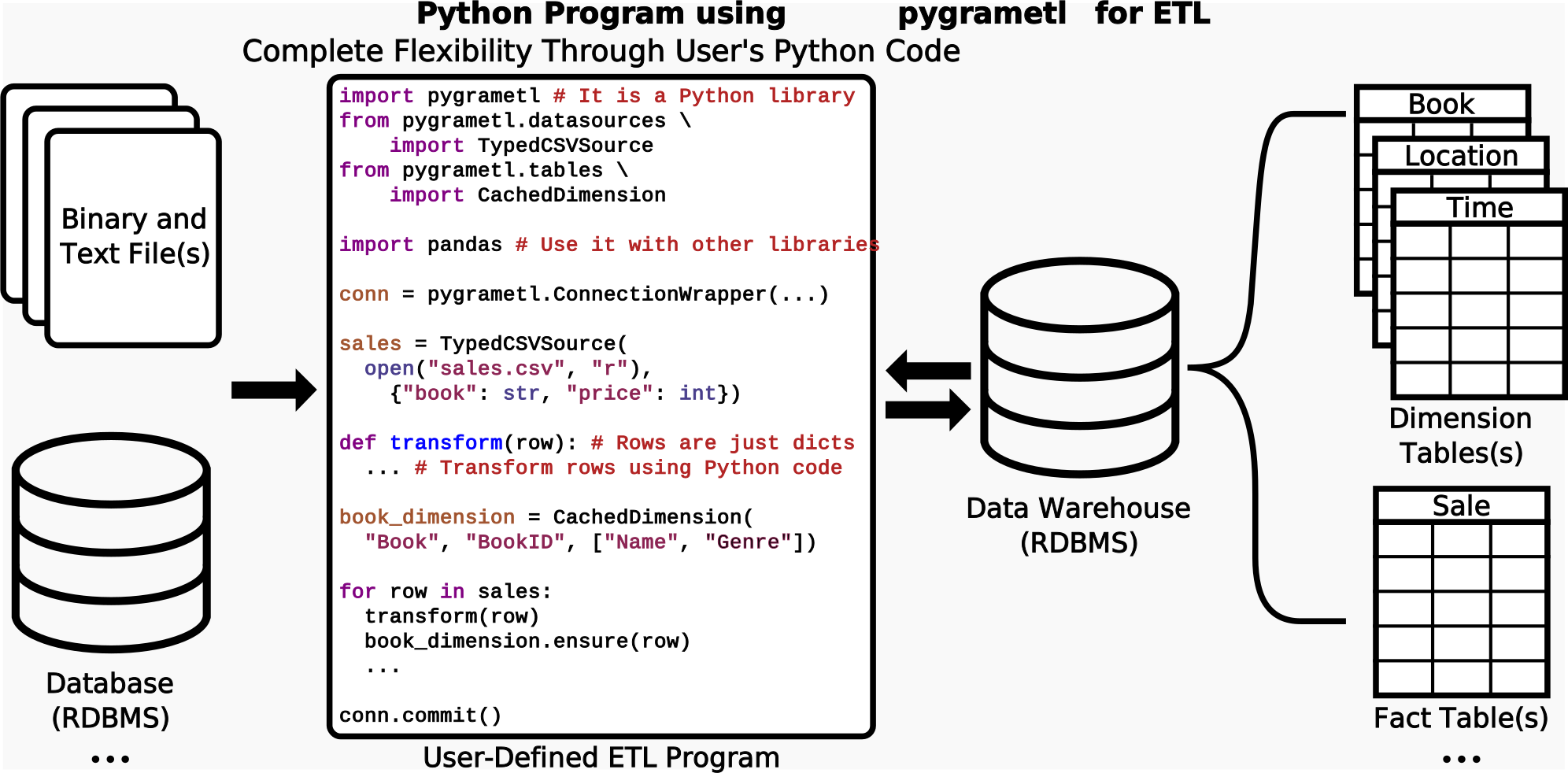
Defining the data warehouse’s schema using SQL and implementing the ETL program itself using standard Python turns out to be very efficient and effective, even when compared to drawing the program in a graphical user interface like Apache Hop or Pentaho Data Integration. pygrametl supports CPython and Jython so both existing Python code that uses native extensions models and PEP 249 connectors and JVM-based code that uses JDBC drivers can be used in the ETL program.
When using pygrametl, the developer creates an object for each data source, dimension and fact table and operate on rows in the form of standard Python dicts. Thus, (s)he can easily read rows from a data source using a loop like for row in datasource:, transform the rows using arbitrary Python code like row["price"] *= 1.25, and then add new dimension members to a dimension and facts to a fact table using dimension.insert(row) and facttable.insert(row), respectively. This is a very simple example, but pygrametl also supports much more complicated scenarios. For example, it is possible to create a single object for an entire snowflaked dimension. It is then possible to add a new dimension member with a single method call by using snowflake.insert(row). This will automatically perform all of the necessary lookups and insertions in the tables participating in the snowflaked dimension. pygrametl also supports multiple types of slowly changing dimensions. Again, the programmer only has to invoke a single method: slowlychanging.scdensure(row). This will perform the needed updates of both type 1 (i.e., overwrites) and type 2 (i.e., adding new versions).
pygrametl was first made publicly available in 2009. Since then, we have continuously made improvements and added new features. Version 2.9 was released in March 2026. Today, pygrametl is used in production systems in different sectors such as healthcare, finance, and transport.
Installation
pygrametl can be installed from PyPI with the following command:
$ pip install pygrametl
The current development version of pygrametl is available on GitHub:
$ git clone https://github.com/chrthomsen/pygrametl.git
For more information about installation see the Install Guide.
Documentation
The documentation is available in HTML and as a PDF. There are also installation and beginner guides available.
In addition to the documentation, multiple papers have been published about pygrametl. The papers are listed here and provide a more detailed description of the foundational ideas behind pygrametl but is obviously not keep up to date with changes and improvements implemented in the framework, for such see the documentation. If you use pygrametl in academia, please cite the relevant paper(s).
Community
To keep the development of pygrametl open for external participation, we have public mailing lists and use Github. Feel free to ask questions and provide all kinds of feedback:
pygrametl-user - For any questions about how to deploy and utilize pygrametl for ETL.
pygrametl-dev - For - questions and discussion about the development of pygrametl.
Github - Bugs and patches should be submitted to Github as issues and pull requests.
When asking a question or reporting a possible bug in pygrametl, please first verify that the problem still occurs with the latest version of pygrametl. If the problem persists after updating please include the following information, preferably with detailed version information, when reporting the problem:
Operating System.
Python Implementation.
Relational Database Management System.
Python Database Connector.
A short description of the problem with a minimal code example that reproduces the problem.
We encourage the use of Github and the mailing lists. For discussions not suitable for a public mailing list, you can, however, send us a private email.
Maintainers
pygrametl is maintained at Aalborg University by Christian Thomsen and Søren Kejser Jensen.
2 maintainers


Metadata
2 maintainers
Release files for pygrametl 2.9
For a detailed explanation of source distributions (sdists) and built distributions (wheels), please see the package formats documentation.
Source distribution (sdist)
| File | Size | Uploaded | Provenance | Actions |
|---|---|---|---|---|
| pygrametl-2.9.tar.gz | 310.1 kB | Without provenance | Details for pygrametl-2.9.tar.gz |
Built distribution (wheel)
| File | Interpreter | ABI | Platform | Actions Reset |
|---|---|---|---|---|
| pygrametl-2.9-py3-none-any.whl | Python 3 | none | any | Details for pygrametl-2.9-py3-none-any.whl |
Total release size: 402.3 kB
Release files / pygrametl-2.9.tar.gz
| Download URL | pygrametl-2.9.tar.gz |
|---|---|
| Size | 310.1 kB |
| Tags | Source |
|
SHA-256 checksum How to use checksums |
9b60bdc0b5f819bee9bdc81ff0adbc67704ec78ee92f89b023a311fefe051db1
|
|
BLAKE2b-256 checksum How to use checksums |
a4e64c85f13c8fda6fbc134d513070e8100a413096c4e0bb243ba75495c35ca1
|
| Upload date | |
|
Uploaded using Trusted Publishing? What is trusted publishing? |
No |
| Uploaded via |
twine/6.2.0 CPython/3.14.3
|
Release files / pygrametl-2.9-py3-none-any.whl
| Download URL | pygrametl-2.9-py3-none-any.whl |
|---|---|
| Size | 92.1 kB |
| Tags | Python 3 |
|
SHA-256 checksum How to use checksums |
dc1c7494f80e966a0f0ee46c86318b6a6f1b19560f88c5aeac2810604087d67c
|
|
BLAKE2b-256 checksum How to use checksums |
f2577f861f53173bf4109874eb1fb2aecfd9e44b613519b82c01fe1935ac0980
|
| Upload date | |
|
Uploaded using Trusted Publishing? What is trusted publishing? |
No |
| Uploaded via |
twine/6.2.0 CPython/3.14.3
|
Security for pygrametl 2.9
Provenance
Provenance describes where a file came from. On PyPI, provenance is shared via attestations, which provide a verifiable record of the build or publishing details. View details, limitations and caveats.
No provenance found
None of the files in this release were uploaded with provenance metadata.
A note on package security
PyPI is a repository for distributing packages, not a service for auditing them. While third-party security researchers and our staff do their best to detect and remove malicious packages, PyPI cannot guarantee the quality, security or suitability of any given package.
To learn more about protecting yourself from malicious actors, visit our package security documentation.














