
ETL programming in Python


Project description


pygrametl (pronounced py-gram-e-t-l) is a Python framework that provides functionality commonly used when developing Extract-Transform-Load (ETL) programs. It is fully open-source and released under a 2-clause BSD license. As shown in the figure below, an ETL program that uses pygrametl is a standard Python program that imports pygrametl and uses the abstractions it provides. To provide developers with complete control over the data warehouse’s schema, pygrametl assumes that all of the dimension tables and fact tables used in the ETL program have already been created using SQL.
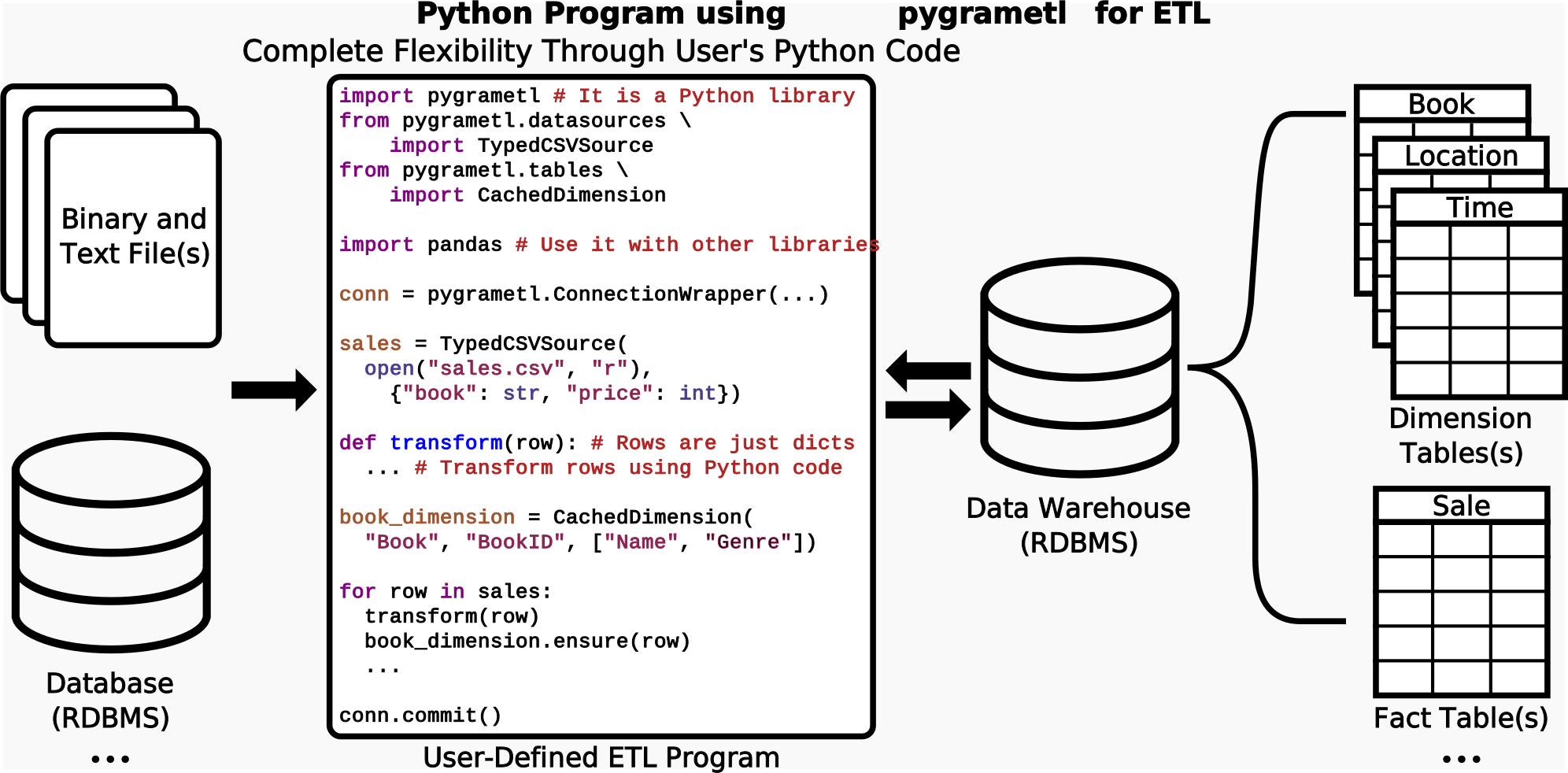
Defining the data warehouse’s schema using SQL and implementing the ETL program itself using standard Python turns out to be very efficient and effective, even when compared to drawing the program in a graphical user interface like Apache Hop or Pentaho Data Integration. pygrametl supports CPython and Jython so both existing Python code that uses native extensions models and PEP 249 connectors and JVM-based code that uses JDBC drivers can be used in the ETL program.
When using pygrametl, the developer creates an object for each data source, dimension and fact table and operate on rows in the form of standard Python dicts. Thus, (s)he can easily read rows from a data source using a loop like for row in datasource:, transform the rows using arbitrary Python code like row["price"] *= 1.25, and then add new dimension members to a dimension and facts to a fact table using dimension.insert(row) and facttable.insert(row), respectively. This is a very simple example, but pygrametl also supports much more complicated scenarios. For example, it is possible to create a single object for an entire snowflaked dimension. It is then possible to add a new dimension member with a single method call by using snowflake.insert(row). This will automatically perform all of the necessary lookups and insertions in the tables participating in the snowflaked dimension. pygrametl also supports multiple types of slowly changing dimensions. Again, the programmer only has to invoke a single method: slowlychanging.scdensure(row). This will perform the needed updates of both type 1 (i.e., overwrites) and type 2 (i.e., adding new versions).
pygrametl was first made publicly available in 2009. Since then, we have continuously made improvements and added new features. Version 2.9 was released in March 2026. Today, pygrametl is used in production systems in different sectors such as healthcare, finance, and transport.
Installation
pygrametl can be installed from PyPI with the following command:
$ pip install pygrametl
The current development version of pygrametl is available on GitHub:
$ git clone https://github.com/chrthomsen/pygrametl.git
For more information about installation see the Install Guide.
Documentation
The documentation is available in HTML and as a PDF. There are also installation and beginner guides available.
In addition to the documentation, multiple papers have been published about pygrametl. The papers are listed here and provide a more detailed description of the foundational ideas behind pygrametl but is obviously not keep up to date with changes and improvements implemented in the framework, for such see the documentation. If you use pygrametl in academia, please cite the relevant paper(s).
Community
To keep the development of pygrametl open for external participation, we have public mailing lists and use Github. Feel free to ask questions and provide all kinds of feedback:
pygrametl-user - For any questions about how to deploy and utilize pygrametl for ETL.
pygrametl-dev - For - questions and discussion about the development of pygrametl.
Github - Bugs and patches should be submitted to Github as issues and pull requests.
When asking a question or reporting a possible bug in pygrametl, please first verify that the problem still occurs with the latest version of pygrametl. If the problem persists after updating please include the following information, preferably with detailed version information, when reporting the problem:
Operating System.
Python Implementation.
Relational Database Management System.
Python Database Connector.
A short description of the problem with a minimal code example that reproduces the problem.
We encourage the use of Github and the mailing lists. For discussions not suitable for a public mailing list, you can, however, send us a private email.
Maintainers
pygrametl is maintained at Aalborg University by Christian Thomsen and Søren Kejser Jensen.


Download files
Download the file for your platform. If you're not sure which to choose, learn more about installing packages.
Source Distribution
Built Distribution
Filter files by name, interpreter, ABI, and platform.
If you're not sure about the file name format, learn more about wheel file names.
Copy a direct link to the current filters
File details
Details for the file pygrametl-2.9.tar.gz.
File metadata
- Download URL: pygrametl-2.9.tar.gz
- Upload date:
- Size: 310.1 kB
- Tags: Source
- Uploaded using Trusted Publishing? No
- Uploaded via: twine/6.2.0 CPython/3.14.3
File hashes
| Algorithm | Hash digest | |
|---|---|---|
| SHA256 |
9b60bdc0b5f819bee9bdc81ff0adbc67704ec78ee92f89b023a311fefe051db1
|
|
| MD5 |
454b30a6a41f92549246ca18262637b7
|
|
| BLAKE2b-256 |
a4e64c85f13c8fda6fbc134d513070e8100a413096c4e0bb243ba75495c35ca1
|
File details
Details for the file pygrametl-2.9-py3-none-any.whl.
File metadata
- Download URL: pygrametl-2.9-py3-none-any.whl
- Upload date:
- Size: 92.1 kB
- Tags: Python 3
- Uploaded using Trusted Publishing? No
- Uploaded via: twine/6.2.0 CPython/3.14.3
File hashes
| Algorithm | Hash digest | |
|---|---|---|
| SHA256 |
dc1c7494f80e966a0f0ee46c86318b6a6f1b19560f88c5aeac2810604087d67c
|
|
| MD5 |
1c623b61af0d41a1ae1d159504d8cd46
|
|
| BLAKE2b-256 |
f2577f861f53173bf4109874eb1fb2aecfd9e44b613519b82c01fe1935ac0980
|






