
An Efficient and Integrated Python Package for Computing Synthetic Seismograms in a Layered Half-Space Model
Verified details
These details have been verified by PyPIProject links
GitHub Statistics
Maintainers

Project description






⭐ Like this project? Give it a Star! ⭐
Overview
PyGRT: An Efficient and Integrated C/Python Package for Computing Synthetic Seismograms, Strain, Rotation and Stress Tensor in a Layered Half-Space Model (Dynamic & Static Cases)
-
PyGRT now can compute following properties in both dynamic and static case.
✔️ Displacements and its spatial derivatives
✔️ Strain Tensor
✔️ Rotation Tensor
✔️ Stress Tensor -
At present, PyGRT can run on
✔️ Linux
✔️ MacOS
✔️ Windows -
PyGRT is extremely easy to install by distributing pre-built binary files.
-
PyGRT now supports the model with liquid layers.
-
PyGRT is still evolving, and more features will be released in the future.
Features
-
Dual-Language:
To optimize performance, PyGRT uses C for its core computational tasks, while Python provides a user-friendly interface. Support script style and command line style to run the program. -
Parallelization:
Accelerated with OpenMP for parallel processing. -
Integration:
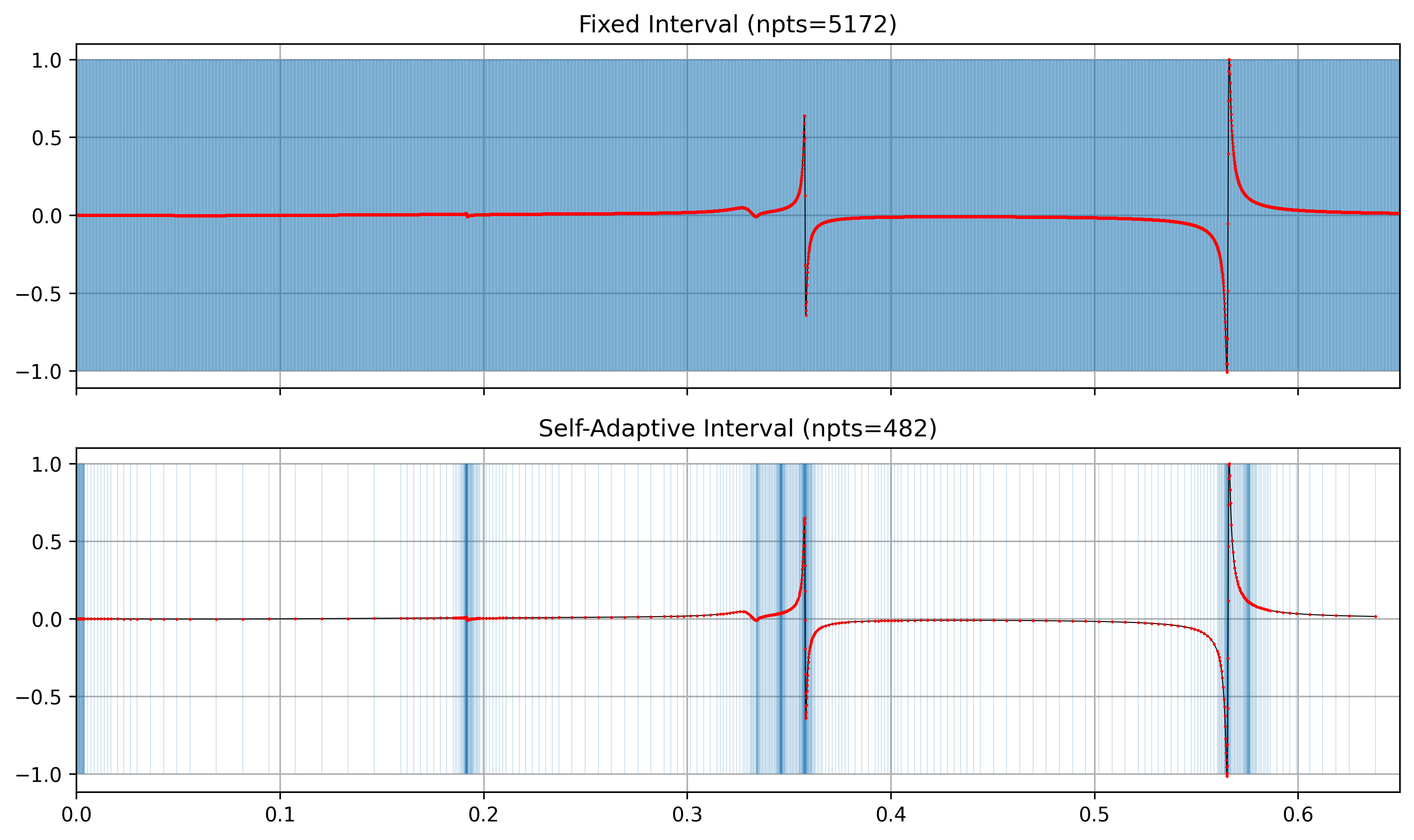
Built on the Generalized Reflection-Transmission matrix Method (GRTM) and the Discrete Wavenumber Method (DWM), PyGRT integrates the Peak-Trough Averaging Method (PTAM), Filon’s Integration Method (FIM) and Self-Adaptive Filon’s Integration Method (SAFIM) to handle diverse source-receiver distributions. -
Modular Design:
Clean and organized code structure, making it easy to extend and maintain. -
Compatibility:
PyGRT provides pre-built static files, ensuring ease of installation, usage, and portability across different systems.

Pre-Requisite
- For Thread-Level Parallel Computing
-
- For Linux and macOS users: If the GNU compiler is installed on your system, the
OpenMPlibrary is usually included. - For Windows users:
OpenMPhas been statically linked.
In general, you don't have to worry about it. However, if the program complains that "
libgomp.sonot found" or "needs more dependencies", you should installOpenMP. - For Linux and macOS users: If the GNU compiler is installed on your system, the
-
- For Python Script Style
- Anaconda (recommend), to build your virtual environment.
- Other dependencies are declared in
setup.py, automatically handled bypip install.
- For Command Line Style
the output waveforms are binary files in SAC format, you need Seismic Analysis Code (SAC) to view and process.
Installation
In PyGRT, the C programs and libraries operate independently of Python (not CPython or Cython). If you are not familiar with Python and pip, and prefer the Command Line Style, you can quickly run the program by downloading the latest GitHub release for your machine. The necessary files are located in the pygrt/C_extension/bin and pygrt/C_extension/lib folders.
Two ways, choose one:
-
PYPI (recommend)
Run the following command in your virtual environment:pip install -v pygrt-kit
-
-
Download the latest release for your machine, uncompress, and change the directory.
-
Run the following command in your virtual environment:
pip install -v .
-
-
*Build from Source Code.
See 中文文档 | English Document
Setting
For Command Line Style, run
python -m pygrt.print
the outputs are
PyGRT installation directory: </path/to/installation>
PyGRT executable file directory: </path/to/installation/bin>
PyGRT library directory: </path/to/installation/lib>
and you can
- add "executable file directory" to
PATHenvironment variable.
Then you can run the command like grt in terminal.
For each command, use -h to see the help message.
Usage Example
example/ folder shows some examples in paper. More examples are coming soon.


Contact
If you have any questions or suggestions, feel free to reach out:
- Email: zhudengda@mail.iggcas.ac.cn
- GitHub Issues: You can also raise an issue directly on GitHub.
Citation
Comming soon.
Project details
Verified details
These details have been verified by PyPIProject links
GitHub Statistics
Maintainers
Release history Release notifications | RSS feed


Download files
Download the file for your platform. If you're not sure which to choose, learn more about installing packages.
Source Distributions
Built Distributions
Filter files by name, interpreter, ABI, and platform.
If you're not sure about the file name format, learn more about wheel file names.
Copy a direct link to the current filters
File details
Details for the file pygrt_kit-0.11.0-py3-none-win_amd64.whl.
File metadata
- Download URL: pygrt_kit-0.11.0-py3-none-win_amd64.whl
- Upload date:
- Size: 8.9 MB
- Tags: Python 3, Windows x86-64
- Uploaded using Trusted Publishing? Yes
- Uploaded via: twine/6.1.0 CPython/3.13.7
File hashes
| Algorithm | Hash digest | |
|---|---|---|
| SHA256 |
cba5085f15978fca92f13c145c72327fa831c548c5bfa6244fda47668ffbf379
|
|
| MD5 |
fc52d0fecca2af2d5c4c44fe7fa6f174
|
|
| BLAKE2b-256 |
e46b6e5abe05a97a857b8f87fd34d5a3d1a639608c66a4183c3a8e25563cb3bf
|
Provenance
The following attestation bundles were made for pygrt_kit-0.11.0-py3-none-win_amd64.whl:
Publisher:
build.yml on Dengda98/PyGRT
-
Statement:
-
Statement type:
https://in-toto.io/Statement/v1 -
Predicate type:
https://docs.pypi.org/attestations/publish/v1 -
Subject name:
pygrt_kit-0.11.0-py3-none-win_amd64.whl -
Subject digest:
cba5085f15978fca92f13c145c72327fa831c548c5bfa6244fda47668ffbf379 - Sigstore transparency entry: 545629630
- Sigstore integration time:
-
Permalink:
Dengda98/PyGRT@57db8d1e1b4ef05b35c4f55eb32074bd10996105 -
Branch / Tag:
refs/tags/v0.11.0 - Owner: https://github.com/Dengda98
-
Access:
public
-
Token Issuer:
https://token.actions.githubusercontent.com -
Runner Environment:
github-hosted -
Publication workflow:
build.yml@57db8d1e1b4ef05b35c4f55eb32074bd10996105 -
Trigger Event:
push
-
Statement type:
File details
Details for the file pygrt_kit-0.11.0-py3-none-manylinux2014_x86_64.whl.
File metadata
- Download URL: pygrt_kit-0.11.0-py3-none-manylinux2014_x86_64.whl
- Upload date:
- Size: 3.1 MB
- Tags: Python 3
- Uploaded using Trusted Publishing? Yes
- Uploaded via: twine/6.1.0 CPython/3.13.7
File hashes
| Algorithm | Hash digest | |
|---|---|---|
| SHA256 |
ff7d6bc6420f76d12d1db314b92ac9226db8e4815dc6edafd3c060317ed9eac7
|
|
| MD5 |
1c9ab43d845e8a87b65019406b5e1764
|
|
| BLAKE2b-256 |
7dfb378d5ba89c70e376f06f6371d131d6d0890e8480670646aba0a4ee7dd755
|
Provenance
The following attestation bundles were made for pygrt_kit-0.11.0-py3-none-manylinux2014_x86_64.whl:
Publisher:
build.yml on Dengda98/PyGRT
-
Statement:
-
Statement type:
https://in-toto.io/Statement/v1 -
Predicate type:
https://docs.pypi.org/attestations/publish/v1 -
Subject name:
pygrt_kit-0.11.0-py3-none-manylinux2014_x86_64.whl -
Subject digest:
ff7d6bc6420f76d12d1db314b92ac9226db8e4815dc6edafd3c060317ed9eac7 - Sigstore transparency entry: 545629608
- Sigstore integration time:
-
Permalink:
Dengda98/PyGRT@57db8d1e1b4ef05b35c4f55eb32074bd10996105 -
Branch / Tag:
refs/tags/v0.11.0 - Owner: https://github.com/Dengda98
-
Access:
public
-
Token Issuer:
https://token.actions.githubusercontent.com -
Runner Environment:
github-hosted -
Publication workflow:
build.yml@57db8d1e1b4ef05b35c4f55eb32074bd10996105 -
Trigger Event:
push
-
Statement type:
File details
Details for the file pygrt_kit-0.11.0-py3-none-macosx_11_0_arm64.whl.
File metadata
- Download URL: pygrt_kit-0.11.0-py3-none-macosx_11_0_arm64.whl
- Upload date:
- Size: 2.5 MB
- Tags: Python 3, macOS 11.0+ ARM64
- Uploaded using Trusted Publishing? Yes
- Uploaded via: twine/6.1.0 CPython/3.13.7
File hashes
| Algorithm | Hash digest | |
|---|---|---|
| SHA256 |
9e077375d5af247fa9730c8480492781dbaa188a5bf5ac5376c791dbda793a12
|
|
| MD5 |
355e5d5a2307b528e9541c8ade6d4fd0
|
|
| BLAKE2b-256 |
cd8742381b6bdb5e63e770ae4fea864bbb65fe7e3f899e8f024e310a46f273e0
|
Provenance
The following attestation bundles were made for pygrt_kit-0.11.0-py3-none-macosx_11_0_arm64.whl:
Publisher:
build.yml on Dengda98/PyGRT
-
Statement:
-
Statement type:
https://in-toto.io/Statement/v1 -
Predicate type:
https://docs.pypi.org/attestations/publish/v1 -
Subject name:
pygrt_kit-0.11.0-py3-none-macosx_11_0_arm64.whl -
Subject digest:
9e077375d5af247fa9730c8480492781dbaa188a5bf5ac5376c791dbda793a12 - Sigstore transparency entry: 545629583
- Sigstore integration time:
-
Permalink:
Dengda98/PyGRT@57db8d1e1b4ef05b35c4f55eb32074bd10996105 -
Branch / Tag:
refs/tags/v0.11.0 - Owner: https://github.com/Dengda98
-
Access:
public
-
Token Issuer:
https://token.actions.githubusercontent.com -
Runner Environment:
github-hosted -
Publication workflow:
build.yml@57db8d1e1b4ef05b35c4f55eb32074bd10996105 -
Trigger Event:
push
-
Statement type:
File details
Details for the file pygrt_kit-0.11.0-py3-none-macosx_10_9_x86_64.whl.
File metadata
- Download URL: pygrt_kit-0.11.0-py3-none-macosx_10_9_x86_64.whl
- Upload date:
- Size: 5.7 MB
- Tags: Python 3, macOS 10.9+ x86-64
- Uploaded using Trusted Publishing? Yes
- Uploaded via: twine/6.1.0 CPython/3.13.7
File hashes
| Algorithm | Hash digest | |
|---|---|---|
| SHA256 |
a472dc3858194ed2fee69c50f468c230e654cc663e993a4b4c10fdce31b8a6e7
|
|
| MD5 |
d05393da2f20cf8b04f2f4186ba0835e
|
|
| BLAKE2b-256 |
e751c642a48a77ec179571823e238b7e4dbf1bc44a915fc0a204fcff7a84566e
|
Provenance
The following attestation bundles were made for pygrt_kit-0.11.0-py3-none-macosx_10_9_x86_64.whl:
Publisher:
build.yml on Dengda98/PyGRT
-
Statement:
-
Statement type:
https://in-toto.io/Statement/v1 -
Predicate type:
https://docs.pypi.org/attestations/publish/v1 -
Subject name:
pygrt_kit-0.11.0-py3-none-macosx_10_9_x86_64.whl -
Subject digest:
a472dc3858194ed2fee69c50f468c230e654cc663e993a4b4c10fdce31b8a6e7 - Sigstore transparency entry: 545629552
- Sigstore integration time:
-
Permalink:
Dengda98/PyGRT@57db8d1e1b4ef05b35c4f55eb32074bd10996105 -
Branch / Tag:
refs/tags/v0.11.0 - Owner: https://github.com/Dengda98
-
Access:
public
-
Token Issuer:
https://token.actions.githubusercontent.com -
Runner Environment:
github-hosted -
Publication workflow:
build.yml@57db8d1e1b4ef05b35c4f55eb32074bd10996105 -
Trigger Event:
push
-
Statement type:






