
pyguitest




Python GUI automation for real desktop applications.
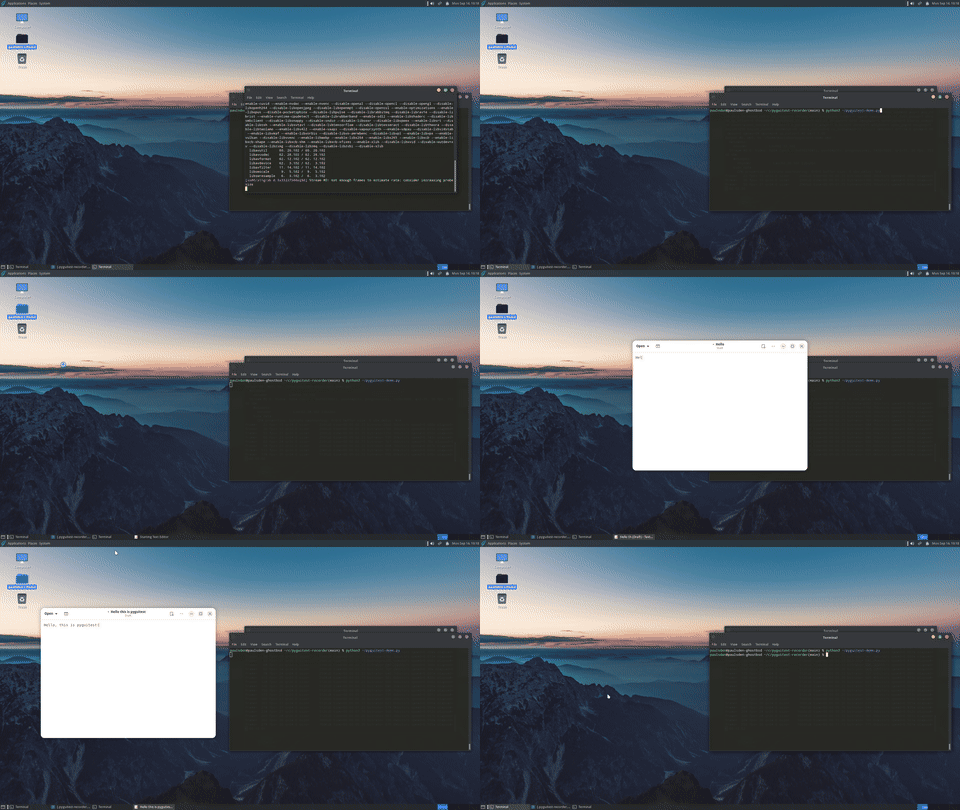
Automate and test Linux, BSD, Windows and macOS desktop applications from Python — even when the application has no automation API.
Pyguitest provides one Python API for mouse, keyboard, window, screenshot, and accessible UI automation across Wayland, X11, XWayland, Windows and macOS.
Use it to:
- 🧪 Build reliable desktop GUI tests
- 🤖 Automate repetitive desktop tasks
- 🖱️ Control applications like a real user
- 🔎 Find and interact with accessible UI elements
- 📸 Capture screenshots and failure artifacts
- 🧰 Diagnose desktop automation environments
- 🔄 Modernize applications and test suites built around older X11 automation tools
- 🎬 Choreograph screen action for film, TV and stage — a character's typing and clicking, landing on cue
The desktop environments it can drive include, but may not be limited to:
- GNOME (Mutter) and KDE Plasma (KWin)
- Xfce and other X11 desktops, including the BSDs
- COSMIC (Pop!_OS)
- sway, Hyprland and niri (the wlroots family)
- Windows and macOS
Status: beta. Every capability is implemented on every backend that can support it. Much of it has been run against real GNOME, KDE, sway, Xfce, X11, GhostBSD, Windows 11 and macOS sessions, and some of it has not yet; docs/validation.md records which.
Because desktops differ in what they permit, what a session can do is
discovered at runtime rather than assumed — gui.supports(...) is how you
ask, and docs/developers/design.md is why the
API is shaped that way instead of being a one-to-one port.
New here? docs/getting-started.md is five minutes from nothing to a working script. docs/recipes.md answers "how do I…", and docs/troubleshooting.md answers "why didn't that work".
What pyguitest is for
One Python API for driving an application that has no automation API of its
own — a desktop program somebody else wrote, which you cannot add a test hook
to. It works at the accessibility layer first, so a button is found by its
role and name rather than by where it happens to be drawn, and falls back to
coordinates only where a toolkit publishes nothing. That is the reason
gui.supports() exists: the API does not promise everything works
everywhere, it tells you what this session can do.
That shape decides what it is good at and what it is not:
- Good at applications with no API of their own, tests that have to survive a redesign or a theme change, and working out why something is not being found on a desktop you do not control.
- Not a test framework. It is a library: no pytest plugin, no fixtures, no runner. Use whatever you already use, and it will fit underneath it.
- Not for browsers or mobile. Web pages have WebDriver and Playwright, phones have their own tooling. This drives desktop windows on Linux, the BSDs, Windows and macOS.
- Not the first choice where the application can help. If a program ships a command line, a documented API or an in-app test hook, driving that is faster, more stable, and says what the test means instead of what it clicked. A toolkit's own test support is closer to the application than this can be.
- Not a recorder. pyguitest-recorder is a separate package that writes pyguitest scripts from a recorded session, and pyguitest does not depend on it.
Install
Requires Python 3.10 or newer.
Linux and the BSDs
pip install pyguitest              # core; no dependencies
pip install 'pyguitest[atspi]'     # + element automation
pip install 'pyguitest[x11]'       # + the X11/XWayland backend (tier-6 reads, native capture)
Extras combine, and which ones you need depends on your desktop —
pip install 'pyguitest[atspi,uinput]' is a common line on GNOME/KDE,
pip install 'pyguitest[uinput]' is enough on COSMIC. See
docs/install.md
for what each desktop actually needs, or just run pyguitest doctor.
The AT-SPI libraries come from your distribution (pyguitest doctor names
them), so a virtualenv needs --system-site-packages to see them.
Windows
pip install pyguitest              # core; window and input control
pip install "pyguitest[windows]"   # + element automation, through comtypes
macOS
pip install pyguitest              # core; screenshots and the clipboard
pip install "pyguitest[macos]"     # + elements, windows and input, through PyObjC
macOS asks for privacy grants (Accessibility, Screen Recording) in System Settings, and input is opt-in — see On macOS.
Or from a checkout, if you are working from the source tree:
git clone https://github.com/ctrondlp/pyguitest.git
cd pyguitest
pip install .
pip install '.[atspi]'      # Linux and the BSDs
pip install '.[windows]'    # Windows
pip install '.[macos]'      # macOS
You do not need -e; that flag is for developing this package, and is
covered in CONTRIBUTING.md.
None are required. The package imports and runs with nothing else
installed. What you add depends on which backend has to serve your desktop
— extras (atspi, x11, uinput, eiinput, windows, macos, dev), a
few distribution packages pip cannot supply, and sometimes a tool on PATH.
Rather than work that out from a document, ask the machine:
pyguitest doctor
It prints the exact commands — naming your distribution's packages on Linux
and the BSDs, and answering in Windows terms on Windows. For the whole
picture — a per-backend requirements matrix, the distribution package table,
and how capture chooses a path — see docs/install.md.
Injecting input has its own setup (/dev/uinput permissions, the ydotool
daemon, libei, portal consent): docs/input.md.
What works where
Which backend serves which part of a session. This is the shape of the
answer, not a promise about your machine: what a session actually assembled
is what connect() reports, what backend.providers() lists, and what
pyguitest doctor prints.
| Session | Pointer and keys | Elements | Windows | Screenshots |
|---|---|---|---|---|
| X11, XWayland | x11 (python-xlib), or a CLI tool |
AT-SPI via atspi |
X11 itself | x11 encodes the PNG itself — the whole screen on X11, one window at a time under XWayland |
| GNOME | a CLI tool, uinput, or libei (eiinput) |
AT-SPI via atspi |
gnomeshell with the extension, otherwise AT-SPI |
the Screenshot portal (connect(backend="portalcapture") — a plain connect() has no path on Mutter), or the extension |
| KDE Plasma | a CLI tool, uinput, or libei (eiinput) |
AT-SPI via atspi, once toolkit accessibility is switched on |
kdotool |
spectacle |
| sway, Hyprland, niri | a CLI tool, uinput, or libei (eiinput) |
AT-SPI via atspi |
their own sockets, standard library only | grim |
| Any desktop with a portal | the RemoteDesktop portal (portal) |
— | — | the Screenshot portal (portalcapture) |
| Unattended CI | x11 under Xvfb, or a headless session |
AT-SPI, where a bus is running | gnomeshell on a headless GNOME |
x11 |
| Windows | win32 (SendInput) |
uia, via the windows extra (UI Automation) |
win32 (EnumWindows, plus window events through SetWinEventHook) |
win32 (GDI BitBlt, and PrintWindow for one window un-occluded) |
| macOS | macquartz, via the macos extra (CGEventPost) — opt-in, and the PostEvent grant is made by hand in System Settings |
macos, via the macos extra (the Accessibility tree) — the Accessibility grant is made by hand in System Settings |
macos, joined to CoreGraphics for the on-screen list; titles need the Screen Recording grant |
screencapture, which ships with the OS, and -l for one window un-occluded |
Two things the table cannot say. Whether an application publishes anything to its accessibility layer is up to the application; testable-guis.md is written for its developers. And which of these paths has been run against a real desktop, on which versions, is recorded in docs/validation.md. The Windows and macOS rows in particular have each been exercised on one machine so far — one Windows 11 desktop, one macOS 26 machine — so read the table as what is implemented and validation.md as what has been measured. ADR 003 and ADR 004 record each platform's design.
Much of what validation.md records comes from one deliberately hostile test target: pyguitest-torture-test, a 702-widget Qt application built as the worst case for this library — 61 distinct widget classes and 95 menu and toolbar actions across nine tabs, every control carrying a stable accessible name, and a status bar that reports each action so a test can prove an interaction landed rather than assume it. Its 105 uniquely-named controls are each driven and status-bar-verified, plus the whole menu bar, on six platforms: FreeBSD/GhostBSD, Pop!_OS/COSMIC, Debian, Omarchy/Hyprland, Windows and macOS — the Hyprland run being the first time this library has been exercised against a wlroots compositor. Every real bug those runs turned up in pyguitest itself is written up in validation.md, and every one of them is fixed.
Usage
import re

import pyguitest

gui = pyguitest.connect()

# Widgets by what they are and what they are called -- the recommended way.
gui.button("OK").click()
gui.text_field("Name").set_text("Ada Lovelace")
gui.dropdown("Country").choose("Norway")

# Windows by title -- a plain string matches as a literal substring, a
# compiled regex as a pattern -- and by app id, which survives a title that
# changes with the document.
window = gui.find_window("Editor")
editor = gui.find_window(app_id="org.gnome.TextEditor")

# Coordinates and keys, when you need them.
gui.move_mouse(500, 300)
gui.click()
gui.type_text("Hello")
gui.send_keys("^(a)^(c)")  # Ctrl-A, Ctrl-C

# Motion the toolkit can see, for drag-and-drop and hover.
gui.drag((120, 400), (600, 400))
Matching on role and name survives the application being moved or resized,
unlike clicking at (842, 612). elements()/element() take more than
role and name -- enabled/visible filter on state, name/description
take a compiled regex instead of an exact string, and predicate is an
escape hatch for anything else (an ancestor/descendant check, say):
from pyguitest import Role

gui.elements(role=Role.PUSH_BUTTON, enabled=True)
gui.element(name=re.compile(r"^Save"))
gui.element(role=Role.CHECK_BOX, within=gui.window_element("Preferences"))
Ask before depending on anything that varies by desktop:
from pyguitest import Capability

if gui.supports(Capability.WINDOW_GEOMETRY):
    x, y, w, h = gui.geometry(window)
connect() never raises on a limited desktop — a session with few capabilities
is the normal case, and supports() is how you find out. On macOS, pointer and
keyboard input is opt-in: pyguitest.connect(backend=["macquartz", "macos"]).
A session is usually several backends at once: elements from AT-SPI, injection
from a CLI adapter, capture from another. CompositeBackend merges their
capabilities and routes each call to whichever member provides it, so callers
see one object. backend.providers() shows the routing.
Screenshots
gui.screenshot("desktop.png")  # the whole desktop
gui.screenshot("editor.png", window=window)  # one window
gui.screenshot("corner.png", region=(0, 0, 400, 300))
region is (x, y, width, height) in screen coordinates — the same tuple
gui.geometry(window) returns, on every backend. You never write a tool's
own rectangle syntax; whichever tool the session picked gets its own built
for it. window is served two ways, and the difference shows in the image:
where the session serves WINDOW_CAPTURE the window's own pixels are read —
its X11 drawable, PrintWindow on Windows, screencapture -l on macOS, or
the GNOME Shell extension's own actor — so anything stacked on top of it is
absent, and a window hanging off the edge of a display comes back whole;
everywhere else, the Linux tools with no per-window mode among them, the
rectangle is looked up and cut out of a full-screen shot, which does include
whatever is covering it and does clip what is offscreen.
gui.supports(Capability.WINDOW_CAPTURE) tells you which you are getting.
Automatically, when a test fails. Nothing captures on its own — a
screenshot has to be taken while the failure is still propagating, because
by the time an except: block runs the application under test is usually
gone. Wrap the part you want documented:
with gui.capture_on_failure("artifacts"):
    gui.button("Save").click()
    assert gui.element(name="Saved")
Nothing is written when the block succeeds. On failure the image lands in
artifacts/ (or $PYGUITEST_SCREENSHOT_DIR, or the temporary directory),
its path is attached to the exception as .screenshot, and the original
exception is re-raised untouched, so the test runner still reports the real
failure. A screenshot that itself fails is recorded on the exception as
.screenshot_error and swallowed — it never replaces the failure it was
trying to document.
Examples
Runnable scripts in examples/, each degrading with an explanation when the desktop cannot do what it asks:
python3 examples/01_what_can_i_do.py     # start here
python3 examples/03_widgets.py           # buttons, text boxes, dropdowns
python3 examples/06_a_real_test.py       # the one to copy: a unittest suite
Tools
pyguitest                     # what this desktop can actually do
pyguitest doctor              # what to install to unlock more
pyguitest debug               # everything needed to diagnose a bug report
pyguitest inspect             # the accessible tree of every open window
pyguitest migrate script.pl   # what porting a Perl script involves
pyguitest record              # hand off to pyguitest-recorder, if installed
Each also works as python -m pyguitest …, for when the pyguitest script
is not on PATH.
pyguitest debug is what to paste into a bug report: package and Python
versions, every environment probe (not only the ones that came back true),
each detected tool's own --version, and whether the process is running
inside a Flatpak, toolbox, or other container -- which changes what every
other probe on this list actually sees. Add --json for a machine-readable
form.
pyguitest inspect walks the accessible tree of every open window and
prints it, grouped by application -- the tool for seeing what gui.button(...)
or gui.element(role=..., name=...) actually has to match against, without
writing a script first. --window TITLE_REGEX narrows it to one application;
--json gives the same tree as machine-readable data, the same split
debug uses.
The migration scanner reports the tier of every call it recognizes in a Perl script and exits non-zero if any call has no Wayland path, so a port can be gated in CI.
pyguitest record is an alias for pyguitest-recorder, which
records desktop activity and writes the pyguitest script for it. That tool is
a separate package -- pyguitest does not depend on it, and installing pyguitest
does not install it -- so the subcommand reports how to install it if it is
absent. Everything after record is passed straight through, so
pyguitest record --help is the recorder's own help and every one of its
flags works unchanged.
Documentation
Start here
- docs/getting-started.md — five minutes to a working script, which API to reach for, and what X11, Wayland and XWayland each change
- docs/recipes.md — task-shaped answers: waiting properly, forms, windows, screenshots, CI, and a cheat sheet for porting a Perl script
- docs/troubleshooting.md — symptom first: nothing found, nothing typed, nothing captured
Reference
- docs/api.md — the full API reference: every public class, method and enum, with the capability each one needs
- docs/install.md — what each backend needs, per distribution, and how capture picks a path
- docs/input.md — injecting pointer and keyboard input: permissions, daemons, keymap safety, libei and the portal
- docs/validation.md — what has been run against a real desktop, and what has not
- docs/ai-assistants.md — rules for a coding assistant generating pyguitest code
- testable-guis.md — how to build a GUI that can be tested at all: the accessibility work that lets a test name a button instead of clicking a coordinate. Written to be handed to application developers; lives in the recorder repository
Design and internals — docs/developers/: why the API is not a port, the audit of the 50 exports it derives from, the four ADRs, the repository structure, and the protocol gaps worth taking upstream.
Contributing
Tests, lint, types, CI and the D-Bus suite: CONTRIBUTING.md.
License
GPL-2.0-or-later. See LICENSE.
1 maintainer

Metadata
1 maintainer
Release files for pyguitest 0.17.0
For a detailed explanation of source distributions (sdists) and built distributions (wheels), please see the package formats documentation.
Source distribution (sdist)
| File | Size | Uploaded | |
|---|---|---|---|
| pyguitest-0.17.0.tar.gz | 1.8 MB | Details |
Built distribution (wheel)
| File | Interpreter | ABI | Platform | Reset |
|---|---|---|---|---|
| pyguitest-0.17.0-py3-none-any.whl | Python 3 | none | any | Details |
Total release size: 2.3 MB
Release files / pyguitest-0.17.0.tar.gz
| Download URL | pyguitest-0.17.0.tar.gz |
|---|---|
| Size | 1.8 MB |
| Tags | Source |
|
SHA-256 checksum How to use checksums |
8b22dfcda00a4cd4e53ed4a78483eaa0cf1c4510cae33d3b83e41c0289164ffb
|
|
BLAKE2b-256 checksum How to use checksums |
5c1ee6c967051b9d0888b577db1f5d66287519d2d8f81b99ca3c78874ba65ae3
|
| Upload date | |
|
Uploaded using Trusted Publishing? What is trusted publishing? |
Yes |
| Uploaded via |
twine/7.0.0 CPython/3.13.14
|
Provenance
Provenance describes where a file came from. On PyPI, provenance is shared via attestations, which provide a verifiable record of the build or publishing details. View details, limitations and caveats.


PyPI Publish Attestation
PyPI verified that this artifact, at this checksum, originated from the publisher listed below.
Signed by GitHub Actions, verified by PyPI on Oct 14, 2026.
Transparency logRelease files / pyguitest-0.17.0-py3-none-any.whl
| Download URL | pyguitest-0.17.0-py3-none-any.whl |
|---|---|
| Size | 498.3 kB |
| Tags | Python 3 |
|
SHA-256 checksum How to use checksums |
dda12fc82841c6fe259d8c0a59f8606fc3e244cac0daa6606d4c4dabea131a1e
|
|
BLAKE2b-256 checksum How to use checksums |
2b1655a45fb37b988c6722795ac90b88ff51dc22adb73b1b4e544eda318c9eae
|
| Upload date | |
|
Uploaded using Trusted Publishing? What is trusted publishing? |
Yes |
| Uploaded via |
twine/7.0.0 CPython/3.13.14
|
Provenance
Provenance describes where a file came from. On PyPI, provenance is shared via attestations, which provide a verifiable record of the build or publishing details. View details, limitations and caveats.
PyPI Publish Attestation
PyPI verified that this artifact, at this checksum, originated from the publisher listed below.
Signed by GitHub Actions, verified by PyPI on Oct 14, 2026.
Transparency log













