
PyGyat
Python with rizz. Be a sigma and mog your skibidi toilet opps before they crashout. This language can only be used in Ohio.
Check out the official PyGyat website.
Join the Telegram community!
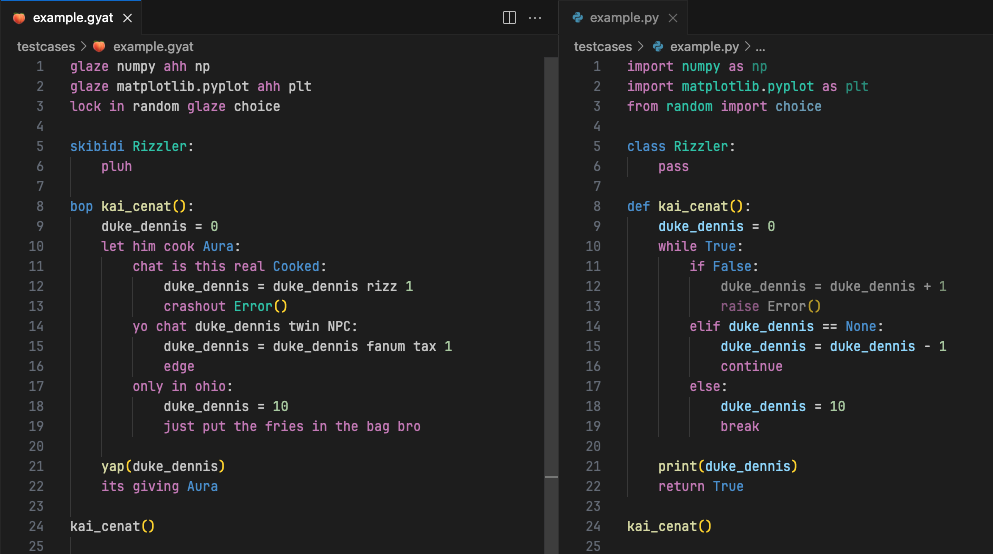
PyGyat is a Python preprosessor which translates regular Python code into brainrot by replacing certain keywords, operators, and built in functions with iPad kid vocabulary.
Implementation based on Bython.
Content of README:
Key features
-
Write Python using brainrot terms instead.
-
Run PyGyat files using the
pygyatcommand, just like Python. -
Translate Python files to PyGyat and vice versa.
-
Real Python keywords that have defined PyGyat mappings will not be allowed.
-
Edit your PyGyat code with syntax highlighting with the
vscode-pygyatextension.
Code example
Installation
You can install PyGyat directly from PyPI using pip (with or without -H, depending on your Python installation):
$ pip3 install pygyat
If you for some reason want to install it from the git repository you can use git clone and do a local install instead:
$ git clone https://github.com/shamith09/pygyat.git
$ cd pygyat
$ pip3 install .
The git version is sometimes a tiny bit ahead of the PyPI version, but not significantly.
To uninstall, simply run
$ pip3 uninstall pygyat
which will undo all the changes.
To install the vscode-pygyat extension for Visual Studio Code, visit:
https://marketplace.visualstudio.com/items?itemName=shamith-pasula.vscode-pygyat
Keyword mappings
Below is a table of all of the Python keywords or operators that should be replaced by their corresponding PyGyat keyword. Python keywords that don't have a mapping or aren't in this table can just be used as is. If you want to request that a new mapping be made, please submit a pull request.
| Python Keyword/Operator | PyGyat Translation |
|---|---|
| try/except/finally | hawk/tuah/spit on that thang |
| return | its giving |
| - | fanum tax |
| + | rizz |
| yap | |
| True | Aura |
| False | Cooked |
| def | bop |
| while | let him cook |
| import | glaze |
| from | lock in |
| class | skibidi |
| if/elif/else | chat is this real/yo chat/only in ohio |
| for | mewing |
| break | just put the fries in the bag bro |
| continue | edge |
| assert | sus |
| raise | crashout |
| in | diddy |
| is | |
| and | |
| or | |
| not | |
| with | pookie |
| as | ahh |
| global | GOAT |
| nonlocal | motion |
| del | delulu |
| yield | pause |
| yield from | pause no diddy |
| None | NPC |
| pass | pluh |
| self | unc |
| range | huzz |
| > | sigma |
| < | beta |
| ≥ | sigma twin |
| ≤ | beta twin |
| == | twin |
| = | |
| async | |
| await | |
| open | mog |
| read | |
| write | |
| close | demure |
| list | |
| set | |
| dict |
Quick intro
PyGyat works by first translating PyGyat files (suggested file ending: .gyat) into Python-files, and then using Python to run them. You therefore need a working installation of Python for PyGyat to work.
To run a PyGyat program, simply type
$ pygyat source.gyat arg1 arg2 ...
to run source.gyat with arg1, arg2, ... as command line arguments. If you want more details on how to run PyGyat files (flags, etc), type
$ pygyat -h
to print the built-in help page. You can also consult the man page by typing
$ man pygyat
PyGyat also includes a translator from Python to PyGyat. This is found via the py2gyat command:
$ py2gyat test.py
This will create a PyGyat file called test.gyat. A full explanation of py2gyat, is found by typing
$ py2gyat -h
or by consulting the man page:
$ man py2gyat
Structure of the repository
At the moment, PyGyat is written in Python. The git repository is structured into 4 directories:
pygyatcontains a Python package containing the parser and other utilities used by the main scriptetccontains manual pages and other auxillary filesscriptscontains the runnable Python scripts, ie the ones run from the shelltestcasescontains a couple of sample *.gyat and *.py files intended for testing the implementationvscode-pygyatcontains the Visual Studio Code extension that enables syntax highlighting in VS Code.
1 maintainer

Release files for pygyat 1.0.8
For a detailed explanation of source distributions (sdists) and built distributions (wheels), please see the package formats documentation.
Source distribution (sdist)
| File | Size | Uploaded | |
|---|---|---|---|
| pygyat-1.0.8.tar.gz | 14.5 kB | Details |
Built distribution (wheel)
| File | Interpreter | ABI | Platform | Reset |
|---|---|---|---|---|
| pygyat-1.0.8-py3-none-any.whl | Python 3 | none | any | Details |
Total release size: 30.5 kB
Release files / pygyat-1.0.8.tar.gz
| Download URL | pygyat-1.0.8.tar.gz |
|---|---|
| Size | 14.5 kB |
| Tags | Source |
|
SHA-256 checksum How to use checksums |
3537ebac3021bd7f9c959d7b2ad94a65b868f6c37d2bb19faf2255c44f181184
|
|
BLAKE2b-256 checksum How to use checksums |
24ee95d3064a99fbdf6c8418266e859d1e966a26858fd08464f2123f12a11278
|
| Upload date | |
|
Uploaded using Trusted Publishing? What is trusted publishing? |
No |
| Uploaded via |
twine/5.1.1 CPython/3.11.0
|
Release files / pygyat-1.0.8-py3-none-any.whl
| Download URL | pygyat-1.0.8-py3-none-any.whl |
|---|---|
| Size | 16.0 kB |
| Tags | Python 3 |
|
SHA-256 checksum How to use checksums |
43606c1cbafc9be3d6ee5376309d3d35fdef7e9b5a8e50040f77210093f56acc
|
|
BLAKE2b-256 checksum How to use checksums |
86f2f16a7ac4923eae649a8a4e940ac2e62ac9b9bf0a437c45ade19aab5ad245
|
| Upload date | |
|
Uploaded using Trusted Publishing? What is trusted publishing? |
No |
| Uploaded via |
twine/5.1.1 CPython/3.11.0
|














