
pyhabitat 🧭
An Introspection Library for Python Environments and Builds
pyhabitat is a lightweight library for Python build and environment introspection. It accurately and securely determines the execution context of a running script by providing definitive checks for:
- OS and Environments: Operating Systems and common container/emulation environments (e.g., WSL, macOS, Termux, iSH, Crostini).
- Build States: Application build systems (e.g., PyInstaller, pipx).
- GUI Backends: Availability of graphical toolkits (e.g., Matplotlib, Tkinter).
Stop writing verbose sys.platform and environment variable checks. Use pyhabitat to implement clean, architectural logic based on the execution habitat.
Additionally, cross-platform functions are available for editing a textfile and viewing a local directory in the appropriate file explorer.
Read the code on github. 🌐
Download binaries here: Releases


📦 Installation
pip install pyhabitat
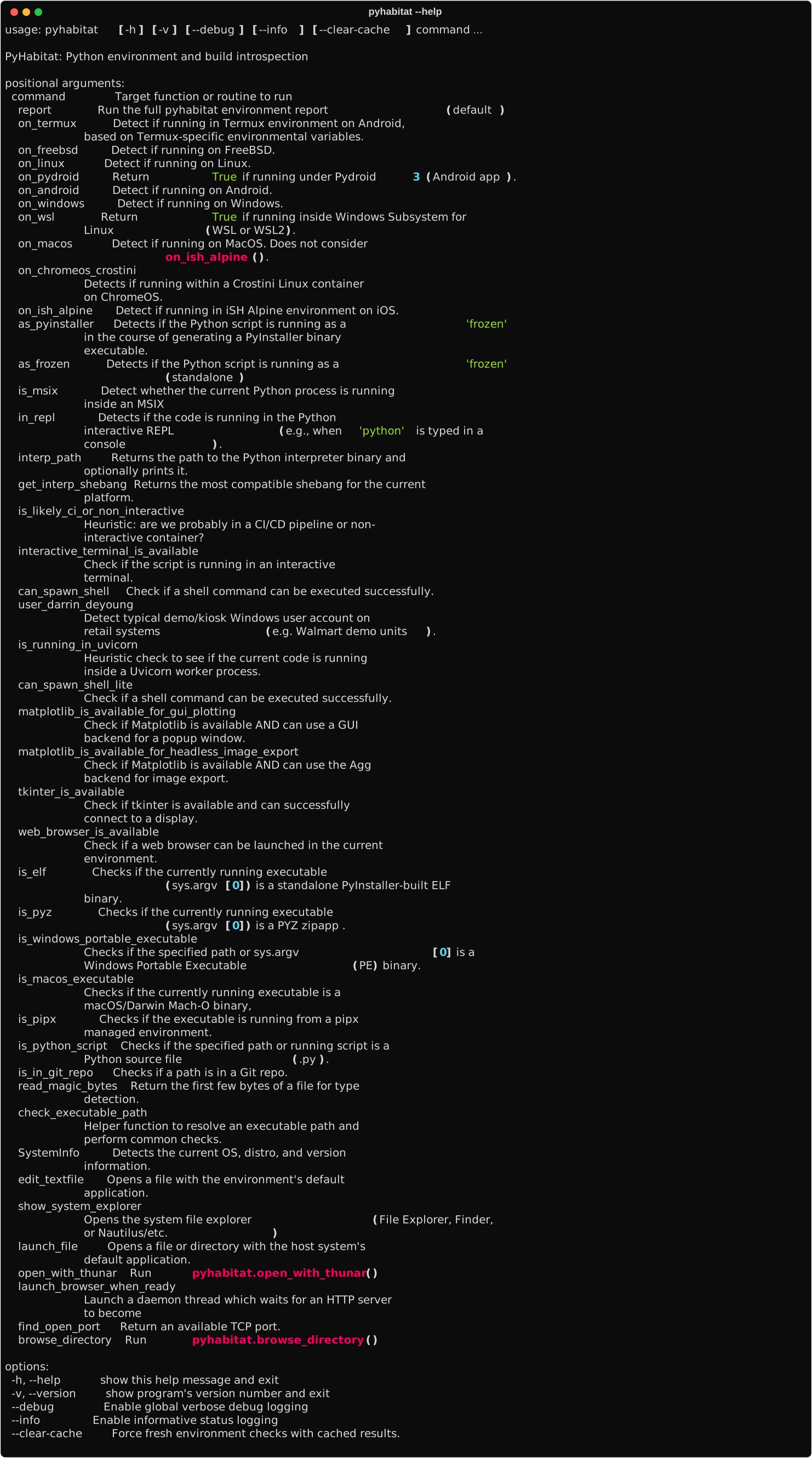
Or, for the CLI,
pipx install pyhabitat
Env Vars
PYHABITAT_USE_THUNAR_ON_CROSTINI # set to 'true' or '1' or 'on' PYHABITAT_USE_THUNAR_ON_WSL # set to 'true' or '1' or 'on'
Side effect: Thunar installation will be attempted if it has not been yet added to the environment in question.
🧠 Motivation
This library is especially useful for leveraging Python in mobile environments (Termux on Android and iSH on iOS), which often have particular limitations and require special handling. For example, projects use pyhabitat in their logic to trigger localhost plotting when a GUI is not available. You can set different behaviors for pyhabitat.on_wsl(), pyhabitat.on_termux(), pyhabitat.on_windows(), and pyhabitat.on_linux().
Our team is fundamentally driven by enabling mobile computing for true utility applications. We liked it when our CLI's and our servers run on every device in the drawer.
This project has a pipx installable CLI
Ultimately, City-of-Memphis-Wastewater aims to produce reference-quality code for the documented proper approach. We recognize that many people (and bots) are searching for ideal solutions, and our functions are built upon extensive research and testing to go beyond simple platform.system() checks.
🚀 Features
- Definitive Environment Checks: Rigorous checks catered to Termux and iSH (iOS Alpine). Accurate, typical modern detection for Windows, macOS (Apple), Linux, FreeBSD, Android.
- GUI Availability: Rigorous, cached checks to determine if the environment supports a graphical popup window (Tkinter/Matplotlib TkAgg) or just headless image export (Matplotlib Agg).
- Build/Packaging Detection: Reliable detection of standalone executables (PyInstaller), Python zipapps (.pyz), Python source scripts (.py), and correct identification/exclusion of pipx-managed virtual environments.
- Executable Type Inspection: Uses file magic numbers (ELF, MZ, Mach-O) to confirm if the running script is a monolithic, frozen binary (non-pipx) or zipapp (.pyz).
📚 Function Reference
OS and Environment Checking
Key question: "What is this running on?"
| Function | Description |
|---|---|
on_windows() |
Returns True on Windows. |
on_macos() |
Returns True on macOS (Darwin). |
on_linux() |
Returns True on Linux in general. |
on_wsl() |
Returns True if running inside Windows Subsystem for Linux (WSL or WSL2). |
on_termux() |
Returns True if running in the Termux Android environment. |
on_chromeos_crostini() |
Returns True if running in the Penguin Linux Developer environment on a ChromeOS machine. |
on_freebsd() |
Returns True on FreeBSD. |
on_ish_alpine() |
Returns True if running in the iSH Alpine Linux iOS emulator. |
on_android() |
Returns True on any Android-based Linux environment. |
on_pydroid() |
Returns True Return True if running under the Pydroid 3 Android app (other versions untested). |
in_repl() |
Returns True is the user is currently in a Python REPL; hasattr(sys,'ps1'). |
Packaging and Build Checking
Key question: "What is the character of my executable or my build state?"
These functions accept an optional path argument (Path or str), defaulting to sys.argv[0] (e.g., pyhabitat/main.py for python -m pyhabitat, empty in REPL). Path.resolve() is used for stability.
| Function | Description |
|---|---|
as_frozen() |
Returns True if the script is running as a standalone executable (any bundler). |
as_pyinstaller() |
Returns True if the script is frozen and generated by PyInstaller (has _MEIPASS). |
is_python_script(path=None) |
Returns True if the script or specified path is a Python source file (.py). |
is_pipx(path=None) |
Returns True if the script or specified path is from a pipx-managed virtual environment. |
is_elf(path=None) |
Returns True if the script or specified path is an ELF binary (Linux standalone executable, non-pipx). |
is_pyz(path=None) |
Returns True if the script or specified path is a Python zipapp (.pyz, non-pipx). |
is_windows_portable_executable(path=None) |
Returns True if the script or specified path is a Windows PE binary (MZ header, non-pipx). |
is_msix() |
Returns True if the currently running software or the target path is an MSIX package, like distributed from the Microsoft Store. |
is_macos_executable(path=None) |
Returns True if the script or specified path is a macOS Mach-O binary (non-pipx). |
Capability Checking
Key Question: "What could I do next?"
| Function | Description |
|---|---|
tkinter_is_available() |
Checks if Tkinter is imported and can successfully create a window. |
matplotlib_is_available_for_gui_plotting(termux_has_gui=False) |
Checks for Matplotlib and its TkAgg backend, required for interactive plotting. Set termux_has_gui=True for Termux with GUI support; defaults to False. |
matplotlib_is_available_for_headless_image_export() |
Checks for Matplotlib and its Agg backend, required for saving images without a GUI. |
interactive_terminal_is_available() |
Checks if standard input and output streams are connected to a TTY (allows safe use of interactive prompts). |
web_browser_is_available() |
Check if a web browser can be launched in the current environment (allows safe use of web-based prompts and localhost plotting). |
Utility
| Function | Description |
|---|---|
edit_textfile(path) |
Opens a text file for editing using the default editor (Windows, Linux, macOS) or nano in Termux/iSH. Can be called from REPL mode. Path argument (str or Path) uses Path.resolve() for stability. |
show_system_explorer(path) |
Launches the appropriate view of the folder based on system. Defaults to Path.cwd(). |
interp_path() |
Returns the path to the Python interpreter binary (sys.executable). Returns empty string if unavailable. |
report() |
Prints a comprehensive environment report with sections: Interpreter Checks (sys.executable), Current Environment Check (sys.argv[0]), Current Build Checks (sys attributes), Operating System Checks (platform.system()), and Capability Checks. Run via python -m pyhabitat or import pyhabitat; pyhabitat.main() in the REPL. |
safe_notify(msg) |
Safe printing of lists, strings, tuples, and None to stderr. |
💻 Usage Examples
The module exposes all detection functions directly for easy access.
0. Example of PyHabitat in Action
The pyhabitat library is used extensively in PDF Link Check and plotting.
1. Running the Environment Report
Run a comprehensive environment report from the command line or REPL to inspect the interpreter (sys.executable), running script (sys.argv[0]), build state, operating system, and capabilities.
# In the terminal
python -m pyhabitat
# In the Python REPL
import pyhabitat as ph
ph.report()
Text Editing
Use this function to open a text file for editing. Ideal use case: Edit a configuration file, if prompted by a CLI command like 'config --textedit'.
from pathlib import Path
import pyhabitat as ph

ph.edit_textfile(path=Path('./config.json'))
🏗️ Build Instructions
Build Options
You can build PyHabitat in two ways:
| Output | Command | Notes |
|---|---|---|
| PYZ | python build_pyz.py |
Cross-platform zipapp |
| EXE/ELF | python build_executable.py |
PyInstaller executable |
✅ Notes:
.pyz is cross-platform but requires Python on the host system.
🤝 Contributing
Contributions are welcome! If there is an environment or build system that is not correctly detected, or that you would like to have added, please open an issue or submit a pull request with the relevant detection logic.
📄 License
This project is licensed under the MIT License. See the LICENSE file for details.
1 maintainer

Release files for pyhabitat 1.3.10
For a detailed explanation of source distributions (sdists) and built distributions (wheels), please see the package formats documentation.
Source distribution (sdist)
| File | Size | Uploaded | |
|---|---|---|---|
| pyhabitat-1.3.10.tar.gz | 39.9 kB | Details |
Built distribution (wheel)
| File | Interpreter | ABI | Platform | Reset |
|---|---|---|---|---|
| pyhabitat-1.3.10-py3-none-any.whl | Python 3 | none | any | Details |
Total release size: 82.1 kB
Release files / pyhabitat-1.3.10.tar.gz
| Download URL | pyhabitat-1.3.10.tar.gz |
|---|---|
| Size | 39.9 kB |
| Tags | Source |
|
SHA-256 checksum How to use checksums |
f71d163cfea235bb0e2f2b1fda57ac072a104119db964805d71a91869c1e79a4
|
|
BLAKE2b-256 checksum How to use checksums |
bd40d3062547db212a334f31f7b500f71b2e248a2a6d9b6dfed331b76dae4c7e
|
| Upload date | |
|
Uploaded using Trusted Publishing? What is trusted publishing? |
Yes |
| Uploaded via |
twine/7.0.0 CPython/3.13.14
|
Provenance
Provenance describes where a file came from. On PyPI, provenance is shared via attestations, which provide a verifiable record of the build or publishing details. View details, limitations and caveats.


PyPI Publish Attestation
PyPI verified that this artifact, at this checksum, originated from the publisher listed below.
Signed by GitHub Actions, verified by PyPI on Aug 27, 2026.
Transparency logRelease files / pyhabitat-1.3.10-py3-none-any.whl
| Download URL | pyhabitat-1.3.10-py3-none-any.whl |
|---|---|
| Size | 42.2 kB |
| Tags | Python 3 |
|
SHA-256 checksum How to use checksums |
21e378db19d3ae77d1442d80b95772ca42e1b6d92e00f54aee4f03987ed229d1
|
|
BLAKE2b-256 checksum How to use checksums |
ee5049e372025b8e5faf4765723b90f5b6af3ebb7513aacab1a2673f23cd6bf4
|
| Upload date | |
|
Uploaded using Trusted Publishing? What is trusted publishing? |
Yes |
| Uploaded via |
twine/7.0.0 CPython/3.13.14
|
Provenance
Provenance describes where a file came from. On PyPI, provenance is shared via attestations, which provide a verifiable record of the build or publishing details. View details, limitations and caveats.
PyPI Publish Attestation
PyPI verified that this artifact, at this checksum, originated from the publisher listed below.
Signed by GitHub Actions, verified by PyPI on Aug 27, 2026.
Transparency log













