
PyHashSum
❓ Overview
PyHashSum is a powerful yet intuitive graphical tool designed to simplify the process of calculating and verifying checksums using various algorithms such as MD5, SHA-1, SHA-256, and SHA-512. With its clean and modern interface, the utility supports drag-and-drop functionality, copying checksum results to the clipboard, and saving results to text or JSON files. Additionally, it allows for folder scanning, making it ideal for batch processing multiple files.
Whether you're verifying file integrity, managing large datasets, or ensuring data security, PyHashSum has you covered!
💪 Key Features
- Drag-and-Drop Support: Simply drag files into the application to calculate their checksums.
- Multiple Hash Algorithms: Supports MD5, SHA-1, SHA-256, and SHA-512 hash algorithms.
- Copy to Clipboard: Quickly copy any checksum result to the clipboard for easy sharing.
- Save Results: Save generated checksum results to text, JSON, or CSV files for record-keeping.
- Verify Hashes: Easily verify the integrity of files by comparing the generated hash with a provided hash.
- Folder Scanning: Scan entire folders (including subfolders) to calculate and display checksums for multiple files at once.
- Save Folder Results: Save the results of folder scans as CSV, JSON, or text files for easy documentation and further analysis.
✅ Screenshots
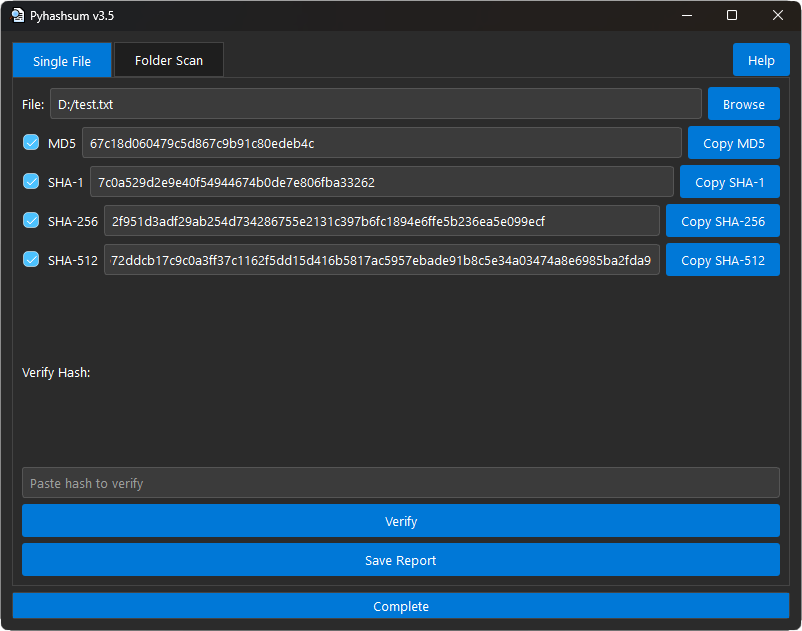
Generating checksums for a single file.
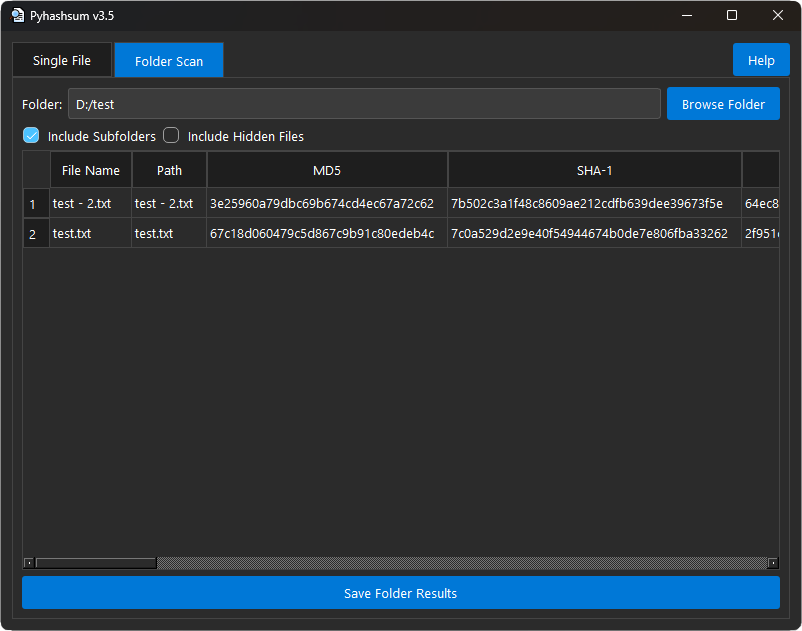
Scanning a folder and generating checksums for all files.
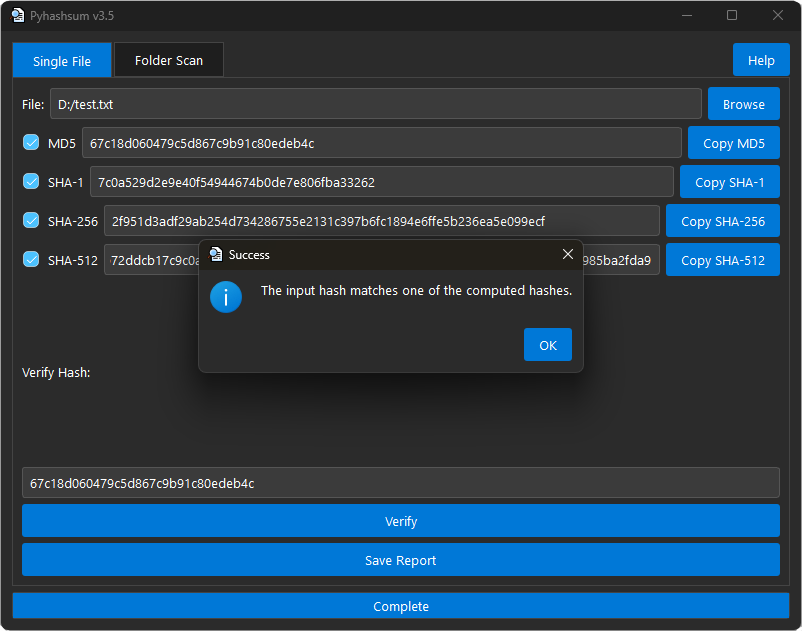
Saving results to a file for future reference.
🔽 Installation
Install via pip (Recommended)
pip install pyhashsum
Download Latest Release
Alternatively, you can download the pre-build executable from GitHub Releases.
💻 Usage
Run the application from the command line:
pyhashsum
⚙️ Development Setup
If you'd like to contribute or modify the source code, follow these steps:
-
Clone the repository:
git clone https://github.com/oop7/pyhashsum.git
-
Navigate to the project directory:
cd pyhashsum
-
Run the application:
python main.py
📦 PyPI Package
The package is available on PyPI:

🛠️ How to Use
Single File Checksum Generation
- Open File: Click the "Browse" button to select a file, or drag and drop the file into the designated area.
- Generate Checksums: The tool will automatically calculate and display the MD5, SHA-1, SHA-256, and SHA-512 checksums.
- Copy Checksums: Use the "Copy" buttons to quickly copy any checksum to the clipboard.
- Save Results: Click the "Save Report" button to save the checksum results to a text or JSON file.
- Verify Hash: Enter a hash in the "Hash" field and click "Verify" to compare it against the calculated checksum.
Folder Scan
- Select Folder: Click the "Browse Folder" button to choose the folder you want to scan.
- Options: Opt to include subfolders and hidden files if necessary.
- Scan Folder: The utility will scan the selected folder and compute the checksums for all files within.
- View Results: The results are displayed in a table, showing file names, paths, and their corresponding checksums.
- Save Folder Results: Click "Save Folder Results" to save the scan results as CSV, JSON, or text files.
📜 License
This project is licensed under the MIT License. See the LICENSE file for more details.
📙 Contributing
We welcome contributions from the community! If you'd like to contribute, feel free to:
- Open an issue to report bugs or suggest features.
- Submit a pull request with improvements or bug fixes.
1 maintainer

Metadata
1 maintainer
Release files for pyhashsum 3.5.1
For a detailed explanation of source distributions (sdists) and built distributions (wheels), please see the package formats documentation.
Source distribution (sdist)
| File | Size | Uploaded | |
|---|---|---|---|
| pyhashsum-3.5.1.tar.gz | 12.3 kB | Details |
Built distribution (wheel)
| File | Interpreter | ABI | Platform | Reset |
|---|---|---|---|---|
| pyhashsum-3.5.1-py3-none-any.whl | Python 3 | none | any | Details |
Total release size: 22.4 kB
Release files / pyhashsum-3.5.1.tar.gz
| Download URL | pyhashsum-3.5.1.tar.gz |
|---|---|
| Size | 12.3 kB |
| Tags | Source |
|
SHA-256 checksum How to use checksums |
d31765f98bdd8d256b9cd4d99b15500bdb04c2e1ab2484d718de31220271bf91
|
|
BLAKE2b-256 checksum How to use checksums |
67bc3b706440b8e3b43ddd7fc488bbc2e6e483a5bc270b2e6c22fc09da738825
|
| Upload date | |
|
Uploaded using Trusted Publishing? What is trusted publishing? |
No |
| Uploaded via |
twine/6.1.0 CPython/3.13.2
|
Release files / pyhashsum-3.5.1-py3-none-any.whl
| Download URL | pyhashsum-3.5.1-py3-none-any.whl |
|---|---|
| Size | 10.1 kB |
| Tags | Python 3 |
|
SHA-256 checksum How to use checksums |
db02e91fd676b314d7b52a526ae23e7fe1f5987fcd5a29431762045b22d7d7da
|
|
BLAKE2b-256 checksum How to use checksums |
ec9398e8f1d517ce303a5c506aeb07134c1cde9a51d3ddf4122db96d884da992
|
| Upload date | |
|
Uploaded using Trusted Publishing? What is trusted publishing? |
No |
| Uploaded via |
twine/6.1.0 CPython/3.13.2
|













