
PyHw, a neofetch-like command line tool for fetching system information but written mostly in python.

Project description
PyHw, a neofetch-like system information fetching tool




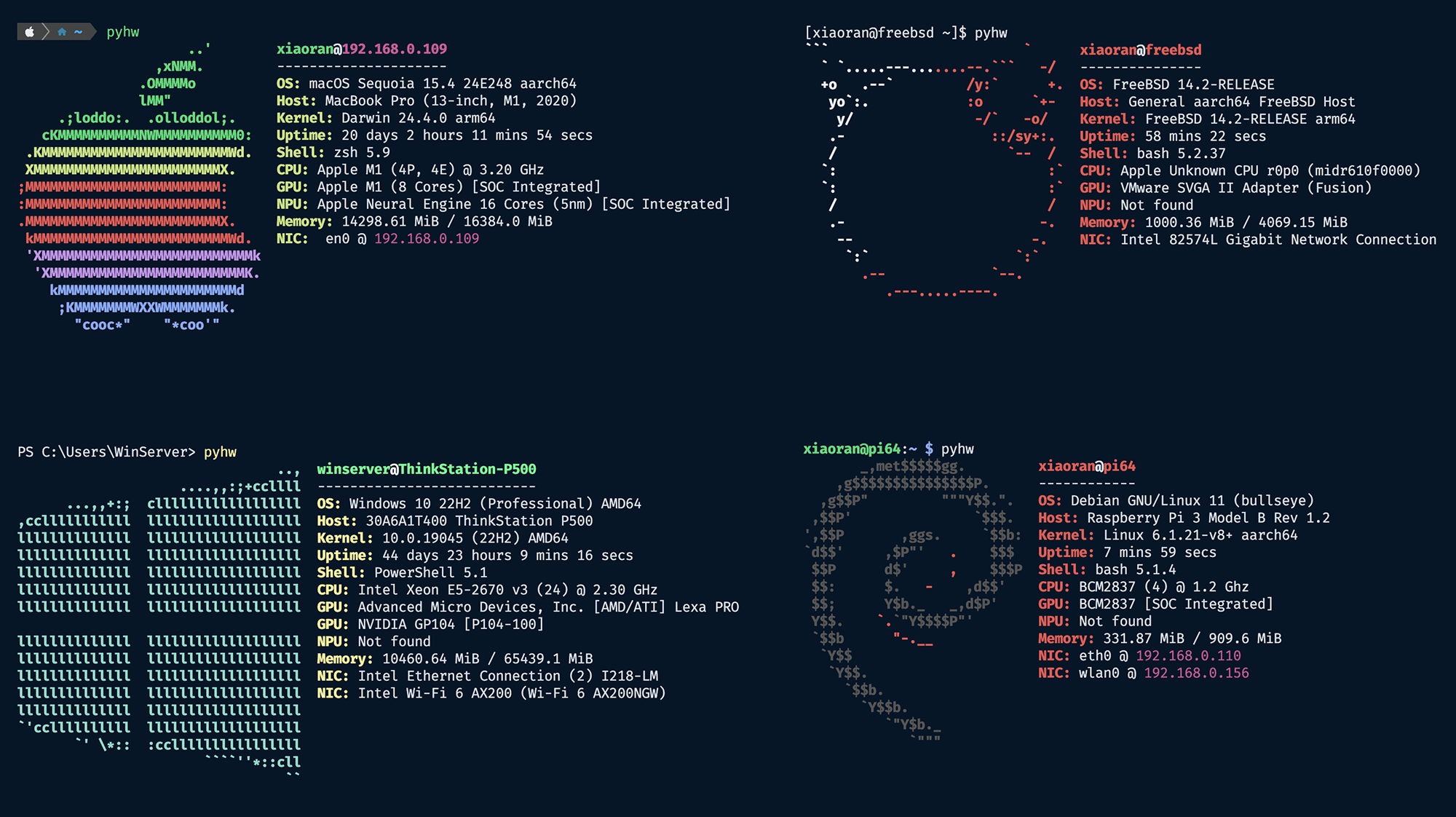
PyHw, a neofetch-like command line tool for fetching system information but written mostly in Python.
This project is a Python reimplementation of neofetch and references the fastfetch project for logo style settings. Since this project is implemented in Python, it will be easier to maintain and extend than bash and c implementation. Also, this project only relies on the Python standard library, so you can run it on any device that has a Python environment (I hope so 🤔).
1. Install
There are already a lot of similar tools so you can choose any of them; they're all essentially no different. If you want to try this tool, There are two convenient ways to install it.
1.1 Install by pipx
pipx is an amazing tool to help you install and run applications written in Python. It is more like brew or apt. You can find more information about it here pipx. pipx is available on almost all major platforms and is usually provided by the corresponding package manager. If you haven't used pipx before, you can refer to this document to install it.
You can install pyhw by the following command:
pipx install pyhw
To upgrade pyhw:
pipx upgrade pyhw
You can then use this tool directly from the command line with the following command, just like neofetch.
pyhw
1.2 Install by pip
In any case, pip is always available, so if you can't install this program using pipx, you can install pyhw by the following command:
pip install pyhw
To upgrade pyhw:
pip install pyhw -U
# or
pip install pyhw --upgrade
You can then use this tool directly from the command line with the following command, just like neofetch.
pyhw
# or
python -m pyhw
Please note that the command line entry for pyhw is created by pip, and depending on the user, this entry may not in the system PATH. If you encounter this problem, pip will give you a prompt, follow the prompts to add entry to the system PATH.
2. Usability
Tested Platform
The following platforms have been tested and are known to work with this package:
- macOS: arm64, x86_64
- Linux: arm64, x86_64, riscv64, ppc64le, mips64el, s390x
- FreeBSD: arm64, x86_64
- Windows 10: x86_64
- Windows 11: arm64, x86_64
For more detailed information, please refer to Tested Platform.
Please note that this package requires Python 3.9, so very old versions of Linux may not be supported.
Features
The functionality of this package varies slightly on different operating systems and architectures, please refer to this documentation for details.
3. Add Logo
- Create a file named <os>.pyhw in logo/ascii folder
- Modify colorConfig.py file to add a new logo style
- Update pyhwUtil.py to enable new logo style.
- You may create a new
PRto add your logo style to the main repository.
4. Build from source
4.1 Dependencies
This package was originally implemented in pure python and only depends on the python standard library. However, in subsequent development, the code for the pci part was separated into a separate package pypci-ng, which can be obtained using pip (or check out this GitHub repository).
4.2 Build tools
Make sure the following Python build tools are already installed.
- setuptools
- build
- twine
Newer versions of twine requires the following dependencies are up to date:
- setuptools
- build
- twine
- packaging
4.3 Build package
clone the project, and run:
python -m build
After the build process, the source package and the binary whl package can be found in the dist folder. Then you can use the following command to install the new package.
pip install dist/*.whl --force-reinstall
4.4 Build Full Feature package
Currently, build process relay on swiftc and macOS IOKit framework. To build Full Feature Package from source, you need a Mac machine with macOS 11 and newer.
Simply type:
make build
make install
5. Test Package
If you have docker installed, you can test this package through docker by type:
make test # local build
make test-pypi # release version
6. Troubleshooting
6.1 Important note about debian 12:
If you use system pip to install pyhw, you will encounter this problem on debian12 and some related distributions (like Ubuntu 24.04):
error: externally-managed-environment

× This environment is externally managed
╰─> To install Python packages system-wide, try apt install
    python3-xyz, where xyz is the package you are trying to
    install.

    If you wish to install a non-Debian-packaged Python package,
    create a virtual environment using python3 -m venv path/to/venv.
    Then use path/to/venv/bin/python and path/to/venv/bin/pip. Make
    sure you have python3-full installed.

    For more information visit http://rptl.io/venv

note: If you believe this is a mistake, please contact your Python installation or OS distribution provider. You can override this, at the risk of breaking your Python installation or OS, by passing --break-system-packages.
hint: See PEP 668 for the detailed specification.
This is due to the fact that system python is not supposed to be managed by pip. You can simply use pipx to install pyhw. Or you can use a virtual environment (venv), conda environment or force remove this restriction (not recommended).
Release history Release notifications | RSS feed


Download files
Download the file for your platform. If you're not sure which to choose, learn more about installing packages.
Source Distribution
Built Distribution
Filter files by name, interpreter, ABI, and platform.
If you're not sure about the file name format, learn more about wheel file names.
Copy a direct link to the current filters
File details
Details for the file pyhw-0.16.10.tar.gz.
File metadata
- Download URL: pyhw-0.16.10.tar.gz
- Upload date:
- Size: 200.0 kB
- Tags: Source
- Uploaded using Trusted Publishing? No
- Uploaded via: twine/6.2.0 CPython/3.14.5
File hashes
| Algorithm | Hash digest | |
|---|---|---|
| SHA256 |
ad19a1274c61335a87b328142ef583401e9fc94ad2eac1bb43ce6bdf7f205cf5
|
|
| MD5 |
bead73c4ed070b949eb660195698f2a5
|
|
| BLAKE2b-256 |
4c14e36b44972153d5a8192c522f73db507f27834ee7db8b293810628f247ff2
|
File details
Details for the file pyhw-0.16.10-py3-none-any.whl.
File metadata
- Download URL: pyhw-0.16.10-py3-none-any.whl
- Upload date:
- Size: 205.2 kB
- Tags: Python 3
- Uploaded using Trusted Publishing? No
- Uploaded via: twine/6.2.0 CPython/3.14.5
File hashes
| Algorithm | Hash digest | |
|---|---|---|
| SHA256 |
18bde7517ce700cd2c9401acdb431bfe99a805e1386269b0fb741af73d603c2f
|
|
| MD5 |
c86026f0228323469b891b21ed510811
|
|
| BLAKE2b-256 |
da45929c06f08ee7a6ae7187e29f709d3306543973bc90a616e4a68bb19812f1
|






