
A CLI tool for interacting with iBooks library.
Verified details
These details have been verified by PyPIProject links
GitHub Statistics
Maintainers

Project description
pyiBook
A CLI tool for interacting with your local Apple iBooks library for MacOS users.


[!NOTE] The functionality that output the highlights in Apple iBook on iPhone will be updated in the future.
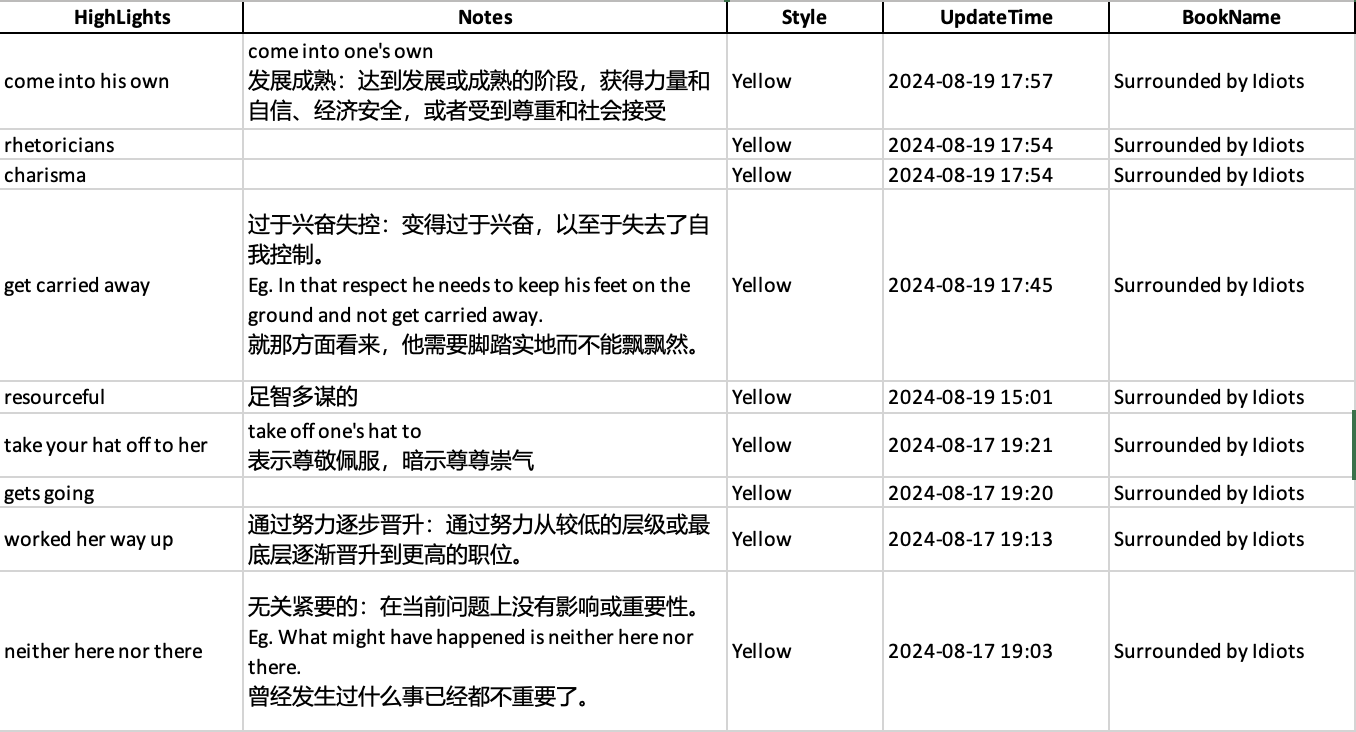
The tool is designed to extract the notes and highlights you have made in Apple Book and download as CSV or XLSX files.
The output will contain:
- Highlighted Content
- Highlight Styles (eg. Underline, Yellow)
- Notes (if you add)
- Modification Date
Output Example:
Installation
[!IMPORTANT] Please ensure that the version of the python on your pc is >=3.9, you can check it by inputting
python3 --versionorpython --version. You can install or upgrade python according to Use python on Mac or Homebrew
It is easy to download the package.
Just input pip install pyiBook or pip install git+https://github.com/higher-bottle/pyiBook.git in Terminal.app.
After the package is downloaded, you can get started!
Instruction
If you input pyibook highlights --help in Terminal.app, you can get the help below.
  Print or output iBook highlights based on the specified criteria.

Options:
  --all            Print all records.
  --all-book       Print all book records.
  --all-pdf        Print all pdf records.
  --bookname TEXT  Print records with the specified book names (comma-separated).
  -output          Output the result to a CSV file.
  --help           Show this message and exit.
At the beginning, it will ask you Do you want to use the default path of Apple Book(Recommend)? (Y/N) [Y], you can choose y for most time because it is programmed to locate the directory automatically.
[!IMPORTANT] However, if it warns that
The path is not valid. Please try another one., you have to manually input the path, please refer to Manually input the path.
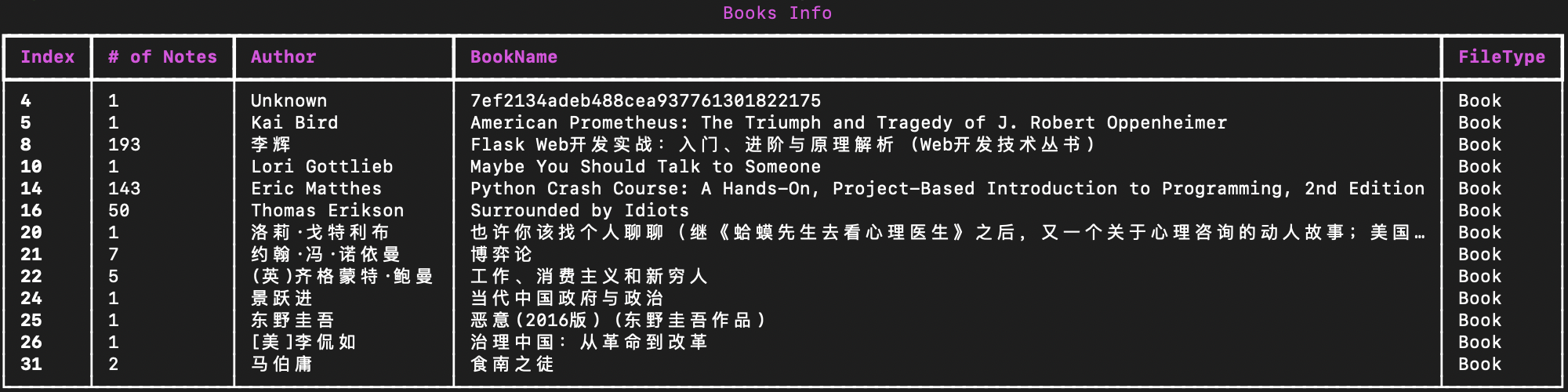
Show the overview of files in your local Apple iBook library
The overview will show the bookname, numbers of highlights, author, and filetype of each book.
[!TIP] If you open and upload your PDF files to Apple Books, these files will also be loaded in this library.
pyibook highlights --all print an overview of all the pdf and books.
pyibook highlights --all-book print an overview of all the books.
pyibook highlights --all-pdf print an overview of all the pdfs.
pyibook highlights --bookname = "book 1, book2, book3" print an overview of all the specified books.
[!WARNING] Please input the fullname of the specified book correctly, or the tool will print
Cannot find the following books: <unfound book name>
E.g:
Output files which contain highlights and notes
Add -output after the commands above, then it will output files for the specified books. You can decide which filetype to be exported(.csv/.xlsx) and the file name.
[!CAUTION] If you input a file name which already exists in the folder you are working, it will replace it automatically, please pay attention to that.
For example, pyibook highlights --all-book -output will export the highlights and notes of all the books. The generated files will be located in the directory where you run the command.
Manually input the path
If the tool asks you to change the path, it may because the given path does not exist or there is no valid database under that.
- To resolve it, you can input
BKLibraryin the Spotlight Search of on your macbook and check if there is some databases with suffiex ".sqlite" in this folder. - If all of those conditions are met, please input the absolute path of its parent folder.
Project details
Verified details
These details have been verified by PyPIProject links
GitHub Statistics
Maintainers
Release history Release notifications | RSS feed


Download files
Download the file for your platform. If you're not sure which to choose, learn more about installing packages.
Source Distribution
Built Distribution
Filter files by name, interpreter, ABI, and platform.
If you're not sure about the file name format, learn more about wheel file names.
Copy a direct link to the current filters
File details
Details for the file pyibook-1.0.1.tar.gz.
File metadata
- Download URL: pyibook-1.0.1.tar.gz
- Upload date:
- Size: 9.4 kB
- Tags: Source
- Uploaded using Trusted Publishing? Yes
- Uploaded via: twine/5.1.0 CPython/3.12.5
File hashes
| Algorithm | Hash digest | |
|---|---|---|
| SHA256 |
771f9b74f0e85e690c8df2c5835cf8627fc30848258bb3d9c92148d3a10d3700
|
|
| MD5 |
43a7063e73356e9f8d06d42d3d954b76
|
|
| BLAKE2b-256 |
283a68c135dc2b59d95e54f8e0ed48186c351104e96fad4f1418103655d0379f
|
File details
Details for the file pyiBook-1.0.1-py3-none-any.whl.
File metadata
- Download URL: pyiBook-1.0.1-py3-none-any.whl
- Upload date:
- Size: 8.7 kB
- Tags: Python 3
- Uploaded using Trusted Publishing? Yes
- Uploaded via: twine/5.1.0 CPython/3.12.5
File hashes
| Algorithm | Hash digest | |
|---|---|---|
| SHA256 |
8437fc45e0e440e9306ae20c0675aeffb8b34116404db9ab88823da4c93d490a
|
|
| MD5 |
f680930f2577918b95dcfc0dc0b030ec
|
|
| BLAKE2b-256 |
397f0c07826cc5ad3f9ccbb7c7ef55e3343e63f312349f367c4f15e2222f9826
|






