


pyIDI
Image-based Displacement Identification (IDI) from high-speed video, in Python.
pyIDI reads a recording, tracks the points you select, and returns their sub-pixel displacement history — ready for modal analysis.
Installation
pip install pyidi          # identification
pip install pyidi[qt]      # + the point-selection and result-viewing GUIs
Python >= 3.10.
Quick start
from pyidi import VideoReader, LucasKanade

video = VideoReader('measurement.cih')

lk = LucasKanade(video)
lk.set_points(points=[[150, 200], [150, 260], [150, 320]])   # (row, column)
lk.configure(roi_size=(21, 21))

displacements = lk.get_displacements()   # (n_points, n_frames, 2), in pixels
VideoReader handles Photron .cih/.cihx, Phantom .cine, Pharsighted .SLOW,
image sequences, ordinary video files (MP4, AVI, MOV, ...), and numpy.ndarray
stacks of shape (n_time_points, image_height, image_width).
Points are set on the method object, not on the VideoReader.
Selecting points interactively
from pyidi import SelectionGUI

gui = SelectionGUI(video, subset_size=21)
lk.set_points(gui)
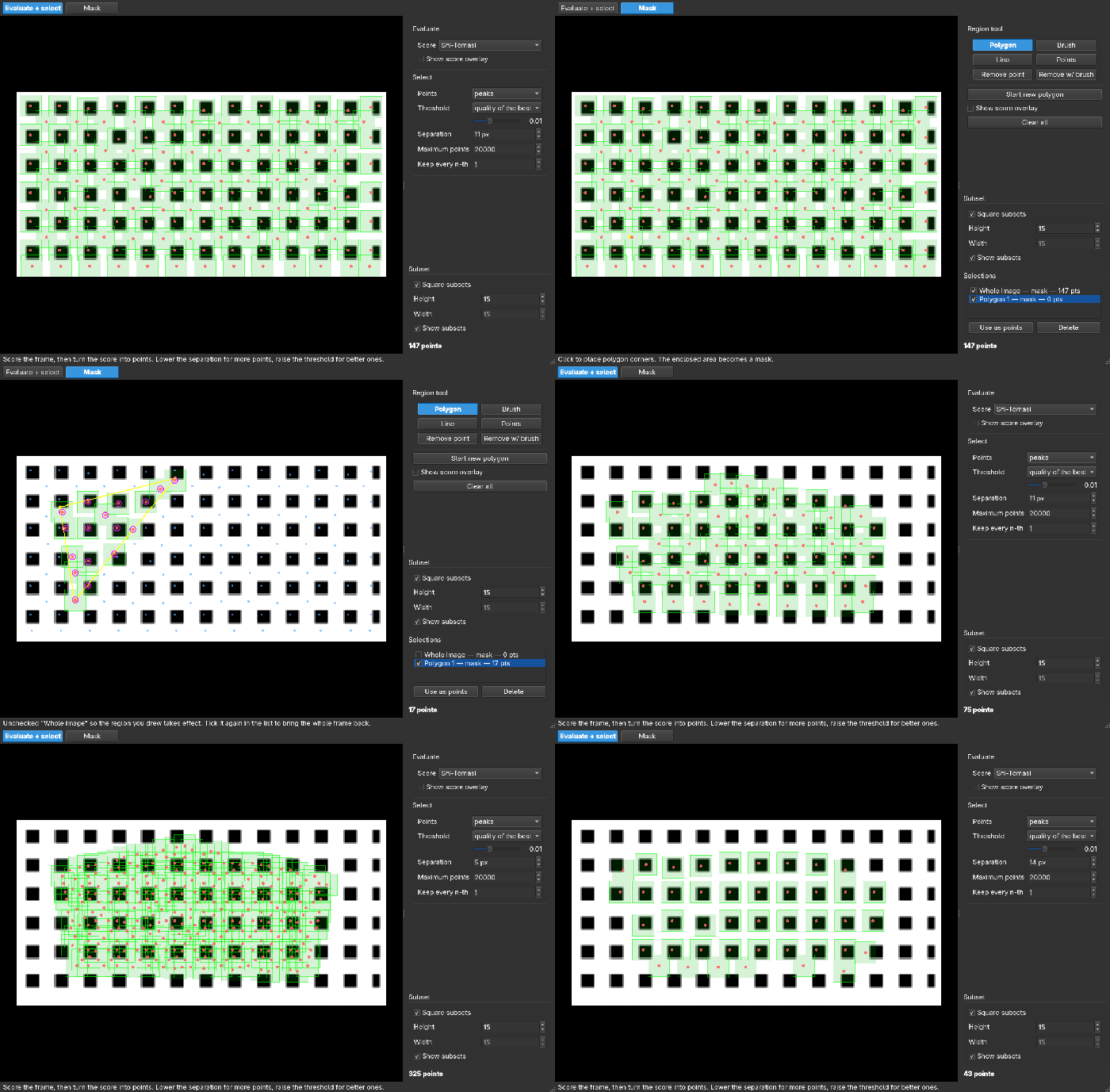
SelectionGUI scores every position in the frame and picks the
best-separated features inside the region you draw, so it finds the points
rather than filtering a grid you placed. Draw with a polygon, a brush, a
polyline or single clicks; set a region's role to points and it lays them
out without scoring. Vertex dragging and undo throughout. See the
documentation.
The window SelectionGUI named in 1.3 is now SelectionGUIOld — deprecated,
and removed in 1.5. It takes the same arguments and returns the same points,
so scripts carry over unchanged.
Or select points without a GUI
The same mask/evaluate/select pipeline is importable on its own, with no Qt needed — useful in scripts, batch processing and on headless machines:
from pyidi.selection import Entry, select_points

region = Entry('polygon', [(20, 20), (20, 200), (180, 200), (180, 20)])
points = select_points(video.get_frame(0), [region], subset_size=21, separation=15)
separation — the closest two points may come — is the one control for how
many you get. Use SelectionPipeline instead when you are sweeping parameters,
as it keeps the computed scores cached between runs.
Or drive everything from the napari UI
from pyidi import VideoReader, GUI

video = VideoReader('data/data_synthetic.cih')
gui = GUI(video)

displacements = gui.method.displacements

Example dataset
No recording of your own yet? A high-speed video of a vibrating music-box comb is
published on Zenodo (10.5281/zenodo.22105821,
CC BY 4.0) and loads directly from pyidi. Only the frames you ask for are downloaded,
and they are cached in ~/.pyidi/datasets (or in PYIDI_DATA_DIR), so only the first
call is slow:
import pyidi

# 600 frames of 640x552 px, 16-bit: 404 MiB on the first call
video = pyidi.datasets.load_music_box()

lk = pyidi.LucasKanade(video)
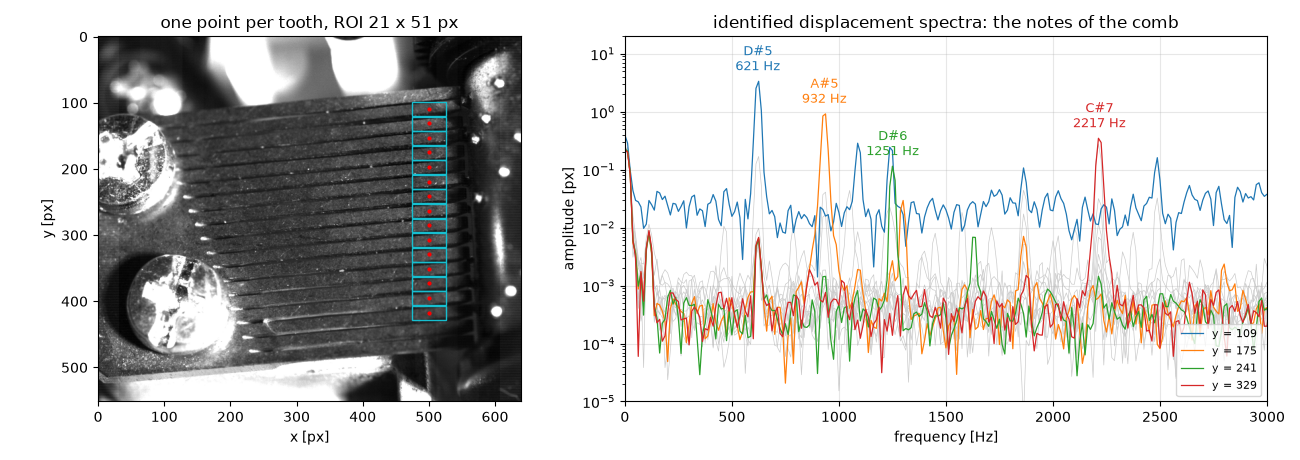
lk.set_points([[109, 500], [175, 500], [329, 500]])   # three teeth of the comb
lk.configure(roi_size=(21, 51))                       # a region one tooth tall
displacements = lk.get_displacements()
The comb was recorded with a Photron FASTCAM SA-Z at 7500 fps. Its teeth are cantilevers of graduated length, so each rings at its own natural frequencies, with sub-pixel amplitudes on a naturally speckled surface — a convenient benchmark for displacement identification. The identified frequencies land within a few cents of equal-tempered pitches across nearly two octaves:
Datasets are a registry, so this one is loaded like any other:
pyidi.datasets.list_datasets() says what is available,
pyidi.datasets.load_dataset('music_box') loads it, and
pyidi.datasets.register_dataset() accepts a recording of your own published the same
way — a Zenodo record with a Photron cihx header next to an uncompressed mraw file.
The full example is in examples/Showcase_music_box.ipynb:
from the raw video to the notes of the comb and to the operating deflection shape of a
single tooth. If you use the dataset, please cite it:
- Stanovnik, G., & Slavič, J. (2026). High-speed video of a vibrating music-box comb (Photron FASTCAM SA-Z, 7500 fps, 640x552 px) [Data set]. Zenodo. https://doi.org/10.5281/zenodo.22105821
Methods
| Method | Solves for | Use it when |
|---|---|---|
SimplifiedOpticalFlow |
2 translations, from the image gradient | a fast first look, motion well below a pixel |
LucasKanade |
2 translations, iteratively | the default choice |
DirectionalLucasKanade |
1 translation along a known direction | motion along a known axis; edge-like features |
DIC |
6 (affine) or 3 (rigid) warp parameters | strain and in-plane rotation, not just translation |
The Lucas-Kanade inner loop is compiled with numba and parallelized over points —
one to two orders of magnitude faster than the NumPy implementation.
DirectionalLucasKanade also accepts a known rigid-body translation, so that the
result is the local motion rather than each point's absolute position:
dlk.set_rigid_body_motion(rbm_ij) # (n_time_points, 2), in pixels
The tracking window follows the prescribed motion and it is subtracted back out of the result. Only its component along each point's tracking direction is used.
Removing rigid-body motion with fiducial markers
If the camera or the whole test rig moved during the recording, that motion is in
every displacement you identify. pyidi.Fiducial tracks ArUco markers fixed to
the moving body, fits the frame-to-reference transformation they imply, and takes
it back out — either from the identified coordinates or from the frames
themselves, before identification:
from pyidi import Fiducial

fid = Fiducial(video.get_frames())            # (n_time_points, height, width)
markers = fid.detect_markers(marker_type='aruco')
transformations = fid.compute_transformations(markers, transform_type='euclidean')

stabilized = fid.revert_frames(transformations)   # or revert_fiducial() on coordinates
The transformation can be euclidean, affine or homography, and
uncertainty_analysis() reports how well the markers pinned it down. Frames that
could not be reverted come back as NaN.
Marker detection needs 8-bit frames. A deeper recording goes through
pre_process(clip_range=(min, max)) first, which maps the given range onto 8-bit
and can also equalize contrast or blur to help detection. See
examples/Showcase_fiducial.ipynb.
Pre-test motion visualization
Eulerian video magnification amplifies subtle, sub-pixel motion directly in the raw recording, before any identification is run — useful for checking whether and where a structure moves, and for isolating a single mode:
from pyidi.postprocessing import EulerianMagnifier

evm = EulerianMagnifier(video)
evm.configure(freq_band=(45.0, 55.0), amplification=25)
evm.save('mode_50Hz', output_format='mp4')
This is qualitative visualization, not a measurement.
Upgrading
Version 1.0 replaced the monolithic pyIDI class with a VideoReader plus a
separate method class, so that autocompletion and inline documentation work
properly in VSCode, PyCharm and similar editors. Later releases removed the old
SubsetSelection widget and changed how untrackable points are reported.
See the upgrading guide
for what to change. The legacy class is still importable
(from pyidi import pyIDI) for compatibility, but is not being developed.
Developer guidelines
- Add
pyidi/methods/_name_of_method.pywith a class that inherits fromIDIMethod. - The class must implement:
configure()— every parameter stored as a class attribute of the same name (this is what makes settings reproducible, picklable and exportable to JSON);calculate_displacements()— setsself.displacements, of shape(n_points, n_frames, 2).
- Export the new class in
pyidi/methods/__init__.py.
Citing
If you are using pyIDI for your research, consider citing our articles:
- Masmeijer, T., Habtour, E., Zaletelj, K., & Slavič, J. (2024). Directional DIC method with automatic feature selection. Mechanical Systems and Signal Processing, 224. https://doi.org/10.1016/j.ymssp.2024.112080
- Čufar, K., Slavič, J., & Boltežar, M. (2024). Mode-shape magnification in high-speed camera measurements. Mechanical Systems and Signal Processing, 213, 111336. https://doi.org/10.1016/J.YMSSP.2024.111336
- Zaletelj, K., Gorjup, D., Slavič, J., & Boltežar, M. (2023). Multi-level curvature-based parametrization and model updating using a 3D full-field response. Mechanical Systems and Signal Processing, 187, 109927. https://doi.org/10.1016/j.ymssp.2022.109927
- Zaletelj, K., Slavič, J., & Boltežar, M. (2022). Full-field DIC-based model updating for localized parameter identification. Mechanical Systems and Signal Processing, 164. https://doi.org/10.1016/j.ymssp.2021.108287
- Gorjup, D., Slavič, J., & Boltežar, M. (2019). Frequency domain triangulation for full-field 3D operating-deflection-shape identification. Mechanical Systems and Signal Processing, 133. https://doi.org/10.1016/j.ymssp.2019.106287

3 maintainers


Download files
Download the file for your platform. If you're not sure which to choose, learn more about installing packages.
Source Distribution
Built Distribution
Filter files by name, interpreter, ABI, and platform.
If you're not sure about the file name format, learn more about wheel file names.
Copy a direct link to the current filters
File details
Details for the file pyidi-1.4.0.tar.gz.
File metadata
- Download URL: pyidi-1.4.0.tar.gz
- Upload date:
- Size: 184.2 kB
- Tags: Source
- Uploaded using Trusted Publishing? Yes
- Uploaded via:
twine/7.0.0 CPython/3.13.14
File hashes
| Algorithm | Hash digest | |
|---|---|---|
| SHA256 |
d41d60de51d5fd9671a7044758a005005ef2ba0d7d0611649d916a2f0c743325
|
|
| MD5 |
780c3a0d826aa010b9884a739d98f817
|
|
| BLAKE2b-256 |
65a05eedaa9a2ebf9375d60934f137c1eb33366e084b429913a8449651283b41
|
Provenance
The following attestation bundles were made for pyidi-1.4.0.tar.gz:
Publisher:
release_and_publish_to_pypi.yaml on ladisk/pyidi
-
Statement:
-
Statement type:
https://in-toto.io/Statement/v1 -
Predicate type:
https://docs.pypi.org/attestations/publish/v1 -
Subject name:
pyidi-1.4.0.tar.gz -
Subject digest:
d41d60de51d5fd9671a7044758a005005ef2ba0d7d0611649d916a2f0c743325 - Sigstore transparency entry: 2790251323
- Sigstore integration time:
-
Permalink:
ladisk/pyidi@4aeaed1ee4f3e43fca69655acde33411ebbcc0c4 -
Branch / Tag:
refs/tags/v1.4.0 - Owner: https://github.com/ladisk
-
Access:
public
-
Token Issuer:
https://token.actions.githubusercontent.com -
Runner Environment:
github-hosted -
Publication workflow:
release_and_publish_to_pypi.yaml@4aeaed1ee4f3e43fca69655acde33411ebbcc0c4 -
Trigger Event:
push
-
Statement type:
File details
Details for the file pyidi-1.4.0-py3-none-any.whl.
File metadata
- Download URL: pyidi-1.4.0-py3-none-any.whl
- Upload date:
- Size: 206.5 kB
- Tags: Python 3
- Uploaded using Trusted Publishing? Yes
- Uploaded via:
twine/7.0.0 CPython/3.13.14
File hashes
| Algorithm | Hash digest | |
|---|---|---|
| SHA256 |
707d051c0bb9aa0ad6f73a695f6d5a9c4647e3f216960afdfc53af38135f55d9
|
|
| MD5 |
df04cc4282186f06a6d9fec348e655b4
|
|
| BLAKE2b-256 |
4eeabc2401b536e9273a3ddbdfa52a61c0246afc1a2af76e9add01517a8b537e
|
Provenance
The following attestation bundles were made for pyidi-1.4.0-py3-none-any.whl:
Publisher:
release_and_publish_to_pypi.yaml on ladisk/pyidi
-
Statement:
-
Statement type:
https://in-toto.io/Statement/v1 -
Predicate type:
https://docs.pypi.org/attestations/publish/v1 -
Subject name:
pyidi-1.4.0-py3-none-any.whl -
Subject digest:
707d051c0bb9aa0ad6f73a695f6d5a9c4647e3f216960afdfc53af38135f55d9 - Sigstore transparency entry: 2790251412
- Sigstore integration time:
-
Permalink:
ladisk/pyidi@4aeaed1ee4f3e43fca69655acde33411ebbcc0c4 -
Branch / Tag:
refs/tags/v1.4.0 - Owner: https://github.com/ladisk
-
Access:
public
-
Token Issuer:
https://token.actions.githubusercontent.com -
Runner Environment:
github-hosted -
Publication workflow:
release_and_publish_to_pypi.yaml@4aeaed1ee4f3e43fca69655acde33411ebbcc0c4 -
Trigger Event:
push
-
Statement type:














