
PyImagen
PyImagen is a desktop GUI app for generating images using a variety of models via the Fal.ai API, with prompt generation by Groq's fast LLM inference.
Inspiration
@rikarends Makepad based version.
@ronaldmannak's Flux AI Studio.
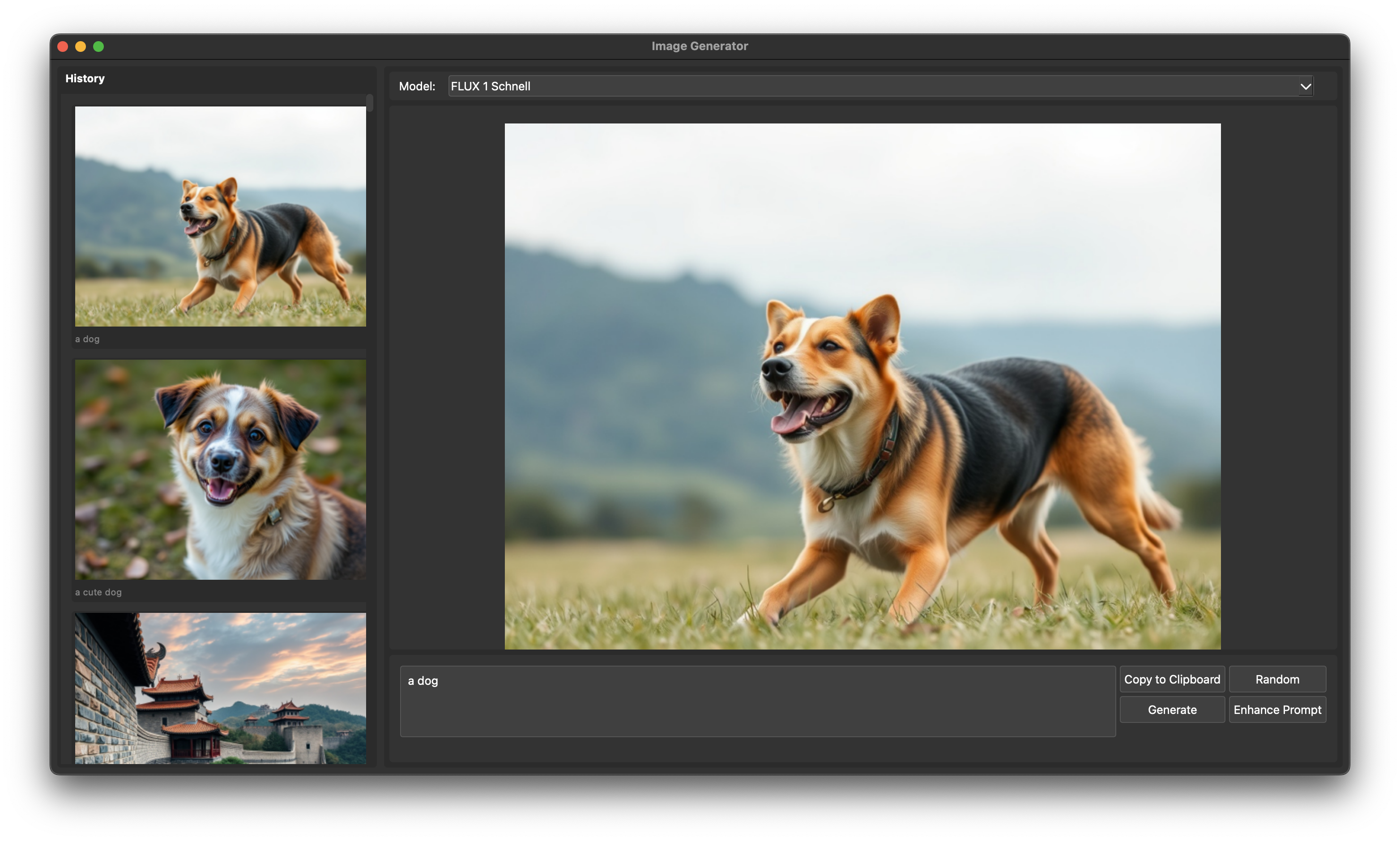
Features
- Generate images from text prompts utilizing multiple AI models
- Create random prompts using Groq's LLM
- Enhance prompts with additional creative details using Groq's LLM
- Maintain an image history with thumbnail previews
- Copy images directly to the clipboard
- Save images and their metadata locally for future reference
Available Models
- FLUX 1 Schnell
- Recraft V3
- AuraFlow
- FLUX 1.1 Pro Ultra
- FLUX 1.1 Pro
- Stable Cascade
- Fast Turbo Diffusion
- Fast LCM Diffusion
- And more...
Requirements
- Python 3.10 or higher
- Groq API key
- Fal.ai API key
API keys
Set GROQ_API_KEY and FAL_KEY in .env alternatively, enter them when the application starts.
Settings
Configuration
Customize PyImagen via settings.json.
- prompt-model: Language model for prompt generation.
- Default:
"llama-3.1-8b-instant"
- Default:
Installation
PYPI
pip install pyimagen
pyimagen
From Source
- Clone the repository and
cdinto it - Install the necessary dependencies:
# Optional
python -m venv .venv && source .venv/bin/activate
pip install -e .
python app.py
1 maintainer

Release files for pyimagen 0.3.2
For a detailed explanation of source distributions (sdists) and built distributions (wheels), please see the package formats documentation.
Source distribution (sdist)
| File | Size | Uploaded | |
|---|---|---|---|
| pyimagen-0.3.2.tar.gz | 876.9 kB | Details |
Built distribution (wheel)
| File | Interpreter | ABI | Platform | Reset |
|---|---|---|---|---|
| pyimagen-0.3.2-py3-none-any.whl | Python 3 | none | any | Details |
Total release size: 893.0 kB
Release files / pyimagen-0.3.2.tar.gz
| Download URL | pyimagen-0.3.2.tar.gz |
|---|---|
| Size | 876.9 kB |
| Tags | Source |
|
SHA-256 checksum How to use checksums |
0284fa4b692dae002f409026e2c3faef484bfea2f82fdbc51ebd478191bfc0db
|
|
BLAKE2b-256 checksum How to use checksums |
299271d04015cb4226c335594d3af99da55af1d79db53cd4739c88b70b6f0f2f
|
| Upload date | |
|
Uploaded using Trusted Publishing? What is trusted publishing? |
No |
| Uploaded via |
twine/5.1.1 CPython/3.11.9
|
Release files / pyimagen-0.3.2-py3-none-any.whl
| Download URL | pyimagen-0.3.2-py3-none-any.whl |
|---|---|
| Size | 16.1 kB |
| Tags | Python 3 |
|
SHA-256 checksum How to use checksums |
f4a29729d4c66dbb59a88aaff92a23095d943663deaebcb0d09eb3f2b8fb1353
|
|
BLAKE2b-256 checksum How to use checksums |
91608f325aa9fef8132adba4ae46694adcd37f35447cedc91a8f5dd0486c6446
|
| Upload date | |
|
Uploaded using Trusted Publishing? What is trusted publishing? |
No |
| Uploaded via |
twine/5.1.1 CPython/3.11.9
|














