
A simple image processing package.

Project description
pyimg-process
The pyimg-process package is a Python library that provides simple and expressive manual image processing techniques. It aims to provide an easy toolkit for begginer users in order to develop their image treatment projects. It is already well on its way towards this goal.
Main Features
Here are some of the implemented features:
- Easy way to read, write and display images
- Image resizing to any dimension
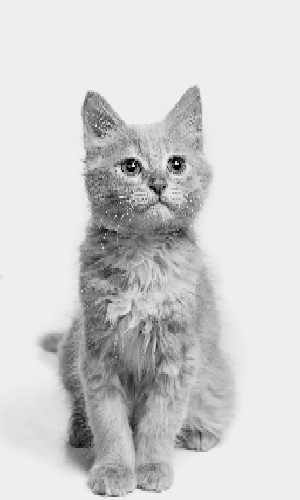
- RGB to grayscale conversion
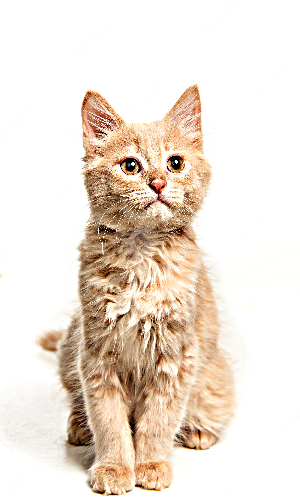
- Image blurring and sharpening methods
- Image filtering by thresholding
- Visualization of the histogram of the image
- Inverse image obtention
Installation
Use the package manager pip to install pyimage.
pip install pyimage
Usage
import pyimage

# loads 'image' from 'path'
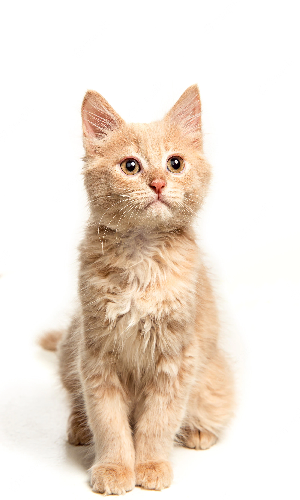
img = pyimage.Methods.read_image('path','image')

# converts img to grayscale
gray = pyimage.Methods.grayscale(img)

# sharpen img with a 100x100 kernel
sharp = pyimage.Methods.sharpen(img, 100)

# displays both images
pyimage.Methods.show_image(img)
pyimage.Methods.show_image(gray)
pyimage.Methods.show_image(sharp)
Dependencies
- NumPy - Adds support for large, multi-dimensional arrays, matrices and high-level mathematical functions to operate on these arrays
- Matplotlib - Matplotlib is a comprehensive library for creating static, animated, and interactive visualizations in Python. Matplotlib makes easy things easy and hard things possible.
- OpenCV - OpenCV provides a real-time optimized Computer Vision library, tools, and hardware.
Contributing
Pull requests are welcome. For major changes, please open an issue first to discuss what you would like to change.
Please make sure to update tests as appropriate.
License
Release history Release notifications | RSS feed


Download files
Download the file for your platform. If you're not sure which to choose, learn more about installing packages.
Source Distribution
Built Distribution
Filter files by name, interpreter, ABI, and platform.
If you're not sure about the file name format, learn more about wheel file names.
Copy a direct link to the current filters
File details
Details for the file pyimg_process-0.0.2.tar.gz.
File metadata
- Download URL: pyimg_process-0.0.2.tar.gz
- Upload date:
- Size: 376.7 kB
- Tags: Source
- Uploaded using Trusted Publishing? No
- Uploaded via: twine/4.0.1 CPython/3.8.10
File hashes
| Algorithm | Hash digest | |
|---|---|---|
| SHA256 |
2d7c2b1daf0f9c81440bd7a4c200a58c9d5880f71c59049bba26aaf7ab3b0e02
|
|
| MD5 |
c64f5549ee7fd858dcd4c91d655a6c73
|
|
| BLAKE2b-256 |
36da926133969544df896776021b73b476d71d2a4cad7ad8b825a7d1445272f4
|
File details
Details for the file pyimg_process-0.0.2-py3-none-any.whl.
File metadata
- Download URL: pyimg_process-0.0.2-py3-none-any.whl
- Upload date:
- Size: 4.6 kB
- Tags: Python 3
- Uploaded using Trusted Publishing? No
- Uploaded via: twine/4.0.1 CPython/3.8.10
File hashes
| Algorithm | Hash digest | |
|---|---|---|
| SHA256 |
21c1b2cc499e6fa9b282f008ab1658122f5d95d5d75346bb5b329ba9984f6d88
|
|
| MD5 |
99223564e5e022d8fcdf7d293e67fb8a
|
|
| BLAKE2b-256 |
7a96c42fd2e932a5d8acd1770f5d208409b3cb3827f44bb45973fa438bb512f9
|






