

pyinternetbox
Python library and CLI tool (with built in exporter) for Swisscom / Wingo Internet Box routers.
📚 Table of Contents
- 🚀 Getting Started
- 📡 Running the Exporter
- Environment Variables
- Usage without authentication
- 🧑💻 Development
- 🧪 Tests
- Related Projects
- Disclaimer
🚀 Getting Started
Installation
from PyPI:
pip install pyinternetbox      # library + `ibox` CLI
uv tool install pyinternetbox  # or: just the `ibox` CLI, in its own environment
with Docker (runs the exporter):
docker run -d -p 9101:9101 -e IB_PASSWORD=secret oregonpillow/pyinternetbox:latest
from source (for development) with uv:
uv sync
from source with pip:
python3 -m venv .venv
source .venv/bin/activate
pip install -e .
CLI usage
with uv (from source)
uv run ibox --help
with pip / uv tool:
ibox --help
ibox --version
The CLI outputs pretty JSON but can still be piped to popular tools like jq.
Library usage
from internetbox_client import InternetBoxClient

with InternetBoxClient() as ibox:
    print(ibox.nmc.status())         # no auth required
    print(ibox.wifi.status())        # no auth required
    print(ibox.devices.topology())   # auth required
    print(ibox.vpn.status())         # auth required
📡 Running the Exporter
The exporter exposes router metrics in Prometheus format on port 9101.
Only a sample of metrics are currently implemented - contributions are welcome!
with uv / pip:
ibox export
with Docker Compose:
Set environment variables in docker-compose.yml, then:
docker compose up -d
Images are published to Docker Hub as oregonpillow/pyinternetbox:
| Tag | Contents |
|---|---|
latest |
Most recent release |
X.Y.Z, X.Y |
A specific release / the latest patch of a minor |
edge |
Latest commit on master (may be unstable) |
Metrics will be available at http://localhost:9101/metrics.
example Prometheus config:
scrape_configs:
  - job_name: "pyinternetbox"
    scrape_interval: 30s
    metrics_path: /metrics
    static_configs:
      - targets: ["localhost:9101"]
Traffic metrics: which one to use
The router exposes several traffic figures that look similar but measure different things. rx/tx are always from the
router's point of view: rx is what the router received on that interface, tx is what it sent.
| Metric | Interface | What it counts | rx means |
tx means |
Type | Includes wired devices | Includes traffic between home devices |
|---|---|---|---|---|---|---|---|
internetbox_wan_rx_bytes_total / internetbox_wan_tx_bytes_total |
veip0 (XGS-PON fibre, WAN) |
All traffic between your home and the internet, from every device | Downloaded from the internet | Uploaded to the internet | Counter (bytes since router boot) | ✅ | ❌ |
internetbox_wifi_rx_bytes_total / internetbox_wifi_tx_bytes_total |
wl0 (5 GHz), wl1 (2.4 GHz) |
All traffic over each Wi-Fi radio, to the internet and to other devices at home | Sent by Wi-Fi devices (their upload) | Sent to Wi-Fi devices (their download) | Counter (bytes since router boot) | ❌ | ✅ (Wi-Fi devices only) |
internetbox_device_rx_bandwidth_last{day,week,month}_bytes / …_tx_… |
Per device (router device list) | The router's own per-device usage over a rolling window (last 24 h / 7 d / 30 d), recalculated about hourly | Received from the device | Sent to the device | Gauge (rolling total, goes up & down) | ❌ (Wi-Fi devices only) | ❓ not verified |
internetbox_veip_downstream_curr_rate_kbps / internetbox_veip_upstream_curr_rate_kbps |
veip0 (XGS-PON fibre, WAN) |
The link speed the fibre connection is synced at (capacity), not traffic. Constant unless the link resyncs | – | – | Gauge (kbps) | – | – |
Notes:
- "How much did I download today?" →
increase(internetbox_wan_rx_bytes_total[<seconds since midnight>s]). - "How fast am I downloading right now?" →
rate(internetbox_wan_rx_bytes_total[5m]) * 8(bits per second). Theveip_*_curr_rate_kbpsmetrics stay at the line speed (e.g. ~10 Gbit/s) no matter how much you download. - Wired traffic between home devices is not measured anywhere: it is switched by the router's Ethernet switch and
never counted, and per-port Ethernet counters (
eth0-eth4) are not accessible with theadminuser (HTTP 401). - The router's
bridgeinterface is not exported: it only sees traffic routed through the router (i.e. internet traffic, counted again from the LAN side withrx/txswapped), so it duplicates the WAN counters. - Counters restart from zero when the Internet Box reboots; Prometheus'
rate()andincrease()handle this. - The per-device rolling totals are only reported for Wi-Fi devices. The direction of their
rx/txfollows the router's naming and has not been independently verified.
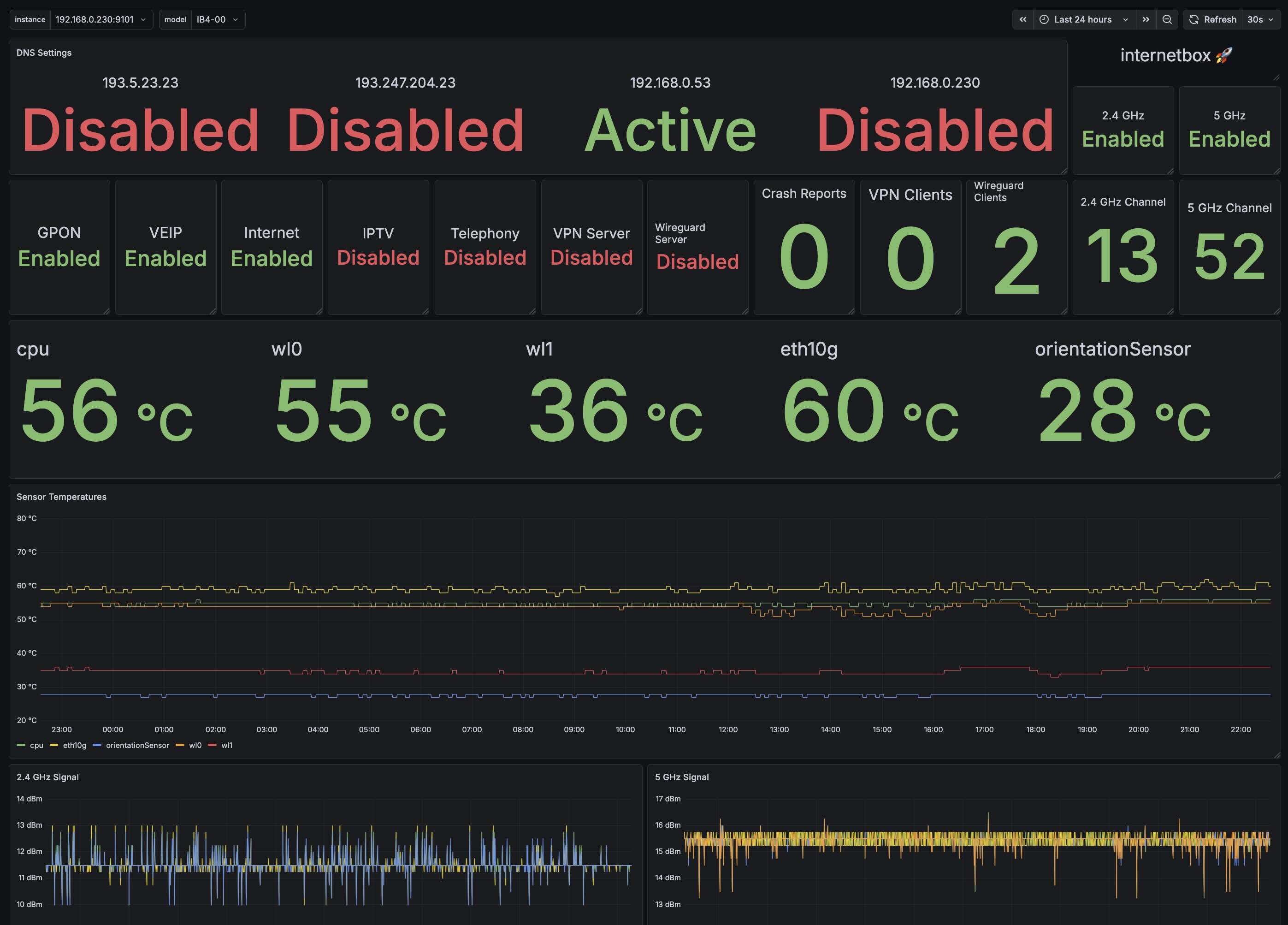
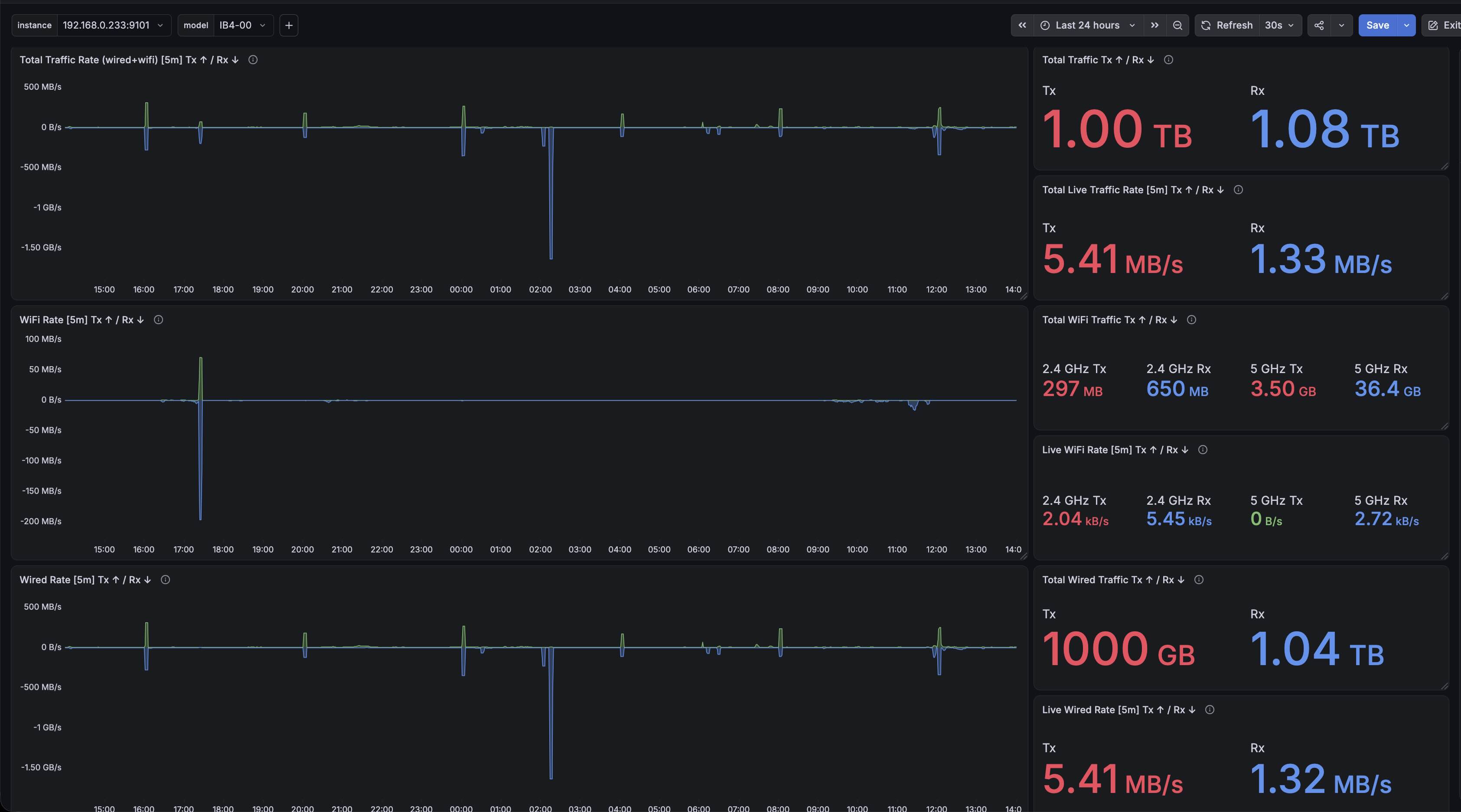
Dashboards can be found in the Grafana folder.
Environment Variables
| Variable | Description | Required |
|---|---|---|
IB_HOSTNAME |
Hostname or IP address of the Internet Box router, e.g. 192.168.1.1 or https://192.168.1.1. http:// is upgraded to https://. Defaults to https://internetbox.swisscom.ch. |
No |
IB_USERNAME |
Username for router authentication. Defaults to admin. |
No |
IB_PASSWORD |
Password for router authentication. Defaults to an empty string. Without a password many of the client methods will not work. See below for complete list of methods that don't require authentication. | No |
IB_EXPORTER_PORT |
TCP port the Prometheus /metrics endpoint listens on. Defaults to 9101. |
No |
IB_EXPORTER_INTERVAL |
Seconds between data collection cycles when running the exporter. Defaults to 30. |
No |
IB_SSL_VERIFY |
true / false to force SSL certificate verification on or off (CLI: --insecure / -k). When unset, verification is on for hostnames and automatically off for IP addresses, since the router's certificate is only valid for internetbox.swisscom.ch. |
No |
Usage without authentication
A limited selection of methods are available without authentication, which means they can be used even if you don't have the password to your router.
| Method | API | CLI |
|---|---|---|
| Devices.info | ibox.devices.info() |
ibox devices info |
| DNS.status | ibox.dns.status() |
ibox dns status |
| Mitigation.status | ibox.mitigation.status() |
ibox mitigation status |
| NMC.status | ibox.nmc.status() |
ibox nmc status |
| NMC.ip_conflicts | ibox.nmc.ip_conflicts() |
ibox nmc ip-conflicts |
| NMC.wan_status | ibox.nmc.wan_status() |
ibox nmc wan-status |
| NMC.orientation | ibox.nmc.orientation() |
ibox nmc orientation |
| PasswordRecovery.status | ibox.password_recovery.status() |
ibox password-recovery status |
| Static.settings | ibox.static.settings() |
ibox static settings |
| Static.translations | ibox.static.translations() |
ibox static translations |
| Sysbus.gpios | ibox.sysbus.gpios() |
ibox sysbus gpios |
| Sysbus.mibs | ibox.sysbus.mibs() |
ibox sysbus mibs |
| Sysbus.veip | ibox.sysbus.veip() |
ibox sysbus veip |
| Sysbus.veip_mibs | ibox.sysbus.veip_mibs() |
ibox sysbus veip-mibs |
| Sysbus.net_dev_stats | ibox.sysbus.net_dev_stats() |
ibox sysbus net-dev-stats |
| Voice.status | ibox.voice.status() |
ibox voice status |
| Voice.trunks | ibox.voice.trunks() |
ibox voice trunks |
| Wifi.status | ibox.wifi.status() |
ibox wifi status |
| WWAN.status | ibox.wwan.status() |
ibox wwan status |
| WWAN.mibs | ibox.wwan.mibs() |
ibox wwan mibs |
*Methods that do not require authentication have the following parameter set within their respective method: auth_required=False. Search for this in codebase if you need to identify them.
🧑💻 Development
So far the project is in early stages and I'm the only contributor, but I welcome contributions from the community! If you want to contribute, please fork the repository and create a pull request with your changes. At the moment I've only tested with an IB4 box, if you have a different box any testing you can provide would be greatly appreciaited! :)
How to contribute
- Read the MISSING_ENDPOINTS doc if you want to work on implementing missing endpoints that might work from the LiveboxMonitor
- Try creating more complex methods, see below for more details
- Take a stab at implementing any bugs or features raised in the issues
- Test the library with different Swisscom/Wingo Internet Box models and report any issues you find - testers are much appreciaited!!
- Contribute more dashboards :)
- Add missing metrics in the exporter: only a subset of methods in this client are currently implemented
- Improve the pipeline
- Buy me a coffee ☕️ ;)
Creating more complex methods
When logged into the web interface, within developer tools you can see the REST-API logic within the js scripts.
Pretty much all the REST-API logic is contained within these. These scripts could be parsed to find missing endpoints and provide a template for how to interact and combine calls for more powerful dynamic methods.
The scripts likely differ based on the Web portal version.
The Web portal version can be found in the web gui: Diagnostics > Internet-Box.
To view the js scripts:
- Open your Internet Box web interface (e.g.
https://internetbox.swisscom.ch) and log in- Open your browser's Developer Tools (F12) → Network tab
- Reload the page and filter by JS — download
app.min.jsandcore.min.js
Supported Internet Box Models
| Model | Tested | Notes |
|---|---|---|
| Internet Box 2 | No | Expected to work partially |
| Internet Box 3 | No | Expected to work partially |
| Internet Box 4 | ✅ | Tested and confirmed to work. |
| Internet Box 5 | No | Expected to work |
| Internet Box 5 Pro | No | Expected to work |
Model Information
| Model | Manufacturer | Model Name | OUI Number |
|---|---|---|---|
| Internet Box 4 | Arcadyan | IB4-00 | 1883BF |
To check your model run ibox devices info. Submit a PR if you have a model not listed here.
Development Requirements
In order to run tests and pre-commit hooks you need to have the development dependencies installed.
In addition to UV, you will need prettier and doctoc to run pre-commit hooks. You can install npx with npm and then use npx to install the tools:
npm install -g npx
npx install -g doctoc
npx install -g prettier
Clone the repo and install all dependencies including dev tools:
uv sync
🪝 Pre-commit Hooks
This project uses pre-commit hooks. To set it up:
uv tool install pre-commit --with pre-commit-uvuvx pre-commit install- test by running all hooks:
uvx pre-commit run -a
🏷️ Releasing
The version is defined only by the git tag — there is no version number to edit in any file.
hatch-vcs derives it at build time, and it flows into the PyPI package, ibox --version, the Docker image tags and the exporter's startup line.
git checkout master && git pull
git tag v0.2.0
git push origin v0.2.0
Pushing the tag runs release.yml, which runs the tests and then:
- publishes
pyinternetbox==0.2.0to PyPI - pushes
oregonpillow/pyinternetbox:0.2.0,:0.2and:latestto Docker Hub - creates a GitHub Release with auto-generated notes and the built packages
Every push to master also publishes oregonpillow/pyinternetbox:edge. Untagged builds get a development version such as 0.2.1.dev3+g1a2b3c4.
Choosing the version (semver): bump PATCH for bug fixes, MINOR for new endpoints/metrics/options, MAJOR for breaking changes. Use plain vMAJOR.MINOR.PATCH tags (no -rc1 style suffixes). To see the version the current commit would get: uv run ibox --version.
If a release fails before anything is published (e.g. tests fail), fix the problem on master, then move the tag:
git tag -d v0.2.0 && git push origin :refs/tags/v0.2.0
git tag v0.2.0 && git push origin v0.2.0
PyPI never accepts the same version twice, so if the package was already uploaded, release a new patch version (v0.2.1) instead.
One-time setup (already done for this repo, kept here for reference):
- GitHub → Settings → Secrets and variables → Actions:
DOCKERHUB_USERNAMEandDOCKERHUB_TOKEN(a Docker Hub personal access token with Read & Write access). - pypi.org → Account → Publishing: trusted publisher for owner
oregonpillow, repositorypyinternetbox, workflowrelease.yml, environmentpypi.
🧪 Tests
| Test | Description | Check | Fix |
|---|---|---|---|
| Unit Tests | Run unit tests | uv run pytest |
N/A |
| End-to-End | Makes real HTTP requests to your router and verifies every endpoint returns a valid HTTP response code. Excluded from the default test run. Requires IB_PASSWORD to be set (see Environment Variables). Read-only and destructive tests can be run separately (see below). |
uv run pytest tests/test_e2e.py -v |
N/A |
| Coverage | Check test coverage | uv run pytest --cov |
N/A |
| Linting | Check code for linting issues | uv run ruff check . |
uv run ruff check --fix . |
| Formatting | Check code formatting | uv run ruff format --check . |
uv run ruff format . |
| isort | Check import sorting consistency | ruff check --select I . |
ruff check --select I --fix . |
| deptry | Checks unused or missing dependencies | uv run deptry . |
N/A |
| prettier | Check markdown formatting | npx prettier --check . |
npx prettier --write . |
| doctoc | Auto-generate table of contents in markdown | npx doctoc README.md |
npx doctoc README.md |
End-to-End (E2E) Tests
⚠️ Use the E2E tests with caution especially if you have a production router (any router where downtime could expose you to the wrath of your partner or roommates).
The tests are designed to be safe but they do make real HTTP requests to your router and some of the tests are destructive (they change a setting on the router and then attempt to change it back). If you want to be extra cautious you can run only the read-only tests which shouldn't make any changes to the router.
# 🔬 Read-only — should be safe for any environment (default when running e2e)
uv run pytest tests/test_e2e.py -m "not destructive" -v

# 💥 All tests including destructive (writes to the router, then reverts)
uv run pytest tests/test_e2e.py -v

# 💥 Only destructive tests
uv run pytest tests/test_e2e.py -m destructive -v
Destructive tests write to the router but always revert the original value immediately after (LED brightness, Wi-Fi TX power, MST rules).
Related Projects
Disclaimer
While I work at Swisscom, this project is a personal endeavor and is not affiliated with or endorsed by Swisscom. The information provided in this project is based on my own research and experience from observing the REST-API calls the router makes when you login using developer tools in your browser. Use at your own risk. I don't work with the Internet Box team or have any affiliation with them.
1 maintainer

Metadata
1 maintainer
Release files for pyinternetbox 0.1.1
For a detailed explanation of source distributions (sdists) and built distributions (wheels), please see the package formats documentation.
Source distribution (sdist)
| File | Size | Uploaded | Provenance | Actions |
|---|---|---|---|---|
| pyinternetbox-0.1.1.tar.gz | 48.6 kB | With provenance | Details for pyinternetbox-0.1.1.tar.gz |
Built distribution (wheel)
| File | Interpreter | ABI | Platform | Actions Reset |
|---|---|---|---|---|
| pyinternetbox-0.1.1-py3-none-any.whl | Python 3 | none | any | Details for pyinternetbox-0.1.1-py3-none-any.whl |
Total release size: 100.6 kB
Release files / pyinternetbox-0.1.1.tar.gz
| Download URL | pyinternetbox-0.1.1.tar.gz |
|---|---|
| Size | 48.6 kB |
| Tags | Source |
|
SHA-256 checksum How to use checksums |
1489d76c7ccf2f4cace629066680c25ab0abffd615007960388f61a94d4d82b7
|
|
BLAKE2b-256 checksum How to use checksums |
820001383a2f65d2e4a16067cb0b05d3e3cb1b00830c60bbdfdbc89e227704dd
|
| Upload date | |
|
Uploaded using Trusted Publishing? What is trusted publishing? |
Yes |
| Uploaded via |
twine/7.0.0 CPython/3.13.16
|
Provenance
Provenance describes where a file came from. On PyPI, provenance is shared via attestations, which provide a verifiable record of the build or publishing details. View details, limitations and caveats.


PyPI Publish Attestation
PyPI verified that this artifact, at this checksum, originated from the publisher listed below.
Signed by GitHub Actions, verified by PyPI on Nov 19, 2026.
Transparency logRelease files / pyinternetbox-0.1.1-py3-none-any.whl
| Download URL | pyinternetbox-0.1.1-py3-none-any.whl |
|---|---|
| Size | 52.0 kB |
| Tags | Python 3 |
|
SHA-256 checksum How to use checksums |
16307114ca02e8bc3ba0cafcb48fcdb66735a98c0de58a042128746fd1799ab8
|
|
BLAKE2b-256 checksum How to use checksums |
6c5e6913c20c1b7a23bd75152fd371c5316fedab3eb50e255302ea9921598684
|
| Upload date | |
|
Uploaded using Trusted Publishing? What is trusted publishing? |
Yes |
| Uploaded via |
twine/7.0.0 CPython/3.13.16
|
Provenance
Provenance describes where a file came from. On PyPI, provenance is shared via attestations, which provide a verifiable record of the build or publishing details. View details, limitations and caveats.
PyPI Publish Attestation
PyPI verified that this artifact, at this checksum, originated from the publisher listed below.
Signed by GitHub Actions, verified by PyPI on Nov 19, 2026.
Transparency logSecurity for pyinternetbox 0.1.1
Provenance
Provenance describes where a file came from. On PyPI, provenance is shared via attestations, which provide a verifiable record of the build or publishing details. View details, limitations and caveats.
Full provenance
Both files in this release have been uploaded with provenance metadata.
Attestation for pyinternetbox-0.1.1.tar.gz
PyPI Publish Attestation
PyPI verified that this artifact, at this checksum, originated from the publisher listed below.
Signed by GitHub Actions, verified by PyPI on Nov 19, 2026.
Transparency logA note on package security
PyPI is a repository for distributing packages, not a service for auditing them. While third-party security researchers and our staff do their best to detect and remove malicious packages, PyPI cannot guarantee the quality, security or suitability of any given package.
To learn more about protecting yourself from malicious actors, visit our package security documentation.














