
pykantui
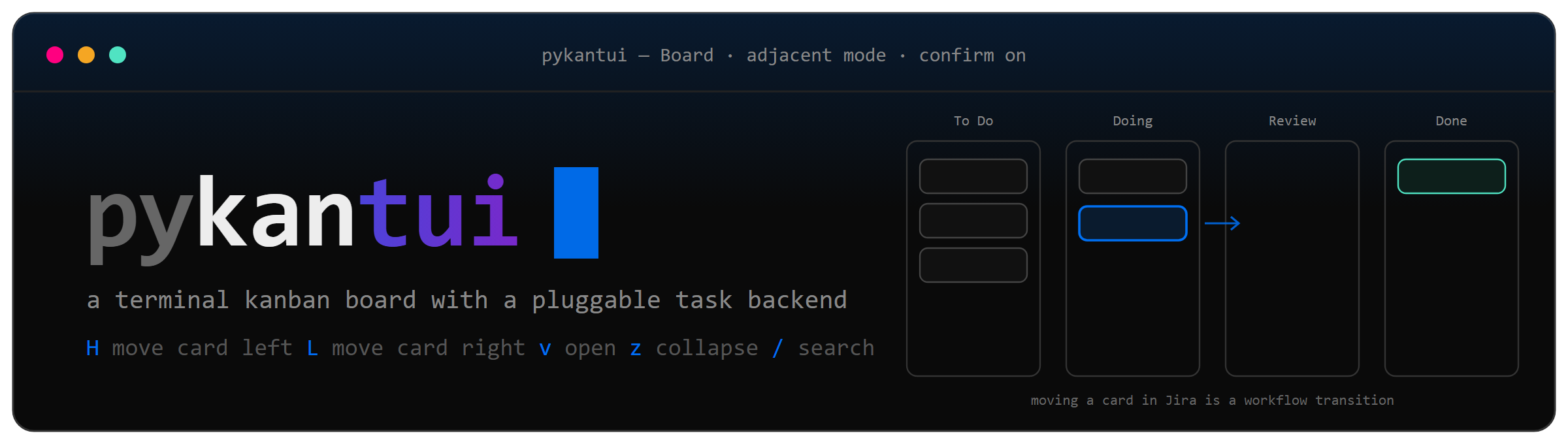
A terminal kanban board where card movement is decoupled from the store behind it. The same board widgets drive a local JSON file or a live Jira project — moving a card left or right in Jira executes a workflow transition.



Quick start
python -m venv .venv
.\.venv\Scripts\python.exe -m pip install -e ".[dev,jira]"
.\.venv\Scripts\kbn.exe demo
python -m venv .venv
./.venv/bin/python -m pip install -e ".[dev,jira]"
./.venv/bin/kbn demo
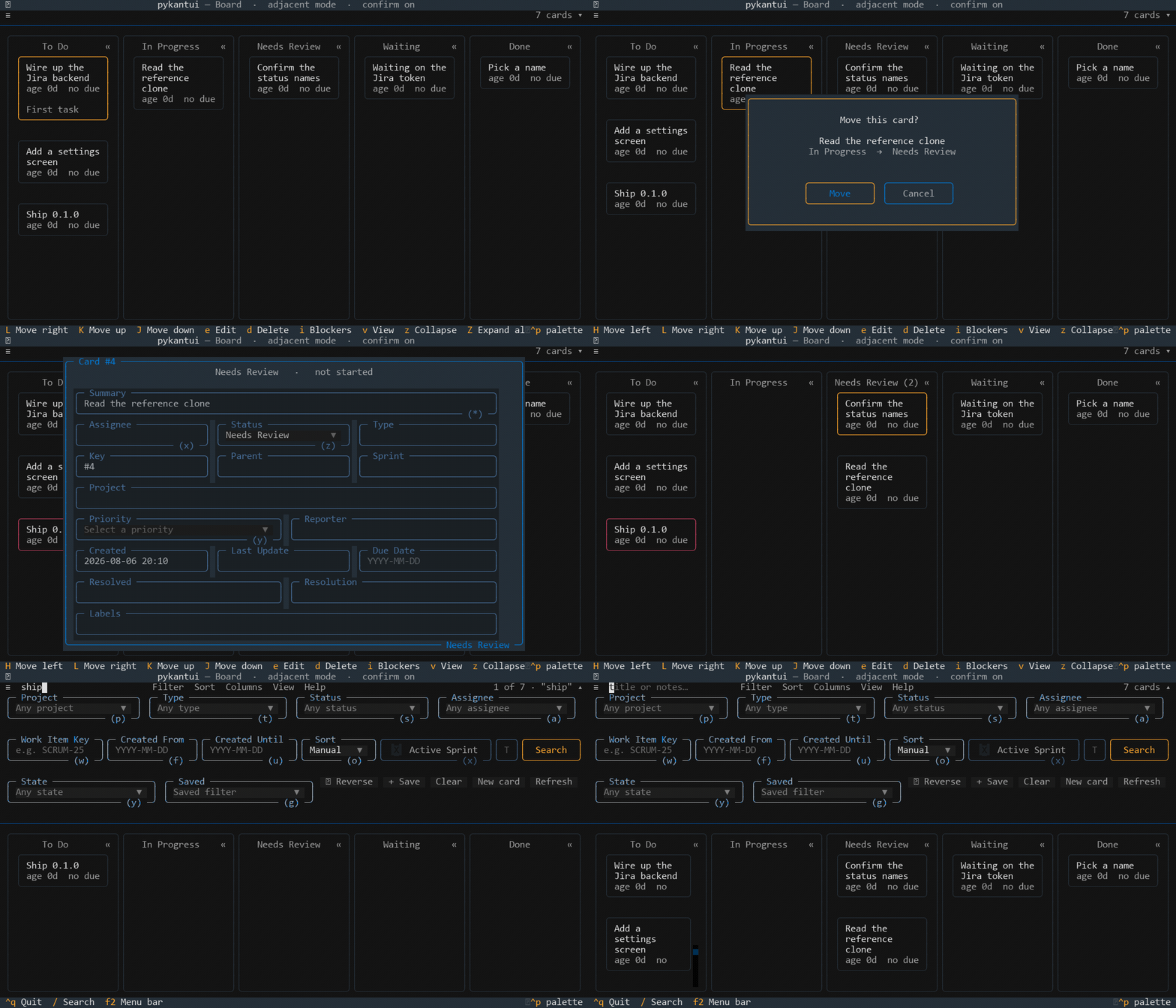
demo opens a throwaway board with sample cards and touches nothing on disk.
Once the venv is on your PATH the command is just kbn, which is how the rest
of this page writes it.
| Command | What it opens |
|---|---|
kbn demo |
a throwaway board with sample tasks |
kbn board |
your local board |
kbn jira |
a Jira board — see Jira |
kbn show |
the board as plain text, no TUI |
| Flag | Effect |
|---|---|
--movement adjacent|jump |
how H/L behave |
--no-confirm |
apply column moves without the confirmation dialog |
--theme NAME |
any Textual theme; saved to config.json |
--edges round|square |
corner style for every border at once; saved |
Contents
- Driving the board — keys, movement, confirmation, collapsing
- The top bar — search, filtering, sorting
- Shaping the board — columns as configuration
- Cards from the command line
- Backends and Jira
- Where things are stored
- How it is built — layout, actions, the write path
- Develop and Recording the demo
Driving the board
Navigation and movement are deliberately different keys: lowercase moves the cursor, uppercase moves the card.
| Key | Effect |
|---|---|
h j k l / arrows |
move focus (wraps; empty columns are skipped) |
H / L |
move the focused card left / right across columns |
J / K |
reorder the card within its column |
enter |
commit a pending move (jump mode) |
n / e / d |
new / edit / delete |
i |
flash the cards blocking this one |
v / double-click |
open the card: dates, dependencies, description, Jira fields |
, / right-click / click ▾ |
the column dropdown |
z / Z |
collapse the focused column / expand every column |
m |
toggle adjacent ↔ jump movement mode |
c |
toggle the move confirmation |
r |
reload from the backend |
/ |
jump to search |
F2 |
cycle the top bar |
ctrl+q |
quit |
Mouse drag works too, with the drop position taken from card midpoints.
Movement modes
- adjacent —
H/Lcommits to the neighbouring column immediately. - jump —
H/Lhighlights a candidate column and waits 1.2 s forenter. PressingH/Lagain walks the highlight further, so crossing three columns is one backend write instead of three. That matters against Jira, where each write is an HTTP round-trip.
Move confirmation
Changing a card's column asks first. enter/y approves, escape/n
cancels. Nothing is written until you approve, so cancelling leaves both the
board and the store untouched.
                 Move this card?

             Wire up the Jira backend
                 Ready  →  Doing

              [ Move ]    [ Cancel ]
The dialog names the side effect when there is one: moving into the finish column marks the task finished, into the reset column clears the dates, and on a read-only backend the move writes to Jira.
It applies to column moves only. J/K reordering does not ask, and neither
does a move the dependency gate is going to refuse — you get the "blocked"
toast instead of a pointless question.
Turn it off with c at runtime or --no-confirm at launch.
Collapsing columns
z shrinks the focused card's column to a 5-cell strip showing the count and
the name read downward; the columns left open share the freed width. Click the
« in a header to collapse, click the strip to reopen, or press Z to expand
everything.
╭──────────────────────────╮╭──────────────────────────╮╭───╮
│           Ready        « ││           Doing        « ││ » │
│ Wire up the Jira backend ││ Read the reference clone ││   │
│ Add a settings screen    ││                          ││ 1 │
│ Ship 0.1.0               ││                          ││   │
│                          ││                          ││ D │
│                          ││                          ││ O │
│                          ││                          ││ N │
│                          ││                          ││ E │
╰──────────────────────────╯╰──────────────────────────╯╰───╯
A collapsed column is hidden, not closed:
- It stays a move target.
Linto a collapsed Done still files the card and the strip's count goes up. Focus stays on a visible card rather than following the card somewhere you cannot see. - Navigation skips it.
h/lstep over collapsed columns. - Its cards are untouched. Nothing is archived or dropped.
- The last open column will not collapse — you would be left with no board.
The JSON backend persists the state, so a board you left with Done collapsed opens that way. Jira keeps it for the session only.
The top bar
One bar, three levels. F2 cycles them, or click the caret at the right.
 ≡                                                       20 cards  ▾    collapsed
 ≡  search…   Filter  Sort  Columns  View  Help          20 cards  ▾    toolbar
 ≡  search…   Filter  Sort  Columns  View  Help          20 cards  ▴    expanded
 ┌ Project ──┐ ┌ Type ─────┐ ┌ Status ───┐ ┌ Assignee ─┐
 ┌ Key ──┐ ┌ From ──┐ ┌ Until ─┐ ┌ Sort ─┐ [ ] Sprint  ┌ JQL ────┐ [Search]
 ┌ State ────┐ ┌ Saved ────┐  ⇵ Reverse   + Save   Clear   New card   Refresh
The level you leave it at is saved and comes back next time. The count shows
at every level, reading 9 of 27 · overdue when something is filtering — a
filter you forgot about is never invisible, even with the bar collapsed.
Fields that need a live query behind the board — Sprint and JQL — are disabled rather than hidden on a local board. A field that vanishes is harder to reason about than one that is visibly not applicable.
Every dropdown has a shortcut that opens the panel and jumps straight to it:
| Key | Field | Key | Field | Key | Field |
|---|---|---|---|---|---|
p |
Project | w |
Key | o |
Sort |
t |
Type | f |
From | g |
Saved |
s |
Status | u |
Until | x |
Sprint |
a |
Assignee | y |
State | q |
JQL |
Filtering
| Group | What it matches |
|---|---|
| Search | title and description, ignoring case |
| State | blocked · unblocked · overdue · due today · no due date · has notes |
| Jira | assignee · priority · type · label — inert on a local board |
| Saved | your named combinations, stored in config.json |
Conditions are cumulative: Overdue plus Has notes means both, not either.
Clear resets the filter and the sort together.
Blocked is computed once per refresh from the whole task list rather than asked per card, so filtering a Jira board is one request, not one per card.
Sorting
Manual · Title · Due · Age · Priority, with a Reverse toggle. Sorting is a view: it never writes positions, so the order you arranged by hand survives underneath and comes back exactly when you pick Manual again.
The trade is that J/K reordering is disabled while a sort is on — there is
nowhere for it to write. The binding greys out rather than failing on press.
Shaping the board
Columns are configuration, not code. They live in one file that both backends read, so a card means the same thing locally and in Jira:
kbn columns                      # what the board looks like now
kbn columns add Blocked --after "In Progress" --statuses "BLOCKED, ON ICE"
kbn columns count 8              # grow or shrink to 8 visible columns
kbn columns move Done 1          # reorder
kbn columns rename Waiting "On Hold"
kbn columns role finish Shipped  # which column means finished
kbn columns remove Waiting       # its cards move left; use --move-to to choose
kbn columns hide Archive         # keep it as a target without showing it
kbn columns reset --yes          # back to the defaults below
| Command | What it does |
|---|---|
list |
columns in order, with roles, hidden flags and Jira statuses |
add NAME |
--after to place it, --statuses to map Jira, --hidden to start hidden |
rename COL NAME |
rename in place |
remove COL |
delete it; cards move to --move-to, or the first column |
move COL N |
put it at 1-based position N |
count N |
grow with Column N placeholders, or shrink from the right |
role reset|start|finish [COL] |
set which column stamps dates; omit COL to clear |
statuses COL "A, B" |
Jira statuses landing here; "" clears |
show COL / hide COL |
visibility without deleting |
reset --yes |
restore the defaults |
Columns are addressed by id (#3), name ("Needs Review") or 1-based
position — whichever is handier. Nothing assumes a column count: one column
works, twelve works.
Boards already open pick changes up on r. Run kbn columns add ... in one
terminal, press r in another, and the board rebuilds with the new shape. No
restart, however many are open.
Roles are stored as column ids, not positions, so reordering never silently
changes which column means "done". Deleting a role column clears the role rather
than leaving it dangling. config.json is meant to be edited by hand, so a
value that is not one of ours falls back to the default instead of raising — a
typo in the file is never the reason the board will not open.
Widths
Columns share the available width while they fit and stop shrinking at 20 cells, after which the board scrolls sideways. That floor is why a ten- or twelve-column board stays usable in an 80-column terminal. Collapsing a column hands its width back to the rest.
Defaults
The starting shape, written out on first run from
core/workflows.py:
| # | Column | Jira statuses | Effect on landing |
|---|---|---|---|
| 1 | To Do | BACKLOG, TO DO |
clears the start and finish dates |
| 2 | In Progress | IN PROGRESS |
stamps the start date |
| 3 | Needs Review | NEEDS REVIEW |
nothing |
| 4 | Waiting | NEEDS MORE INFO, WAITING ON HOLD, WAITING OR ON HOLD |
nothing |
| 5 | Done | DONE, CANCEL |
stamps the finish date |
| 6 | Archive | — | hidden by default |
Needs Review is a stage of the work, so it sits in the flow between In Progress and Done. Waiting is a parked state — blocked on someone else, or missing information — which is why it is not on the straight line to Done.
Neither stamps a date. Work under review or on hold is not un-started and not finished, so a card in either keeps the start date it already had and picks straight back up when it moves on.
The dependency gate only guards In Progress and Done. A blocked card can sit in Needs Review or Waiting; it cannot be claimed as started or done.
Cards from the command line
kbn task add "Write the docs"                    # one card in the first column
kbn task add Task --count 30 --column "To Do"    # Task 01 .. Task 30
kbn task add "Ship it" --column Done --description "the details"
kbn task rm 4 7 9                                # delete by id
kbn task clear "To Do" --yes                     # empty a column
Counts are zero-padded to the width of the total, so 30 cards come out
Task 01 … Task 30 and sort in the order you meant. Columns are addressed the
same way as in kbn columns. Editing a card is still the TUI's job (e).
Backends
Backend is the whole contract: four abstract
methods plus optional writes. Anything store-specific rides in Task.metadata
rather than becoming a domain field.
| Backend | Writable | Reorder | Query | Notes |
|---|---|---|---|---|
json |
yes | yes | no | default; one readable file per board |
jira |
no | no | yes | cards are created and edited in Jira |
Every capability only some stores have is a method with a default on the base
class, not an attribute the UI goes looking for. The app asks the backend
questions — writable, supports_reorder, supports_query, query_text(),
sprint_only() — and never rummages through its attributes to guess.
Jira
Columns are not Jira board columns. A board is a saved JQL query plus a
{status name -> column id} map held on this side, so it works against any
project without the Agile board API.
kbn jira --init                 # writes jira.json
kbn jira                        # once base_url and api_token are filled in
--init writes jira.json owner-only from the moment it exists, because the
next thing you do is paste an API token into it. Fill in base_url and
api_token, adjust jql, and add rows to column_mapping for any status your
project has that is not listed. The token can also live in auth.json as
jira_token if you would rather keep it apart.
Reading a scrum board
Issues come from a raw JQL query, from a scrum or kanban board, or from that board's open sprint:
kbn jira --list-boards            # your boards and their ids
kbn jira --list-sprints 42        # that board's sprints and their ids
kbn jira --board 42               # everything on board 42
kbn jira --board 42 --sprint      # only the open sprint
kbn jira --board 42 --sprint 118  # a named sprint by id
The flags override jira.json for one run; set source, board_id and
sprint in the file to make it the default. --board uses the board's own
filter, so what you see matches what Jira shows you.
sprint: "active" is resolved on every fetch, not pinned at startup — the
board follows a sprint rollover instead of quietly going stale. If no sprint is
open you get an empty board and a warning naming the board, rather than silence.
Whichever source you use, the columns are still yours — the status map from
kbn columns, not Jira's board configuration. A board with six Jira columns can
be read into your five, and moving a card is still a workflow transition.
Matching statuses and transitions
Status names match ignoring case and spacing, so TO DO, To Do and
to do are the same status. That matters: an exact-match lookup fails silently,
piling every unmatched card into one column with no error. Anything genuinely
unmapped lands in fallback_column and raises a startup warning naming the
statuses, rather than disappearing into To Do unannounced.
Moving a card fetches the issue's available transitions, maps each transition's
destination status back through column_mapping, and picks the one whose
column id matches the target. It compares ints, not status names — several
statuses share a column here, and name comparison silently picks the wrong
transition when they do. A transition to CANCEL is a valid way of reaching
Done; any of the four paused statuses is a valid way of reaching Waiting. If
nothing matches, the move is refused with a message listing what Jira actually
offered, and the board does not change.
Where things are stored
| File | What |
|---|---|
%LOCALAPPDATA%\pykantui\board.json |
the local board's cards |
%LOCALAPPDATA%\pykantui\config.json |
columns, roles, saved filters, theme |
%LOCALAPPDATA%\pykantui\jira.json |
Jira connection settings |
%LOCALAPPDATA%\pykantui\auth.json |
the Jira token, if kept apart |
On Linux and macOS the base is $XDG_DATA_HOME or ~/.local/share.
PYKANTUI_HOME overrides the lot, which is how the tests and the demo board
never touch anything real. Every write goes to a temp file and is renamed over
the target, so an interrupted save leaves the old file intact rather than half
of a new one.
How it is built
src/pykantui/
  api/        clients for the services a board can sit on (the Jira REST surface)
  cli/        argument parsing and dispatch, nothing else
  commands/   one module per kbn subcommand: columns, tasks, jira
  config/     where data lives (paths.py) and the saved board shape (board.py)
  core/       board logic no screen or store owns: actions, filters, workflows
  models/     the domain objects and the enums they are built from
  pages/      full-screen views pushed over the board: detail, edit, menu, confirm
  sync/       the task stores and the Backend contract they satisfy
  tui/        the app, its themes, and the widgets on the board
tools/        dev scripts: gif and screenshot rendering
Dependencies run one way. models depends on nothing, core on models,
config on both, sync on those, and tui/pages on everything below. api
knows nothing about columns — it takes connection details and hands back a
client.
What a click means
Every clickable thing has to say what it stands for, and the only channel a
widget id or an option id gives you is a string. So there is a wire format,
"kind:value" — parsed into an Action at the boundary and never picked apart
again:
Action.parse("sort:due")                       # Action(kind=ActionKind.SORT, value="due")
Action.of(ActionKind.ACT, Act.CLEAR).chip_id   # "chip-act-clear"
Action.from_chip_id("chip-act-clear")          # back again
core/actions.py holds the vocabulary —
ActionKind, Menu, Act, ViewToggle, ColumnCommand, HelpTopic — as
enums, so a misspelled action is a parse that returns None at one known place
rather than a branch that silently never fires. The app dispatches with a single
match over ActionKind, which the type checker can see through.
The board re-renders only when the view actually changed. Re-syncing a dropdown to the value it already holds posts a Changed event, and rebuilding for that drops the focused card — which at startup means the first key press after opening goes nowhere.
How a move works
Keyboard and mouse both converge on KanbanBoard.request_move, and every column
move goes through it:
- check dependencies (
Task.can_move_to) — refuse with a toast if blocked, - ask for confirmation, and stop here if cancelled,
- hand off to
commit_move, the only function that writes a move, - write to the backend,
- bail out with a toast if the write failed — the board is untouched, so there is nothing to roll back,
- only then move the widget and restack the columns.
request_move is a Textual worker rather than a plain coroutine, because
awaiting a modal needs one. That matters in tests: a bare pilot.pause() can
return before the move has landed, so tests/test_board_tui.py has a settle
helper that also drains workers.
Develop
.\.venv\Scripts\python.exe -m ruff check .
.\.venv\Scripts\python.exe -m mypy
.\.venv\Scripts\python.exe -m unittest discover -s tests -t .
Baseline: ruff clean, mypy strict clean (51 files), 338 tests OK.
| Suite | Tests | Time |
|---|---|---|
test_filters test_models test_jsonstore test_jira test_config test_columns_cli test_tasks_cli |
193 | ~2 s |
test_mouse_ui |
32 | ~256 s |
test_menu_bar |
58 | ~253 s |
test_board_tui |
55 | ~268 s |
Pass -t . so tests is imported as a package. Its __init__.py does two
things that only work if it is: it points PYKANTUI_HOME at a throwaway
directory for the whole run, so a test that forgets to sandbox itself cannot
rewrite your real board, and it quietens the asyncio logger that
IsolatedAsyncioTestCase turns to debug — booting a Textual app trips its
slow-callback warning constantly and buries the results.
The TUI suites are slow because each test boots a real Textual app under the pilot; run them by module while iterating. Check the test count, not just the verdict: a module that fails to import is reported as one error and the suite still ends with a summary line.
Recording the demo
The gif at the top is generated, not captured by hand:
.\.venv\Scripts\python.exe -m pip install pillow
.\.venv\Scripts\python.exe tools\gif.py          # assets/demo.gif
tools/gif.py runs the app under Textual's pilot against a
throwaway in-memory board, reads each screen straight off the compositor as
styled cells, draws it with Pillow, and stitches the frames with ffmpeg. No
terminal recorder, no browser and no pty, which is why it runs the same on a
laptop and in CI. Edit the SCRIPT list at the top of the file to change what
the demo does.
tools/screenshots.py does the same for stills, writing
SVGs — text, so they render crisply at any size and a diff shows what actually
changed instead of a wall of binary.
tools/demo.tape is a vhs
script for the same demo, kept for anyone who has vhs working: it needs ttyd and
a headless Chromium, which is exactly the machinery tools/gif.py avoids.
License
MIT.
1 maintainer

Download files
Download the file for your platform. If you're not sure which to choose, learn more about installing packages.
Source Distribution
Built Distribution
Filter files by name, interpreter, ABI, and platform.
If you're not sure about the file name format, learn more about wheel file names.
Copy a direct link to the current filters
File details
Details for the file pykantui-0.1.0.tar.gz.
File metadata
- Download URL: pykantui-0.1.0.tar.gz
- Upload date:
- Size: 478.1 kB
- Tags: Source
- Uploaded using Trusted Publishing? Yes
- Uploaded via:
twine/7.0.0 CPython/3.13.14
File hashes
| Algorithm | Hash digest | |
|---|---|---|
| SHA256 |
39a0c0cb1fdf93626bffa6d89ef3ad3cbb5d6b7620966d603c90d673c62174b8
|
|
| MD5 |
cbb722cbebde2c2045d4c906d5097c7d
|
|
| BLAKE2b-256 |
1ace1d06ef26b3ea238e4a83b717ce7a860c459f029ec3cf9820812690e3354e
|
Provenance
The following attestation bundles were made for pykantui-0.1.0.tar.gz:
Publisher:
release.yml on joselrnz/pykantui
-
Statement:
-
Statement type:
https://in-toto.io/Statement/v1 -
Predicate type:
https://docs.pypi.org/attestations/publish/v1 -
Subject name:
pykantui-0.1.0.tar.gz -
Subject digest:
39a0c0cb1fdf93626bffa6d89ef3ad3cbb5d6b7620966d603c90d673c62174b8 - Sigstore transparency entry: 2363714340
- Sigstore integration time:
-
Permalink:
joselrnz/pykantui@a2b4d380036c32e12fa4d66dfcc6ea6aa2a35eb8 -
Branch / Tag:
refs/tags/v0.1.0 - Owner: https://github.com/joselrnz
-
Access:
public
-
Token Issuer:
https://token.actions.githubusercontent.com -
Runner Environment:
github-hosted -
Publication workflow:
release.yml@a2b4d380036c32e12fa4d66dfcc6ea6aa2a35eb8 -
Trigger Event:
push
-
Statement type:
File details
Details for the file pykantui-0.1.0-py3-none-any.whl.
File metadata
- Download URL: pykantui-0.1.0-py3-none-any.whl
- Upload date:
- Size: 93.3 kB
- Tags: Python 3
- Uploaded using Trusted Publishing? Yes
- Uploaded via:
twine/7.0.0 CPython/3.13.14
File hashes
| Algorithm | Hash digest | |
|---|---|---|
| SHA256 |
3185ece550c150203c6a96d5f410fd1415f8c48d806edb6d03179a17cd461e0a
|
|
| MD5 |
442119b2e97cea3cefba6ea9dce70fbe
|
|
| BLAKE2b-256 |
ebf2d7eebb4fed08d00fdad300fb90fdcfd756b18e97922387c42e8cb989fa40
|
Provenance
The following attestation bundles were made for pykantui-0.1.0-py3-none-any.whl:
Publisher:
release.yml on joselrnz/pykantui
-
Statement:
-
Statement type:
https://in-toto.io/Statement/v1 -
Predicate type:
https://docs.pypi.org/attestations/publish/v1 -
Subject name:
pykantui-0.1.0-py3-none-any.whl -
Subject digest:
3185ece550c150203c6a96d5f410fd1415f8c48d806edb6d03179a17cd461e0a - Sigstore transparency entry: 2363714470
- Sigstore integration time:
-
Permalink:
joselrnz/pykantui@a2b4d380036c32e12fa4d66dfcc6ea6aa2a35eb8 -
Branch / Tag:
refs/tags/v0.1.0 - Owner: https://github.com/joselrnz
-
Access:
public
-
Token Issuer:
https://token.actions.githubusercontent.com -
Runner Environment:
github-hosted -
Publication workflow:
release.yml@a2b4d380036c32e12fa4d66dfcc6ea6aa2a35eb8 -
Trigger Event:
push
-
Statement type:














