





Pykg2vec: Python Library for KGE Methods
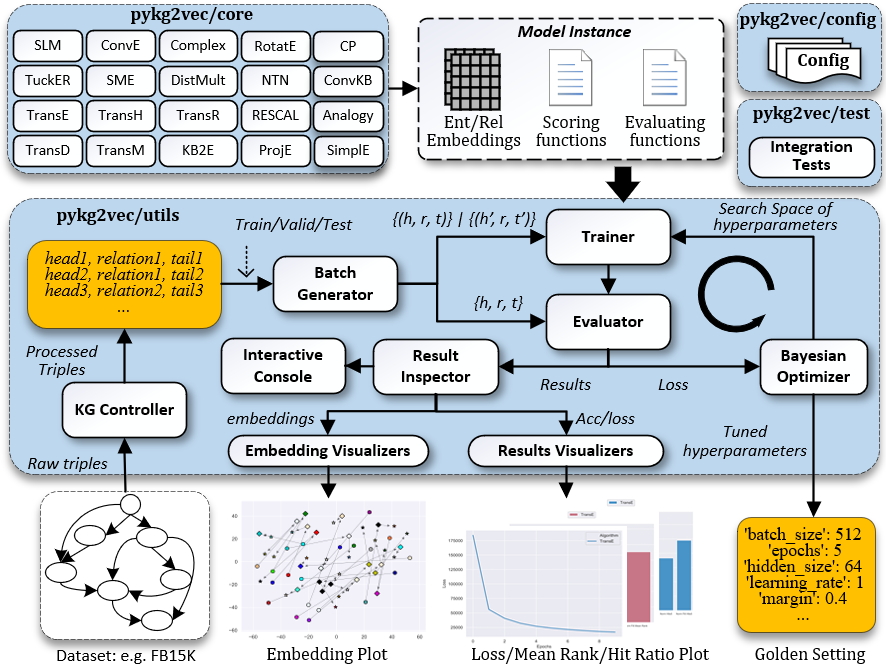
Pykg2vec is a library for learning the representation of entities and relations in Knowledge Graphs built on top of PyTorch 1.5 (TF2 version is available in tf-master branch as well). We have attempted to bring state-of-the-art Knowledge Graph Embedding (KGE) algorithms and the necessary building blocks in the pipeline of knowledge graph embedding task into a single library. We hope Pykg2vec is both practical and educational for people who want to explore the related fields.
Features:
- Support state-of-the-art KGE model implementations and benchmark datasets. (also support custom datasets)
- Support automatic discovery for hyperparameters.
- Tools for inspecting the learned embeddings.
- Support exporting the learned embeddings in TSV or Pandas-supported format.
- Interactive result inspector.
- TSNE-based, KPI summary visualization (mean rank, hit ratio) in various format. (csvs, figures, latex table)
We welcome any form of contribution! Please refer to CONTRIBUTING.md for more details.
To Get Started
Before using pykg2vec, we recommend users to have the following libraries installed:
- python >=3.6 (recommended)
- pytorch>= 1.5
Quick Guide for Anaconda users:
- Setup a Virtual Environment: we encourage you to use anaconda to work with pykg2vec:
(base) $ conda create --name pykg2vec python=3.6
(base) $ conda activate pykg2vec
- Setup Pytorch: we encourage to use pytorch with GPU support for good training performance. However, a CPU version also runs. The following sample commands are for setting up pytorch:
# if you have a GPU with CUDA 10.1 installed
(pykg2vec) $ conda install pytorch torchvision cudatoolkit=10.1 -c pytorch
# or cpu-only
(pykg2vec) $ conda install pytorch torchvision cpuonly -c pytorch
- Setup Pykg2vec:
(pykg2vec) $ git clone https://github.com/Sujit-O/pykg2vec.git
(pykg2vec) $ cd pykg2vec
(pykg2vec) $ python setup.py install
For beginners, these papers, A Review of Relational Machine Learning for Knowledge Graphs, Knowledge Graph Embedding: A Survey of Approaches and Applications, and An overview of embedding models of entities and relationships for knowledge base completion can be good starting points!
User Documentation
The documentation is here.
Usage Examples
With pykg2vec command-line interface, you can
- Run a single algorithm with various models and datasets (customized dataset also supported).
# Check all tunnable parameters. (pykg2vec) $ pykg2vec-train -h # Train TransE on FB15k benchmark dataset. (pykg2vec) $ pykg2vec-train -mn TransE # Train using different KGE methods. (pykg2vec) $ pykg2vec-train -mn [TransE|TransD|TransH|TransG|TransM|TransR|Complex|ComplexN3| CP|RotatE|Analogy|DistMult|KG2E|KG2E_EL|NTN|Rescal|SLM|SME|SME_BL|HoLE| ConvE|ConvKB|Proje_pointwise|MuRP|QuatE|OctonionE|InteractE|HypER] # For KGE using projection-based loss function, use more processes for batch generation. (pykg2vec) $ pykg2vec-train -mn [ConvE|ConvKB|Proje_pointwise] -npg [the number of processes, 4 or 6] # Train TransE model using different benchmark datasets. (pykg2vec) $ pykg2vec-train -mn TransE -ds [fb15k|wn18|wn18_rr|yago3_10|fb15k_237|ks|nations|umls|dl50a|nell_955] # Train TransE model using your own hyperparameters. (pykg2vec) $ pykg2vec-train -exp True -mn TransE -ds fb15k -hpf ./examples/custom_hp.yaml # Use your own dataset (pykg2vec) $ pykg2vec-train -mn TransE -ds [name] -dsp [path to the custom dataset] - Tune a single algorithm.
# Tune TransE using the benchmark dataset. (pykg2vec) $ pykg2vec-tune -mn [TransE] -ds [dataset name] # Tune TransE with your own search space (pykg2vec) $ pykg2vec-tune -exp True -mn TransE -ds fb15k -ssf ./examples/custom_ss.yaml - Perform Inference Tasks (more advanced).
# Train a model and perform inference tasks.
(pykg2vec) $ pykg2vec-infer -mn TransE

# Perform inference tasks over a pretrained model.
(pykg2vec) $ pykg2vec-infer -mn TransE -ld [path to the pretrained model]
* NB: On Windows, use pykg2vec-train.exe, pykg2vec-tune.exe and pykg2vec-infer.exe instead.
For more usage of pykg2vec APIs, please check the programming examples.
Citation
Please kindly consider citing our paper if you find pykg2vec useful for your research.
  @article{yu2019pykg2vec,
  title={Pykg2vec: A Python Library for Knowledge Graph Embedding},
  author={Yu, Shih Yuan and Rokka Chhetri, Sujit and Canedo, Arquimedes and Goyal, Palash and Faruque, Mohammad Abdullah Al},
  journal={arXiv preprint arXiv:1906.04239},
  year={2019}
  }


Release files for pykg2vec 0.0.52
For a detailed explanation of source distributions (sdists) and built distributions (wheels), please see the package formats documentation.
Source distribution (sdist)
| File | Size | Uploaded | Provenance | Actions |
|---|---|---|---|---|
| pykg2vec-0.0.52.tar.gz | 64.4 kB | Without provenance | Details for pykg2vec-0.0.52.tar.gz |
Built distribution (wheel)
| File | Interpreter | ABI | Platform | Actions Reset |
|---|---|---|---|---|
| pykg2vec-0.0.52-py3.6.egg | Legacy Egg format | - | - | Details for pykg2vec-0.0.52-py3.6.egg |
Total release size: 262.5 kB
Release files / pykg2vec-0.0.52.tar.gz
| Download URL | pykg2vec-0.0.52.tar.gz |
|---|---|
| Size | 64.4 kB |
| Tags | Source |
|
SHA-256 checksum How to use checksums |
c1ef46a9dcd3ac0b2030ab3ecc5213efaa08aba10400d9347813958dd7fbf4a9
|
|
BLAKE2b-256 checksum How to use checksums |
34d2ad68cb04e5bbc610dfcbd9b2a77e6298be4289479d8232a2782596aca698
|
| Upload date | |
|
Uploaded using Trusted Publishing? What is trusted publishing? |
No |
| Uploaded via |
twine/3.1.1 pkginfo/1.5.0.1 requests/2.25.1 setuptools/49.6.0.post20201009 requests-toolbelt/0.9.1 tqdm/4.54.1 CPython/3.6.11
|
Release files / pykg2vec-0.0.52-py3.6.egg
| Download URL | pykg2vec-0.0.52-py3.6.egg |
|---|---|
| Size | 198.1 kB |
| Tags | Egg |
|
SHA-256 checksum How to use checksums |
635e3da145c9d9cfce8cd308f905264830d3166a5655fb8f3ce7bcd7817ee774
|
|
BLAKE2b-256 checksum How to use checksums |
7b9915205c3a7c74464001fa33b5b5e84055120c55fa947b95ea86575f96e20b
|
| Upload date | |
|
Uploaded using Trusted Publishing? What is trusted publishing? |
No |
| Uploaded via |
twine/3.1.1 pkginfo/1.5.0.1 requests/2.25.1 setuptools/49.6.0.post20201009 requests-toolbelt/0.9.1 tqdm/4.54.1 CPython/3.6.11
|
Security for pykg2vec 0.0.52
Provenance
Provenance describes where a file came from. On PyPI, provenance is shared via attestations, which provide a verifiable record of the build or publishing details. View details, limitations and caveats.
No provenance found
None of the files in this release were uploaded with provenance metadata.
A note on package security
PyPI is a repository for distributing packages, not a service for auditing them. While third-party security researchers and our staff do their best to detect and remove malicious packages, PyPI cannot guarantee the quality, security or suitability of any given package.
To learn more about protecting yourself from malicious actors, visit our package security documentation.














