
pykoop




pykoop is a Koopman operator identification library written in Python. It allows the user to specify Koopman lifting functions and regressors in order to learn a linear model of a given system in the lifted space.
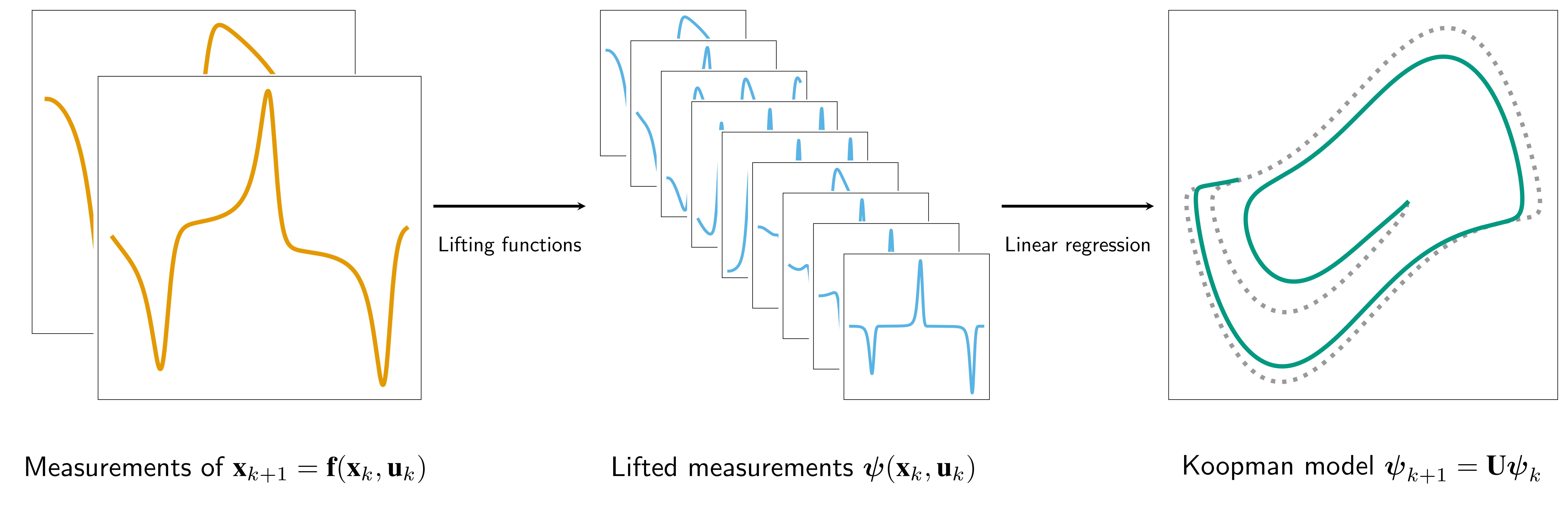
To learn more about Koopman operator theory, check out this talk or this review article.
pykoop places heavy emphasis on modular lifting function construction and scikit-learn compatibility. The library aims to make it easy to automatically find good lifting functions and regressor hyperparameters by leveraging scikit-learn’s existing cross-validation infrastructure. pykoop also gracefully handles control inputs and multi-episode datasets at every stage of the pipeline.
pykoop also includes several experimental regressors that use linear matrix inequalities to constraint the asymptotic stability of the Koopman system, or regularize the regression using its H-infinity norm. Check out arXiv:2110.09658 [eess.SY] and arXiv:2102.03613 [eess.SY] for details.
Example
Consider Tikhonov-regularized EDMD with polynomial lifting functions applied to mass-spring-damper data. Using pykoop, this can be implemented as:
import pykoop
from sklearn.preprocessing import MaxAbsScaler, StandardScaler

# Get example mass-spring-damper data
eg = pykoop.example_data_msd()

# Create pipeline
kp = pykoop.KoopmanPipeline(
    lifting_functions=[
        ('ma', pykoop.SkLearnLiftingFn(MaxAbsScaler())),
        ('pl', pykoop.PolynomialLiftingFn(order=2)),
        ('ss', pykoop.SkLearnLiftingFn(StandardScaler())),
    ],
    regressor=pykoop.Edmd(alpha=1),
)

# Fit the pipeline
kp.fit(
    eg['X_train'],
    n_inputs=eg['n_inputs'],
    episode_feature=eg['episode_feature'],
)

# Predict using the pipeline
X_pred = kp.predict_trajectory(eg['x0_valid'], eg['u_valid'])

# Score using the pipeline
score = kp.score(eg['X_valid'])

# Plot results
kp.plot_predicted_trajectory(eg['X_valid'], plot_input=True)
More examples are available in examples/, in notebooks/, or on binder.
Library layout
Most of the required classes and functions have been imported into the
pykoop namespace. The most important object is the
pykoop.KoopmanPipeline, which requires a list of lifting functions and
a regressor.
Some example lifting functions are
pykoop.PolynomialLiftingFn,pykoop.RbfLiftingFn,pykoop.DelayLiftingFn, andpykoop.BilinearInputLiftingFn.
scikit-learn preprocessors can be wrapped into lifting functions using
pykoop.SkLearnLiftingFn. States and inputs can be lifted independently
using pykoop.SplitPipeline. This is useful to avoid lifting inputs.
Some basic regressors included are
pykoop.Edmd(includes Tikhonov regularization),pykoop.Dmdc, andpykoop.Dmd.
More advanced (and experimental) LMI-based regressors are included in the pykoop.lmi_regressors namespace. They allow for different kinds of regularization as well as hard constraints on the Koopman operator.
You can roll your own lifting functions and regressors by inheriting from
pykoop.KoopmanLiftingFn, pykoop.EpisodeIndependentLiftingFn,
pykoop.EpisodeDependentLiftingFn, and
pykoop.KoopmanRegressor.
Some sample dynamic models are also included in the pykoop.dynamic_models namespace.
Installation and testing
pykoop can be installed from PyPI using
$ pip install pykoopAdditional LMI solvers can be installed using
$ pip install mosek
$ pip install cvxopt
$ pip install smcp
Mosek is recommended, but is nonfree and requires a license.
The library can be tested using
$ pip install -r requirements-dev.txt
$ pytest
Note that pytest must be run from the repository’s root directory.
To skip unit tests that require a MOSEK license, including all doctests and examples, run
$ pytest ./tests -k "not mosek"The documentation can be compiled using
$ cd doc
$ make html
If you want a hook to check source code formatting before allowing a commit, you can use
$ cd .git/hooks/
$ ln -s ../../.githooks/pre-commit .
$ chmod +x ./pre-commit
You will need yapf installed for this.
Citation
If you use this software in your research, please cite it as below or see CITATION.cff.
@software{dahdah_pykoop_2024,
    title={{decargroup/pykoop}},
    doi={10.5281/zenodo.5576490},
    url={https://github.com/decargroup/pykoop},
    publisher={Zenodo},
    author={Steven Dahdah and James Richard Forbes},
    version = {{v2.0.1}},
    year={2024},
}
License
This project is distributed under the MIT License, except the contents of pykoop/_sklearn_metaestimators/, which are from the scikit-learn project, and are distributed under the BSD-3-Clause License.


Release files for pykoop 2.0.1
For a detailed explanation of source distributions (sdists) and built distributions (wheels), please see the package formats documentation.
Source distribution (sdist)
| File | Size | Uploaded | |
|---|---|---|---|
| pykoop-2.0.1.tar.gz | 84.0 kB | Details |
Built distribution (wheel)
| File | Interpreter | ABI | Platform | Reset |
|---|---|---|---|---|
| pykoop-2.0.1-py3-none-any.whl | Python 3 | none | any | Details |
Total release size: 154.9 kB
Release files / pykoop-2.0.1.tar.gz
| Download URL | pykoop-2.0.1.tar.gz |
|---|---|
| Size | 84.0 kB |
| Tags | Source |
|
SHA-256 checksum How to use checksums |
cd02706772a861f3e4e098d4c5a88dc6a5339aa2964d5b5893a61ae29b814974
|
|
BLAKE2b-256 checksum How to use checksums |
7727a6918af6abfaef7dc1721334abd89ccb9034c2a1cc43cd093af003384832
|
| Upload date | |
|
Uploaded using Trusted Publishing? What is trusted publishing? |
No |
| Uploaded via |
twine/5.1.1 CPython/3.9.20
|
Release files / pykoop-2.0.1-py3-none-any.whl
| Download URL | pykoop-2.0.1-py3-none-any.whl |
|---|---|
| Size | 70.9 kB |
| Tags | Python 3 |
|
SHA-256 checksum How to use checksums |
36b5ae6cdf4a518862405e8f49263cbe13074887dcdd374292a54df40cb4919b
|
|
BLAKE2b-256 checksum How to use checksums |
bdde24906f55db3d5b35ba1996914e08025ba66aceb27257125a81df75dea0f0
|
| Upload date | |
|
Uploaded using Trusted Publishing? What is trusted publishing? |
No |
| Uploaded via |
twine/5.1.1 CPython/3.9.20
|














