
Package for vegetation trait retrievals with ARTMO-based GPR models from hyperspectral images.

Project description
PyL2BV
Overview
PyL2BV (Python Level 2B Vegetation) is a Python package for processing ARTMO-based Gaussian Process Regression (GPR) models on hyperspectral images. It enables biophysical parameter retrieval using machine learning models.
Citation
Mészáros Viktor Ixion (2025). pyl2bv (zenodo). Zenodo: https://doi.org/10.5281/zenodo.15655521

Key Features
- Process hyperspectral images (ENVI Standard, CHIME netCDF)
- Gaussian Process Regression (GPR) for vegetation parameters
- Command-Line Interface (CLI) and Graphical User Interface (GUI)
- Customizable chunk-based retrieval
- Supports large-scale image processing with parallelization
- Automated ENVI file and NetCDF exports
Installation Guide
Prerequisites
Ensure you have Python 3.10 or later installed on your system.
Install via PyPI
pip install PyL2BV
Usage
# Check installation
pip show pyl2bv
# Invoke the GUI (details descibed below)
pyl2bv-gui (details descibed below)
# Invoke CLI
pyl2bv-cli --help
(For Developers) Install the package directly from GitHub using pip:
pip install git+https://github.com/mv-xion/PyL2BV.git
Creating a Virtual Environment
Using venv
# 1. Create a virtual environment
   python -m venv pyl2bv_env
# 2. Activate the virtual environment:
   source pyl2bv_env/bin/activate  # macOS/Linux
   pyl2bv_env\Scripts\activate    # Windows
Using conda
# 1. Create a new conda environment:
   conda create --name pyl2bv_env python=3.10
# 2. Activate the conda environment:
   conda activate pyl2bv_env
Installing Side-Packages
Once you have activated your virtual environment, install the necessary packages from requirements.txt:
pip install -r requirements.txt
Usage
Using the Python API
Use PyL2BV in Python scripts, below is an example:
from PyL2BV.pyl2bv_code.model_runner import run_retrieval

# Define the input folder path
input_folder_path = "/path/to/your/input_folder"
# Define the input type (assuming it's a required argument)
input_type = "ENVI Standard"
# Define the model folder path
model_folder_path = "/path/to/your/model_folder"
# Define the conversion factor (example value, replace with actual if needed)
conversion_factor = 0.0001
# Define the chunk size based on your memory (example value, replace with actual if needed)
chunk_size = 300

# Run the retrieval
run_retrieval(
    input_folder_path=input_folder_path,
    input_type=input_type,
    model_folder_path=model_folder_path,
    conversion_factor=conversion_factor,
    chunk_size=chunk_size,
    plot=False,
    debug_log=False,
)
Using the Command-Line Interface (CLI)
You can also run the model using the CLI. Below is an example of how to use it:
# Installed form PyPi
pyl2bv-cli /path/to/your/input/folder "ENVI Standard" /path/to/your/model/folder 0.0001 300 --plot
# Installed from Github
python -m PyL2BV.cli /path/to/your/input/folder "ENVI Standard" /path/to/your/model/folder 0.0001 300 --plot
The CLI accepts the following arguments:
input_folder_path: Path to the input folderinput_type: Type of input filemodel_folder_path: Path to the model folderconversion_factor: Image conversion factor- `chunk_size: Retrieval chunk size
--plot: Optional flag to enable plotting
GUI Usage
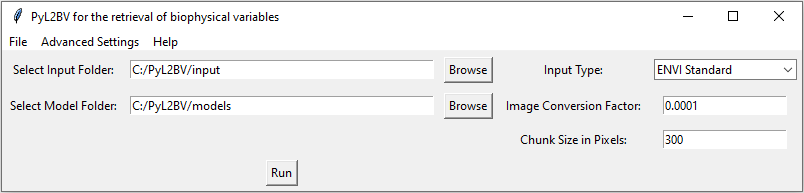
The GUI allows the user to set the following parameters:
- Input Folder: Select the folder containing the input files.
- Model Folder: Choose the folder with the required model files.
- Input Type: Specify the type of input (options include "CHIME netCDF" and "ENVI Standard").
- Conversion Factor: Set the image conversion factor as needed.
- Chunk Size: Set the optimal retrieval chunk size factor for your PC.
- Advanced Settings: The "Plotting results" option can be toggled in this dropdown.
Program Running
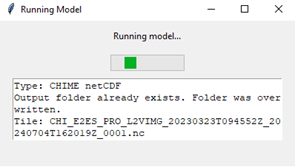
When the "Run" button is pressed, the program begins retrieval and opens a progress window for tracking.
Outcomes
Below are examples of outcome images generated by the program:
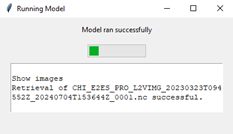
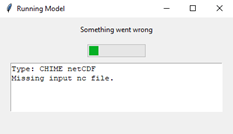
After the progress window closes, the user can initiate another retrieval directly from the GUI.
License
This project is licensed under the Apache 2.0 License - see the LICENSE file for details.
Contributing to PyL2BV
Thank you for your interest in contributing to PyL2BV!
We welcome contributions that help improve the project, whether it's fixing bugs, adding new features, or improving documentation.
- Fork the repository on GitHub.
- Create a new branch (
git checkout -b feature-name) - Commit changes
- Push to the branch
- Open a Pull Request
Support
For issues, please open a GitHub Issue.
References


Download files
Download the file for your platform. If you're not sure which to choose, learn more about installing packages.
Source Distribution
Built Distribution
Filter files by name, interpreter, ABI, and platform.
If you're not sure about the file name format, learn more about wheel file names.
Copy a direct link to the current filters
File details
Details for the file pyl2bv-1.1.5.tar.gz.
File metadata
- Download URL: pyl2bv-1.1.5.tar.gz
- Upload date:
- Size: 22.9 kB
- Tags: Source
- Uploaded using Trusted Publishing? No
- Uploaded via: poetry/2.1.2 CPython/3.10.11 Windows/10
File hashes
| Algorithm | Hash digest | |
|---|---|---|
| SHA256 |
5748fa10a9b47096c9beb4f0cab9e183e1aa48a8bf3ed0d2e5849efdf2af3eee
|
|
| MD5 |
d613d30d9112d39eb72f85f5e6dca933
|
|
| BLAKE2b-256 |
46a9728b5558871853707d57d814619fe1bb2830e13e767d1931ebe118fb0a24
|
File details
Details for the file pyl2bv-1.1.5-py3-none-any.whl.
File metadata
- Download URL: pyl2bv-1.1.5-py3-none-any.whl
- Upload date:
- Size: 28.6 kB
- Tags: Python 3
- Uploaded using Trusted Publishing? No
- Uploaded via: poetry/2.1.2 CPython/3.10.11 Windows/10
File hashes
| Algorithm | Hash digest | |
|---|---|---|
| SHA256 |
4ca514b09a681290cbf0cc81002094f581d4857f19dfa175b537cb04b709e8a1
|
|
| MD5 |
0a8b0e1af03bd8a12ecc2c8a4e453ebd
|
|
| BLAKE2b-256 |
d696db61c3ef4e9dd4fb07a50b336bf51a613e0be26a3e951664303ec3ae7422
|






