
 RAFT: Reusable Accelerated Functions and Tools
RAFT: Reusable Accelerated Functions and Tools
Contents
- Useful Resources
- What is RAFT?
- Use cases
- Is RAFT right for me?
- Getting Started
- Installing RAFT
- Codebase structure and contents
- Contributing
- References
Useful Resources
- RAFT Reference Documentation: API Documentation.
- RAFT Getting Started: Getting started with RAFT.
- Build and Install RAFT: Instructions for installing and building RAFT.
- RAPIDS Community: Get help, contribute, and collaborate.
- GitHub repository: Download the RAFT source code.
- Issue tracker: Report issues or request features.
What is RAFT?
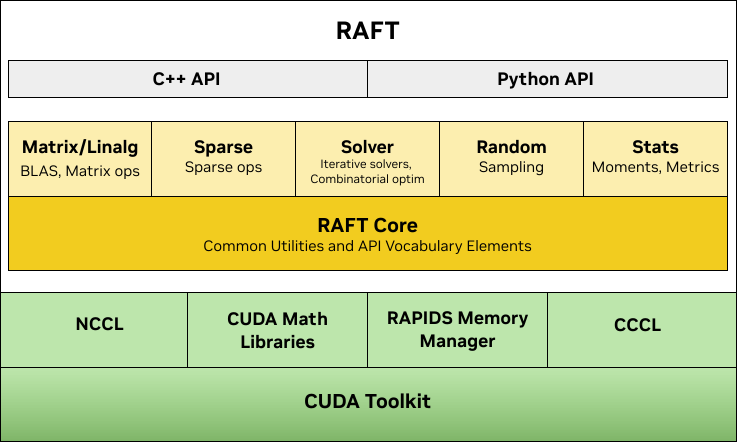
RAFT contains fundamental widely-used algorithms and primitives for machine learning and data mining. The algorithms are CUDA-accelerated and form building blocks for more easily writing high performance applications.
By taking a primitives-based approach to algorithm development, RAFT
- accelerates algorithm construction time
- reduces the maintenance burden by maximizing reuse across projects, and
- centralizes core reusable computations, allowing future optimizations to benefit all algorithms that use them.
While not exhaustive, the following general categories help summarize the accelerated functions in RAFT:
| Category | Accelerated Functions in RAFT |
|---|---|
| Data Formats | sparse & dense, conversions, data generation |
| Dense Operations | linear algebra, matrix and vector operations, reductions, slicing, norms, factorization, least squares, svd & eigenvalue problems |
| Sparse Operations | linear algebra, eigenvalue problems, slicing, norms, reductions, factorization, symmetrization, components & labeling |
| Solvers | combinatorial optimization, iterative solvers |
| Statistics | sampling, moments and summary statistics, metrics, model evaluation |
| Tools & Utilities | common tools and utilities for developing CUDA applications, multi-node multi-gpu infrastructure |
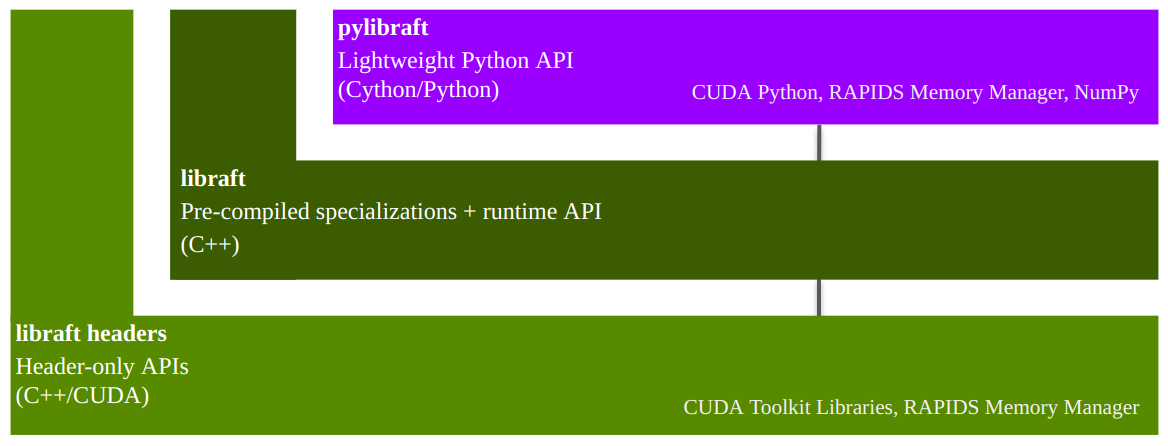
RAFT is a C++ header-only template library with an optional shared library that
- can speed up compile times for common template types, and
- provides host-accessible "runtime" APIs, which don't require a CUDA compiler to use
In addition being a C++ library, RAFT also provides 2 Python libraries:
pylibraft- lightweight Python wrappers around RAFT's host-accessible "runtime" APIs.raft-dask- multi-node multi-GPU communicator infrastructure for building distributed algorithms on the GPU with Dask.
Is RAFT right for me?
RAFT contains low-level primitives for accelerating applications and workflows. Data source providers and application developers may find specific tools very useful. RAFT is not intended to be used directly by data scientists for discovery and experimentation. For data science tools, please see the RAPIDS website.
Getting started
RAPIDS Memory Manager (RMM)
RAFT relies heavily on RMM which eases the burden of configuring different allocation strategies globally across the libraries that use it.
Multi-dimensional Arrays
The APIs in RAFT accept the mdspan multi-dimensional array view for representing data in higher dimensions similar to the ndarray in the Numpy Python library. RAFT also contains the corresponding owning mdarray structure, which simplifies the allocation and management of multi-dimensional data in both host and device (GPU) memory.
The mdarray forms a convenience layer over RMM and can be constructed in RAFT using a number of different helper functions:
#include <raft/core/device_mdarray.hpp>

int n_rows = 10;
int n_cols = 10;

auto scalar = raft::make_device_scalar<float>(handle, 1.0);
auto vector = raft::make_device_vector<float>(handle, n_cols);
auto matrix = raft::make_device_matrix<float>(handle, n_rows, n_cols);
C++ Example
Most of the primitives in RAFT accept a raft::device_resources object for the management of resources which are expensive to create, such CUDA streams, stream pools, and handles to other CUDA libraries like cublas and cusolver.
The example below demonstrates creating a RAFT handle and using it with device_matrix and device_vector to allocate memory, generating random clusters, and computing
pairwise Euclidean distances with the NVIDIA cuVS library:
#include <raft/core/device_resources.hpp>
#include <raft/core/device_mdspan.hpp>
#include <raft/random/make_blobs.cuh>
#include <cuvs/distance/distance.hpp>

raft::device_resources handle;

int n_samples = 5000;
int n_features = 50;

float *input;
int *labels;
float *output;

...
// Allocate input, labels, and output pointers
...

auto input_view = raft::make_device_matrix_view(input, n_samples, n_features);
auto labels_view = raft::make_device_vector_view(labels, n_samples);
auto output_view = raft::make_device_matrix_view(output, n_samples, n_samples);

raft::random::make_blobs(handle, input_view, labels_view);

auto metric = cuvs::distance::DistanceType::L2SqrtExpanded;
cuvs::distance::pairwise_distance(handle, input_view, input_view, output_view, metric);
Python Example
The pylibraft package contains a Python API for RAFT algorithms and primitives. pylibraft integrates nicely into other libraries by being very lightweight with minimal dependencies and accepting any object that supports the __cuda_array_interface__, such as CuPy's ndarray. The number of RAFT algorithms exposed in this package is continuing to grow from release to release.
The example below demonstrates computing the pairwise Euclidean distances between CuPy arrays using the NVIDIA cuVS library. Note that CuPy is not a required dependency for pylibraft.
import cupy as cp

from cuvs.distance import pairwise_distance

n_samples = 5000
n_features = 50

in1 = cp.random.random_sample((n_samples, n_features), dtype=cp.float32)
in2 = cp.random.random_sample((n_samples, n_features), dtype=cp.float32)

output = pairwise_distance(in1, in2, metric="euclidean")
The output array in the above example is of type raft.common.device_ndarray, which supports cuda_array_interface making it interoperable with other libraries like CuPy, Numba, PyTorch and RAPIDS cuDF that also support it. CuPy supports DLPack, which also enables zero-copy conversion from raft.common.device_ndarray to JAX and Tensorflow.
Below is an example of converting the output pylibraft.device_ndarray to a CuPy array:
cupy_array = cp.asarray(output)
And converting to a PyTorch tensor:
import torch

torch_tensor = torch.as_tensor(output, device='cuda')
Or converting to a RAPIDS cuDF dataframe:
cudf_dataframe = cudf.DataFrame(output)
When the corresponding library has been installed and available in your environment, this conversion can also be done automatically by all RAFT compute APIs by setting a global configuration option:
import pylibraft.config
pylibraft.config.set_output_as("cupy")  # All compute APIs will return cupy arrays
pylibraft.config.set_output_as("torch") # All compute APIs will return torch tensors
You can also specify a callable that accepts a pylibraft.common.device_ndarray and performs a custom conversion. The following example converts all output to numpy arrays:
pylibraft.config.set_output_as(lambda device_ndarray: return device_ndarray.copy_to_host())
pylibraft also supports writing to a pre-allocated output array so any __cuda_array_interface__ supported array can be written to in-place:
import cupy as cp

from cuvs.distance import pairwise_distance

n_samples = 5000
n_features = 50

in1 = cp.random.random_sample((n_samples, n_features), dtype=cp.float32)
in2 = cp.random.random_sample((n_samples, n_features), dtype=cp.float32)
output = cp.empty((n_samples, n_samples), dtype=cp.float32)

pairwise_distance(in1, in2, out=output, metric="euclidean")
Installing
RAFT's C++ and Python libraries can both be installed through Conda and the Python libraries through Pip.
Installing C++ and Python through Conda
The easiest way to install RAFT is through conda and several packages are provided.
libraft-headersC++ headerspylibraft(optional) Python libraryraft-dask(optional) Python library for deployment of multi-node multi-GPU algorithms that use the RAFTraft::commsabstraction layer in Dask clusters.
Use the following command, depending on your CUDA version, to install all of the RAFT packages with conda (replace rapidsai with rapidsai-nightly to install more up-to-date but less stable nightly packages). mamba is preferred over the conda command.
# CUDA 13
mamba install -c rapidsai -c conda-forge raft-dask pylibraft cuda-version=13.3

# CUDA 12
mamba install -c rapidsai -c conda-forge raft-dask pylibraft cuda-version=12.9
Note that the above commands will also install libraft-headers and libraft.
You can also install the conda packages individually using the mamba command above. For example, if you'd like to install RAFT's headers and pre-compiled shared library to use in your project:
# CUDA 13
mamba install -c rapidsai -c conda-forge libraft libraft-headers cuda-version=13.3

# CUDA 12
mamba install -c rapidsai -c conda-forge libraft libraft-headers cuda-version=12.9
Installing Python through Pip
pylibraft and raft-dask both have experimental packages that can be installed through pip:
# CUDA 13
pip install pylibraft-cu13
pip install raft-dask-cu13

# CUDA 12
pip install pylibraft-cu12
pip install raft-dask-cu12
These packages statically build RAFT's pre-compiled instantiations and so the C++ headers won't be readily available to use in your code.
The build instructions contain more details on building RAFT from source and including it in downstream projects. You can also find a more comprehensive version of the above CPM code snippet the Building RAFT C++ and Python from source section of the build instructions.
Contributing
If you are interested in contributing to the RAFT project, please read our Contributing guidelines. Refer to the Developer Guide for details on the developer guidelines, workflows, and principals.
References
When citing RAFT generally, please consider referencing this Github project.
@misc{rapidsai,
  title={Rapidsai/raft: RAFT contains fundamental widely-used algorithms and primitives for data science, Graph and machine learning.},
  url={https://github.com/rapidsai/raft},
  journal={GitHub},
  publisher={NVIDIA RAPIDS},
  author={Rapidsai},
  year={2022}
}
Release files for pylibraft-cu12 26.8.0
For a detailed explanation of source distributions (sdists) and built distributions (wheels), please see the package formats documentation.
Built distributions (wheels)
| File | Interpreter | ABI | Platform | Reset |
|---|---|---|---|---|
| pylibraft_cu12-26.8.0-cp311-abi3-manylinux_2_24_x86_64.manylinux_2_28_x86_64.whl | CPython 3.11 | abi3 | Linux glibc 2.24+ x86-64, Linux glibc 2.28+ x86-64 | Details |
| pylibraft_cu12-26.8.0-cp311-abi3-manylinux_2_24_aarch64.manylinux_2_28_aarch64.whl | CPython 3.11 | abi3 | Linux glibc 2.28+ ARM64, Linux glibc 2.24+ ARM64 | Details |
Total release size: 1.9 MB
Release files / pylibraft_cu12-26.8.0-cp311-abi3-manylinux_2_24_x86_64.manylinux_2_28_x86_64.whl
| Download URL | pylibraft_cu12-26.8.0-cp311-abi3-manylinux_2_24_x86_64.manylinux_2_28_x86_64.whl |
|---|---|
| Size | 940.0 kB |
| Tags | CPython 3.11 Linux glibc 2.24+ x86-64 Linux glibc 2.28+ x86-64 abi3 |
|
SHA-256 checksum How to use checksums |
c6c5ba11d8a4ee7854c4289aecee72c0b632988c920a2956d2f6b26366cb4bae
|
|
BLAKE2b-256 checksum How to use checksums |
0f57ea0d97e6be7eff6b78d8afa5db3e53d3c5a814e893474755f0e2a8ee154c
|
| Upload date | |
|
Uploaded using Trusted Publishing? What is trusted publishing? |
No |
| Uploaded via |
twine/7.0.0 CPython/3.14.6
|
Release files / pylibraft_cu12-26.8.0-cp311-abi3-manylinux_2_24_aarch64.manylinux_2_28_aarch64.whl
| Download URL | pylibraft_cu12-26.8.0-cp311-abi3-manylinux_2_24_aarch64.manylinux_2_28_aarch64.whl |
|---|---|
| Size | 924.4 kB |
| Tags | CPython 3.11 Linux glibc 2.24+ ARM64 Linux glibc 2.28+ ARM64 abi3 |
|
SHA-256 checksum How to use checksums |
cd220bc6e3ce87e2d6a6619516e17315c0aa3579ab16fc181a7b4766437cab5c
|
|
BLAKE2b-256 checksum How to use checksums |
44a39223404da001517a398720127c92ea3207c68e25c4cb3cce101b4d5cc0a9
|
| Upload date | |
|
Uploaded using Trusted Publishing? What is trusted publishing? |
No |
| Uploaded via |
twine/7.0.0 CPython/3.14.6
|














