
pylibseekdb
Low-level Python bindings for the seekdb C client library.
🚀 What is OceanBase seekdb?
OceanBase seekdb is an AI-native search database that unifies relational, vector, full-text, JSON, and GIS in a single engine, enabling hybrid search and in-database AI workflows.
📖 Read the launch blog → · 📚 Docs →
✨ Why seekdb for Agents?
🔥 Streaming Write + Concurrent Search, Without the P99 Spike
Agent workloads are continuous write + millisecond-later read. seekdb's async index pipeline (Change Stream) decouples DML from index build, and its two-level HNSW (incremental + snapshot) makes newly-written vectors immediately searchable.
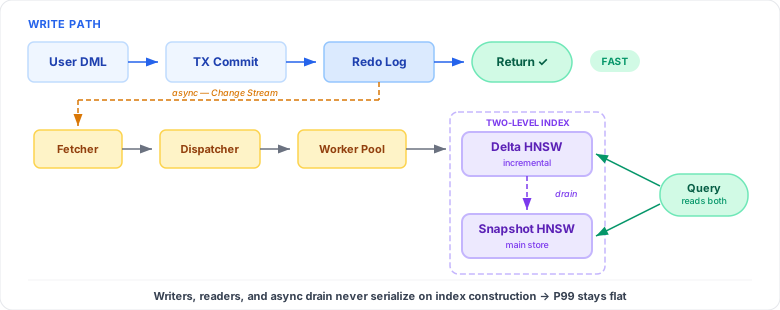
The write path commits and returns without waiting on index construction. The Change Stream pipeline consumes the redo log asynchronously and updates the delta HNSW. Queries hit both delta and snapshot indexes with fine-grained read locks — this is why P99 stays flat under concurrency.
🌿 Copy-on-Write Sandboxes for Agent Exploration
FORK DATABASE snapshots an entire database in seconds — no data copy. Agents experiment freely (write, query, even break tables); then MERGE TABLE commits the work back, or DROP DATABASE discards it.
🔍 Hybrid Search in a Single SQL
Vector + full-text + scalar filter pushed into one execution plan. No N+1 client-side merging, no glue code to combine results.
🐬 MySQL-Compatible, ACID, Embeddable
Built on the proven OceanBase SQL engine. Works as an embedded library, a single-node server, or in the OceanBase distributed cluster. Full ACID, real-time writes, and the entire MySQL ecosystem out of the box.
Installation
pip install pylibseekdb
Logical version migration
pylibseekdb installs seekdb-dump and seekdb-restore for migrating an
embedded database without opening an old data directory with a new runtime.
Stop all application writes and DDL, then create the dump while the old wheel
is still installed:
seekdb-dump ./old.db -o backup.sql
After installing the new wheel, restore into a new or otherwise empty instance:
seekdb-restore ./new.db backup.sql
The dump is mysql-compatible SQL, so stdout, stdin, and external compression can be used:
seekdb-dump ./old.db | gzip > backup.sql.gz
gzip -dc backup.sql.gz | seekdb-restore ./new.db
By default all user databases are included. Repeat --database NAME to select
specific databases. System databases, users, and grants are never exported.
Tables, their data and indexes, and ordinary views are supported. Triggers,
stored routines, events, materialized views, and unknown object types are
reported before any SQL is written and make the command fail. To deliberately
create a partial dump, use --ignore-unsupported. Restore warns with the
skipped-object list and continues without those objects.
seekdb-restore refuses a target containing any user table or view. A failed
restore can contain already-applied DDL, so discard that target and retry with
an empty instance.
Requirements
- CPython >= 3.11
- Linux x86_64 or aarch64 with glibc >= 2.28 (Alpine / musl not supported yet)
- macOS arm64 >= 15.6
🎬 Quick Start
pylibseekdb exposes a lightweight DB-API 2-style interface directly over the seekdb C driver.
It currently starts a local seekdb runtime via open(). Native embedded-mode support will be released soon.
import pylibseekdb as seekdb

# Start a local seekdb runtime (embedded-mode support will be released soon)
seekdb.open(db_dir="./seekdb.db")

# Get a connection and a cursor
conn   = seekdb.connect(database="test", autocommit=True)
cursor = conn.cursor()

# Create a table with a vector column and an HNSW index
cursor.execute("""
    CREATE TABLE IF NOT EXISTS articles (
        id        INT PRIMARY KEY,
        title     TEXT,
        embedding VECTOR(4),
        VECTOR INDEX idx_vec (embedding)
            WITH (DISTANCE=l2, TYPE=hnsw, LIB=vsag)
    ) ORGANIZATION = HEAP
""")

# Insert a row
cursor.execute(
    "INSERT INTO articles VALUES (1, 'Hello seekdb', '[0.1, 0.2, 0.3, 0.4]')"
)

# Hybrid / vector search
cursor.execute("""
    SELECT id, title,
           l2_distance(embedding, '[0.1, 0.2, 0.3, 0.4]') AS dist
    FROM articles
    ORDER BY dist APPROXIMATE
    LIMIT 5
""")
rows = cursor.fetchall()
for row in rows:
    print(row)

cursor.close()
conn.close()
seekdb.close()
Multiple instances
One process can manage multiple local seekdb runtimes through the
SeekdbInstance objects returned by open():
import pylibseekdb as seekdb

first = seekdb.open("./first.db")
second = seekdb.open("./second.db")

first_connection = first.connect(database="test")
second_connection = second.connect(database="test")

first_connection.close()
second_connection.close()
first.close()
second.close()
Each instance stores its local socket inside the normalized database directory.
On macOS and Linux, startup and application connections use a per-instance
short Unix-socket alias under /tmp/pylibseekdb-uds-<pid>-XXXXXX, so long
database paths do not exceed the Unix socket pathname limit. TCP is disabled
by default on those platforms. On Windows, startup discovery uses the local
named pipe and application connections use a verified loopback TCP endpoint by
default. The first successful open() also becomes the
module's default instance, preserving the legacy
seekdb.connect(), seekdb.connection_options(), and seekdb.close() API.
Later calls return independent instance objects without changing that default.
Use the object methods for additional instances.
Connect with PyMySQL
connection_options() returns the active local endpoint and authentication
arguments used by Python MySQL-protocol drivers. PyMySQL is installed with
pylibseekdb:
pip install pylibseekdb
import pymysql
import pylibseekdb as seekdb

instance = seekdb.open(db_dir="./seekdb.db")
options = instance.connection_options()

connection = pymysql.connect(database="test", **options)
try:
    with connection.cursor() as cursor:
        cursor.execute("SELECT 1")
        print(cursor.fetchone())
finally:
    # External connections must release the server before its lifecycle handle.
    connection.close()
    instance.close()
On macOS and Linux, options contains user="root" and unix_socket. On
Windows it normally contains host="127.0.0.1", port, and user="root";
when connected to a local-only server it contains named_pipe instead. Many
Python MySQL clients do not accept a named-pipe path, so use
SeekdbInstance.connect() for that explicit local-only Windows configuration.
The database name remains caller-owned because PyMySQL uses database while
aiomysql uses db. Keep the SeekdbInstance alive while any external
connections use these options; close those connections before closing their
lifecycle instance.
Async initialization and aiomysql
Install aiomysql separately:
pip install aiomysql
import asyncio

import aiomysql
import pylibseekdb as seekdb


async def main():
    instance = await seekdb.aopen(db_dir="./seekdb.db")
    options = instance.connection_options()
    pool = await aiomysql.create_pool(
        db="test",
        minsize=1,
        maxsize=5,
        **options,
    )
    try:
        async with pool.acquire() as connection:
            async with connection.cursor() as cursor:
                await cursor.execute("SELECT 1")
                print(await cursor.fetchone())
    finally:
        pool.close()
        await pool.wait_closed()
        instance.close()


asyncio.run(main())
aopen() runs the synchronous C startup operation in a worker thread and
returns a SeekdbInstance, so it does not block the asyncio event loop.
Cancelling the coroutine cannot stop seekdb_open() after that worker starts.
Transaction support
conn = seekdb.connect(database="test", autocommit=False)
cursor = conn.cursor()
try:
    conn.begin()
    cursor.execute("INSERT INTO articles VALUES (2, 'Second', '[0.5,0.6,0.7,0.8]')")
    conn.commit()
except seekdb.SeekdbError:
    conn.rollback()
    raise
finally:
    cursor.close()
    conn.close()
SQL — Hybrid Search
-- Create table with vector column, full-text index, and HNSW vector index
CREATE TABLE docs (
    id        INT PRIMARY KEY,
    title     TEXT,
    content   TEXT,
    embedding VECTOR(384),
    FULLTEXT INDEX idx_fts (content) WITH PARSER ik,
    VECTOR   INDEX idx_vec (embedding)
        WITH (DISTANCE=l2, TYPE=hnsw, LIB=vsag)
) ORGANIZATION = HEAP;

-- Hybrid search: vector similarity + full-text match in one query
SELECT id, title,
       l2_distance(embedding, '[0.12, 0.34, ...]') AS dist
FROM docs
WHERE MATCH(content) AGAINST('quarterly report')
ORDER BY dist APPROXIMATE
LIMIT 10;
API Reference
Module-level functions
| Function | Description |
|---|---|
open(db_dir="./seekdb.db") |
Start a local runtime and return its SeekdbInstance. The first open instance becomes the module default. |
await aopen(db_dir="./seekdb.db") |
Run open() in a worker thread and return its SeekdbInstance. |
connection_options() |
Return connection arguments for the default instance. The database name is not included. |
connect(database="test", autocommit=False) |
Return a Connection to the default instance. |
close() |
Close and clear the default instance. Idempotent. |
SeekdbInstance
| Attribute or method | Description |
|---|---|
db_dir |
Normalized absolute database directory used by this instance. |
closed |
Whether this instance has been closed. |
connect(database="test", autocommit=False) |
Return a Connection to this instance. |
connection_options() |
Return connection arguments for PyMySQL or aiomysql. |
close() |
Release this instance. Existing native Connection objects keep the underlying lifecycle handle alive until they close. |
Connection
| Method | Description |
|---|---|
cursor() |
Return a new Cursor. |
begin() |
Begin a transaction. |
commit() |
Commit the current transaction. |
rollback() |
Roll back the current transaction. |
close() |
Disconnect and release resources. |
Cursor
| Method | Description |
|---|---|
execute(sql) |
Execute sql; returns the number of rows in the result set (0 for statements without a result set). |
fetchone() |
Return the next row as a tuple, or None. |
fetchall() |
Return all remaining rows as a list of tuple. |
close() |
Free the result set. |
SeekdbError
Exception raised on driver errors. Subclass of RuntimeError.
📚 Use Cases
- 🤖 Agentic AI — streaming memory writes, millisecond-later vector retrieval,
FORK DATABASEfor safe exploration - 📖 RAG & Knowledge Retrieval — hybrid search across enterprise knowledge bases
- 🔍 Semantic Search — embedding-based search for text, images, and other modalities
- 💻 AI-Assisted Coding — semantic code search with multi-project isolation
- 📱 On-Device & Edge AI — lightweight local deployments today, with embedded-mode support coming soon
🌐 Resources
License
Apache-2.0 — see LICENSE.
Metadata
Release files for pylibseekdb 1.4.0.post2
For a detailed explanation of source distributions (sdists) and built distributions (wheels), please see the package formats documentation.
Built distributions (wheels)
Total release size: 570.3 MB
Release files / pylibseekdb-1.4.0.post2-cp312-abi3-win_amd64.whl
| Download URL | pylibseekdb-1.4.0.post2-cp312-abi3-win_amd64.whl |
|---|---|
| Size | 65.9 MB |
| Tags | CPython 3.12 Windows x86-64 abi3 |
|
SHA-256 checksum How to use checksums |
2760ad366070cf72b220ad234f31cb9d0add1f98786537822efacd1c6466dba5
|
|
BLAKE2b-256 checksum How to use checksums |
c04a5fcb97c45ca9e222a87f0fb33b101cf0524688ee54de5faca4b43ee2bd67
|
| Upload date | |
|
Uploaded using Trusted Publishing? What is trusted publishing? |
No |
| Uploaded via |
twine/6.1.0 CPython/3.8.17
|
Release files / pylibseekdb-1.4.0.post2-cp312-abi3-manylinux_2_28_x86_64.whl
| Download URL | pylibseekdb-1.4.0.post2-cp312-abi3-manylinux_2_28_x86_64.whl |
|---|---|
| Size | 54.0 MB |
| Tags | CPython 3.12 Linux glibc 2.28+ x86-64 abi3 |
|
SHA-256 checksum How to use checksums |
833105ed55d7ff80e32d4a8f02571b5db9fc8cca670e7a3d1ce7b7ab67a3d1df
|
|
BLAKE2b-256 checksum How to use checksums |
890c9aa217b9e7bbf94b598de5eac2edd96bb7c709c5bf8fc41b94dd88abc1e8
|
| Upload date | |
|
Uploaded using Trusted Publishing? What is trusted publishing? |
No |
| Uploaded via |
twine/6.1.0 CPython/3.8.17
|
Release files / pylibseekdb-1.4.0.post2-cp312-abi3-manylinux_2_28_aarch64.whl
| Download URL | pylibseekdb-1.4.0.post2-cp312-abi3-manylinux_2_28_aarch64.whl |
|---|---|
| Size | 49.4 MB |
| Tags | CPython 3.12 Linux glibc 2.28+ ARM64 abi3 |
|
SHA-256 checksum How to use checksums |
741fb9a38b91bc9c14a15370f41ccfff33eb62fdd979663cced1a2d4c579538f
|
|
BLAKE2b-256 checksum How to use checksums |
b5737e73a8dc99e739abc70ba640df9e373fa4294af59598aeb9518f6a649be5
|
| Upload date | |
|
Uploaded using Trusted Publishing? What is trusted publishing? |
No |
| Uploaded via |
twine/6.1.0 CPython/3.8.17
|
Release files / pylibseekdb-1.4.0.post2-cp312-abi3-macosx_15_0_x86_64.whl
| Download URL | pylibseekdb-1.4.0.post2-cp312-abi3-macosx_15_0_x86_64.whl |
|---|---|
| Size | 63.6 MB |
| Tags | CPython 3.12 abi3 macOS 15.0+ x86-64 |
|
SHA-256 checksum How to use checksums |
780c591e67fee830c33296f0dfc8ec83b5d66ad8c47fc8f1db7a6fcfdacebbef
|
|
BLAKE2b-256 checksum How to use checksums |
2b2f129074e6ef4fa5650a0160e868ac86e4c11b11a8e2e0ca581495540453ff
|
| Upload date | |
|
Uploaded using Trusted Publishing? What is trusted publishing? |
No |
| Uploaded via |
twine/6.1.0 CPython/3.8.17
|
Release files / pylibseekdb-1.4.0.post2-cp312-abi3-macosx_15_0_arm64.whl
| Download URL | pylibseekdb-1.4.0.post2-cp312-abi3-macosx_15_0_arm64.whl |
|---|---|
| Size | 52.2 MB |
| Tags | CPython 3.12 abi3 macOS 15.0+ ARM64 |
|
SHA-256 checksum How to use checksums |
cc99c8d1ba930b16788170aef1771a0adb4dd6dc2af5fb02105a5445204ef967
|
|
BLAKE2b-256 checksum How to use checksums |
9bceeadb9947a0984f3f707065683de3b73f8c0321d2c4bf7019969c0f774801
|
| Upload date | |
|
Uploaded using Trusted Publishing? What is trusted publishing? |
No |
| Uploaded via |
twine/6.1.0 CPython/3.8.17
|
Release files / pylibseekdb-1.4.0.post2-cp311-cp311-win_amd64.whl
| Download URL | pylibseekdb-1.4.0.post2-cp311-cp311-win_amd64.whl |
|---|---|
| Size | 65.9 MB |
| Tags | CPython 3.11 Windows x86-64 |
|
SHA-256 checksum How to use checksums |
3401be04541c261b3ba24566183b970c061ae9511f5a62a63903bbcb6268e129
|
|
BLAKE2b-256 checksum How to use checksums |
8e47a55b4d3ece198fe08910479dd972718bddc3f64de5852b644b47b7bdf8f0
|
| Upload date | |
|
Uploaded using Trusted Publishing? What is trusted publishing? |
No |
| Uploaded via |
twine/6.1.0 CPython/3.8.17
|
Release files / pylibseekdb-1.4.0.post2-cp311-cp311-manylinux_2_28_x86_64.whl
| Download URL | pylibseekdb-1.4.0.post2-cp311-cp311-manylinux_2_28_x86_64.whl |
|---|---|
| Size | 54.0 MB |
| Tags | CPython 3.11 Linux glibc 2.28+ x86-64 |
|
SHA-256 checksum How to use checksums |
3f46d826badf0635cc729d6fc8826799ed2e1db07214430853c53d1422a90a21
|
|
BLAKE2b-256 checksum How to use checksums |
3d5bfb0c4a1ea96a7e2494d9f28aa346a7a705e9de47232a0565a55594354000
|
| Upload date | |
|
Uploaded using Trusted Publishing? What is trusted publishing? |
No |
| Uploaded via |
twine/6.1.0 CPython/3.8.17
|
Release files / pylibseekdb-1.4.0.post2-cp311-cp311-manylinux_2_28_aarch64.whl
| Download URL | pylibseekdb-1.4.0.post2-cp311-cp311-manylinux_2_28_aarch64.whl |
|---|---|
| Size | 49.4 MB |
| Tags | CPython 3.11 Linux glibc 2.28+ ARM64 |
|
SHA-256 checksum How to use checksums |
f688bbe6a6c2157492a8c269a6adb30324f6d0cd416567068cfee02b5669541e
|
|
BLAKE2b-256 checksum How to use checksums |
c869496442da6839cb657f2d2e3278100e18814119c795655b2854089f994bdb
|
| Upload date | |
|
Uploaded using Trusted Publishing? What is trusted publishing? |
No |
| Uploaded via |
twine/6.1.0 CPython/3.8.17
|
Release files / pylibseekdb-1.4.0.post2-cp311-cp311-macosx_15_0_x86_64.whl
| Download URL | pylibseekdb-1.4.0.post2-cp311-cp311-macosx_15_0_x86_64.whl |
|---|---|
| Size | 63.6 MB |
| Tags | CPython 3.11 macOS 15.0+ x86-64 |
|
SHA-256 checksum How to use checksums |
fdff9a5c4ef0dcf8ec448b117448dfe5ebe8419af2fdf83068693409fad60433
|
|
BLAKE2b-256 checksum How to use checksums |
0caff2bc288cf07c3a25a595ff8f62549b5f6e2a9a555516f4972ae52ecd9aa6
|
| Upload date | |
|
Uploaded using Trusted Publishing? What is trusted publishing? |
No |
| Uploaded via |
twine/6.1.0 CPython/3.8.17
|
Release files / pylibseekdb-1.4.0.post2-cp311-cp311-macosx_15_0_arm64.whl
| Download URL | pylibseekdb-1.4.0.post2-cp311-cp311-macosx_15_0_arm64.whl |
|---|---|
| Size | 52.2 MB |
| Tags | CPython 3.11 macOS 15.0+ ARM64 |
|
SHA-256 checksum How to use checksums |
8735078eaa1744a680ab53eb19f8f7c6320daddf483a1f8f021a73e0a5ac1ffe
|
|
BLAKE2b-256 checksum How to use checksums |
5a1234bd9aece4ff1509fcfc26f1f3d59ef2f2957532b86d4f6bc2cdbc458a64
|
| Upload date | |
|
Uploaded using Trusted Publishing? What is trusted publishing? |
No |
| Uploaded via |
twine/6.1.0 CPython/3.8.17
|
Security for pylibseekdb 1.4.0.post2
Provenance
Provenance describes where a file came from. On PyPI, provenance is shared via attestations, which provide a verifiable record of the build or publishing details. View details, limitations and caveats.
No provenance found
None of the files in this release were uploaded with provenance metadata.
A note on package security
PyPI is a repository for distributing packages, not a service for auditing them. While third-party security researchers and our staff do their best to detect and remove malicious packages, PyPI cannot guarantee the quality, security or suitability of any given package.
To learn more about protecting yourself from malicious actors, visit our package security documentation.














