
pylier
Decorate your functions. Watch the pipeline that actually ran appear.
pylier infers data handoffs at runtime and renders an interactive graph of the pipeline that actually executed — no graph DSL, no manual edge wiring, no tracing framework to adopt. Watch it live while the pipeline runs, or export a standalone HTML file to share.




import pylier


@pylier.node
def embed(chunks: list[str]) -> list[dict]: ...


with pylier.trace("ingest"):
    embed(load("report.pdf"))

pylier.serve()  # live viewer at http://localhost:8765
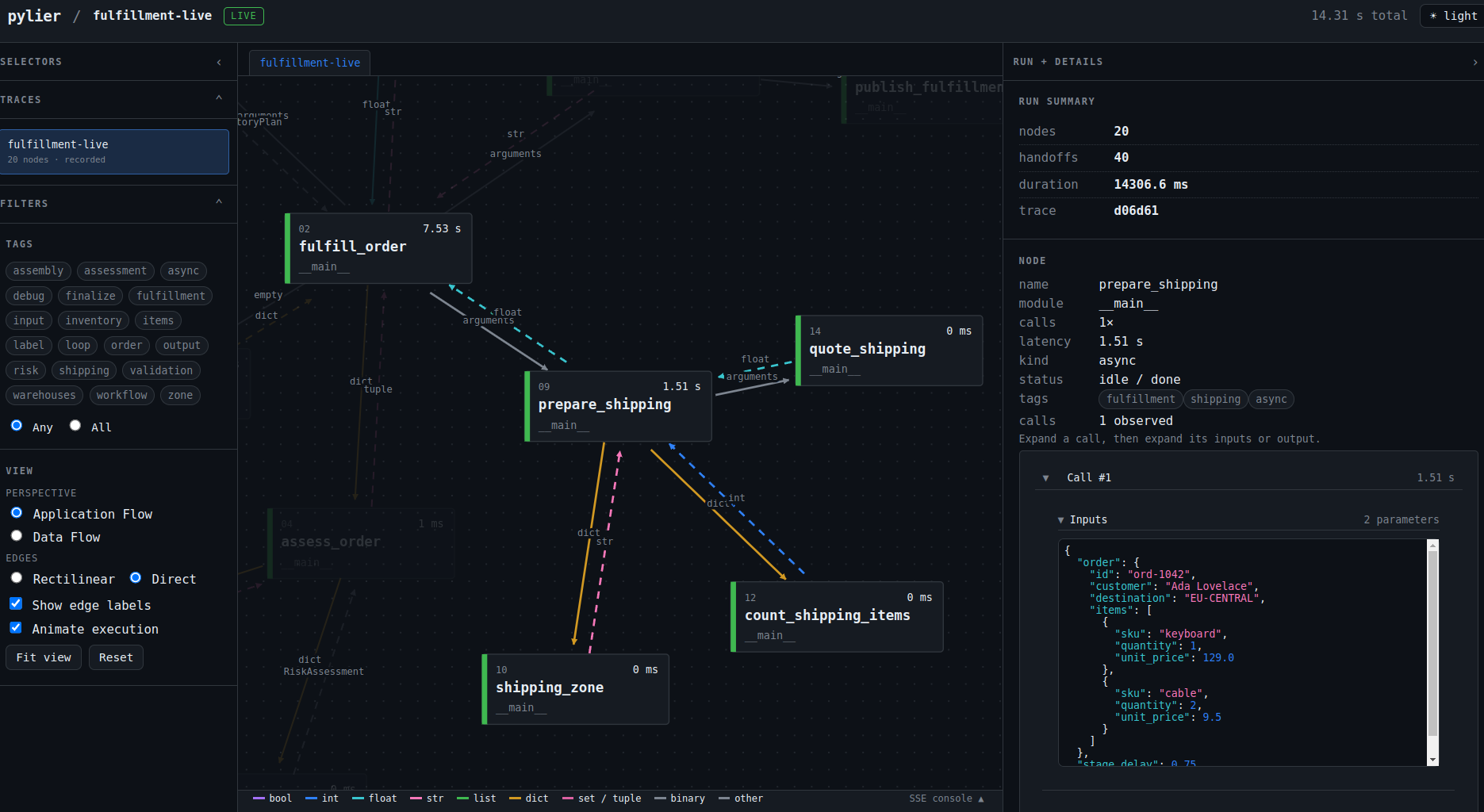
|
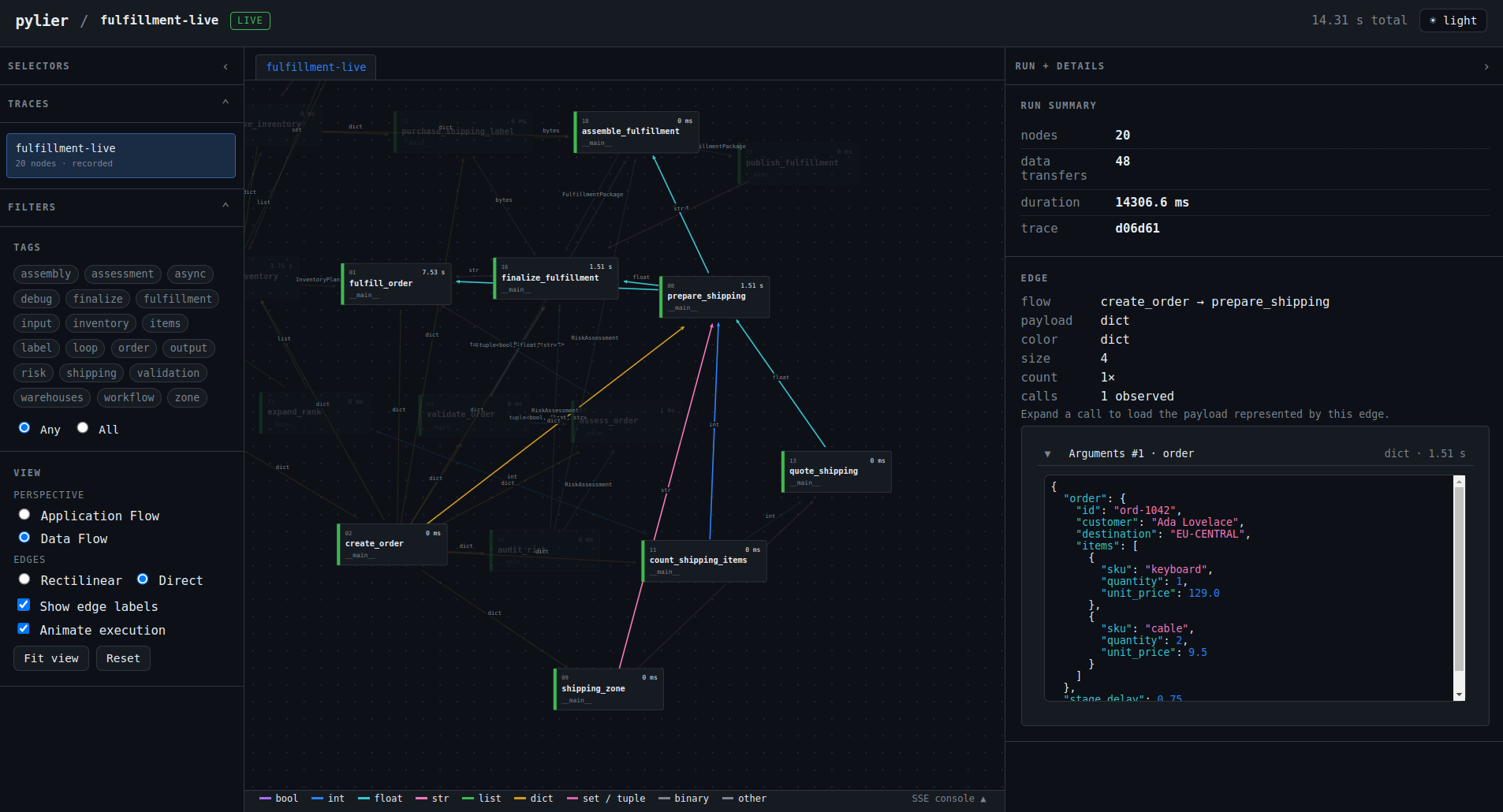
|
|
Application Flow
|
Data Flow
|
Why pylier?
Pipeline diagrams rot the moment code changes. DAG frameworks want you to rewrite your code as a graph. pylier does neither: it reads the handoffs your code already performs and renders them.
|
Decorate, don't rebuild
Mark ordinary sync or async functions with |
Follow real data
Edges are inferred from the values passed between stages, so the graph reflects execution instead of a hand-maintained diagram. |
Watch it live
Open a live in-process viewer that streams the graph as work happens; export a self-contained HTML file when you need to share. |
How it compares
| pylier | Prefect / Dagster | graphviz / diagrams | OpenTelemetry | |
|---|---|---|---|---|
| What it shows | Data flow that actually ran | Scheduler DAG of declared tasks | Hand-drawn diagram | Span tree of call timing |
| Edges | Inferred at runtime | Declared in code | Drawn by hand | Inferred, but per-call timing |
| Adopt it | @pylier.node decorator |
Adopt a scheduler + rewrite as tasks | Re-render on every change | Instrument with a backend + storage |
| Output | Live in-process viewer (+ portable HTML for sharing) | A server / orchestrator | Static image | A telemetry backend |
| Data provenance | Yes, per value fingerprint | No (task I/O only) | No | No |
| Runtime cost | Optional, level-gated | Always-on scheduler | None | Always-on export |
pylier is not a replacement for a scheduler or an observability backend — it's the thing you reach for when you want to see a pipeline, not run or monitor one.
Try demos
Quick start: document ingestion
The ingestion example is the fastest way to see pylier's value: a document branches into text and image paths, then concurrently embeds both branches before they converge at an indexing stage.
git clone https://github.com/theMladyPan/pylier.git
cd pylier
uv sync
uv run python -m examples.ingest serve
# viewer: http://localhost:8765
Open the viewer in a browser and watch the graph grow as work happens — a document branches into text and image paths, then concurrently embeds both branches before they converge at an indexing stage. To get a self-contained file for sharing instead:
uv run python -m examples.ingest html
pylier-ingest.html is a single file — no server required.
The whole API in one flow
import pylier


@pylier.node
def load_document(path: str) -> dict: ...


@pylier.node(_tags=["document", "text"])
def extract_text(document: dict) -> list[str]: ...


@pylier.node
def embed(chunks: list[str]) -> list[dict]: ...


with pylier.trace("document-ingest"):
    document = load_document("report.pdf")
    vectors = embed(extract_text(document))

pylier.render("document-ingest.html")  # interactive, standalone HTML
Notes
For a plain-Python transformation or join that loses value provenance, preserve its sources explicitly:
vectors = pylier.derive(text_vectors + image_vectors, from_=[text_vectors, image_vectors])
derive() returns the original value unchanged; its only job is to keep the
branch lineage visible in the next decorated stage. See
docs/records/derive-lineage.md for its exact behavior.
Built for useful traces
- Signal over noise — use
core,info,debug, andtracecapture levels to control both captured nodes and metadata detail. - Useful inspection — filter by node tags; click graph nodes and edges for
payload type, size, preview, and optional captured values. Full values require
PYLIER_CAPTURE_VALUES=1and remain bounded FIFO by count and bytes. To make an intentionally shareable debug bundle, usepylier.render("debug.html", embed_payloads=True); the bundled data is readable by anyone with the HTML file, so the default static render remains metadata-only. The published examples use this opt-in only because their data is synthetic. - Stream or share —
pylier.serve()streams updates to a live in-process viewer with SSE;pylier.render()exports a portable HTML file for sharing. - Keep an audit trail —
pylier.trace(..., sidecar="trace.jsonl")writes already-resolved events to JSONL for offline consumers.
No tracing framework to adopt
pylier has no OpenTelemetry or other tracer dependency. It records
its own local decorator traces and does not mutate ambient tracing context, so
another tracer can instrument the same process independently. The only runtime
dependency is pydantic-settings for configuration. pylier ships a py.typed
marker and full PEP 695 type annotations, so IDE autocompletion and type checkers
work out of the box.
Development
uv run pytest
uv run ruff format src tests examples
uv run ruff check src tests examples
Versioning
pylier follows Semantic Versioning. Given a MAJOR.MINOR.PATCH
version: breaking API changes bump MAJOR, backward-compatible additions bump
MINOR, and fixes/patches bump PATCH. No silent breaking changes in minor
releases — if you pin a minor version, upgrades within it stay safe.
Roadmap
pylier is a decorator-first local visualizer today. The direction, in priority order:
- Framework helpers — optional extras that autotrace popular stacks:
uv add "pylier[fastapi]"thenpylier.instrument_fastapi()to trace HTTP endpoints,pylier[pydantic-ai]to autotrace / auto-spawn nodes for LLM agents, and so on. Helpers stay opt-in extras — the core stays dependency-light. - Live remote tracing — a dedicated server for online tracing of cloud / VM applications, so pipelines running outside your machine stream their graphs to a shared viewer (today the live viewer is in-process only).
- UI redesign — a more polished, better-structured graph viewer and inspector.
None of these change the core contract: decorate a function, get the graph of what actually ran.
Contributing
Issues and pull requests are welcome at theMladyPan/pylier.
1 maintainer

Release files for pylier 1.3.0
For a detailed explanation of source distributions (sdists) and built distributions (wheels), please see the package formats documentation.
Source distribution (sdist)
| File | Size | Uploaded | |
|---|---|---|---|
| pylier-1.3.0.tar.gz | 1.0 MB | Details |
Built distribution (wheel)
| File | Interpreter | ABI | Platform | Reset |
|---|---|---|---|---|
| pylier-1.3.0-py3-none-any.whl | Python 3 | none | any | Details |
Total release size: 1.1 MB
Release files / pylier-1.3.0.tar.gz
| Download URL | pylier-1.3.0.tar.gz |
|---|---|
| Size | 1.0 MB |
| Tags | Source |
|
SHA-256 checksum How to use checksums |
d5739c3f3256c06345cf7e239ee6a6116be98ed75c107615387be6b6d61e92c7
|
|
BLAKE2b-256 checksum How to use checksums |
307d4eb5f9474043c9bf44669d8852e45d236e3b8c4e5d7837edd9c535269963
|
| Upload date | |
|
Uploaded using Trusted Publishing? What is trusted publishing? |
Yes |
| Uploaded via |
uv/0.12.3 {"installer":{"name":"uv","version":"0.12.3","subcommand":["publish"]},"python":null,"implementation":{"name":null,"version":null},"distro":{"name":"Ubuntu","version":"24.04","id":"noble","libc":null},"system":{"name":null,"release":null},"cpu":null,"openssl_version":null,"setuptools_version":null,"rustc_version":null,"ci":true}
|
Release files / pylier-1.3.0-py3-none-any.whl
| Download URL | pylier-1.3.0-py3-none-any.whl |
|---|---|
| Size | 53.1 kB |
| Tags | Python 3 |
|
SHA-256 checksum How to use checksums |
3a39036f54b4dcbdfa00e4c9b65b27ae6d380ad2f27d8c967bd4271c19c77039
|
|
BLAKE2b-256 checksum How to use checksums |
2f67411e0a9eee3d0a115c37769e69b8c90b56e155e19051c37e9240ded107fa
|
| Upload date | |
|
Uploaded using Trusted Publishing? What is trusted publishing? |
Yes |
| Uploaded via |
uv/0.12.3 {"installer":{"name":"uv","version":"0.12.3","subcommand":["publish"]},"python":null,"implementation":{"name":null,"version":null},"distro":{"name":"Ubuntu","version":"24.04","id":"noble","libc":null},"system":{"name":null,"release":null},"cpu":null,"openssl_version":null,"setuptools_version":null,"rustc_version":null,"ci":true}
|














